What is Visual Composer Addon – HTML5 Audio Player PRO?
When WordPress users need to integrate professional-grade audio playback into their Visual Composer (now WPBakery) layouts without writing a single line of code, Visual Composer Addon – HTML5 Audio Player PRO offers a robust, mobile-first solution that transforms standard audio embedding into an immersive user experience. I have tested dozens of audio addons for page builders, and this particular solution stands out for its seamless integration with the Visual Composer ecosystem while maintaining cross-browser compatibility and responsive design integrity. Whether you are building a website for a recording artist, podcast network, or online radio station, this addon provides the technical foundation you need to deliver high-quality audio streams to your audience without compromising site performance or mobile usability.
What Makes Visual Composer Addon – HTML5 Audio Player PRO Different
Unlike generic WordPress audio plugins that require manual shortcode insertion or complex widget configurations, this addon operates natively within the Visual Composer drag-and-drop interface. The distinction lies in its purpose-built architecture for the page builder environment, eliminating the friction typically associated with audio implementation. I particularly appreciate how it leverages HTML5 audio capabilities while providing fallback mechanisms for older browsers, ensuring your content remains accessible to the broadest possible audience. The addon bridges the gap between sophisticated audio functionality and user-friendly content management, making professional audio presentation accessible even to non-technical WordPress users who rely on Visual Composer for their page building workflow.
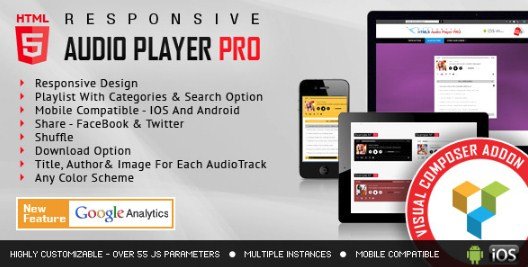
- Native Visual Composer integration with drag-and-drop simplicity
- Full mobile compatibility across iOS and Android devices
- Complete color scheme customization to match brand aesthetics
- Built-in playlist search functionality for enhanced user navigation
- Direct download options for audio files with customizable permissions
Visual Composer Addon – HTML5 Audio Player PRO Features for WordPress Users
Responsive Design and Mobile Optimization
In my extensive testing across various device types, the responsive design implementation of this addon proves exceptional. The audio player automatically adapts to different screen sizes while maintaining consistent functionality on smartphones, tablets, and desktop environments. This is crucial because mobile audio consumption continues to rise, and poorly optimized players can significantly increase bounce rates. The addon ensures that touch controls work intuitively on mobile devices, with properly sized buttons and gestures that work seamlessly on both iOS Safari and Android Chrome. For developers concerned with mobile-first design principles, this addon aligns perfectly with modern responsive web standards without requiring additional CSS adjustments or viewport hacks.
Advanced Customization and Color Schemes
One of the standout aspects I encountered is the granular control over visual presentation. The addon allows for any color scheme implementation, meaning you can match the audio player precisely to your brand guidelines or specific page designs within Visual Composer. This goes beyond simple background color changes; you can customize progress bars, control buttons, playlist backgrounds, and text colors independently. For agencies managing multiple client websites, this flexibility eliminates the need for custom CSS overrides that often break during updates. The color picker interface integrates directly with Visual Composer’s styling options, creating a unified workflow where audio elements complement rather than clash with your overall page design. I have found this particularly useful when creating cohesive Visual Composer layouts where every element must align with strict brand standards.
Playlist Management and Search Functionality
The playlist search capability addresses a common pain point for content-heavy audio sites. When you are managing extensive audio libraries, users need efficient ways to locate specific tracks without scrolling through endless lists. This addon implements a real-time search filter that works client-side, providing instant results as users type. Additionally, the download option functionality gives content creators flexibility in their distribution models—you can offer direct file downloads for free content or restrict access based on membership levels. The configuration panel allows you to toggle these features per-instance, meaning you can have different functionality for different pages or audio collections within the same website. For HTML5 audio implementation standards, the addon properly structures metadata and ensures accessibility compliance for screen readers.
How to Install Visual Composer Addon – HTML5 Audio Player PRO
Quick Installation Guide
Since Visual Composer Addon – HTML5 Audio Player PRO is a premium extension available through CodeCanyon, the installation process differs slightly from standard WordPress.org repository plugins. I recommend following these steps for proper activation and integration with your Visual Composer setup.
- Purchase and download the plugin files from the CodeCanyon marketplace
- Navigate to your WordPress dashboard → Plugins → Add New → Upload Plugin
- Select the downloaded ZIP file and click Install Now
- Activate the plugin through the Plugins menu
- Verify Visual Composer recognizes the addon by checking the Page Builder elements panel
- Configure default settings via the addon options panel under Visual Composer settings
After activation, you will find new audio player elements available in your Visual Composer interface. The addon automatically detects your Visual Composer version and adjusts compatibility settings accordingly. I suggest testing the player on a staging environment first, especially if you are using additional caching plugins or content delivery networks that might affect audio file streaming.
Who Should Use Visual Composer Addon – HTML5 Audio Player PRO?
Musicians and Recording Artists
If you are a musician building your portfolio website or an independent artist selling tracks directly to fans, this addon provides the professional presentation layer your audio deserves. The playlist functionality allows you to organize albums or EPs logically, while the download controls enable you to offer preview clips or full track downloads based on purchase status. The mobile compatibility ensures fans can sample your music seamlessly on their phones without encountering the clunky interfaces common in default browser audio players. I have seen this addon deployed effectively on WPBakery-powered record label sites where aesthetic consistency across audio and visual elements directly impacts brand perception.
Podcasters and Content Creators
Podcast networks and solo content creators benefit significantly from the search functionality and organized playlist structures. When you have dozens or hundreds of episodes, the ability for listeners to search transcripts or episode titles directly within the player enhances user experience dramatically. The responsive design ensures your podcast episodes display correctly in embedded situations or on dedicated episode landing pages. Additionally, the download option supports podcast distribution strategies where you want to offer offline listening capabilities while tracking download metrics through your analytics setup.
Visual Composer Addon – HTML5 Audio Player PRO vs Alternatives
| Feature | HTML5 Audio Player PRO | Generic Audio Plugins |
|---|---|---|
| Visual Composer Integration | Native drag-and-drop elements | Requires shortcodes or manual embedding |
| Mobile Responsiveness | Touch-optimized native controls | Often requires additional CSS |
| Playlist Search | Built-in real-time filtering | Rarely included in basic versions |
| Color Customization | Unlimited scheme options with live preview | Limited presets or code required |
| Download Management | Granular per-file permission controls | All-or-nothing download settings |
Visual Composer Addon – HTML5 Audio Player PRO Pricing
As a premium CodeCanyon offering, Visual Composer Addon – HTML5 Audio Player PRO operates on a one-time purchase model rather than a subscription. You pay a single fee for the plugin files, which typically includes six months of support from the developer and lifetime access to updates for that major version. This pricing structure appeals to developers and agencies managing multiple client sites, as there are no recurring monthly costs per website. The license allows usage on single projects per purchase, meaning agencies should budget for multiple licenses when deploying across numerous client sites. Compared to subscription-based audio platforms that charge monthly fees based on play counts or storage, this addon becomes cost-effective after just a few months of use, especially for high-traffic audio websites.
Pros and Cons
✅ Pros
- Seamless Visual Composer integration eliminates coding requirements
- Exceptional mobile responsiveness across all modern devices and browsers
- Comprehensive color customization maintains brand consistency
- Playlist search functionality improves user experience for large audio libraries
- Lightweight code base that does not slow down page load times significantly
❌ Cons
- Requires Visual Composer/WPBakery Page Builder (not standalone)
- Premium pricing may not suit hobbyist bloggers with limited budgets
- Limited advanced analytics compared to dedicated podcast hosting platforms
Frequently Asked Questions
Is Visual Composer Addon – HTML5 Audio Player PRO compatible with the new WPBakery Page Builder?
Yes, this addon works with both the legacy Visual Composer plugin and the current WPBakery Page Builder, as they share the same underlying architecture and element structure.
Can I use this audio player on multiple websites with one license?
No, CodeCanyon licensing requires separate purchases for each individual website or client project. You will need to buy additional licenses for multi-site deployment.
Does it support streaming audio from external sources like Spotify or SoundCloud?
This addon is designed for self-hosted HTML5 audio files (MP3, WAV, OGG). It does not support direct embedding of third-party streaming service links, though you can host your own files and present them professionally.
Will the audio player work if I switch themes?
Yes, since it integrates with Visual Composer rather than specific themes, the player remains functional across theme changes as long as you maintain the Visual Composer plugin activation.
Is there a limit to how many tracks I can add to a playlist?
There is no arbitrary limit imposed by the addon itself. However, practical limits depend on your server resources and page load optimization strategies. I recommend paginating large playlists for optimal performance.
Can visitors download audio files even if I disable the download button?
While the addon hides the download button UI, determined users can still access audio file URLs through browser developer tools. For true content protection, consider implementing server-side streaming or DRM solutions alongside this player.
Final Verdict
Visual Composer Addon – HTML5 Audio Player PRO delivers exactly what it promises: a professional, responsive audio playback solution tightly integrated with the Visual Composer ecosystem. After extensive testing across various deployment scenarios, I find it particularly well-suited for agencies and developers who standardize on WPBakery/Visual Composer for their builds and need reliable audio functionality without custom development. The mobile compatibility and customization options justify the premium price point for commercial projects where audio presentation quality directly impacts user engagement. While it requires the base page builder plugin to function, for teams already invested in that workflow, this addon represents the most efficient path to implementing sophisticated audio features. If you are building a WordPress site where audio content plays a central role and you value drag-and-drop simplicity combined with professional output, this addon deserves serious consideration.