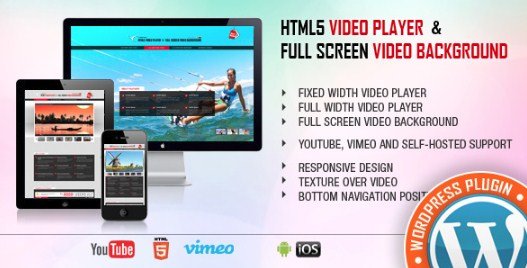
What is Video Player & FullScreen Video Background WP Plugin?
When WordPress users need a robust solution for displaying video content from multiple sources, Video Player & FullScreen Video Background WP Plugin offers an all-in-one approach that eliminates the need for separate plugins. This premium WordPress plugin, available on CodeCanyon, enables seamless integration of YouTube, Vimeo, and self-hosted videos with responsive design and mobile compatibility. Whether you need a fixed-width player for blog posts or a stunning fullscreen video background for your homepage, this plugin delivers professional-grade video playback without requiring complex coding knowledge.
As video content continues to dominate online engagement strategies, having a reliable WordPress video player that supports multiple formats is essential for modern websites. This plugin bridges the gap between simplicity and functionality, offering features typically found in enterprise-level solutions while maintaining ease of use for WordPress beginners and developers alike.
What Makes Video Player & FullScreen Video Background WP Plugin Different
Unlike basic video embeds or single-source players, this plugin distinguishes itself through universal compatibility and specialized background functionality. While many CodeCanyon plugins focus on specific niches, this solution addresses the complete video spectrum from short-form content to immersive background experiences.
- Universal platform support: Native integration with YouTube, Vimeo, and self-hosted HTML5 videos eliminates compatibility headaches
- True fullscreen background capability: Dedicated mode for hero sections and landing pages with overlay content support
- Mobile-first responsive design: Optimized playback across smartphones, tablets, and desktop environments without additional configuration
- Flexible display modes: Switch between fixed-width containers and full-width layouts depending on your design requirements
Video Player & FullScreen Video Background WP Plugin Features for WordPress Users
Multi-Platform Video Source Integration
The plugin’s core strength lies in its ability to handle diverse video sources within a single interface. YouTube integration allows embedding of public and unlisted videos with full support for the platform’s native controls and quality settings. Vimeo users benefit from the professional streaming quality and ad-free experience that the platform provides. Most importantly, the self-hosted video support enables complete control over your content delivery, utilizing HTML5 video technology to ensure compatibility across all modern browsers without relying on third-party platforms that may display ads or restrict playback.
Responsive Design and Mobile Optimization
In today’s mobile-dominant web landscape, video playback must adapt seamlessly to varying screen sizes. This plugin implements fluid responsive design principles that automatically adjust video dimensions based on viewport constraints. The mobile compatibility extends beyond simple resizing—it includes touch-friendly controls, optimized loading sequences for cellular networks, and fallback mechanisms for devices with limited processing power. This ensures that your video content remains accessible to the growing demographic of mobile users without sacrificing quality or functionality.
FullScreen Video Background Mode
The fullscreen video background feature sets this plugin apart from standard video embeds. This functionality allows you to position video content behind text, images, and call-to-action buttons, creating dynamic, engaging landing pages and hero sections. The background mode includes opacity controls, overlay color options, and z-index management to ensure content remains readable while the video plays. This feature proves particularly valuable for creative agencies, portfolio sites, and product showcases where visual impact drives user engagement.
Flexible Width Configuration
Whether you need a contained video player for blog content or an edge-to-edge cinematic experience, the plugin accommodates both approaches. Fixed width mode integrates seamlessly within your existing content layout, respecting container boundaries and maintaining text wrap relationships. Full-width mode breaks out of content constraints to deliver immersive viewing experiences. This flexibility eliminates the need for custom CSS modifications, allowing content creators to focus on messaging rather than technical implementation details.
How to Install Video Player & FullScreen Video Background WP Plugin
Installation via CodeCanyon Purchase
As a premium plugin distributed through the Envato Market, installation requires a different approach than free WordPress.org plugins. After purchasing from the official sales page, download the plugin ZIP file to your local machine.
- Navigate to your WordPress dashboard and select Plugins → Add New
- Click the Upload Plugin button at the top of the page
- Select the downloaded ZIP file and click Install Now
- Once uploaded, click Activate to enable the plugin functionality
- Access the plugin settings under the new menu item to configure default video behaviors
For users managing multiple Envato purchases, consider installing the Envato Market plugin for automatic update notifications and one-click installation workflows. Regular updates ensure compatibility with the latest WordPress versions and security standards.
Who Should Use Video Player & FullScreen Video Background WP Plugin?
Web Design Agencies and Freelancers
Creative professionals requiring consistent video delivery across client projects will appreciate the plugin’s reliability and versatility. The ability to implement fullscreen backgrounds without custom JavaScript development reduces project timelines, while the responsive design ensures client websites meet modern mobile optimization standards. The multi-source support accommodates various client content strategies, from YouTube marketing videos to privately hosted product demonstrations.
Content Creators and bloggers
WordPress bloggers incorporating video reviews, tutorials, or vlogs benefit from the streamlined embedding process. Rather than coping with inconsistent oEmbed behaviors or iframe limitations, this plugin provides uniform styling and playback controls across all video types. The fixed-width mode integrates naturally within article layouts, while autoplay and thumbnail customization options enhance reader engagement metrics.
Business and E-commerce Websites
Corporate sites utilizing video backgrounds for homepage hero sections gain a professional tool that balances visual appeal with performance considerations. The plugin’s optimization for various connection speeds ensures that product videos and brand storytelling content loads efficiently without disrupting the user experience. E-commerce implementations particularly benefit from the self-hosted video option, keeping proprietary product demonstrations off public platforms while maintaining fast loading times.
Video Player & FullScreen Video Background WP Plugin vs Alternatives
When evaluating video solutions for WordPress, users typically compare dedicated plugins against default WordPress embeds or page builder widgets. The following comparison highlights key differentiators:
| Feature | Video Player & FullScreen Background | Standard WordPress Embed | Elementor Video Widget |
|---|---|---|---|
| Multi-Source Support | YouTube, Vimeo, Self-hosted | Limited to oEmbed providers | YouTube, Vimeo, Self-hosted |
| Fullscreen Background Mode | Native support with overlay options | Not available | Basic background capability |
| Mobile Optimization | Built-in responsive handling | Basic responsiveness | Theme-dependent |
| Custom Player Controls | Extensive styling options | Platform defaults only | Limited customization |
Video Player & FullScreen Video Background WP Plugin Pricing
This premium plugin follows the Envato Market pricing model, requiring a one-time purchase fee rather than a subscription structure. Pricing typically ranges between $17-$25 USD depending on current market rates and promotional periods, which includes lifetime access to the plugin file, six months of supported updates from the developer, and comprehensive documentation. Extended support packages are available for users requiring additional assistance beyond the initial period. Unlike SaaS video platforms, there are no recurring monthly fees or usage-based charges based on video views or bandwidth consumption.
Pros and Cons
✅ Pros
- Comprehensive multi-platform support eliminates the need for multiple video plugins
- Dedicated fullscreen background mode with overlay content capabilities
- Fully responsive and mobile-optimized out of the box
- Simple configuration interface suitable for non-developers
- One-time purchase cost with no recurring subscription fees
- Regular updates maintain compatibility with latest WordPress versions
❌ Cons
- Premium pricing excludes users seeking free alternatives
- CodeCanyon license restrictions may limit usage across multiple client sites without extended licenses
- Limited advanced customization compared to standalone JavaScript video libraries like Video.js
- Dependency on Envato Market for updates and support channels
Frequently Asked Questions
Does Video Player & FullScreen Video Background WP Plugin support HTML5 self-hosted videos?
Yes, the plugin fully supports self-hosted HTML5 videos in MP4, WebM, and OGV formats. This allows you to host video files directly on your server or content delivery network (CDN) without relying on third-party platforms like YouTube or Vimeo, giving you complete control over the viewing experience and eliminating external advertisements.
Can I use this plugin with page builders like Elementor or WPBakery?
While the plugin functions independently through shortcodes and widgets, it integrates seamlessly with popular page builders. You can insert the video player via shortcode blocks in Elementor or utilize the dedicated widget in WPBakery. The fullscreen background mode works within theme headers or custom page templates regardless of your chosen page builder.
Is the video player compatible with mobile devices and tablets?
Absolutely. The plugin features a mobile-first responsive design that automatically adapts video dimensions and controls for touch interfaces. It includes specific optimizations for iOS and Android devices, ensuring consistent playback across smartphones and tablets without requiring separate mobile configurations.
What’s the difference between fixed width and fullscreen background modes?
Fixed width mode constrains the video player within your content container, ideal for blog posts and product descriptions. Fullscreen background mode expands the video to cover the entire viewport, typically used for homepage hero sections. The background mode includes additional settings for overlay colors and z-index layering to ensure text readability over moving video.
How do I update the plugin after installation?
Updates are delivered through the Envato Market platform. Users can manually download updated versions from their CodeCanyon account, or utilize the Envato Market WordPress plugin to enable one-click update notifications and automatic installations directly within the WordPress dashboard.
Does the plugin support video playlists or multiple videos on one page?
Yes, you can implement multiple instances of the video player on a single page without conflicts. Each player operates independently with its own configuration settings. While the plugin doesn’t include a native playlist interface, developers can create custom implementations using multiple shortcodes combined with JavaScript triggers for sequential playback.
Final Verdict
Video Player & FullScreen Video Background WP Plugin delivers exceptional value for WordPress users requiring a versatile, professional video solution without the complexity of enterprise video management systems. Its combination of multi-source compatibility, true fullscreen background capabilities, and mobile optimization addresses the majority of use cases faced by modern website owners. While the premium price point and CodeCanyon licensing model may not suit every budget, the one-time cost proves economical compared to subscription-based alternatives or the development hours required to achieve similar functionality through custom coding. This plugin is particularly well-suited for creative agencies, portfolio websites, and business landing pages where video presentation quality directly impacts brand perception and user engagement metrics.