What is UserPro Shortcode Elements for Visual Composer?
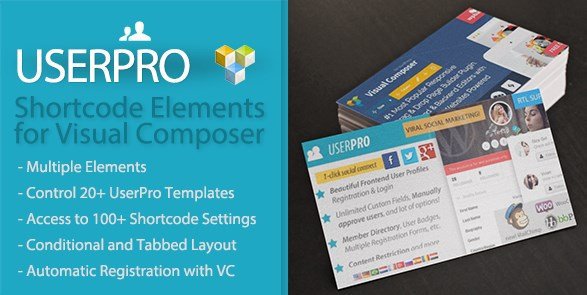
When WordPress users need to display user profiles, member directories, or authentication forms without writing complex shortcodes, UserPro Shortcode Elements for Visual Composer offers a seamless drag-and-drop solution. This specialized addon bridges the gap between the UserPro plugin and WPBakery Page Builder (formerly Visual Composer), transforming over 16 UserPro templates into editable visual elements.
What Makes UserPro Shortcode Elements for Visual Composer Different
Unlike manually inserting shortcodes into text blocks and guessing parameter combinations, this addon provides dedicated Visual Composer elements with intuitive option panels. You can visually configure login forms, member directories, and profile cards directly within the frontend or backend editor, seeing real-time previews of your layout changes without touching a single line of code.
- Eliminates manual shortcode syntax errors through visual parameter configuration
- Provides 16+ specialized elements covering authentication, directories, and social features
- Maintains full UserPro functionality while adding modern page builder convenience
UserPro Shortcode Elements for Visual Composer Features for WordPress Users
Authentication & Access Control Elements
The addon transforms essential user authentication shortcodes into customizable visual modules. You get dedicated elements for Login Forms with redirect options, Registration Forms with custom field support, and Password Reset Forms—all configurable through Visual Composer’s parameter windows. These elements support UserPro’s security features including reCAPTCHA integration and custom redirects, ensuring your membership site maintains professional access control while looking exactly as designed.
Member Directory & Profile Display Options
Showcasing your community becomes effortless with multiple directory layouts. The Member Directory element offers grid and list views with advanced filtering, while the Enhanced Member Directory adds search and sorting capabilities. For more visual impact, the Collage element creates Pinterest-style masonry layouts, and Profile Cards display compact user information perfect for team pages or featured member sections. Each element inherits your theme’s styling while offering granular control over avatar sizes, field visibility, and hover effects.
Social Engagement & Activity Components
Building community interaction is streamlined through social-focused elements. Display Followers and Following lists with connection counts, integrate Activity Feeds showing user updates across your network, and add Social Connect Buttons for one-click registration via Facebook, Twitter, or LinkedIn. The View Profile and Edit Profile elements allow seamless frontend profile management, while Posts by Users displays content submissions from specific community members—perfect for multi-author blogs or user-generated content platforms.
How to Install UserPro Shortcode Elements for Visual Composer
CodeCanyon Installation Method
- Purchase and download the plugin files from CodeCanyon
- Navigate to Plugins → Add New → Upload Plugin in your WordPress dashboard
- Select the downloaded ZIP file and click Install Now
- Activate the plugin through the ‘Plugins’ menu
- Ensure both UserPro and WPBakery Page Builder are installed and active
- Access Visual Composer to find new UserPro elements in the content elements list
Note: This is a premium addon requiring valid licenses for both parent plugins. You cannot use this extension without the base UserPro plugin and WPBakery Page Builder installed.
Who Should Use UserPro Shortcode Elements for Visual Composer?
Membership Site Administrators
If you’re running a membership platform using UserPro, this addon eliminates the technical barrier between your community data and beautiful presentation. Instead of hiring developers to customize shortcode outputs, you can visually design member directories, restricted content areas, and profile showcases that match your brand identity perfectly. The Frontend Publisher element is particularly valuable for sites accepting user submissions, allowing contributors to submit posts without accessing the WordPress backend.
Community & Social Network Builders
For developers and site owners creating niche social networks or community forums, the social engagement elements provide instant community-building tools. The Followers/Following system creates Twitter-style connections, while Activity Feeds keep users engaged with real-time updates. These visual elements make it possible to construct complex social layouts—like activity streams alongside member spotlights—without nested shortcode confusion or CSS conflicts.
UserPro Shortcode Elements for Visual Composer vs Alternatives
| Feature | UserPro Shortcode Elements | Manual Shortcode Insertion |
|---|---|---|
| Configuration Method | Visual drag-and-drop with live preview | Manual shortcode typing with parameters |
| Error Prevention | Built-in validation and dropdown options | Prone to syntax errors and typos |
| Design Flexibility | Column/grid integration with VC layouts | Limited to shortcode output styling |
| Element Count | 16+ specialized UserPro elements | All UserPro shortcodes available but manual |
UserPro Shortcode Elements for Visual Composer Pricing
This addon follows the standard CodeCanyon licensing model. As a premium-only extension, pricing typically ranges between $20-30 for a regular license covering single-site usage. Extended licenses for multi-site or commercial applications are available at higher tiers. Important cost considerations include the requirement for both UserPro (approximately $39) and WPBakery Page Builder ($64), making the total investment approximately $120-130 for the complete toolkit. Six months of support is included, with options to extend support coverage.
Pros and Cons
✅ Pros
- Zero coding required for complex UserPro layouts
- 16 dedicated elements covering all major UserPro functions
- Real-time visual editing within familiar Visual Composer interface
- Maintains UserPro’s responsive design and mobile optimization
- Frontend Publisher element enables true frontend content submission
❌ Cons
- Requires expensive parent plugins (UserPro + WPBakery) to function
- No compatibility with Elementor, Divi, or other modern page builders
- Premium pricing with no free trial or lite version available
- Dependency on legacy Visual Composer ecosystem (WPBakery)
- Limited to UserPro functionality—cannot extend beyond existing shortcodes
Frequently Asked Questions
Can I use UserPro Shortcode Elements for Visual Composer without WPBakery Page Builder?
No. This is specifically an addon for WPBakery Page Builder (formerly Visual Composer). The elements will not appear in other page builders like Elementor or Divi Builder, nor do they work with the WordPress block editor alone.
Does this plugin work with the latest WordPress and PHP versions?
Yes, when properly maintained, the addon receives updates for compatibility with current WordPress core versions. However, since it depends on both UserPro and WPBakery, ensure all three components are updated simultaneously to prevent conflicts.
How do I customize the styling of UserPro elements added through Visual Composer?
Each element includes Visual Composer design options (margins, padding, CSS classes) plus inherits UserPro’s built-in styling settings. For advanced customization, you can add custom CSS through the Extra Class Name field or modify your theme’s stylesheet.
Is the Frontend Publisher element safe for multi-author sites?
Yes, it utilizes UserPro’s established permission system. Posts submitted through the frontend enter pending status (configurable) and respect WordPress user capabilities, preventing unauthorized publishing while maintaining security.
Can I display specific user roles only in member directories?
Absolutely. The Enhanced Member Directory and Simple List elements include role-filtering parameters accessible through the Visual Composer settings panel, allowing you to create directories for specific groups like ‘Authors’ or ‘Premium Members’.
What happens to my layouts if I deactivate Visual Composer?
The shortcodes will revert to plain text or disappear, potentially breaking page layouts. Since the plugin generates standard UserPro shortcodes wrapped in VC structure, deactivating the page builder may cause layout disruption requiring manual shortcode recovery.
Final Verdict
UserPro Shortcode Elements for Visual Composer is a highly specialized tool that delivers exceptional value for existing UserPro and WPBakery users. It successfully eliminates the friction between UserPro’s powerful community features and modern visual page building, turning complex shortcode memorization into intuitive point-and-click configuration. However, the requirement for both expensive parent plugins limits its accessibility for budget-conscious projects. It’s particularly well-suited for established membership sites, community platforms, and social networks already invested in the UserPro ecosystem who want to streamline their design workflow without switching page builders. If you’re already using both parent plugins, this addon is an essential productivity tool; if not, the total cost of entry may outweigh the convenience for smaller projects.