What is Unlimited Pop-Ups WordPress Plugin?
When WordPress users need complete control over their website’s popup strategy without limitations, Unlimited Pop-Ups WordPress Plugin offers a comprehensive solution that stands out from restrictive alternatives. I have tested numerous popup solutions, and this CodeCanyon offering provides the flexibility that marketers and developers crave. Unlike free alternatives that limit you to one or two popups, this plugin allows you to create unlimited campaigns with distinct styles, targeting rules, and animation effects.
What Makes Unlimited Pop-Ups WordPress Plugin Different
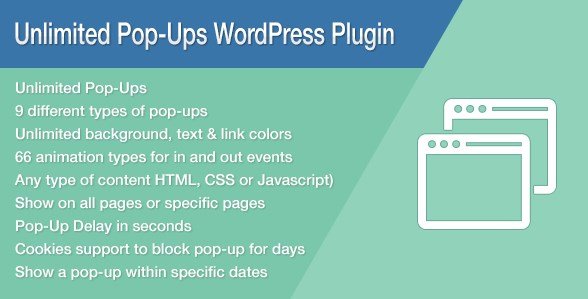
Most WordPress popup plugins either restrict the number of campaigns you can run simultaneously or charge monthly subscription fees that quickly add up. The Unlimited Pop-Ups WordPress Plugin breaks this mold by offering a one-time purchase model with genuinely unlimited popup creation capabilities. What truly distinguishes this tool is its granular control system—you can target specific user roles, hide popups on mobile devices while showing them on desktop, and implement 66 different animation combinations for entrance and exit effects.
- True unlimited popup creation without campaign restrictions
- Advanced user role-based targeting for membership sites
- 66 animation types combining entrance and exit transitions
- Full content flexibility supporting HTML, CSS, JavaScript, and shortcodes
Unlimited Pop-Ups WordPress Plugin Features for WordPress Users
Advanced Design & Positioning Controls
The plugin provides nine different display locations, allowing you to position popups exactly where they will have maximum impact. Whether you need center-screen modals, bottom bars, slide-ins from corners, or full-screen takeovers, the positioning system handles it flawlessly. I particularly appreciate the unlimited color and styling options that ensure your popups match your brand identity without requiring custom CSS overrides. The visual editor supports any type of content insertion, making it compatible with popular page builders and form plugins.
Intelligent Display & Targeting Rules
Smart targeting separates effective popups from annoying ones. This plugin offers multiple display options including time-delay triggers, which prevent immediate popup bombardment that drives visitors away. The cookie-based display system ensures returning visitors don’t see the same popup repeatedly, improving user experience while maintaining conversion potential. For membership sites or multi-author blogs, the user role-based display is invaluable—you can show different offers to subscribers versus administrators, or hide promotional content from existing customers.
Mobile Optimization & Performance
Mobile traffic dominates modern web browsing, and poorly optimized popups can destroy your Google rankings and user experience. The Unlimited Pop-Ups WordPress Plugin addresses this with device-specific controls allowing you to hide individual popups on tablets or mobile devices while maintaining them on desktop. This granular control prevents mobile usability penalties while preserving your conversion strategy for larger screens. Combined with the 66 animation types that create smooth, professional transitions without jarring movements, the plugin maintains site performance standards.
How to Install Unlimited Pop-Ups WordPress Plugin
Manual Installation via WordPress Dashboard
- Download the plugin files from your CodeCanyon purchase
- Navigate to Plugins → Add New → Upload Plugin in your WordPress dashboard
- Select the downloaded ZIP file and click Install Now
- Activate the plugin through the ‘Plugins’ menu
- Access the “Unlimited Pop-Ups” menu item to begin creating campaigns
Who Should Use Unlimited Pop-Ups WordPress Plugin?
Conversion-Focused Marketers
If you run lead generation campaigns, this plugin provides the testing capabilities you need. Create multiple variants with different copy, colors, and calls-to-action to determine what converts best for your audience. The ability to insert any content type means you can integrate with email marketing services like Mailchimp, ConvertKit, or ActiveCampaign using their provided shortcodes or HTML forms.
Membership Site Administrators
For sites running membership plugins like MemberPress or Restrict Content Pro, the role-based display features are essential. Show upgrade prompts only to free subscribers, display admin notices to authors, or offer exclusive discounts to premium members—all without conflicting with your existing user management system.
E-commerce Store Owners
WooCommerce users can leverage the delay settings and cookie controls to reduce cart abandonment. Create exit-intent style campaigns (using the timing and positioning options) to offer last-minute discounts, or announce flash sales to specific user segments without overwhelming your regular shoppers.
Unlimited Pop-Ups WordPress Plugin vs Alternatives
| Feature | Unlimited Pop-Ups | Popup Maker (Free) | Elementor Pro Popups |
|---|---|---|---|
| Campaign Limits | Unlimited | Limited in free version | Unlimited with subscription |
| User Role Targeting | Built-in | Requires paid extension | Available |
| Animation Types | 66 combinations | Basic | Limited set |
| Pricing Model | One-time purchase | Freemium | Annual subscription |
| Mobile Controls | Per-popup device hiding | Basic responsive | Responsive only |
Unlimited Pop-Ups WordPress Plugin Pricing
Available exclusively through CodeCanyon, this plugin operates on a one-time payment model typically ranging between $20-$30 for a regular license, with extended licenses available for developers building client sites. Unlike SaaS popup solutions that charge monthly fees based on pageview limits, this standalone plugin gives you lifetime access for unlimited domains (depending on license type) without recurring costs. Support and updates are included for six months, with options to extend.
Pros and Cons
✅ Pros
- Completely unlimited popup creation without artificial caps
- Granular device targeting (hide on mobile/tablet specifically)
- Robust animation library with 66 entrance/exit combinations
- Role-based visibility perfect for membership communities
- One-time cost significantly cheaper than subscription alternatives
- Supports any content type including complex shortcodes and scripts
❌ Cons
- No built-in email marketing service integrations (requires manual form embedding)
- Lack of A/B testing features for popup optimization
- Requires manual installation (not available in WordPress.org repository)
- Learning curve for advanced targeting rules
Frequently Asked Questions
Is Unlimited Pop-Ups WordPress Plugin compatible with page builders like Elementor?
Yes, the plugin accepts any content type including shortcodes. You can create popups using Elementor templates and insert them via shortcode, or use the HTML/CSS input fields for custom designs.
Can I show different popups to logged-in vs logged-out users?
Absolutely. The user role-based display feature allows targeting by specific roles (Administrator, Editor, Subscriber, etc.) and can differentiate between logged-in users and visitors.
Does this plugin slow down my website?
When configured properly, the impact is minimal. The cookie-based display prevents repeated loading, and you can disable popups on mobile devices where performance matters most. However, inserting heavy scripts or large images into popups will affect load times.
Is it GDPR compliant?
The plugin itself is a display tool; compliance depends on your content. Since you control all HTML/JS inserted, you can ensure cookie consent and data collection practices meet GDPR requirements. The cookie-based display system respects browser settings.
Can I use this on client websites?
The regular license covers single-end product use. For building websites for clients, you should purchase the extended license or individual licenses for each client site, depending on your business model and CodeCanyon’s licensing terms.
How does the 9-location positioning work?
The plugin provides strategic placement options including center modal, top bar, bottom bar, and corner slide-ins. Each location can be configured independently with different animations and timing rules.
Final Verdict
The Unlimited Pop-Ups WordPress Plugin delivers exactly what its name promises: unrestricted popup creation with professional-grade targeting capabilities. While it lacks some automated optimization features found in premium SaaS alternatives, the combination of user role targeting, device-specific controls, and extensive animation options makes it particularly valuable for WordPress developers and site owners who need granular control. For membership sites, multi-language installations, or complex e-commerce operations requiring distinct messaging for different user segments, this plugin provides capabilities that justify the one-time investment over free alternatives. Just ensure you have the technical comfort to manually install and configure the targeting rules to maximize its potential.