

What is UberGrid?
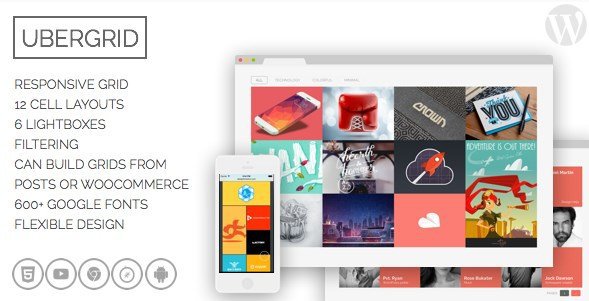
When WordPress users need to create visually stunning, responsive grid layouts without touching a single line of code, UberGrid offers a powerful drag-and-drop solution that transforms ordinary content into captivating masonry-style galleries. This premium WordPress grid plugin enables you to build beautiful walls of square items that can be defined manually or pulled automatically from your existing WordPress posts, including WooCommerce products and custom post types.
What Makes UberGrid Different
Unlike standard gallery plugins that limit you to basic image collections, UberGrid functions as a comprehensive responsive grid builder designed specifically for modern WordPress websites. The plugin stands out through its unique combination of automatic content pulling capabilities and granular customization options that adapt to virtually any design requirement. Whether you’re showcasing a photography portfolio, displaying team members, or creating product showcases, UberGrid’s square cell format provides a clean, professional aesthetic that works seamlessly across all devices.
- Automatic grid population from posts, products, and custom post types
- 12 distinct cell layouts with 2x width and height support
- Built-in filtering system for departments, categories, and work types
- Retina and high-DPI display support for crystal-clear images
UberGrid Features for WordPress Users
Responsive Design & Mobile Optimization
UberGrid takes responsive design seriously with dedicated settings for different screen sizes. The plugin includes specific configuration options for screens below 768 pixels and below 440 pixels, ensuring your grids look perfect on smartphones, tablets, and desktops. You can adjust cell sizes dynamically, and the system utilizes fast CSS3 animations when browser-supported, creating smooth transitions without slowing down your site. For users concerned about WordPress performance optimization, UberGrid’s lightweight codebase ensures your galleries load quickly while maintaining visual fidelity.
Dynamic Content Integration
One of UberGrid’s most powerful features is its ability to build grids automatically using your existing WordPress content. Simply select your desired post type—whether standard posts, WooCommerce products, or custom post types created by third-party plugins—and apply filters to curate your display. You can configure the grid to rebuild automatically on every page load or generate it once for manual refinement afterward. This functionality is particularly valuable for e-commerce sites needing WooCommerce product grids that update automatically when inventory changes.
Advanced Customization & Lightbox
UberGrid offers unparalleled customization options, giving you control over spacing, borders, block sizes, font selection from 600+ Google Fonts, colors, and hover effects. The plugin includes 12 different cell layouts supporting multiple aspect ratios, various title positioning options, and customizable labels below cells. Version 2.0 introduced the ability to open grids directly in a lightbox, while version 2.9 added dark and light lightbox themes. The built-in lightbox supports images, Google Maps, YouTube, Vimeo, and text content, complete with smooth animations and responsive behavior.
How to Install UberGrid
Installation via CodeCanyon
- Purchase and download UberGrid from CodeCanyon
- Navigate to Plugins → Add New in your WordPress dashboard
- Click “Upload Plugin” and select the downloaded ZIP file
- Click Install Now, then Activate the plugin
- Access UberGrid settings from the new menu item in your dashboard
After activation, you’ll find the UberGrid interface integrated into your WordPress admin panel, allowing you to start building grids immediately using the intuitive visual builder.
Who Should Use UberGrid?
Photographers & Creative Agencies
Photographers and design agencies requiring sophisticated portfolio grid WordPress solutions will find UberGrid indispensable. The plugin’s square cell format creates Instagram-style layouts perfect for visual portfolios, while the filtering capabilities allow you to organize work by category, client, or project type. The retina support ensures your high-resolution images display flawlessly on modern displays, maintaining the professional quality your work deserves.
E-commerce Store Owners
For WooCommerce store owners, UberGrid transforms standard product listings into engaging visual experiences. The automatic post-type integration pulls product images, titles, and metadata directly into attractive grid layouts. You can create department-specific displays, featured product walls, or seasonal collections that update automatically as your inventory changes, all while maintaining responsive behavior across mobile shopping experiences.
UberGrid vs Alternatives
| Feature | UberGrid | Essential Grid |
|---|---|---|
| Content Source | Native WP posts, WooCommerce, CPTs | External sources, social media |
| Cell Layouts | 12 preset layouts with 2x sizing | Flexible but complex grid system |
| Mobile Optimization | Breakpoint-specific settings (768px/440px) | Standard responsive scaling |
| Lightbox | Built-in with maps/video support | Requires third-party integration |
UberGrid Pricing
UberGrid is available exclusively through CodeCanyon as a premium plugin. The standard license typically ranges between $29-$39, which includes lifetime updates for the specific version purchased and six months of support from the developer. Extended licensing options are available for developers creating websites for clients or integrating the plugin into commercial themes. Unlike subscription-based alternatives, UberGrid operates on a one-time payment model, making it cost-effective for long-term projects.
Pros and Cons
✅ Pros
- Exceptional responsive controls with device-specific breakpoints
- Seamless WooCommerce and custom post type integration
- Comprehensive built-in lightbox eliminating need for additional plugins
- 600+ Google Fonts and extensive color customization
- Lightweight CSS3 animations that don’t impact site speed
❌ Cons
- Square cell format may not suit all design requirements
- Premium pricing barrier for casual users
- Learning curve for advanced filtering and automation features
Frequently Asked Questions
Is UberGrid compatible with page builders like Elementor or Divi?
Yes, UberGrid works seamlessly with all major page builders including Elementor, Divi, and WPBakery. The plugin generates shortcodes that can be inserted anywhere on your site, and many page builders include dedicated UberGrid widgets or modules for easier integration.
Can I use UberGrid to display WooCommerce products with filtering?
Absolutely. UberGrid excels as a WooCommerce product grid solution, allowing you to pull products automatically and implement filtering by categories, tags, or custom taxonomies. The filtering system supports department-style navigation perfect for large e-commerce catalogs.
Does UberGrid support retina and high-resolution displays?
Yes, UberGrid includes full retina and high-DPI screen support. The plugin automatically serves appropriately sized images for different device pixel densities, ensuring your grids look crisp on iPhones, MacBooks, and other high-resolution devices without unnecessary bandwidth usage on standard screens.
How does UberGrid handle mobile responsiveness?
UberGrid provides specific breakpoint controls for screens under 768 pixels and under 440 pixels. You can configure different cell sizes, spacing, and visibility options for mobile devices independently from desktop settings, ensuring optimal user experience across all screen sizes.
Can I import existing WordPress posts into a grid automatically?
Yes, this is one of UberGrid’s standout features. You can configure grids to pull content automatically from any post type—standard posts, pages, custom post types, or WooCommerce products—using filters to specify exactly which content appears. You can choose to rebuild the grid automatically on page load or generate it once for manual tweaking.
What content types does the built-in lightbox support?
UberGrid’s integrated lightbox supports multiple content types including images, HTML content, Google Maps embeds, YouTube videos, and Vimeo videos. Version 2.9 introduced separate dark and light themes for the lightbox, allowing you to match your site’s aesthetic perfectly.
Final Verdict
UberGrid delivers exceptional value as a responsive grid builder for WordPress users who prioritize visual presentation and mobile optimization. Its unique combination of automatic content integration, device-specific responsive controls, and comprehensive customization options makes it particularly well-suited for photography portfolios, WooCommerce stores, and agency websites requiring sophisticated content displays. While the square cell format imposes some design constraints, the trade-off is a consistently professional appearance that works reliably across all devices. For users seeking a premium image masonry plugin that balances automation with granular control, UberGrid represents a solid investment that eliminates the need for multiple separate gallery and lightbox plugins.

.jpg "WooCommerce Password Protected Categories")


