What is Touchy WordPress Mobile Menu Plugin?
When WordPress users need a comprehensive mobile navigation solution that prioritizes touch interaction and responsive design, Touchy WordPress Mobile Menu Plugin offers an exceptionally fast and customizable approach. Designed specifically with smartphones in mind, this premium plugin transforms how visitors interact with your site on mobile devices while maintaining full functionality on desktop browsers.
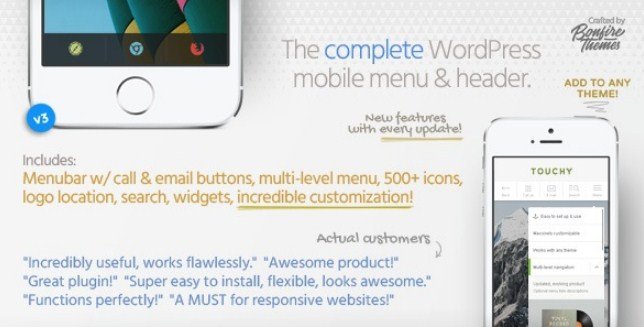
Unlike standard responsive menus that simply shrink desktop navigation, Touchy creates a native app-like experience complete with call buttons, email integration, search functionality, and multi-level dropdown menus. It serves as a complete mobile header and navigation solution that can either complement your existing theme or completely replace your current mobile menu by hiding theme elements through class or ID targeting.
What Makes Touchy Different
Touchy distinguishes itself through deep WordPress Live Customizer integration, allowing real-time visual editing of every element without touching code. While many mobile menu plugins offer limited color options or rigid layouts, Touchy provides granular control over transparencies, positioning, button arrangements, and behavioral triggers.
- Complete mobile header solution with logo positioning, contact buttons, and search
- Real-time customization via WordPress Live Customizer with 500+ icon options
- Advanced display controls allowing resolution-specific targeting and theme element hiding
Touchy WordPress Mobile Menu Plugin Features
Intelligent Menu Bar Architecture
The plugin’s foundation rests on a highly adaptable menu bar system that supports both fixed and absolute positioning at the top or bottom of the screen. You can rearrange the back, call, email, search, and menu buttons to match your user flow priorities, customize divider heights, and implement see-through transparency effects. The menu bar intelligently responds to scrolling behavior, optionally increasing shadow depth when users navigate down the page, creating subtle depth cues that enhance usability.
Advanced Multi-Level Navigation
Touchy implements an accordion-style dropdown menu that gracefully handles complex site architectures. The menu supports unlimited nesting levels with smooth animations, including two distinct arrow animation styles—traditional flipping or transformation into an ‘X’ symbol. For content-heavy sites, the dropdown area becomes scrollable when exceeding screen real estate, ensuring users can access deep navigation structures without frustration. The system also integrates two unstyled widget locations at the top and bottom of the menu panel, perfect for call-to-action elements, promotional content, or social media integration.
Brand Integration and Logo Management
The logo positioning system offers sophisticated behavior modeling, including a subtle fade effect when users scroll—creating a sticky navigation bar that maximizes screen real estate while maintaining brand visibility. Support for retina images ensures crisp display on high-density displays, while background image options with opacity controls allow for textured or photographic header treatments. You can align logos left, center, or right, adjust sizing independently, or completely hide the logo area for minimalist applications.
How to Install Touchy WordPress Mobile Menu Plugin
Manual Installation for Premium Plugins
As a CodeCanyon premium plugin, Touchy requires manual installation rather than repository-based deployment:
- Purchase and download the plugin files from CodeCanyon
- Navigate to Plugins → Add New → Upload Plugin in your WordPress dashboard
- Select the touchy.zip file and click Install Now
- Activate the plugin through the ‘Plugins’ menu
- Access Appearance → Customize → Touchy to configure your mobile menu
After activation, the Live Customizer integration provides immediate visual feedback as you adjust colors, positioning, and functionality. For detailed implementation guidance, refer to WordPress Customize API documentation to understand how Touchy leverages native WordPress functionality.
Who Should Use Touchy WordPress Mobile Menu Plugin?
Mobile-First Business Websites
Companies prioritizing mobile conversions benefit significantly from Touchy’s integrated contact features. The one-tap call and email buttons eliminate friction for service-based businesses, while the customizable search function helps e-commerce sites reduce navigation abandonment. If your analytics show high mobile traffic but low engagement, Touchy’s app-like interface can dramatically improve user retention metrics.
WordPress Agencies and Developers
Development teams working with diverse client portfolios appreciate Touchy’s theme agnostic approach. The ability to hide existing theme menus by class or ID means you can implement consistent mobile experiences across incompatible themes without custom coding. Multisite compatibility further streamlines deployment across client networks, while the clean, well-marked code base facilitates custom modifications when necessary.
Touchy vs Alternatives
| Feature | Touchy | Standard Responsive Menus |
|---|---|---|
| Customization Interface | Native WordPress Live Customizer | Separate admin panels or CSS editing |
| Contact Integration | Built-in call/email buttons with 500+ icons | Requires additional plugins or coding |
| Theme Compatibility | Hide theme elements by class/ID | Often conflicts with existing headers |
| Widget Support | 2 dedicated unstyled widget areas | Limited or no widget integration |
Touchy WordPress Mobile Menu Plugin Pricing
Touchy operates on the CodeCanyon marketplace model with a one-time purchase fee that includes lifetime updates and six months of support from the author. Extended support options are available for additional investment. Unlike subscription-based SaaS solutions, this pricing structure makes Touchy particularly attractive for agencies managing multiple client sites, as the single license can be implemented across projects without recurring monthly fees. For current pricing details, visit the official CodeCanyon listing.
Pros and Cons
✅ Pros
- Comprehensive mobile header solution eliminating need for multiple plugins
- Real-time visual customization through native WordPress Customizer
- Extensive device testing across iOS, Android, and Windows platforms
- Retina-ready image support and 500+ customizable icons
- Multisite compatible for network-wide deployment
❌ Cons
- Premium pricing may deter small personal blogs or hobby sites
- Manual installation required (not available in WordPress.org repository)
- Extensive customization options may overwhelm beginners seeking simple solutions
- No free trial version available for testing before purchase
Frequently Asked Questions
Does Touchy work with all WordPress themes?
Touchy is designed to be theme-agnostic and works with any properly coded WordPress theme. The plugin includes functionality to hide your existing theme menu or header by specifying CSS classes or IDs, ensuring no conflicts or duplicate navigation elements appear on mobile devices.
Can I use Touchy on desktop sites as well?
Yes, while Touchy is optimized for mobile touch interactions, it functions perfectly on desktop browsers. You can configure display settings to show the menu only on specific resolutions, or enable it universally for a consistent cross-device experience.
Is Touchy compatible with WordPress Multisite?
Yes, Touchy is fully WordPress Multisite compatible, allowing network administrators to deploy standardized mobile navigation across multiple sites within a network, with individual site customization capabilities maintained through the Customizer.
How does the Live Customizer integration work?
Touchy leverages the native WordPress Customizer API, meaning all changes to colors, positioning, button arrangements, and transparency settings appear in real-time preview before publishing. This eliminates the need to save, refresh, and check changes repeatedly.
Can I add custom content to the mobile menu?
Absolutely. Touchy includes two unstyled widget locations within the dropdown menu—one at the top and one at the bottom. These accept any WordPress widgets, shortcodes, HTML, or embedded content, perfect for promotional banners, contact forms, or social links.
What happens to my existing menu when I activate Touchy?
Touchy can coexist with your existing menu or completely replace it. Using the ‘hide theme menu’ feature, you can specify CSS selectors to automatically hide your theme’s default navigation when Touchy loads, creating a seamless replacement experience.
Final Verdict
Touchy WordPress Mobile Menu Plugin represents a mature, feature-complete solution for sites prioritizing mobile user experience. Its strength lies not just in the extensive customization options, but in the thoughtful UX decisions—like the scroll-fading logo and intelligent button placement—that demonstrate real understanding of mobile browsing behaviors.
For businesses and agencies requiring reliable, professional mobile navigation without ongoing subscription costs, Touchy offers exceptional value. The Live Customizer integration reduces development time significantly, while the comprehensive feature set eliminates the need for additional contact bar or search plugins. It’s particularly well-suited for service businesses, e-commerce operations, and content publishers seeking to improve mobile engagement metrics through superior navigation design.