What is Toolset – Views?
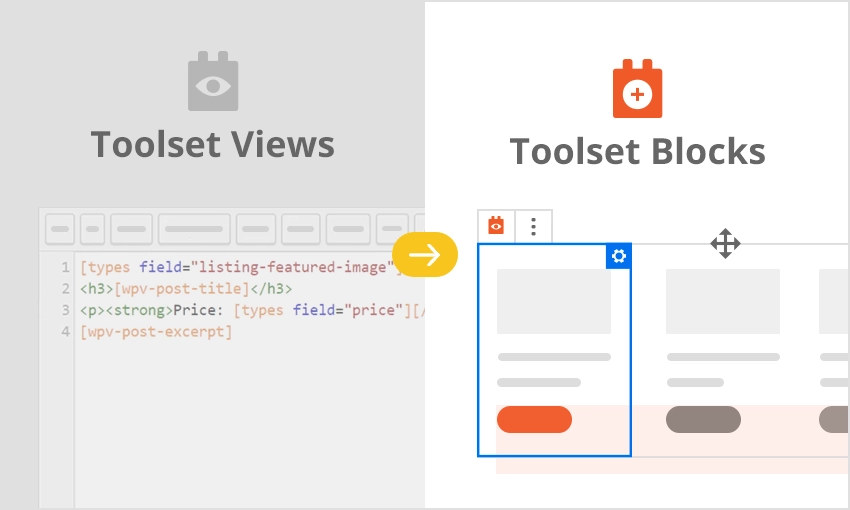
Toolset – Views was a cornerstone component of the popular Toolset suite, renowned for empowering WordPress users to display website content dynamically and precisely. Its primary purpose was to allow site builders, from beginners to seasoned developers, to query the WordPress database and present any kind of content in a custom-designed format without needing to write PHP. Think of it as a sophisticated visual query builder and display engine. You could use Toolset – Views to create custom lists of posts, pages, custom post types (like products, events, or portfolios), user profiles, and much more. It offered fine-grained control over what content was fetched, how it was filtered (e.g., by category, custom field values, author), and how it was sorted. The significance of Toolset – Views lay in its ability to transform a standard WordPress site into a highly customized, dynamic platform. Whether you needed to showcase related articles, build complex directory listings, create custom WooCommerce product archives, or design intricate search results pages, Toolset – Views provided the tools. Importantly, Toolset – Views has now been integrated into and superseded by Toolset Blocks. This evolution means that the powerful querying and display capabilities of Views are now available within the WordPress block editor (Gutenberg), offering a more modern, intuitive, and visually integrated site-building experience. While the name ‘Views’ might still be referenced, its functionalities are now a core part of the Toolset Blocks experience, enabling users to build advanced sites with even greater ease and flexibility directly within the familiar Gutenberg interface. Understanding Toolset – Views is understanding a key part of Toolset’s history in making complex WordPress development accessible.
Key Features of Toolset – Views (Now in Toolset Blocks)
- Advanced Query Builder: Toolset – Views allowed users to visually construct complex database queries. You could select content types (posts, pages, users, custom post types, taxonomy terms), apply multiple filters based on taxonomy, custom fields, dates, author, post relationships, and more. This powerful filtering ensured you could display exactly the content needed for any specific section of your site. This capability is now central to Toolset Blocks, often within the ‘View Loop’ block.
- Customizable Output & Styling: Beyond fetching data, Toolset – Views provided robust tools for designing how that data appeared on the front-end. Users could use HTML, CSS, and special shortcodes (or dynamic sources in Toolset Blocks) to arrange fields, create layouts (like grids, lists, tables), and style the output to match their theme. It supported various layout styles out-of-the-box, including unformatted lists, ordered lists, tables, and grids, all of which could be fully customized. Predefined styles were available, offering a quick start, with the ability to fully edit the HTML and CSS for pixel-perfect design.
- Front-End Display Anywhere: Views created with Toolset could be inserted virtually anywhere on a WordPress site. This included pages, posts, widget areas, theme template files (via PHP or shortcodes), and archives. With Toolset Blocks, this is even more seamless, as ‘View’ blocks can be directly inserted into any Gutenberg-enabled area, including Full Site Editing templates.
- Custom Search Implementation: A significant feature was the ability to create powerful custom search forms. Users could define search fields based on custom fields, taxonomies, or standard post data, allowing visitors to filter content dynamically. The search results would then be displayed using a View, updating in real-time or upon submission. This is critical for directories, real estate sites, and e-commerce platforms. Toolset Blocks continues to offer robust custom search creation.
- Pagination, AJAX, and Conditional Logic: Toolset – Views supported advanced display options like pagination for long lists of content, AJAX loading for smoother user experience (updating content without page reloads), and powerful conditional logic within the display loop (e.g., show a field only if it has a value, or display different HTML based on a custom field). These features ensured a professional and user-friendly experience, all manageable without deep coding knowledge. These are now integral to how Toolset Blocks handles dynamic content.
The latest version of Toolset, which includes Toolset Blocks (the successor to Toolset – Views), continually receives updates focusing on deeper Gutenberg integration, performance enhancements, and new dynamic capabilities. This ensures users have access to cutting-edge tools for building custom WordPress sites. For instance, recent updates often focus on expanding the range of dynamic sources available in blocks and improving the user interface for building queries and layouts. Users are encouraged to check the official Toolset blog for the latest developments.
How to Download Toolset – Views (Now Toolset Blocks)
Since Toolset – Views is a premium plugin and its functionality is now part of Toolset Blocks within the broader Toolset suite, it’s not available for free download from the WordPress.org repository. To get access, you need to purchase a Toolset plan. Here’s a general guide on how to obtain and start using Toolset, which includes the capabilities formerly known as Views:
- Visit the Official Toolset Website: Navigate to Toolset.com. This is the only official source for purchasing and downloading the Toolset plugins. Be wary of third-party sites offering unauthorized downloads, as they may contain malware or outdated versions. The official site will have the most current information on features and pricing.
- Choose a Toolset Plan: Toolset typically offers several pricing tiers, catering to different needs, such as single-site licenses, multi-site licenses, or lifetime plans. Evaluate the features included in each plan. All standard plans will include Toolset Types (for custom post types, fields, and taxonomies), Toolset Blocks (which incorporates Views functionality for displaying content), Toolset Forms (for front-end submission and editing), and Toolset Access (for controlling user permissions). Select the plan that best fits your project requirements and budget. Consider the number of sites you’ll use it on and if you need features like e-commerce integration with WooCommerce.
- Complete the Purchase and Download: Once you’ve selected a plan, proceed to checkout. After successful payment, you will gain access to your Toolset account dashboard. From there, you can download the individual Toolset component plugins as ZIP files. You’ll typically download Toolset Types and Toolset Blocks as the core components to replicate and extend the functionality previously offered by Toolset – Views. Ensure you download the latest stable versions for compatibility and security. Remember to store your license key safely, as you’ll need it for updates and support.
For a hassle-free setup and optimal performance for your dynamic WordPress site, consider using a reliable managed WordPress hosting provider. A good host can significantly impact your site’s speed and stability, especially when dealing with complex queries that Toolset – Views (now Toolset Blocks) can generate. While Toolset itself doesn’t pre-install, a quality hosting environment makes the entire process smoother.
Installing Toolset – Views (via Toolset Blocks): Step-by-Step Guide
Once you have purchased and downloaded the Toolset plugin files (specifically Toolset Types and Toolset Blocks, which encompass the functionality of the former Toolset – Views), installing them on your WordPress site is straightforward. Follow these steps to integrate these powerful tools into your website, enabling you to create custom content displays and dynamic queries. Remember to always back up your website before installing new plugins, especially comprehensive suites like Toolset. This precaution can save you from potential conflicts or issues, ensuring you can restore your site if needed. Many top WordPress hosting providers offer easy backup solutions.
1. Download Plugins from Your Toolset Account:
- Log in to your account on the official Toolset website (toolset.com).
- Navigate to the downloads section. You will find a list of Toolset components. Download the ZIP files for ‘Toolset Types’ and ‘Toolset Blocks’. These are the foundational plugins you’ll need to replicate and expand upon what Toolset – Views offered. Save these .zip files to a convenient location on your computer. Do not unzip them.
2. Upload and Install Plugins via WordPress Dashboard:
- Log in to your WordPress admin dashboard.
- Navigate to ‘Plugins’ > ‘Add New’.
- Click the ‘Upload Plugin’ button at the top of the page.
- Click ‘Choose File’, then locate and select the ‘Toolset Types’ .zip file you downloaded. Click ‘Install Now’.
- After the installation is complete, click ‘Activate Plugin’.
- Repeat the process for the ‘Toolset Blocks’ .zip file: ‘Upload Plugin’, choose the ‘Toolset Blocks’ .zip file, ‘Install Now’, and then ‘Activate Plugin’. It’s generally recommended to install and activate Toolset Types first, followed by Toolset Blocks.
3. Register Toolset for Updates and Support:
- Once activated, Toolset will usually prompt you to register your site for automatic updates and support. This typically involves going to ‘Toolset’ > ‘Settings’ or a similar menu item in your WordPress dashboard.
- Enter the license key you received upon purchasing Toolset. This step is crucial for receiving ongoing updates, which include new features, bug fixes, and security patches, as well as for accessing official support channels if you encounter any issues. Follow the on-screen instructions to complete the registration. This ensures your Toolset installation, including the powerful features of Toolset Blocks (formerly Views), remains current and secure.
Note: Always ensure your WordPress core, theme, and other plugins are up to date before installing a comprehensive suite like Toolset to minimize potential conflicts. After installation and activation, explore the Toolset dashboard and the new blocks available in the Gutenberg editor to start building your custom content displays. The Toolset documentation provides extensive guides and tutorials to help you get started with creating custom post types, fields, and displaying them using Toolset Blocks.
Toolset – Views (Toolset Suite) Pricing
Toolset – Views is not sold as a standalone plugin but is an integral part of the comprehensive Toolset suite. When you purchase Toolset, you gain access to all its components, including Toolset Blocks (which now contains the Views functionality), Toolset Types (for custom post types, fields, and taxonomies), Toolset Forms (for front-end content submission and editing), and Toolset Access (for membership and access control). The pricing structure is designed to offer flexibility based on the number of sites and the duration of support and updates. As of my last update, Toolset typically offers a few main package tiers, and it’s crucial to visit the official Toolset pricing page for the most current details, as offers and packages can change. They often run promotions, so checking their site directly is always best. Generally, you can expect annual subscription plans that grant you access to support and updates for one year, and sometimes lifetime plans for a one-time fee, offering updates and support indefinitely. These plans vary in the number of sites they can be used on, from a single site to unlimited sites, catering to individual users, freelance developers, and agencies. Investing in Toolset is investing in a complete solution for building advanced, dynamic WordPress websites without needing to code extensively, or for developers, a way to streamline their workflow.
| Component/Plan Tier (Example) | Estimated Price Range (Annual) | Key Details |
|---|---|---|
| Toolset Basic (e.g., 1 Site) | ~$69 – $149 | Includes all Toolset components (Types, Blocks/Views, Forms, Access) for use on one website. Standard support and updates for one year. Ideal for a single project or personal site. |
| Toolset Agency (e.g., Multiple/Unlimited Sites) | ~$149 – $299 | Includes all Toolset components for use on multiple or unlimited websites. Standard or priority support and updates for one year. Suited for freelancers and agencies building sites for clients. |
| Toolset Lifetime (Often available) | ~$299 – $499 (One-time) | Includes all Toolset components for a specified number of sites (often unlimited) with lifetime updates and support. This can be a very cost-effective option for long-term users and agencies. |
Toolset – Views (Now Toolset Blocks) Alternatives
While Toolset – Views (and its successor, Toolset Blocks) offers a comprehensive solution for displaying dynamic content in WordPress, several other plugins and methods can achieve similar results, each with its own strengths and weaknesses. Choosing the right alternative depends on your specific needs, technical expertise, and budget. Some developers might prefer a more code-centric approach, while others will look for visual builders. The WordPress ecosystem is rich with options, from dedicated query builders to page builders with dynamic content features. It’s also worth noting that WordPress core itself is evolving, with features like the Query Loop block offering basic dynamic content capabilities, though often not as extensive as dedicated plugins.
Advanced Custom Fields (ACF) + Custom PHP/Query Builders:
- Pros: ACF is extremely popular for creating custom fields. Paired with custom PHP in theme templates or a separate query builder plugin (like Elementor Pro’s custom query capabilities if you use Elementor, or standalone query plugins), it offers immense flexibility. Highly favored by developers for its control.
- Cons: Requires coding knowledge (PHP, HTML, CSS) to display the fields and build complex queries if not using a visual builder add-on. The free version of ACF has limitations, and robust display logic often requires ACF Pro or additional tools.
- Best For: Developers or users comfortable with code who need granular control over custom data and its presentation. Those already using ACF for data structure.
- Pros: A powerful dynamic content plugin, especially popular within the Elementor and Gutenberg ecosystems. Offers custom post types, taxonomies, custom fields, relations, and extensive listing grid/query building options. Strong visual interface.
- Cons: Primarily designed to work best with Elementor, though Gutenberg support is robust. Can have a learning curve due to its extensive feature set. It’s a premium-only solution.
- Best For: Users, especially Elementor users, looking for an all-in-one toolkit for creating complex dynamic websites, including custom listings, searches, and CPTs.
WordPress Core Query Loop Block & Theme Blocks:
- Pros: Built into WordPress core, so it’s free and ensures good compatibility. The Query Loop block allows basic filtering and display of posts and custom post types. Many modern block themes also provide patterns and specific blocks for dynamic content.
- Cons: Far less powerful and flexible than Toolset or JetEngine. Filtering options are limited, and advanced customization of the loop item’s layout requires creating custom block patterns or deeper block theme development. Not suitable for very complex queries or custom search functionalities.
- Best For: Simple blogs or sites needing basic listings of posts/pages without complex filtering or highly custom layouts. Users who want to stick to core WordPress features as much as possible.
Toolset – Views vs. Other WordPress Dynamic Content Plugins
When comparing Toolset – Views (now integrated into Toolset Blocks) with other WordPress plugins designed for dynamic content display and custom queries, it’s essential to consider its comprehensive nature within the Toolset ecosystem. Toolset isn’t just about displaying content; it’s a suite of tools designed to work seamlessly together to build advanced WordPress sites. This integration offers a significant advantage for users who want a unified solution for custom post types, custom fields, front-end forms, access control, and, of course, displaying that custom content dynamically. While standalone plugins might excel in one specific area, Toolset aims to provide a holistic development environment. For example, creating a custom post type with ‘Toolset Types’, adding custom fields, then using ‘Toolset Blocks’ (Views functionality) to display this data, and perhaps ‘Toolset Forms’ to allow front-end submissions, all happens within a consistent interface and framework. This tight integration can simplify development workflows and reduce potential conflicts between disparate plugins from different developers. Many alternatives require piecing together various plugins, which can lead to compatibility headaches and a steeper learning curve managing multiple interfaces.
- Integrated Ecosystem vs. Standalone Solutions: Toolset’s primary advantage is its all-in-one nature. Alternatives like ACF are excellent for data structure but require separate solutions (custom code, other plugins) for display and querying. JetEngine comes close to an ecosystem approach but is often tied more closely to page builders like Elementor for its full potential. Toolset offers a more builder-agnostic approach with its robust Gutenberg integration.
- Ease of Use for Non-Coders vs. Developer Power: Toolset, particularly with Toolset Blocks, strikes a balance between being accessible to non-coders through its visual interfaces and offering deep customization options for developers. While tools like ACF + custom code offer ultimate flexibility for developers, Toolset empowers users with less coding skill to achieve complex results that would otherwise require significant programming.
- Learning Curve and Community Support: Toolset has an extensive library of documentation, tutorials, and a dedicated support team. Because it’s a mature product, there’s a wealth of community knowledge available. Some newer or more niche plugins might have smaller communities or less comprehensive learning resources, making it harder to find solutions to specific problems or get help when needed.
- Pricing and Value Proposition: Toolset is a premium suite, and its cost reflects the comprehensive set of tools provided. When comparing, consider the combined cost of alternative plugins needed to achieve similar functionality. For example, ACF Pro, a forms plugin, and a query builder plugin might collectively cost more than a Toolset subscription, especially if you need them for multiple sites. Toolset’s lifetime plan, when available, can offer exceptional long-term value.
Ultimately, the choice depends on your project’s specific requirements and your preferred workflow. If you need a deeply integrated system for managing and displaying custom content across various aspects of your site, and you value a visual building experience backed by powerful features, Toolset (with Toolset Blocks incorporating Views) is a very strong contender. It’s particularly well-suited for users building directory sites, custom e-commerce experiences, membership sites, or any website that relies heavily on custom data and dynamic presentation. If your needs are simpler, or if you are a developer who prefers to hand-code queries and displays, other more focused tools might be sufficient.
Tips for Using Toolset – Views (Now Toolset Blocks) Effectively
- Plan Your Data Structure First: Before diving into creating Views (or View Loops in Toolset Blocks), meticulously plan your custom post types, custom fields, and taxonomies using Toolset Types. A well-thought-out data structure makes querying and displaying content much easier and more efficient. Consider all the information you need to store and how it relates.
- Leverage Conditional Logic: Use Toolset’s conditional output capabilities extensively. This allows you to display certain fields or HTML blocks only if specific conditions are met (e.g., a field is not empty, a user has a certain role, or a post belongs to a particular category). This keeps your displays clean and relevant.
- Optimize Your Queries: For sites with large amounts of content, poorly constructed queries can slow down your site. Be specific with your filters. Avoid fetching more data than you need. Toolset offers query optimization options; familiarize yourself with them. Consider pagination for long lists to improve initial page load times.
- Master Dynamic Sources in Toolset Blocks: Understand how to use dynamic sources within Toolset Blocks. This feature allows you to pull data from your custom fields, post information, taxonomies, and more, directly into standard Gutenberg blocks or Toolset’s specialized blocks, making your content truly dynamic.
- Utilize Relationship Features: If your content has relationships (e.g., authors related to books, events related to venues), use Toolset’s post relationships feature. You can then create Views that display related content, which is incredibly powerful for building interconnected websites. For instance, on a book’s page, you can display a View of other books by the same author.
- Keep an Eye on Performance: While Toolset is optimized, complex Views with many fields and intricate queries can impact performance. Regularly test your page load speeds using tools like Google PageSpeed Insights. Consider caching plugins like WP Rocket and ensure your hosting is adequate.
- Explore Pre-built Design Libraries or Patterns: Toolset often provides, or integrates with, design libraries or block patterns. These can give you a significant head start in styling your Views, which you can then customize to match your site’s branding.
- Regularly Consult Toolset Documentation and Support: The Toolset team provides extensive documentation, tutorials, and courses. If you’re stuck or want to learn advanced techniques, their resources are invaluable. Don’t hesitate to use their support forum for specific issues.
Pairing Toolset – Views (Toolset Blocks) with WooCommerce
Pairing Toolset – Views (now seamlessly integrated into Toolset Blocks) with WooCommerce unlocks a vast potential for creating highly customized e-commerce experiences on WordPress. While WooCommerce provides a robust foundation for online stores, its default product displays and archive pages can be somewhat generic. Toolset empowers you to break free from these limitations and design unique shopping experiences tailored to your specific products and brand. You can use Toolset Blocks to create entirely custom layouts for single product pages, replacing or augmenting the standard WooCommerce templates. Imagine displaying product attributes in unique ways, showcasing related products based on complex criteria, or integrating custom field data directly into the product presentation. For product listing pages (shop page, category archives), Toolset allows you to build custom grids or lists, add advanced filtering options (beyond what WooCommerce offers by default), and control every aspect of how products are displayed. For example, you could create custom search forms that allow customers to filter products by multiple custom taxonomies or price ranges, with results displayed in a custom-designed View. Toolset also allows you to add custom fields to WooCommerce products and then display these fields creatively. This is invaluable for stores selling products with unique specifications or requiring additional information beyond standard WooCommerce fields. Furthermore, with Toolset Forms, you can even allow vendors or users to submit products from the front-end, with all the custom field data managed by Toolset. The combination essentially lets you build a custom e-commerce platform on top of WordPress and WooCommerce, with fine-grained control over data and presentation, all without needing to delve deep into PHP template customization. This is particularly beneficial for niche stores or marketplaces that require a unique user experience and product display. The ability to design these custom templates directly within the Gutenberg editor using Toolset Blocks makes the process more visual and accessible than ever before.
Should You Invest in the Full Toolset Suite?
Investing in the full Toolset suite is a significant decision, but for users looking to build complex, dynamic WordPress websites without writing extensive code, or for developers seeking to streamline their workflow, it often represents excellent value. The question isn’t just about the capabilities of Toolset – Views (now part of Toolset Blocks), but the power of the entire integrated package. The free alternatives or piecing together various single-function plugins might work for simpler sites, but when your project demands custom post types with intricate field setups, sophisticated relationships between different content types, custom front-end forms for data submission and editing, granular access control for users, and the ability to display all this data in highly customized ways, Toolset provides a cohesive and comprehensive solution. Consider investing in the premium Toolset suite if your projects regularly require features such as creating and managing custom post types, taxonomies, and custom fields (via Toolset Types), which is fundamental for any data-rich website. If you need to design custom layouts for archives and single posts, or build complex queries to display specific content (the core of Toolset Blocks/Views), Toolset excels. Furthermore, if you require functionality for users to submit or edit content from the front-end of your site (via Toolset Forms), or implement detailed access restrictions and membership features (via Toolset Access), these components integrate seamlessly. The synergy between these components is a key selling point; data defined in Types is easily displayed with Blocks, submitted via Forms, and protected by Access. This integration can save considerable development time and reduce the complexity of managing multiple, potentially conflicting plugins. The support and documentation provided by the Toolset team are also valuable assets, especially when tackling advanced projects. For agencies and freelance developers, the ability to rapidly develop sophisticated custom sites for clients can make Toolset a very profitable investment. While there’s a learning curve, the power and flexibility unlocked by the full suite often justify the cost for serious WordPress builders. Visit the official Toolset website for detailed pricing and to assess which plan aligns with your needs.
- Advanced Custom Post Types and Fields Management: For creating and managing complex data structures beyond standard posts and pages.
- Sophisticated Content Relationships: To link different content types (e.g., events to venues, doctors to clinics) and display related information.
- Front-End Content Submission and Editing: Allowing users to submit and manage content without accessing the WordPress admin area.
- Granular Access Control and Membership Features: To control who can see or do what on your website, creating protected content areas or membership levels.
- Custom E-commerce Solutions: Deeply customizing WooCommerce product displays, archives, and search functionalities.
Frequently Asked Question:
What happened to Toolset – Views? Is it still available?
Toolset – Views has been integrated into and effectively replaced by Toolset Blocks. Its powerful querying and display functionalities are now part of the Toolset Blocks plugin, offering a more modern experience within the WordPress block editor (Gutenberg). You get all the power of Views, but with an improved user interface and deeper integration with the block editor. So, while the standalone ‘Views’ plugin name is retired, its capabilities live on and are enhanced in Toolset Blocks.
Do I need to know coding to use Toolset – Views (now Toolset Blocks)?
No, one of the primary strengths of Toolset, including the functionality formerly in Views, is that it allows you to build complex, dynamic websites without writing PHP. Toolset Blocks provides a visual interface for building queries, designing layouts, and displaying content. However, knowledge of HTML and CSS can be very beneficial for custom styling and fine-tuning the appearance of your Views.
Can I use Toolset – Views with any WordPress theme or page builder?
Yes, Toolset (including Toolset Blocks/Views) is designed to be compatible with any WordPress theme that follows WordPress coding standards. It also works well with most popular page builders like Elementor or Beaver Builder, especially as Toolset Blocks are native Gutenberg blocks, which can often be used within page builder layouts or alongside them. For Full Site Editing themes, Toolset Blocks are a natural fit.
Is Toolset – Views (Toolset Blocks) free?
No, Toolset is a premium suite of plugins. Toolset – Views functionality is included within Toolset Blocks, which is part of the paid Toolset package. You need to purchase a Toolset license to download and use its components. They offer different pricing tiers, which you can find on the official Toolset website.
What kind of websites can I build with Toolset – Views (Toolset Blocks)?
You can build a wide variety_of advanced websites, including directories (e.g., business listings, real estate), classifieds sites, custom e-commerce stores (extending WooCommerce), membership sites, portfolios, event calendars, and any site that requires custom content types and dynamic displays. Its flexibility makes it suitable for almost any project that needs more than standard WordPress functionality.
How does Toolset – Views handle responsive design?
The content displayed by Toolset – Views (via Toolset Blocks) will generally inherit responsive styles from your active WordPress theme. Toolset itself provides options for creating responsive layouts, for example, by allowing you to define different grid behaviors on various screen sizes or by giving you control over the HTML and CSS, where you can implement your own responsive rules. Using modern CSS techniques like flexbox or grid within your View templates ensures responsiveness.
Conclusion
Toolset – Views, now evolved and integrated into Toolset Blocks, remains a formidable tool for WordPress users aiming to craft sophisticated, dynamic websites with custom content displays. Its core strength lies in empowering users—regardless of their coding proficiency—to query the WordPress database with precision and present information in elegant, highly customized layouts. By transitioning its powerful features into the modern Gutenberg block editor via Toolset Blocks, Toolset has made these advanced capabilities more accessible and intuitive than ever before. Whether you’re building a complex directory, a bespoke e-commerce platform, a membership site, or any other project demanding unique data presentation, the Toolset suite provides a comprehensive, integrated solution. The ability to visually construct queries, design templates, and manage custom data types all within a unified environment streamlines development and opens up a world of possibilities. While it’s a premium investment, the value delivered in terms of saved time, enhanced functionality, and professional results makes Toolset, with its powerful Views-like capabilities in Toolset Blocks, a compelling choice for serious WordPress developers and site builders. We encourage you to explore the official Toolset website to see how it can transform your WordPress projects.
Disclaimer: Plugin features, pricing, and names can change. Always refer to the official Toolset website for the most up-to-date information before making any purchase decisions. This article reflects information available up to its last update.