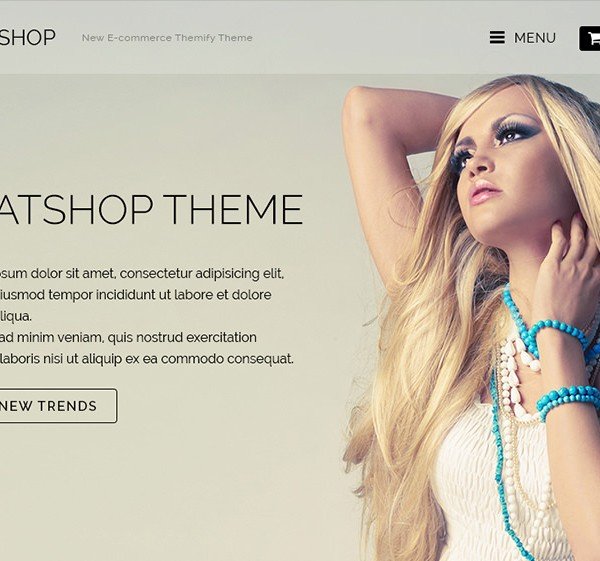
What is Themify Flatshop WooCommerce Themes?
Themify Flatshop is an exceptional WooCommerce theme meticulously crafted by Themify to empower users in transforming any WordPress website into a visually captivating and highly functional online store. This theme stands out by prioritizing an engaging user experience, leveraging advanced transition effects such as seamless parallax scrolling and subtle fly-in animations to capture visitor attention and enrich their browsing journey. Flatshop adopts a mobile-first design philosophy, ensuring complete responsiveness and retina-ready display capabilities. This means your eCommerce site will render impeccably with sharp graphics and fluid performance across all devices, from expansive desktop monitors to compact smartphones and tablets. Beyond its striking aesthetics, Themify Flatshop offers profound integration with the ubiquitous free WooCommerce plugin, providing a robust and intuitive platform for efficient product management and streamlined sales processing. It boasts an extensive array of customization options, enabling store owners to precisely tailor the visual appearance and functionality of their shop and individual product pages, ensuring perfect alignment with their brand identity and allowing them to effectively showcase unique product offerings. Key features like product lightboxes, dynamic AJAX slide carts, and the powerful Themify Builder significantly simplify the process of establishing a professional and engaging online retail presence. Themify Flatshop emerges as an ideal selection for anyone aspiring to sell products online with unparalleled style and efficiency.
Key Features of Themify Flatshop WooCommerce Themes
- Themify Builder Integration: Fully integrated with Themify’s intuitive drag & drop Builder, allowing you to design custom page layouts for posts, pages, and even individual product pages with a live frontend preview. This significantly enhances design flexibility.
- Responsive & Retina Ready: Guarantees that your online store maintains a flawless appearance and crisp graphics across all device types and high-resolution screens, providing an optimal viewing experience for every visitor.
- Fullwidth Slider: Create an unlimited number of customizable sliders with diverse text, image, and background options, assignable on a per-page basis, making it perfect for highlighting promotions or new arrivals.
- Advanced WooCommerce Compatibility: Features deep integration with the WooCommerce plugin, offering specialized custom shop layouts, granular individual product styling options, and the ability to create unlimited shop pages organized by categories.
- Engaging Visual Effects: Incorporates sophisticated parallax scrolling and dynamic fly-in animations that add visual depth and interactive elements, significantly enhancing user engagement and overall site aesthetics.
- Product Lightbox & AJAX Cart: Provides a convenient product lightbox for quick detail viewing without page redirects, and an AJAX slide cart that instantly updates the shopping cart, streamlining the buying process.
- Flexible Layout Options: Offers a wide range of layout choices for shop pages (including fullwidth, 4, 3, and 2-column grids) and blog posts (list and grid views), allowing for diverse content presentation.
- Slide-out Menu and Cart: Designed to maintain a clean header, it features slide-out panels for navigation, social media icons, a search bar, and the shopping cart, optimizing screen real estate.
- Infinite Scroll or Pagination: Choose between dynamically loading content as users scroll (infinite scroll) or traditional paginated navigation, offering flexibility in how large product catalogs or blog archives are displayed.
- Footer Info & Map: Provides an option to prominently display essential contact information, business hours, and an embeddable Google map within the footer area, improving accessibility for customers.
The latest version of Themify Flatshop ensures seamless compatibility with the most recent versions of WordPress and WooCommerce, continuously receiving updates to enhance features, improve performance, and address any potential issues. It requires the WooCommerce plugin to be installed and active for its full eCommerce functionality. For more information, refer to the official Flatshop documentation.
How to Download Themify Flatshop WooCommerce Themes
Themify Flatshop WooCommerce Theme is a premium product developed by Themify and is not accessible through the free WordPress.org theme repository. To acquire Themify Flatshop, you must directly purchase it from the official Themify website. This ensures you receive legitimate files, regular updates, and dedicated support, which are crucial for maintaining a secure and functional online store. Themify offers various purchasing tiers, providing flexibility based on your specific needs, whether a single theme license or a comprehensive club membership.
1. Access the Official Themify Website:
- Begin by navigating to themify.me/themes/flatshop, the dedicated sales page for Themify Flatshop.
- Explore the pricing and feature details specific to the Flatshop theme to understand its offerings thoroughly.
2. Select Your Purchase Plan:
- Themify provides several purchase options: a Standard license for a single theme, a Developer license (which includes Photoshop files), or memberships to their Master Club or Lifetime Club.
- The Master Club grants one year of access to all Themify themes and plugins, while the Lifetime Club offers perpetual access with a single payment. Choose the option best suited for your project’s scope and budget.
3. Download the Theme Files:
- Upon successful completion of your purchase, you will gain immediate access to your Themify member area.
- From your personal member dashboard, locate and download the Themify Flatshop theme as a compressed .zip file. This is the file you will upload to your WordPress site.
For a hassle-free setup and optimized performance for your WordPress and WooCommerce site, consider WPX Hosting. They are a top-rated provider offering reliable managed WordPress hosting solutions that come pre-configured for speed and efficiency, making your start easier.
Installing Themify Flatshop WooCommerce Themes: Step-by-Step Guide
Once you have successfully downloaded the Themify Flatshop theme file in .zip format from your Themify member account, the installation process on your WordPress website is straightforward. Before proceeding with any theme or plugin installation, it’s always recommended to create a full backup of your website to prevent any potential data loss. This ensures that you can revert to a previous state if any unforeseen issues arise during the installation or activation process. Follow these steps for a smooth installation:
1. Access Your WordPress Admin Panel:
- Open your web browser and navigate to your WordPress dashboard by typing `yourwebsite.com/wp-admin` into the address bar.
- Enter your registered username and password to log in securely to your site’s administration area.
2. Upload the Flatshop Theme File:
- From the WordPress dashboard, locate and click on `Appearance` in the left-hand navigation menu, then select `Themes`.
- On the Themes page, click the `Add New` button positioned at the top. Subsequently, click `Upload Theme`, select the Flatshop .zip file you downloaded, and then click `Install Now`.
3. Activate the Themify Flatshop Theme:
- After the upload and installation process is complete, WordPress will display a success message confirming the theme has been installed.
- To make Flatshop the active theme for your website, click on the `Activate` link provided within the confirmation message. Your new WooCommerce store powered by Flatshop is now ready for customization!
Note: Always remember to back up your site before installing or updating any plugins or themes. After updating Themify Flatshop, if prompted, utilize Themify’s built-in tools or the theme options to clear caches or re-save settings to ensure full functionality.
Themify Flatshop WooCommerce Themes Pricing
| Component | Price | Details |
|---|---|---|
| Standard License | $59 (one-time) | Includes the Themify Flatshop theme for unlimited sites, 1 year of support and updates. |
| Developer License | $69 (one-time) | Includes the Themify Flatshop theme, access to Photoshop design files for customization, unlimited site usage, and 1 year of support and updates. |
| Master Club | $89 (per year) | Provides 1-year access to ALL Themify themes, plugins, addons, Photoshop files, and all new products/updates released within the year. Excellent value for multiple projects. |
| Lifetime Club | $249 (one-time payment) | Offers lifetime access to ALL Themify themes, plugins, addons, Photoshop files, and all future product releases and updates. Best long-term value. |
Themify offers competitive pricing with a 30-day money-back guarantee across all its purchase options, providing peace of mind for buyers. All licenses permit use on unlimited websites, making them highly versatile for designers and agencies. For the most current pricing and any ongoing promotions, always refer to the official Themify Flatshop sales page.
Themify Flatshop WooCommerce Themes Alternatives
While Themify Flatshop offers a robust solution for building stylish WooCommerce stores, the WordPress ecosystem abounds with alternative themes that cater to different design preferences, feature requirements, and budget constraints. When exploring alternatives, consider themes known for their deep WooCommerce integration, design flexibility, performance optimization, and strong community or developer support. Each alternative presents a unique set of advantages and potential drawbacks, making the best choice dependent on your specific project needs.
Astra Theme (with Starter Templates):
- Pros: Extremely lightweight and fast, highly customizable with native WordPress Customizer, extensive library of pre-built starter templates (many for WooCommerce), excellent compatibility with page builders like Elementor and Beaver Builder, good for SEO.
- Cons: Core theme is minimalist, requiring additional time to build out complex designs without a starter template; some advanced features are locked behind the Pro version.
- Best For: Users prioritizing speed, flexibility, and integration with page builders, or those who want a quick start with pre-designed WooCommerce sites. Suitable for businesses of all sizes from startups to established stores.
Kadence Theme (with Starter Templates):
- Pros: Offers impressive performance, intuitive header and footer builders, robust customization options through the Customizer, strong integration with WooCommerce, and a growing library of beautiful starter templates. Provides excellent control over individual page layouts.
- Cons: Some unique blocks and advanced features are exclusive to the Pro version; learning curve for new users due to its extensive options.
- Best For: Developers and users who desire granular control over their site’s design and functionality, particularly for performance-critical WooCommerce stores and professional online presences.
Storefront (Official WooCommerce Theme):
- Pros: Free and developed by WooCommerce itself, ensuring 100% compatibility and stability; clean and minimalist design, making it easy to customize via child themes or extensions; lightweight and performance-focused.
- Cons: Basic design out-of-the-box, requires significant customization or extensions to stand out; limited built-in features compared to premium themes.
- Best For: Budget-conscious users, developers who prefer to build a custom design on a stable foundation, or those who prioritize absolute compatibility with WooCommerce without extra theme overhead. Ideal for small to medium-sized stores.
Each of these alternatives presents a valid approach to building a WooCommerce store. Your ultimate choice should align with your technical comfort, design requirements, and long-term business goals.
Themify Flatshop WooCommerce Themes vs. Other Themes
Themify Flatshop distinguishes itself in the competitive landscape of WooCommerce themes through its unique blend of aesthetic appeal, feature richness, and deep integration with the Themify Builder. While many themes offer WooCommerce compatibility, Flatshop goes a step further by weaving dynamic visual effects and advanced customization tools directly into the eCommerce experience. Compared to other popular themes like Astra or Kadence, or general-purpose themes utilizing page builders, Flatshop provides a more curated and integrated design environment specifically tailored for online retail with a distinct stylish flair.
- Integrated Visual Effects: Flatshop’s built-in parallax scrolling and fly-in animations offer out-of-the-box visual dynamism that many alternative themes, though flexible, might require additional plugins or custom coding to achieve. This provides an immediate ‘wow factor’ for product presentation.
- Native Themify Builder Power: While themes like Astra and Kadence excel with third-party page builders like Elementor, Flatshop’s tight integration with the Themify Builder allows for highly specialized product page designs right within the theme’s ecosystem, often with less complexity for users already familiar with Themify’s interface.
- Curated eCommerce Experience: Flatshop prioritizes the online shopping journey with features like product lightboxes and AJAX slide carts that are seamlessly integrated into the theme’s design, providing a polished and efficient user flow from product discovery to checkout. Many general themes may offer these functionalities through separate WooCommerce extensions.
- Focused Design Aesthetics: Flatshop’s design is distinctively modern and clean, with a clear focus on showcasing products. Other themes might offer broader design versatility but may not have the same immediate aesthetic impact for a visually driven eCommerce site without significant customization.
The choice largely depends on your starting point and preferences. If you’re invested in the Themify ecosystem or prefer a theme with advanced visual effects and a streamlined product focus built-in, Flatshop is an excellent choice. If you prefer a highly minimalist base to build upon with a page builder from scratch, or require a theme with the absolute lightest footprint, alternatives might be more suitable. It’s often about balancing out-of-the-box features with ultimate flexibility.
Tips for Using Themify Flatshop WooCommerce Themes Effectively
- Utilize the Themify Builder for Product Pages: Don’t just rely on default WooCommerce templates. Use the Themify Builder to create unique, engaging layouts for your individual product pages, incorporating elements like sliders, galleries, videos, and accordions to highlight product features.
- Experiment with Parallax and Fly-in Animations: These effects add a professional touch and user engagement. Apply them selectively to key sections or images to create visual interest without overwhelming the visitor.
- Optimize Product Images: Flatshop is a visually driven theme. Ensure all your product images are high-quality, consistently sized, and optimized for web performance to maintain fast loading times and a professional appearance. Consider using a plugin like WP Smush Pro for image optimization.
- Customize Your Shop Layouts: Flatshop offers unlimited shop pages with various column options. Organize your products logically into categories and create separate shop pages to better guide customers and enhance discoverability.
- Leverage the Slide-out Menu and Cart: Keep your header clean and minimal by fully utilizing the slide-out navigation and AJAX cart. This improves the user experience, especially on mobile devices, by providing easy access to vital functions without clutter.
- Configure the Footer Area: Make sure to utilize the footer info and map options to display essential contact details, business hours, and location, building trust and providing easy access for customers.
Pairing Themify Flatshop WooCommerce Themes with Complementary Tools
Themify Flatshop is designed to work seamlessly with WooCommerce, forming the core of your online store. However, to truly elevate your eCommerce site and optimize for performance, conversions, and user management, pairing it with other powerful WordPress plugins is highly recommended. For instance, integrating Themify Flatshop with a robust caching plugin like WP Rocket (learn more here) can drastically improve your site’s loading speed, which is crucial for reducing bounce rates and improving SEO rankings for an online store. Furthermore, for enhancing user interaction and offering advanced filtering options on your product archives, a plugin like WooCommerce Product Filters by WooBeWoo could be invaluable. While Flatshop has strong visual capabilities itself, considering a dedicated forms plugin like WPForms for contact forms, product inquiries, or even customer surveys can significantly boost lead generation and communication effectiveness. These complementary tools not only extend the functionality of your Flatshop-powered store but also ensure a more professional, faster, and user-friendly shopping experience.
Should You Invest in Themify Flatshop’s Premium Features or Clubs?
While the Standard License for Themify Flatshop provides a fully functional eCommerce theme, the decision to invest in a Developer License, Master Club, or Lifetime Club hinges on your long-term needs and the scale of your WordPress projects. The core Flatshop theme is robust for basic use, but premium features and club memberships offer significant advantages if you require:
- Advanced Design Flexibility and Assets: The Developer License includes Photoshop files, giving designers greater control and freedom for more intricate custom design mockups and branding.
- Access to a Full Ecosystem of Tools: The Master Club or Lifetime Club memberships unlock all Themify themes and plugins. This is incredibly valuable if you plan to build multiple websites or need access to other Themify add-ons like Builder Pro, Post Type Builder, or specific Builder Addons to enhance your site’s functionality beyond the theme’s core capabilities.
- Continuous Updates and Comprehensive Support: Club memberships ensure you receive all future updates, compatibility fixes, and dedicated support for all Themify products, which is crucial for long-term website maintenance and security.
- Cost-Effectiveness for Multiple Projects: If you’re an agency or a freelancer who builds many client sites, the Master or Lifetime Club quickly pays for itself by providing unlimited access to a vast library of Themify products, saving you money on individual theme or plugin purchases.
For a single personal store, the Standard or Developer license might suffice. However, for serious developers, agencies, or those with multiple ongoing and future WordPress projects, the value offered by the Master or Lifetime Club is immense. Visit the official Themify pricing page for detailed information and to compare club benefits.
Frequently Asked Question:
Is Themify Flatshop compatible with the latest WordPress and WooCommerce versions?
Yes, Themify regularly updates the Flatshop theme to ensure full compatibility with the latest versions of WordPress and the WooCommerce plugin, providing stability and access to new features.
Do I need the Themify Builder to use Flatshop?
Themify Flatshop comes with the Themify Builder deeply integrated. While you can use the theme’s core functionalities without extensively using the Builder, leveraging it allows you to create highly customized layouts for products and pages, maximizing the theme’s potential.
Can I use Themify Flatshop for a non-eCommerce website?
Yes, Themify Flatshop can certainly be used as a standard blog or static website even without the WooCommerce plugin active. All its visual effects and layout options are available for general content, offering a clean and modern design. However, its primary strength lies in its eCommerce capabilities.
Is there a free version of Themify Flatshop available?
No, Themify Flatshop is a premium theme and is not available as a free download. You must purchase a license directly from the official Themify website to acquire it.
Does Flatshop support multilingual websites?
Yes, Flatshop is translation-ready and compatible with popular multilingual plugins like WPML, Polylang, and TranslatePress, allowing you to create a store catering to a global audience.
What kind of support is included with Themify Flatshop purchase?
All Themify purchases, including Flatshop, come with 1 year of support and updates. Themify offers robust documentation, support forums, and direct contact options to assist users with any issues or queries.
Conclusion
Themify Flatshop WooCommerce Themes stand out as a highly capable and visually striking solution for anyone looking to establish a professional and engaging online store on WordPress. Its seamless integration with WooCommerce, coupled with Themify’s powerful Builder and distinctive visual effects like parallax scrolling and fly-in animations, empowers users to create unique product displays and a captivating shopping experience. Flatshop’s responsive and retina-ready design ensures your store looks fantastic on any device, while features like the product lightbox and AJAX cart streamline the user journey. By focusing on both aesthetics and functionality, Themify Flatshop provides a comprehensive toolkit for building an eCommerce presence that not only attracts but also retains customers, making it a worthy investment for aspiring online retailers and seasoned entrepreneurs alike. Embrace Flatshop to bring your products to life with style and efficiency.
Disclaimer: Please note that pricing, features, and compatibility mentioned are based on information available at the time of writing and are subject to change. Always refer to the official Themify website for the most current and accurate details. When installing any software, ensure you download from official sources and back up your website beforehand.