What is Testimonials Showcase – WordPress Plugin?
When WordPress site owners need to build instant credibility with potential customers, Testimonials Showcase – WordPress Plugin offers a comprehensive solution that goes beyond basic quote blocks. I’ve tested dozens of testimonial plugins over the years, and this CodeCanyon offering stands out for its flexibility in displaying social proof through multiple layout options while maintaining full schema markup compatibility for SEO benefits.
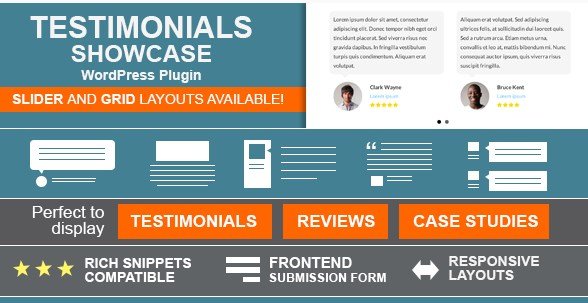
This premium plugin allows you to display testimonials, reviews, or quotes in either grid or slider formats, making it perfect for service businesses, e-commerce stores, and agencies looking to highlight client feedback. With features like front-end submission forms and star rating systems, it transforms how you collect and display social proof on your WordPress website.
What Makes Testimonials Showcase Different
Unlike standard testimonial plugins that offer limited layout choices, Testimonials Showcase provides both grid and slider presentations with over 15 customization options. The built-in front-end submission system allows customers to leave reviews directly on your site without accessing the WordPress dashboard, streamlining the collection process for busy business owners.
- Dual layout modes: Grid for static displays, Slider for dynamic homepage features
- Built-in front-end submission forms eliminate manual data entry
- Native Schema.org markup for enhanced Google search visibility
- Star rating integration for visual credibility indicators
Testimonials Showcase Features for WordPress Users
Flexible Grid and Slider Layouts
The plugin’s primary strength lies in its versatile display options. Whether you need a static grid for your about page or an animated slider for your homepage hero section, Testimonials Showcase adapts to your design requirements. With more than 15 layout customization options, you can control columns, spacing, typography, and hover effects without touching CSS code. This flexibility ensures your testimonials match your brand aesthetic while maintaining readability across mobile and desktop devices.
Rich Snippets and Schema Markup Integration
For SEO-conscious website owners, Testimonials Showcase outputs proper Schema.org Review markup, helping search engines understand your testimonial content. This structured data can enhance your search listings with star ratings and review counts, potentially improving click-through rates from organic search results. Learning how to implement schema markup is crucial for local businesses and e-commerce sites competing for visibility.
Front-End Submission System
p>One standout feature that separates this plugin from free alternatives is the front-end submission capability. Instead of emailing clients and manually copying their feedback into WordPress, you can provide a dedicated form where customers submit testimonials directly. This feature includes moderation controls, so you review submissions before they go live, maintaining quality control while reducing administrative overhead. The system captures star ratings, client photos, and company information through an intuitive interface.Star Rating and Visual Customization
The integrated star rating system adds visual credibility to written testimonials, allowing prospects to quickly gauge customer satisfaction levels. You can customize the star colors, sizes, and positioning to align with your brand guidelines. Additionally, the plugin supports images and logos, enabling you to display client headshots or company logos alongside their feedback for added authenticity.
How to Install Testimonials Showcase
Quick Installation Guide
- Purchase and download the plugin files from CodeCanyon
- Navigate to Plugins → Add New in your WordPress dashboard
- Click “Upload Plugin” and select the ZIP file
- Click Install Now, then Activate
- Access the Testimonials menu to configure your first showcase
After activation, you’ll find a dedicated testimonials section in your WordPress admin menu where you can add individual testimonials, configure layout settings, and set up the front-end submission form. The plugin is compatible with WordPress version 5.2 and higher, ensuring compatibility with modern block editor features.
Who Should Use Testimonials Showcase?
E-Commerce Store Owners
Online retailers benefit significantly from displaying product reviews and customer experiences. The grid layout works perfectly for dedicated review pages, while sliders can feature top testimonials on product pages or checkout screens to reduce cart abandonment through social proof.
Service-Based Businesses and Agencies
Consultants, marketing agencies, and local service providers can leverage the front-end submission feature to build a steady pipeline of client feedback. The ability to link testimonials to detailed case studies helps potential clients understand the specific results you’ve achieved for similar businesses.
Membership and Community Sites
Organizations looking to display member success stories or community quotes will appreciate the translation-ready features and customizable layouts. The plugin supports multiple languages, making it suitable for international organizations displaying global member feedback.
Testimonials Showcase vs Alternatives
| Feature | Testimonials Showcase | Strong Testimonials (Free) |
|---|---|---|
| Layout Options | 15+ Grid and Slider combinations | Limited templates without extensions |
| Front-End Submission | Built-in with moderation | Requires paid extension |
| Schema Markup | Native Schema.org support | Basic markup only |
| Star Ratings | Integrated visual system | Available via add-ons |
Testimonials Showcase Pricing
Testimonials Showcase – WordPress Plugin is available exclusively through CodeCanyon as a premium solution. The regular license typically ranges between $17-$25 for a single site installation, including six months of support from the developer. Extended licenses are available for multi-site or client work applications. While this represents an investment compared to free alternatives, the included front-end submission system and rich snippet capabilities often justify the cost for business-critical websites where social proof directly impacts revenue.
Pros and Cons
✅ Pros
- Dual grid and slider layouts with extensive customization options
- Native Schema.org markup improves SEO and search visibility
- Front-end submission forms streamline testimonial collection
- Translation ready for multilingual websites
- Star rating system enhances visual credibility
❌ Cons
- No free version available for testing before purchase
- Requires CodeCanyon account and Envato licensing system
- Advanced styling may require custom CSS for unique brand requirements
- Limited third-party integrations compared to enterprise solutions
Frequently Asked Questions
Is Testimonials Showcase compatible with Elementor or other page builders?
Yes, the plugin works seamlessly with popular page builders including Elementor, Beaver Builder, and WPBakery. You can insert testimonials using shortcodes or dedicated widgets within your page builder interface.
Can I import existing testimonials from other plugins?
While the plugin doesn’t include automatic import tools for every third-party plugin, you can manually import testimonials using WordPress’s native import features or copy content into the custom post type. CSV import functionality depends on your specific version and any additional extensions.
Does Testimonials Showcase support rich snippets for SEO?
Absolutely. The plugin generates proper Schema.org Review markup that helps Google display star ratings in search results. This feature works best when combined with SEO best practices for maximum visibility.
Is there a free version of Testimonials Showcase available?
No, this is a premium-only plugin available through CodeCanyon. There is no free version or lite edition, though the regular license is affordably priced for most small to medium businesses.
How do I prevent spam submissions through the front-end form?
The plugin includes moderation controls that require administrator approval before testimonials appear publicly. You can also integrate with reCAPTCHA or other spam protection plugins to filter automated submissions.
Will Testimonials Showcase slow down my website?
The plugin is optimized for performance and loads assets only on pages where testimonials are displayed. For optimal speed, pair it with a quality caching plugin and image optimization tools for client photos.
Final Verdict
Testimonials Showcase – WordPress Plugin delivers exceptional value for businesses serious about leveraging social proof. The combination of front-end submission capabilities, schema markup support, and flexible layout options makes it a superior choice over basic free alternatives. While the premium pricing may deter hobby bloggers, service businesses and e-commerce operators will appreciate the professional presentation and time-saving submission features. It’s particularly well-suited for WordPress users who need a reliable, low-maintenance solution for collecting and displaying customer feedback without technical complications.