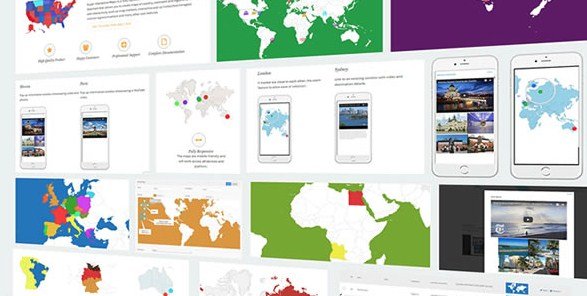
What is Super Interactive Maps for WordPress?
When WordPress users need to display location-based information visually, Super Interactive Maps for WordPress offers a comprehensive solution with over 300 customizable maps. This premium plugin integrates seamlessly with Google Geochart API to create stunning interactive maps that enhance user engagement and provide valuable geographical context for your content.
What Makes Super Interactive Maps Different
Super Interactive Maps stands out by providing an extensive library of vector maps combined with powerful customization options and seamless WordPress integration. Unlike basic map plugins, it offers complete control over map appearance, interactivity, and content presentation.
- 300+ pre-built maps including all countries, continents, and regions
- Full integration with Google Geochart API for accurate geographical data
- Multiple display styles: Regions, Markers, and Text Labels
Super Interactive Maps Features for WordPress Users
Comprehensive Map Library
The plugin includes an impressive collection of over 300 maps covering all 195 countries worldwide, continents, subcontinents, and regional divisions. From world maps to specific country divisions like USA states or UK regions, you’ll find the perfect geographical representation for your needs. Each map is built as a scalable vector graphic (SVG), ensuring crisp display at any size or resolution.
Advanced Customization Options
Customize every aspect of your maps to match your brand identity. Adjust background colors, border styles, hover effects, marker appearances, and text labels. The plugin provides granular control over visual elements including zoom levels, pan functionality, and responsive behavior across all devices. You can even create custom markers using Font Awesome icons for unique location indicators.
Interactive Elements & Content Integration
Transform static maps into engaging interactive experiences with tooltips, lightbox popups, and URL linking. Display rich content including text, images, and videos in responsive popups that work perfectly on mobile devices. The drag-and-drop marker feature, integrated with Google Maps API, allows precise location pinpointing with autocomplete search functionality for efficient map creation.
How to Install Super Interactive Maps
Quick Installation
- Purchase the plugin from CodeCanyon
- Download the plugin ZIP file to your computer
- Go to Plugins → Add New → Upload Plugin in WordPress dashboard
- Select the ZIP file and click Install Now
- Activate the plugin and configure your settings
Who Should Use Super Interactive Maps?
Business Directory Websites
Create interactive business directories showing locations of stores, offices, or service areas. Use custom markers to differentiate business types and implement tooltips displaying contact information, hours, and services. The responsive design ensures mobile users can easily access location information while on the go.
Travel and Tourism Sites
Display destination maps with points of interest, hotels, restaurants, and attractions. Use the lightbox popup feature to showcase beautiful images and videos of locations, creating an immersive planning experience for travelers. Regional maps help visitors understand geographical relationships between destinations.
Super Interactive Maps vs Alternatives
| Feature | Super Interactive Maps | Google Maps Plugin |
|---|---|---|
| Map Library | 300+ pre-built maps | Requires custom creation |
| Customization | Full visual control | Limited styling options |
| Offline Functionality | Vector-based, works offline | Requires internet connection |
Super Interactive Maps Pricing
Super Interactive Maps is available as a premium plugin on CodeCanyon for a one-time purchase of $29. This includes 6 months of support with the option to extend to 12 months for an additional $8.63. The purchase includes lifetime updates and access to all features without any recurring subscription fees.
Pros and Cons
✅ Pros
- Extensive map library with 300+ options
- Highly customizable visual appearance
- Fully responsive across all devices
❌ Cons
- Premium only – no free version available
- Requires Google Maps API key for some features
- Learning curve for advanced customization
Frequently Asked Questions
Is Super Interactive Maps compatible with page builders?
Yes, the plugin is fully compatible with Visual Composer and other popular page builders through shortcode integration.
Can I use custom markers on my maps?
Absolutely! The plugin supports custom markers using Font Awesome icons and allows full customization of marker size, color, and appearance.
Does the plugin work with the latest WordPress version?
Yes, Super Interactive Maps is regularly updated and fully compatible with the latest WordPress versions.
Can I display maps in sidebar widgets?
Yes, you can use shortcodes to display maps anywhere on your site including posts, pages, and sidebar widgets.
Is the plugin mobile-responsive?
All maps and interactive elements are fully responsive and work perfectly across all mobile devices and browsers.
Do I need coding knowledge to use this plugin?
No coding is required. The plugin provides an intuitive admin interface with autocomplete search and drag-and-drop functionality.
Final Verdict
Super Interactive Maps for WordPress delivers exceptional value for anyone needing professional, customizable maps on their website. With its extensive map library, powerful customization options, and seamless WordPress integration, it’s particularly well-suited for businesses, travel sites, and educational platforms. While the premium price point may deter casual users, the comprehensive feature set and professional results justify the investment for serious WordPress projects.