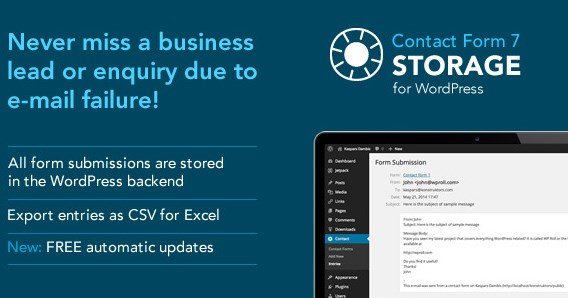
What is Storage for Contact Form 7?
When WordPress users need a reliable safety net for their contact form submissions, Storage for Contact Form 7 offers a robust database backup solution that eliminates the risk of lost leads. If you rely on Contact Form 7 for client inquiries but worry about email deliverability issues, this plugin ensures every submission gets saved directly to your WordPress database before the email even sends.
I have seen countless businesses lose valuable customer inquiries due to server misconfigurations, spam folder filtering, or email delivery failures. Storage for Contact Form 7 acts as your insurance policy, capturing every form entry including file attachments, timestamps, and user metadata. Unlike the default Contact Form 7 setup that relies solely on email transmission, this premium plugin creates a permanent record accessible directly from your WordPress dashboard.
What Makes Storage for Contact Form 7 Different
While there are free alternatives like Flamingo available in the WordPress repository, Storage for Contact Form 7 distinguishes itself through advanced export capabilities and granular data collection. The plugin doesn’t just save messages—it creates a comprehensive CRM-like entry system with individual field columns, attachment management, and detailed visitor tracking including referrer URLs and device information.
- Individual database columns for each form field enable precise CSV filtering and sorting
- Complete attachment storage with direct download links in the admin interface
- Advanced date-range filtering for exports perfect for monthly reporting
- Referrer URL tracking to identify which pages generate the most leads
Storage for Contact Form 7 Features for WordPress Users
Complete Database Backup Solution
The core functionality of Storage for Contact Form 7 revolves around creating a redundant backup system for your contact entries. Every time a visitor submits your form, the plugin intercepts the data before email transmission and commits it to your WordPress database. This dual-storage approach means that even if your SMTP configuration fails or messages end up in spam folders, you maintain complete access to the original submission. The plugin stores submissions in a dedicated admin interface that resembles an email inbox, making it intuitive to browse, search, and manage entries without database knowledge.
Advanced CSV Export Capabilities
Data portability is crucial for business analysis and customer relationship management. Storage for Contact Form 7 provides sophisticated export functionality that converts your form entries into Excel-compatible CSV formats. You can export all submissions or apply specific filters including date ranges and individual form selection. The export includes individual columns for every form field, allowing you to sort by name, email, or custom fields in your spreadsheet application. Additionally, the CSV includes direct links to any file attachments uploaded through the form, streamlining document collection workflows for applications, support tickets, or project briefs.
Comprehensive Entry Metadata
Beyond form field values, Storage for Contact Form 7 captures extensive contextual data about each submission. Every entry records the exact time and date, the intended email recipient from your form configuration, the subject line of the notification email, and the specific page URL where the form was submitted. For security and analytics purposes, the plugin also logs the user’s IP address, browser type, and device user-agent string. This metadata proves invaluable for troubleshooting submission issues, identifying spam patterns, or analyzing which landing pages drive the most engagement. Privacy-conscious administrators will appreciate the settings option to disable IP tracking and user-agent collection for GDPR compliance.
How to Install Storage for Contact Form 7
Quick Installation Guide
Since Storage for Contact Form 7 is a premium plugin sold through CodeCanyon, installation differs slightly from standard WordPress.org repository plugins:
- Purchase and download the plugin ZIP file from the CodeCanyon sales page
- Navigate to Plugins → Add New in your WordPress dashboard
- Click “Upload Plugin” and select the downloaded storage-for-cf7.zip file
- Click Install Now, then Activate the plugin
- Ensure Contact Form 7 is already installed and active (required dependency)
- Access the new “Storage” menu item to configure your backup preferences
Who Should Use Storage for Contact Form 7?
Small Business Owners and Service Providers
If you run a service-based business where every inquiry represents potential revenue, losing contact form submissions is unacceptable. Storage for Contact Form 7 ensures that quote requests, appointment bookings, and consultation inquiries remain accessible even when email systems fail. The CSV export feature particularly benefits businesses that need to import leads into external CRM systems or maintain offline records for compliance purposes. Real estate agents, law firms, medical practices, and consultants rely on this plugin to maintain audit trails of client communications.
Digital Marketing Agencies
Marketing professionals managing multiple client websites need reliable data collection infrastructure. Storage for Contact Form 7 provides agencies with the ability to prove lead generation results to clients through concrete database records and exportable reports. The referrer URL tracking helps demonstrate which marketing campaigns and landing pages convert, while the attachment storage ensures creative briefs and asset submissions never get lost in email threads. For agencies building conversion rate optimization strategies, having complete historical data of form submissions enables before-and-after analysis of design changes.
Storage for Contact Form 7 vs Alternatives
| Feature | Storage for Contact Form 7 | Flamingo (Free Alternative) |
|---|---|---|
| Database Storage | Yes – Advanced custom tables | Yes – Custom post type |
| CSV Export | Advanced filtering by date/form | Basic export only |
| Attachment Handling | Direct storage with download links | Limited attachment support |
| IP Address Tracking | Optional (can disable for GDPR) | Always collected |
| Support & Updates | 6 months included (extendable) | Community support only |
Storage for Contact Form 7 Pricing
Storage for Contact Form 7 operates on a premium licensing model through CodeCanyon. The regular license typically costs around $20-25 USD for use on a single website, including 6 months of support from the developer Presto. Extended licenses are available for multi-site deployments or applications where the end-user will be charged for access. While free alternatives exist, the commercial license ensures regular updates, security patches, and professional support for mission-critical business forms. The investment pays for itself by preventing even one lost high-value client inquiry.
Pros and Cons
✅ Pros
- Zero data loss guarantee with dual email and database storage
- Granular CSV exports with individual field columns for CRM import
- Complete file attachment preservation with organized admin access
- Referrer tracking identifies your highest-converting landing pages
- Privacy-compliant with optional IP and user-agent disable settings
- Clean, intuitive inbox-style interface for managing submissions
❌ Cons
- Premium pricing unlike free alternatives such as Flamingo
- Requires Contact Form 7 – not compatible with WPForms or Gravity Forms
- Database storage can grow large with high-volume forms if not pruned
- CodeCanyon licensing restrictions may limit multi-site deployments without extended license
Frequently Asked Questions
Does Storage for Contact Form 7 store file attachments uploaded through forms?
Yes, the plugin stores all file attachments uploaded via Contact Form 7 file fields. These are saved to your WordPress uploads directory with organized folder structures, and the database entries include direct download links. You can access these files directly from the submission entry screen or through the CSV export which includes attachment URLs.
Can I export specific date ranges of form submissions to Excel?
Absolutely. The plugin includes advanced filtering options that allow you to export submissions by specific date ranges, individual contact forms, or both. This is particularly useful for monthly reporting or quarterly business reviews where you need to analyze lead generation trends during specific campaign periods.
Is storing IP addresses and user data GDPR compliant?
Storage for Contact Form 7 includes privacy settings that allow administrators to disable IP address logging and user-agent tracking. When disabled, the plugin only stores the form data and timestamp, making it compliant with strict GDPR regulations regarding personal data collection. Always consult your privacy policy when enabling tracking features.
What happens to my stored data if I deactivate the plugin?
The database tables containing your form submissions remain in your WordPress database even after deactivation to prevent accidental data loss. You can access this data by reactivating the plugin. If you wish to completely remove all stored entries, you should delete the plugin through the WordPress admin, which typically prompts for data cleanup options.
Does this plugin work independently of Contact Form 7?
No, Storage for Contact Form 7 is specifically designed as an extension for the free Contact Form 7 plugin. It requires Contact Form 7 to be installed and active. It does not integrate with other form builders like WPForms, Ninja Forms, or Gravity Forms. If you use multiple form plugins, you will need separate storage solutions for each.
How do I prevent my database from filling up with old form submissions?
The plugin does not include automatic pruning features, so you should manually export and delete old entries periodically to maintain database performance. For high-traffic websites, consider implementing a regular maintenance schedule to export monthly data and remove entries older than your required retention period. Alternatively, database optimization plugins can help manage table sizes.
Final Verdict
Storage for Contact Form 7 delivers exactly what it promises: bulletproof backup storage for your contact form submissions with professional export capabilities. While the premium price point distinguishes it from free alternatives, the advanced filtering, attachment management, and dedicated support justify the investment for business-critical websites. The plugin is particularly well-suited for lead generation sites, e-commerce operations, and professional service providers who cannot afford to miss client inquiries due to email delivery failures. If you rely on Contact Form 7 and value data security, this plugin provides essential infrastructure for reliable customer communication management.