What is Social Wall Addon for UserPro?
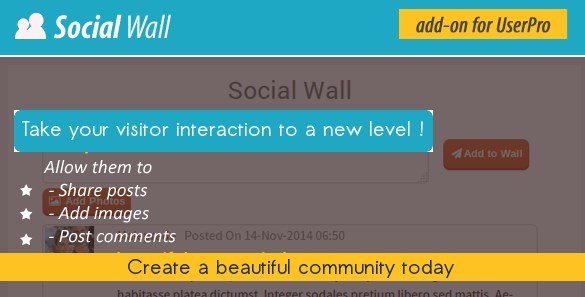
When WordPress site owners need to transform their UserPro-powered communities into interactive social networks, Social Wall Addon for UserPro offers a refreshing solution that creates Facebook-like engagement directly on your website. This premium WordPress plugin transforms static user profiles into dynamic social hubs where members can share posts, images, and interact through comments and reactions. If you are building a membership site, online community, or social network using the UserPro plugin, this addon provides the missing social layer that keeps users returning to your platform daily. The UserPro ecosystem becomes significantly more powerful when members can communicate through a centralized wall rather than isolated profile pages.
What Makes Social Wall Addon for UserPro Different
Unlike generic social feed plugins that require complex API integrations with external platforms like Facebook or Twitter, Social Wall Addon for UserPro creates a self-contained social network within your WordPress installation. This approach gives you complete control over content moderation, user data, and the overall community experience without depending on third-party algorithms or privacy concerns. The addon integrates seamlessly with UserPro’s existing user management system, leveraging the same user profiles, avatars, and authentication methods you’ve already configured. This native integration means zero conflicts with your existing membership structure while adding robust social networking capabilities that rival standalone platforms like BuddyPress but with UserPro’s superior profile management features.
- Native UserPro integration without API configuration headaches
- Self-hosted social network with complete data ownership
- Real-time interaction system with like/dislike functionality
- Comprehensive moderation tools for community managers
Social Wall Addon for UserPro Features for WordPress Users
Content Sharing and Media Management
The core functionality of Social Wall Addon for UserPro centers around intuitive content creation tools that encourage user participation. Members can compose text posts directly from the wall interface, sharing updates, thoughts, or community announcements with their entire network. The image sharing capability allows users to upload photos to their posts, creating visually engaging content that drives higher interaction rates than text-only updates. This media support is crucial for modern WordPress communities where visual storytelling dominates user engagement. The plugin handles image uploads securely, storing media within your WordPress library while maintaining proper file organization and optimization standards.
Interactive Engagement System
Engagement mechanics in Social Wall Addon for UserPro mirror popular social platforms to ensure user familiarity and immediate adoption. The like and dislike system allows community members to express reactions to posts without cluttering the feed with excessive comments, while the commenting feature enables deeper conversations around specific topics. Users receive visual feedback when others engage with their content, creating the dopamine-driven retention loops that make social networks addictive in a positive way for your brand. The “Load More” button implementation ensures infinite scrolling capabilities without overwhelming your server resources, loading content dynamically as users scroll through their feed.
Advanced Moderation and Content Control
Community management requires robust moderation tools, and Social Wall Addon for UserPro delivers comprehensive administrative controls. Site administrators retain ultimate authority with the ability to delete any user’s post or comment instantly, maintaining community standards without database access. The reporting system allows users to flag inappropriate content, funneling potential issues into an easy-to-manage moderation queue. Additionally, users maintain autonomy over their own contributions with self-deletion capabilities for their posts and comments. This dual-layer moderation approach—combining automated user reporting with manual administrative oversight—creates a safe environment for community interaction while reducing the moderation burden on site owners.
How to Install Social Wall Addon for UserPro
CodeCanyon Installation Process
Since Social Wall Addon for UserPro is distributed exclusively through CodeCanyon, the installation process differs slightly from standard WordPress.org repository plugins. First, purchase and download the plugin files from your CodeCanyon dashboard. You will receive a ZIP file containing the plugin package. Navigate to your WordPress admin panel, select Plugins → Add New, then click the “Upload Plugin” button at the top of the page. Choose the downloaded ZIP file and click “Install Now.” After installation completes, activate the plugin through the Plugins menu. Ensure that UserPro is already installed and activated, as this addon requires the base UserPro plugin to function correctly.
- Purchase and download the plugin from CodeCanyon
- Navigate to WordPress Dashboard → Plugins → Add New → Upload Plugin
- Select the social-wall-addon.zip file and click Install Now
- Activate the plugin through the ‘Plugins’ menu
- Configure wall settings through UserPro → Social Wall options
Who Should Use Social Wall Addon for UserPro?
Membership Site Owners
If you operate a premium membership site using WordPress, Social Wall Addon for UserPro provides the community infrastructure necessary to justify recurring subscription fees. Members gain value not only from your core content but from networking with peers, sharing insights, and building relationships within your branded ecosystem. This social layer significantly reduces churn rates by increasing the switching costs—users don’t just lose access to content when they cancel, they lose their community connections and shared history.
Niche Community Builders
Specialized communities—whether focused on professional networking, hobbyist groups, or support networks—benefit immensely from the structured interaction that Social Wall Addon for UserPro facilitates. Unlike scattered forum threads, the social wall presents a chronological feed that keeps all community activity visible and accessible. This visibility encourages lurkers to become participants when they see active discussions relevant to their interests.
Educational Platforms and Online Courses
Course creators using UserPro for student management can deploy Social Wall Addon for UserPro to create cohort-based learning environments. Students share progress, ask questions publicly where answers benefit the entire class, and provide peer support that reduces instructor workload. The social wall transforms isolated learning experiences into collaborative educational communities.
Social Wall Addon for UserPro vs Alternatives
| Feature | Social Wall Addon for UserPro | BuddyPress Activity Stream |
|---|---|---|
| UserPro Integration | Native, seamless connection | Requires bridging plugins |
| Setup Complexity | Plug-and-play with UserPro | Complex configuration required |
| Moderation Tools | Built-in reporting and admin controls | Basic moderation features |
| Media Sharing | Direct image uploads supported | Requires additional plugins |
Social Wall Addon for UserPro Pricing
Social Wall Addon for UserPro operates under CodeCanyon’s standard licensing model. The regular license typically ranges between $20-$30 USD for use on a single site, with extended licensing available for multi-site deployments or integration within products you plan to resell. This pricing includes six months of support from the plugin author, with options to extend support periods. As a premium addon, there are no free versions available, ensuring continuous development and compatibility updates with UserPro core updates. Remember that this addon requires the base UserPro plugin, which represents an additional investment if you haven’t already purchased the core membership system.
Pros and Cons
✅ Pros
- Seamless native integration with UserPro user profiles and authentication
- Comprehensive moderation suite including user reporting and admin deletion tools
- Facebook-like interface reduces learning curve for community members
- Self-hosted solution maintains complete data privacy and ownership
- Load More functionality prevents server overload with large communities
❌ Cons
- Requires UserPro base plugin (additional cost and dependency)
- No free version available for testing before purchase
- Limited to CodeCanyon support channels rather than WordPress.org forums
- May require customization for heavily themed websites
Frequently Asked Questions
Do I need the UserPro plugin to use Social Wall Addon?
Yes, absolutely. Social Wall Addon for UserPro is specifically designed as an extension of the UserPro membership system. It requires the base UserPro plugin to be installed and activated, as it utilizes UserPro’s user database, profile fields, and authentication system to function.
Can users upload multiple images to a single post?
The standard functionality supports image sharing within posts, though specific multi-image gallery capabilities depend on your version of the addon. The primary focus is on single-image posts with text content, similar to early Facebook wall functionality.
How does the reporting system work for inappropriate content?
Users can flag posts or comments that violate community guidelines. These reported items appear in your WordPress admin dashboard under the Social Wall moderation section, allowing administrators to review content and take appropriate action including deletion or user warnings.
Is Social Wall Addon for UserPro compatible with multisite networks?
The addon functions within standard WordPress multisite installations, though each site within the network requires its own license depending on your CodeCanyon purchase terms. User data remains site-specific unless you’re using a shared user table configuration.
Can I customize the appearance to match my theme?
Yes, the plugin includes CSS classes that allow for styling customization. Advanced users can override template files or use custom CSS to match their brand colors, typography, and layout preferences. However, significant visual modifications may require developer assistance.
Does this addon work with page builders like Elementor or Divi?
Social Wall Addon for UserPro integrates through shortcodes or widgets that function within most page builders. You can embed the social wall on custom pages built with Elementor, Divi, or other popular builders without conflicts, provided UserPro is properly configured.
Final Verdict
Social Wall Addon for UserPro successfully bridges the gap between traditional membership sites and modern social networks, offering a compelling solution for WordPress communities that need engagement without platform dependency. The tight integration with UserPro eliminates the technical friction typically associated with third-party social plugins, while the comprehensive moderation tools ensure your community maintains quality standards as it scales. It’s particularly well-suited for membership site owners who have already invested in the UserPro ecosystem and need to increase user retention through social interaction. While the requirement for UserPro core limits its audience to existing users of that platform, for those within that ecosystem, this addon represents essential infrastructure for building sticky, engaging communities that compete with standalone social platforms.