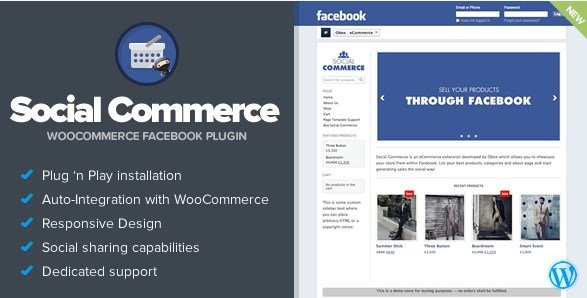
What is Social Commerce – WooCommerce Facebook Tab?
When WordPress store owners need to tap into Facebook’s massive user base without building a separate storefront from scratch, Social Commerce – WooCommerce Facebook Tab offers a seamless bridge between your existing WooCommerce catalog and your Facebook Fan Page. This premium WordPress extension transforms your eCommerce website into a Facebook-friendly shopping destination, allowing customers to browse, share, and purchase products directly through a custom tab integrated into your business page. Unlike standard sharing buttons that merely link back to your site, this plugin creates a fully immersive shopping experience within Facebook’s ecosystem, capitalizing on the platform’s massive social reach while maintaining your brand’s visual identity. By embedding your store directly into the Facebook interface, you reduce friction in the customer journey and capture impulse buyers who discover your products through social sharing.
What Makes Social Commerce Different
What sets Social Commerce apart from basic social media plugins is its dedicated focus on commerce conversion rather than simple content sharing. While most plugins add share buttons or auto-post products to timelines, this tool creates a persistent storefront tab on your Facebook Fan Page. It synchronizes with your WooCommerce inventory in real-time and emulates Facebook’s native design language, making your store feel like a natural extension of the platform rather than an external iframe, improving user trust essential for social selling.
- Dedicated commerce tab rather than simple sharing buttons
- Real-time inventory synchronization with WooCommerce
- Native Facebook aesthetic that builds customer confidence
Social Commerce Features for WordPress Users
Native Facebook Integration
The plugin creates a dedicated shopping tab on your Facebook Fan Page that loads your WooCommerce products within Facebook’s interface. This native integration means customers never feel like they’re being redirected to an unknown website, reducing bounce rates and cart abandonment. The tab functions seamlessly across desktop and mobile Facebook applications, ensuring consistent product display regardless of how users access your page. By leveraging Facebook’s social graph, customers can see which friends have liked or shared your products, adding powerful social proof to your merchandise.
Visual Branding Control
Social Commerce provides extensive customization options through its powerful settings panel, allowing you to upload custom logos and backgrounds that align with your brand while respecting Facebook’s design aesthetics. The responsive design ensures your product grids, featured sliders, and category navigation display perfectly on all devices. You can configure homepage content choosers to highlight specific collections or bestsellers, creating curated shopping experiences that match seasonal promotions or inventory priorities. This level of visual control ensures brand consistency while adapting to Facebook’s interface requirements.
Social Commerce Features
Beyond basic product display, the plugin includes built-in social sharing capabilities that encourage viral marketing of your products. The featured slider functionality allows you to showcase high-margin or new arrival items prominently at the top of your Facebook store. Product pages include sharing buttons that make it easy for customers to post items to their timelines or share with specific friends. This creates organic marketing opportunities as each share exposes your products to extended networks, effectively turning customers into brand ambassadors without additional advertising costs.
How to Install Social Commerce
Quick Installation
- Purchase and download the plugin from CodeCanyon
- Navigate to Plugins → Add New → Upload Plugin in WordPress dashboard
- Activate the plugin and navigate to the settings panel
- Connect your Facebook Business account and authorize the app
- Configure your store tab, upload branding assets, and select product categories
For detailed integration steps with Facebook Business Manager, consult the official documentation to ensure proper API permissions.
Who Should Use Social Commerce?
Small Business Owners
Local retailers and boutique owners who have built community followings on Facebook will find this plugin invaluable for converting social engagement into sales. If you’ve already invested in growing a Facebook Fan Page but struggle to drive traffic to your external WooCommerce site, Social Commerce eliminates that barrier. Small businesses selling handmade goods, specialty foods, or limited inventory items can particularly benefit from the social proof aspects, as local customers can see community members interacting with products, creating trust signals that drive in-store and online purchases simultaneously.
Digital Marketers and Dropshippers
Ecommerce entrepreneurs running dropshipping operations or digital product stores can leverage this plugin to capitalize on Facebook advertising traffic without building complex sales funnels. By sending ad traffic directly to a Facebook tab rather than an external website, you reduce mistrust factors and keep users within the platform they’re already comfortable using. This approach works exceptionally well for impulse purchase products, flash sales, and viral merchandise where minimizing click-through steps directly correlates with conversion rate improvements and lower customer acquisition costs.
Social Commerce vs Alternatives
| Feature | Social Commerce Plugin | Facebook Native Shop |
|---|---|---|
| Inventory Sync | Real-time WooCommerce integration | Manual CSV upload or limited API |
| Customization | Full branding control with logo/uploads | Standard Facebook formatting only |
| Pricing Model | One-time purchase | Free but limited features |
| Social Proof | Friends activity visibility built-in | Basic likes and shares |
Social Commerce Pricing
Social Commerce – WooCommerce Facebook Tab is available exclusively through CodeCanyon under a regular license suitable for single-store implementations, typically priced between $25-$30. This license includes lifetime updates from the developer and six months of support, with options to extend support to twelve months for an additional fee. For developers or agencies managing multiple client stores, an extended license is available at a higher tier. Unlike SaaS alternatives that charge monthly subscription fees based on product count or sales volume, this one-time payment structure makes it economically advantageous for established WooCommerce stores seeking permanent Facebook integration without recurring overhead costs.
Pros and Cons
✅ Pros
- Native Facebook aesthetic creates seamless shopping experience
- One-time licensing fee provides lifetime value vs monthly SaaS
- Fully responsive layout adapts to mobile Facebook apps
- Automatic inventory synchronization prevents overselling
- Featured slider and homepage content chooser enable strategic merchandising
- Works with existing WooCommerce payment gateways
❌ Cons
- Heavy reliance on Facebook’s evolving platform policies and API
- Requires technical configuration of Facebook Business Manager
- Fan Page tabs receive less prominent placement than Facebook Marketplace
- Support limited to CodeCanyon’s terms rather than WooCommerce ecosystem
- Potential conflicts with other Facebook-related tracking pixels
Frequently Asked Questions
What exactly does Social Commerce WooCommerce Facebook Tab do?
It creates a dedicated shopping tab on your Facebook Fan Page that displays your WooCommerce products natively within Facebook, allowing customers to browse and purchase without leaving the social platform.
Do customers checkout on Facebook or my website?
While the browsing experience happens within Facebook, checkout typically redirects to your secure WooCommerce checkout page, ensuring you maintain control over payment processing and customer data collection.
Is this plugin compatible with my existing WordPress theme?
Yes, the plugin is designed to work with any WooCommerce-compatible theme by rendering products through Facebook’s interface rather than relying on your theme’s styling, though you can learn more about optimizing your Facebook shop setup for best results.
Can I use this on multiple Facebook pages?
The regular license covers single-end product use; for multiple client sites or fan pages, you’ll need to purchase additional licenses or an extended license depending on your specific use case per CodeCanyon’s licensing terms.
Does it support variable products and attributes?
Absolutely. The plugin synchronizes your entire WooCommerce catalog including variable products, sizes, colors, and custom attributes, though the display format may vary based on Facebook’s tab rendering limitations.
Will this work with Facebook Pixel and analytics?
The plugin functions alongside standard Facebook Commerce implementations, allowing you to track tab visits, product views, and conversion events through your existing analytics setup without conflicts.
Final Verdict
Social Commerce – WooCommerce Facebook Tab represents a solid solution for WooCommerce store owners seeking to monetize their Facebook audience without building separate infrastructure. It successfully bridges the gap between social media marketing and eCommerce functionality, particularly benefiting small businesses with established fan bases. While the dependency on Facebook’s platform introduces some risk, the one-time cost structure and robust feature set make it a worthwhile investment for retailers prioritizing social commerce. For businesses already investing in Facebook community building, this plugin converts likes and shares into measurable revenue streams effectively.