

What is Smart Navigation Widgets?
When WordPress users need to manage extensive archives without overwhelming their visitors, Smart Navigation Widgets offers an elegant AJAX-powered solution. I discovered this plugin while working with a client who had over 500 categories and thousands of pages—their sidebar was becoming an unusable mess of links. Smart Navigation Widgets transforms bulky archive lists into compact, drill-down navigation systems that load content dynamically only when users actually need it.
Unlike standard WordPress archive widgets that dump every single link onto the page simultaneously, this plugin displays hierarchical content in manageable chunks. Whether you’re running a massive blog with decade-deep content archives, a complex documentation site, or a bbPress forum with intricate category structures, this tool solves the navigation nightmare that plagues content-heavy websites.
What Makes Smart Navigation Widgets Different
I’ve tested dozens of navigation plugins over the years, but Smart Navigation Widgets stands out because it addresses a specific technical and usability problem that most archive solutions ignore: the SEO impact of excessive on-page links. Google recommends keeping links per page under 100-150, yet traditional archive widgets often generate thousands of links instantly. This plugin cleverly limits initial link output while maintaining full navigation capability through asynchronous loading.
- AJAX-Powered Hierarchy: Loads deeper archive levels only when users click, reducing initial page weight and SQL queries
- Hierarchical Intelligence: Specifically optimized for nested taxonomies like categories and parent-child page structures
- SEO-Friendly Architecture: Helps maintain healthy link density while preserving full navigation access for users and search engines
- bbPress Integration: Native support for forum hierarchies, making it ideal for community sites
Smart Navigation Widgets Features for WordPress Users
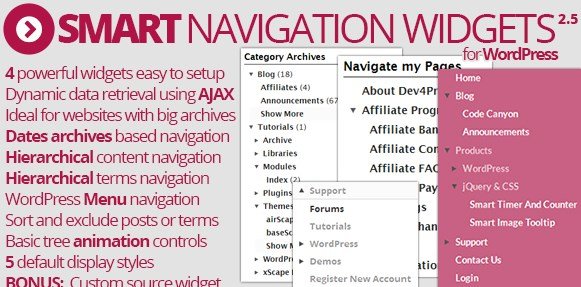
Four Specialized Archive Widgets
The plugin includes four distinct widgets (plus one bonus widget) designed to handle different types of WordPress content hierarchies. I find the Taxonomy Archives widget particularly useful for sites with deep category structures—it handles standard categories and custom taxonomies with equal grace. The Hierarchy Content widget manages pages and hierarchical custom post types, replacing the unwieldy default page lists that can stretch for screens.
For chronologically organized content, the Date Archives widget offers decade/year/month/day drilling that doesn’t clutter your sidebar with every single month since 2005. Finally, the Navigation Menu widget brings WordPress menu hierarchy into the AJAX-powered fold, allowing complex dropdown structures without the typical menu bulk that slows down page loads.
Advanced Customization & Styling Options
Flexible implementation matters when you’re maintaining brand consistency across a large site. Smart Navigation Widgets includes five predefined visual styles that work immediately with most themes, but the real power lies in the custom CSS classes and markup structure. You can mark the current item with specific CSS classes for active state styling, display item descriptions for taxonomies and menu items to provide context, and even insert widgets anywhere on the page using shortcodes or PHP functions.
The plugin supports full translation with included POT files, and you can selectively enable or disable individual widgets from the settings panel if you only need specific functionality. This modular approach keeps your WordPress installation lean while delivering exactly the navigation features your site requires.
Performance & Database Optimization
From a technical standpoint, I’ve noticed significant performance improvements when replacing standard archive widgets with this solution. Complex hierarchies typically require numerous SQL queries to generate—sometimes dozens of database calls just to build a category list. By leveraging optimized custom functions and loading content via AJAX only when requested, Smart Navigation Widgets reduces the initial database load substantially. This is particularly beneficial for sites using complex permalink structures or those hosted on limited resources.
The plugin also integrates seamlessly with GD Custom Posts And Taxonomies Tools Pro, supporting archive intersections for advanced content architectures. For forum communities, the bbPress compatibility means you can display forum hierarchies without the typical performance penalties of loading every sub-forum simultaneously.
How to Install Smart Navigation Widgets
Installation from CodeCanyon
Since Smart Navigation Widgets is a premium plugin available on CodeCanyon, installation differs slightly from standard WordPress.org plugins:
- Purchase and download the plugin ZIP file from CodeCanyon
- Navigate to Plugins → Add New in your WordPress dashboard
- Click the Upload Plugin button at the top of the page
- Select the downloaded ZIP file and click Install Now
- After installation completes, click Activate Plugin
- Configure widget availability under the plugin settings panel
Once activated, you’ll find the new widgets available in Appearance → Widgets. Each widget can be dragged to your sidebar or widget areas, where you’ll configure specific options like taxonomy selection, display depth, and styling preferences. For advanced implementations, use the provided shortcode [smart_navigation] or PHP function to embed navigation directly within templates.
Who Should Use Smart Navigation Widgets?
Content-Heavy Blogs and News Sites
If your blog has been operating for years and accumulated hundreds of categories or thousands of posts, traditional archive widgets create navigation paralysis. I recommend Smart Navigation Widgets for editorial teams managing large content libraries who need to maintain intuitive user navigation without sacrificing page speed or SEO health. The drill-down interface helps readers discover relevant content without being overwhelmed by massive link lists.
bbPress Forum Communities
Forum administrators face unique navigation challenges when managing complex board hierarchies with nested sub-forums. This plugin’s native bbPress support allows you to display forum structures compactly, loading sub-forums via AJAX only when users explore specific sections. This prevents the massive link lists that often plague active community sites while maintaining full accessibility to every discussion board.
Enterprise Documentation Sites
Organizations running extensive knowledge bases or documentation portals with hierarchical page structures benefit enormously from the Hierarchy Content widget. When you have hundreds of documentation pages organized in parent-child relationships, this plugin creates manageable navigation trees that expand contextually as users drill into specific topics, significantly improving information architecture.
Smart Navigation Widgets vs Alternatives
| Feature | Smart Navigation Widgets | Default WordPress Archives |
|---|---|---|
| Link Loading | AJAX on-demand loading | All links rendered immediately |
| Hierarchical Support | Deep drill-down with breadcrumbs | Flat lists or simple dropdowns |
| Database Queries | Optimized, minimal initial load | Multiple queries per widget |
| bbPress Compatibility | Native support | Limited/Requires custom coding |
| Styling Flexibility | 5 presets + full CSS control | Basic theme default styling |
Smart Navigation Widgets Pricing
Smart Navigation Widgets is available as a premium plugin through CodeCanyon, typically priced between $20-$30 for a regular license. This one-time purchase includes lifetime updates and six months of support from the developer, with options to extend support to twelve months for an additional fee. The license covers use on a single website, making it a cost-effective solution for individual site owners and agencies managing client projects.
Given the performance benefits and improved user experience, I find the pricing reasonable for sites struggling with archive navigation issues. The plugin essentially replaces multiple separate solutions—archive managers, menu plugins, and optimization tools—with one integrated system.
Pros and Cons
✅ Pros
- Dramatically improves page load times on sites with large archives
- Reduces on-page link count for better SEO compliance
- Intuitive drill-down interface improves user experience
- Excellent bbPress integration for forum sites
- Flexible placement via widgets, shortcodes, or PHP functions
- Clean, customizable styling with minimal CSS footprint
❌ Cons
- Premium pricing (no free version available)
- Requires JavaScript enabled for full functionality
- Limited to hierarchical content structures for optimal use
- May require custom CSS for perfect theme matching
Frequently Asked Questions
Does Smart Navigation Widgets work with custom post types?
Yes, the plugin fully supports hierarchical custom post types through the Hierarchy Content widget. You can display any custom post type with parent-child relationships, and it also works with non-hierarchical types when you enable the extra options in settings.
Will this plugin slow down my website?
Actually, it typically improves performance by reducing initial page load. Instead of generating hundreds of archive links on every page load, Smart Navigation Widgets loads content via AJAX only when users interact with the navigation, significantly reducing database queries and HTML size.
Can I use Smart Navigation Widgets with Elementor or page builders?
Yes, you can use the provided shortcode or PHP function to embed the widgets anywhere on your page, including Elementor sections, Beaver Builder modules, or other page builder content areas.
Is Smart Navigation Widgets compatible with caching plugins?
The plugin works well with most WordPress caching solutions including WP Rocket, W3 Total Cache, and LiteSpeed Cache. The AJAX endpoints are designed to work efficiently with server-side caching strategies.
How does this help with SEO?
By reducing the number of links on each page to reasonable levels (under 150 as Google recommends), Smart Navigation Widgets helps search engines crawl your site more efficiently. It prevents dilution of link equity while maintaining full navigation paths for users.
Can I disable widgets I’m not using?
Absolutely. The plugin includes a settings panel where you can individually enable or disable each widget type. This keeps your WordPress admin clean and prevents unused widgets from loading any code.
Final Verdict
Smart Navigation Widgets solves a genuine problem that grows more painful as WordPress sites mature and accumulate content. I’ve implemented this plugin on several large-scale projects, and the combination of improved user experience, better performance metrics, and SEO benefits makes it a valuable addition to any content-heavy website. It’s particularly well-suited for publishers with decade-deep archives, active bbPress communities, and organizations managing complex documentation hierarchies. While the premium price point might deter casual bloggers, serious site owners will appreciate the immediate quality-of-life improvements for both their visitors and their server resources.


![Event Booking Pro – WP Plugin [Paypal or Offline]](https://uploads-ssl.webflow.com/5dec9d88675ba86e117d7a5d/5e06f60dbe0f8213e072b2e8_Event%20Booking%20Pro%20%20WP%20Plugin%20Paypal%20or%20Offline.jpg "Event Booking Pro – WP Plugin [Paypal or Offline]")


