What is SimpleKey – One Page Portfolio WordPress Theme?
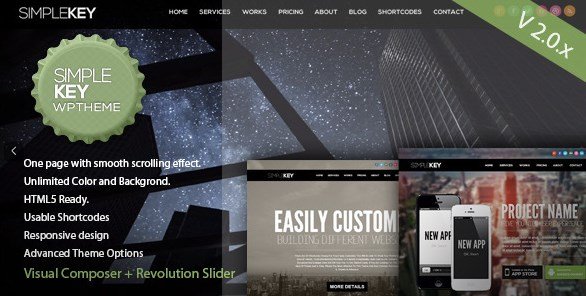
SimpleKey is a popular and highly customizable WordPress theme designed specifically for creating stunning one-page websites. It’s perfect for individuals and businesses looking to showcase their portfolio, services, or products in a sleek and engaging manner. With its responsive design and user-friendly interface, SimpleKey makes it easy to build a professional website without any coding knowledge.
Key Features of SimpleKey – One Page Portfolio WordPress Theme
- One-Page Layout: Creates a seamless scrolling experience for visitors, allowing them to navigate through your content effortlessly.
- Responsive Design: Ensures your website looks great on all devices, from desktops to smartphones.
- Revolution Slider & WPBakery Page Builder: Bundled with premium plugins for easy and visual customization of your website.
- Custom Shortcodes: Includes over 30 custom shortcodes/elements to easily display portfolios, team introductions, price tables, and more.
- Advanced Theme Options: Provides extensive options to customize colors, backgrounds, and layouts to match your brand.
The latest version, V2.6.3, fixed the compatibility issue with WP 5.6 and updated Slider Revolution to 6.3.3 and WPBakery Page Builder to 6.4.2.
Why Choose SimpleKey – One Page Portfolio WordPress Theme in 2024?
SimpleKey remains a top choice for creating one-page portfolio websites due to its ease of use, extensive customization options, and responsive design. Here’s why it’s the top choice:
- Ease of Use: SimpleKey is designed to be user-friendly, making it accessible to both beginners and experienced WordPress users.
- Customization: With Revolution Slider, WPBakery Page Builder, and advanced theme options, you have full control over the look and feel of your website.
- Responsiveness: Ensures your website looks great on all devices, providing a seamless user experience for all visitors.
- Comprehensive Features: Includes a wide range of features, such as custom shortcodes and an integrated Ajax contact form, to enhance your website’s functionality.
- Excellent Support: The developers provide top-notch support, helping users with any questions or issues they may encounter.
How to Download SimpleKey – One Page Portfolio WordPress Theme
1. Purchase from ThemeForest:
- Visit the SimpleKey ThemeForest page.
- Click the “Add to Cart” button and complete the purchase.
2. Download the Theme:
- Log in to your ThemeForest account.
- Go to your “Downloads” page and locate SimpleKey.
3. Access Documentation:
- Find the documentation file included in the downloaded package.
- Follow the instructions to install and set up the theme.
For a hassle-free setup, consider WPX Hosting from top rated reliable and managed providers, which comes with pre-install WordPress and WooCommerce with optimized performance.
Installing SimpleKey: Step-by-Step Guide
1. Upload the Theme:
- In your WordPress dashboard, go to “Appearance” > “Themes” > “Add New”.
- Click “Upload Theme” and select the SimpleKey theme file you downloaded.
2. Activate the Theme:
- Once the theme is uploaded, click “Activate”.
- Follow the prompts to install any required plugins, such as Revolution Slider and WPBakery Page Builder.
3. Set Up Your One-Page Layout:
- Create different sections for your homepage (e.g., About, Services, Portfolio, Contact).
- Use the theme options and custom shortcodes to design each section according to your needs.
Note: Back up your site before installing or updating themes. Use SimpleKey’s built-in tools if prompted after an update.
SimpleKey Pricing
| Component | Price | Details |
|---|---|---|
| Regular License | $39 | Use in a single end product which end users are not charged for. |
| Extended License | $1950 | Use in a single end product which end users can be charged for. |
| Support Extension | $10.13 | Extend support to 12 months (discounted price). |
SimpleKey Alternatives
Divi:
- Pros: Highly versatile, visual builder, extensive community and resources.
- Cons: Can be resource-intensive, steeper learning curve for beginners.
- Best For: Users who need a comprehensive and versatile website builder.
Uncode:
- Pros: Pixel-perfect design, advanced grid system, optimized for performance.
- Cons: Can be complex to set up, limited customization options compared to Divi.
- Best For: Designers and developers who need a high-performance and visually stunning website.
Astra:
- Pros: Lightweight and fast, integrates well with page builders, extensive customization options.
- Cons: Limited features in the free version, requires additional plugins for full functionality.
- Best For: Users who need a fast and customizable theme with good page builder integration.
SimpleKey vs. Other One-Page Themes
SimpleKey distinguishes itself through its bundled premium plugins and ease of use, offering a balanced approach to customization and performance compared to competitors.
- Cost: Offers a cost-effective solution by including Revolution Slider and WPBakery Page Builder, which can be expensive separately.
- Flexibility: Provides ample customization options while remaining user-friendly, suitable for users of all skill levels.
- Integration: Seamlessly integrates with essential plugins and services, ensuring a smooth website building experience.
- Support: Offers excellent support, helping users resolve any issues and make the most of the theme’s features.
SimpleKey is a solid choice for anyone seeking a reliable and feature-rich one-page portfolio theme for WordPress.
Tips for Using SimpleKey Effectively
- Plan Your Content: Before you start building your website, plan out the content for each section of your one-page layout to ensure a cohesive and engaging user experience.
- Utilize Custom Shortcodes: Take advantage of the theme’s custom shortcodes to easily display your portfolio, team members, prices, and other important information.
- Optimize Images: Optimize your images for the web to ensure fast loading times and a smooth browsing experience for your visitors.
- Customize Theme Options: Explore the theme options to customize the colors, fonts, and layouts to match your brand identity.
- Keep it Simple: Avoid overcrowding your one-page layout with too much content. Focus on presenting the most important information in a clear and concise manner.
Pairing SimpleKey with Elementor
While SimpleKey includes WPBakery Page Builder, pairing it with Elementor can provide even more flexibility and design options. Elementor’s intuitive drag-and-drop interface allows you to create custom layouts and designs with ease, complementing SimpleKey’s one-page structure. By using Elementor alongside SimpleKey, you can achieve a unique and visually stunning website that stands out from the crowd.
Should You Invest in Premium Extensions?
The free theme is sufficient for basic use, but premium features are worth considering if you need:
- Advanced Customization type.
- Enhanced Support type.
- Integration to third-party platforms.
- More layouts and design options.
Visit the official site for pricing details.
Conclusion
SimpleKey – One Page Portfolio WordPress Theme offers a robust and user-friendly solution for creating professional one-page websites. Its extensive customization options, responsive design, and bundled premium plugins make it an excellent choice for showcasing your portfolio and services effectively. Download SimpleKey today and create a stunning online presence!
Disclaimer: Always refer to the official ThemeForest page for the most up-to-date pricing and features. Verify compatibility with the latest WordPress versions before purchasing.