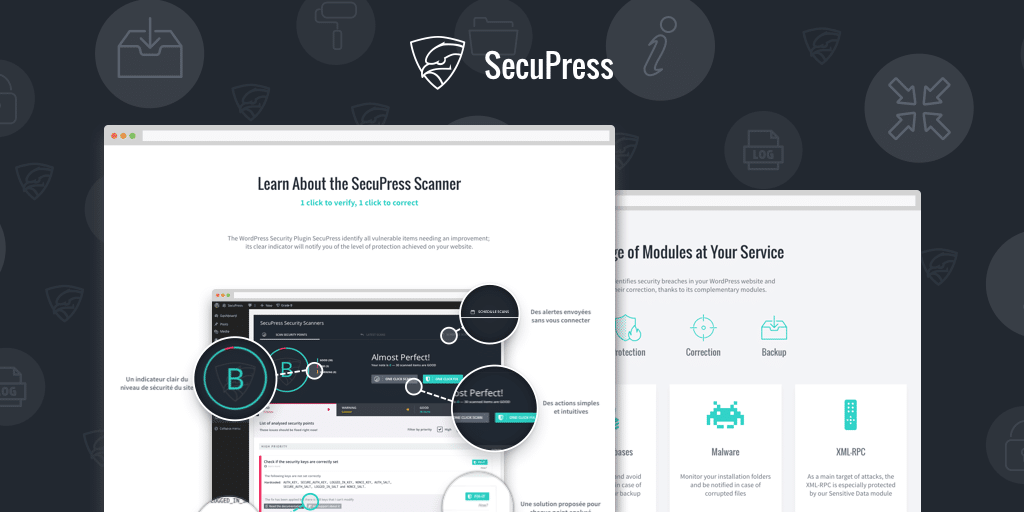
What is SecuPress Pro?
SecuPress Pro is a comprehensive WordPress security plugin designed to safeguard websites from common threats and vulnerabilities. Developed by experts in cybersecurity, it offers robust protection for WordPress sites by identifying and resolving security issues through automated scans, real-time monitoring, and proactive defenses. This plugin is particularly significant for website owners who handle sensitive data, run e-commerce stores, or manage high-traffic blogs, as it helps prevent hacks that could lead to data breaches, downtime, or reputational damage. With over 35 security checkpoints, SecuPress Pro simplifies the process of maintaining a secure site, making it an essential tool in today’s digital landscape where cyberattacks occur every second. According to statistics from sources like Internet Live Stats, thousands of websites are hacked daily, underscoring the need for reliable security measures. Users appreciate its user-friendly interface, which guides them through identifying and fixing issues step by step, ensuring that even non-technical users can enhance their site’s defenses. For more on WordPress security best practices, check out internal resources like WordPress Security Plugins on our site. This plugin’s emphasis on ease of use, combined with features like anti-intrusion and data protection, positions it as a top choice for enhancing site resilience.
Key Features of SecuPress Pro
- Advanced scanning and monitoring that identifies over 35 security points, allowing users to quickly detect and resolve vulnerabilities before they’re exploited.
- Anti-intrusion capabilities that block hacking attempts and control access to your site, ensuring unauthorized users are kept at bay.
- Data protection features that securely back up and safeguard sensitive information, minimizing the risk of data loss or exposure.
- E-reputation management to prevent issues like spam, malicious content, and poor SEO signals caused by security breaches.
- Business continuity tools that keep your website accessible and operational, reducing potential financial losses from downtime.
The latest version of SecuPress Pro, v2.3 (Starboost), introduces enhanced automation for scans, improved module integrations, and better compatibility with modern WordPress themes and plugins. This update focuses on faster threat detection and user-friendly resolutions, making it easier to maintain site health amid evolving cyber threats. As highlighted on external authoritative sources like the official WordPress plugin directory, these features provide a proactive approach to security, helping users stay ahead of potential attacks.
How to Download SecuPress Pro for Free
1. Visit the Official Site:
- Go to the SecuPress website at https://secupress.me/ and navigate to the pricing or download section.
- Look for the free version option, as SecuPress offers a basic free plugin with upgrade paths to Pro features.
2. Sign Up or Log In:
- Create an account if you don’t have one, or log in to access downloads; this ensures you receive updates and support.
- Check for any promotional offers that might allow free access to Pro features for a limited time.
3. Download the Plugin:
- Click the download button for the free version and save the ZIP file to your computer.
- For a seamless experience, consider using managed hosting like WPX Hosting, which optimizes WordPress performance and security.
For a hassle-free setup, consider WPX Hosting from top-rated reliable and managed providers, which comes with pre-installed WordPress and WooCommerce with optimized performance.
Installing SecuPress Pro: Step-by-Step Guide
1. Prepare Your Site:
- Back up your WordPress site using a plugin like UpdraftPlus before proceeding.
- Ensure your WordPress version is up to date for compatibility.
2. Upload and Activate:
- Log into your WordPress dashboard, go to Plugins > Add New, and upload the ZIP file you downloaded.
- Activate the plugin and follow the initial setup wizard to configure basic settings.
3. Configure Security Options:
- Run the first scan to identify issues and apply recommended fixes.
- Explore modules for advanced features, such as enabling two-factor authentication for added security. For more tips, visit WordPress Tutorials on our site, and refer to external resources like Sucuri’s security blog for best practices.
Note: Back up your site before installing or updating plugins/themes. Use SecuPress Pro’s built-in tools if prompted after an update.
SecuPress Pro Pricing
| Component | Price | Details |
|---|---|---|
| Basic Plan | Free (with limitations) | Includes core scanning and basic protection; ideal for small sites. |
| Pro Plan | Starting at $59/year | Full access to all modules, priority support, and advanced features; suitable for professional sites. Visit SecuPress Pricing for details. |
| Enterprise Plan | Custom pricing | Tailored for large-scale sites with dedicated support and integrations; includes expert consultations as per their support page. |
SecuPress Pro Alternatives
Wordfence Security:
- Pros: Real-time firewall and malware scanner with detailed reporting.
- Cons: Can be resource-intensive for smaller sites.
- Best For: Sites needing in-depth threat intelligence from Wordfence’s resources.
Sucuri Security:
- Pros: Excellent for malware removal and ongoing monitoring.
- Cons: Higher cost for premium features.
- Best For: E-commerce sites prioritizing external CDN and DDoS protection.
iThemes Security:
- Pros: User-friendly with strong brute-force protection.
- Cons: Lacks some advanced scanning options.
- Best For: Beginners seeking easy setup, as discussed in internal guides like Security Plugins Comparison.
SecuPress Pro vs. Other Plugins
SecuPress Pro stands out compared to competitors like Wordfence or Sucuri due to its intuitive setup and comprehensive modules, making it ideal for users without extensive technical knowledge. While others may offer similar features, SecuPress Pro excels in ease of use and targeted WordPress optimization.
- Cost Efficiency: More affordable for small businesses, with flexible pricing tiers unlike some premium alternatives.
- User Control: Provides step-by-step guides for issue resolution, enhancing flexibility over more automated systems.
- Compatibility: Seamlessly integrates with popular plugins like WooCommerce, as per external insights from WPBeginner.
- Support Quality: Offers direct email support from security experts, surpassing basic community forums in competitors.
This makes it suitable for a wide range of users, from bloggers to enterprises, though it requires regular updates for optimal performance.
Tips for Using SecuPress Pro Effectively
- Schedule regular scans to catch vulnerabilities early and maintain site health.
- Enable two-factor authentication for admin logins to add an extra layer of security.
- Customize modules based on your site’s needs, such as focusing on e-reputation for content-heavy sites.
- Review security reports weekly and act on recommendations to prevent potential threats.
- Integrate with backup plugins for comprehensive data protection strategies.
Pairing SecuPress Pro with WooCommerce
SecuPress Pro pairs effectively with WooCommerce to enhance e-commerce security, offering features like payment gateway protection and intrusion detection that safeguard transactions. This combination benefits online stores by reducing risks of data breaches and ensuring compliance with regulations, as detailed in resources like WooCommerce Security guides.
Should You Invest in Premium Extensions?
The free version of SecuPress is sufficient for basic security needs, but premium extensions are worth considering if you require advanced features like enhanced scanning and expert support.
- Advanced functionality for high-traffic sites.
- Enhanced threat detection and automation.
- Seamless integrations with other tools.
- Customized reporting and alerts.
Visit the official site for pricing details and to make an informed decision.
Frequently Asked Questions
Is SecuPress Pro easy to install for beginners?
Yes, SecuPress Pro features a guided setup process, making it user-friendly for beginners, with step-by-step instructions to scan and secure your site quickly.
How does SecuPress Pro protect against hacking attempts?
It uses real-time monitoring and blocks suspicious activities, such as brute-force attacks, ensuring your site remains secure as per standard cybersecurity practices.
Can I use SecuPress Pro on multiple websites?
Yes, depending on your plan, it supports multiple sites, with the Pro version offering licenses for various installations to scale your security needs.
What makes SecuPress Pro different from free security plugins?
It provides professional-grade features like advanced scanning and email support, which go beyond basic free plugins for more robust protection.
Does SecuPress Pro affect website speed?
No, it’s optimized for performance, with efficient scans that minimize impact on load times while enhancing security.
Is there a money-back guarantee for SecuPress Pro?
Yes, many plans come with a satisfaction guarantee, allowing you to request a refund if it doesn’t meet your expectations, as outlined on their site.
Conclusion
SecuPress Pro is an invaluable asset for WordPress users seeking reliable security without complexity. By downloading and using it, you can protect your site from evolving threats, ensuring peace of mind and optimal performance. Explore its features today to experience the benefits firsthand.
Disclaimer: Always use official sources for the latest pricing and features, and verify compatibility with your site.