What is Romeroc Theme?
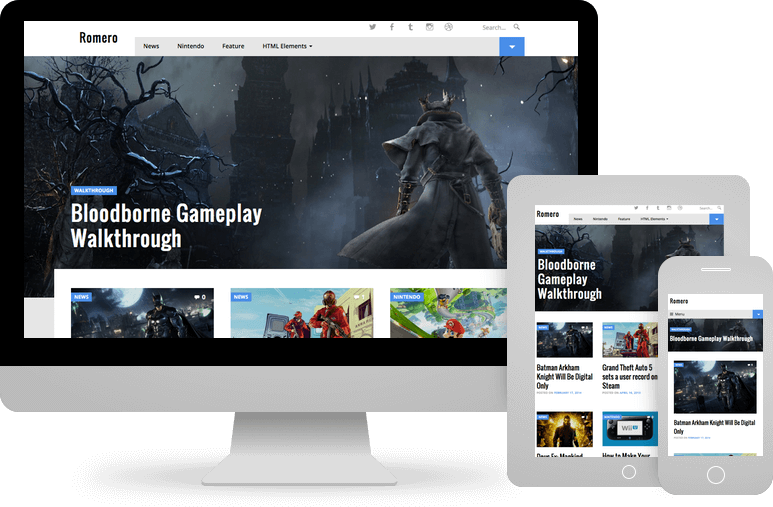
The Romeroc Theme, developed by Pro Theme Design, is a premium WordPress theme specifically crafted for content-heavy websites demanding a bold, visual impact. Its core purpose is to make your content stand out, particularly through the use of striking, full-width featured images and a dynamic homepage layout. Romero caters perfectly to niches where strong visuals are paramount, such as video game review sites, motoring magazines, travel blogs, lifestyle publications, and any site focusing on high-quality photography or graphics. Unlike multi-purpose themes that try to be everything, Romeroc focuses intently on the magazine and blogging experience, ensuring features are tailored for showcasing articles, reviews, and visual stories effectively. Its significance lies in offering a professional, distinct aesthetic that can elevate a standard blog into a visually engaging online magazine. Built with ease of use in mind, it allows users to achieve a sophisticated look without needing extensive coding knowledge, leveraging the native WordPress Customizer for straightforward modifications. Furthermore, its responsive design guarantees an optimal viewing experience across all devices, from large desktops to small mobile screens, which is crucial for reaching a wider audience in today’s diverse digital landscape. The theme emphasizes not just looks but also a solid foundation built on modern WordPress standards.
Key Features of Romeroc Theme
- Bold Homepage Design: The Romeroc Theme immediately captures attention with a full-width featured post slot at the top, followed by a grid showcasing six more recent articles, and then a standard chronological blog feed. This structured layout is designed to maximize content discovery and engagement right from the first view, perfect for sites publishing frequently.
- Full-Width Featured Images: Each post or page can display a large, edge-to-edge featured image below the header. This signature feature creates a dramatic visual introduction to your content, enhancing the professional magazine feel and making articles more appealing.
- Responsive & Mobile-Friendly: Built with a mobile-first approach, Romeroc ensures your website looks and functions flawlessly on all screen sizes. Whether viewed on a desktop, tablet, or smartphone, the layout adapts seamlessly, providing an excellent user experience for every visitor, crucial for both engagement and mobile-first indexing by search engines.
- Easy Customization via Customizer: Modify site identity (logo, tagline), colors, background images, menus, and widgets using the native WordPress Customizer. See real-time previews of your changes before publishing, making personalization intuitive and code-free.
- Quality Code and SEO Focus: Developed following WordPress coding standards, accessibility guidelines (WCAG), and SEO best practices. This ensures the Romeroc Theme is lightweight, fast-loading, and search engine friendly, contributing positively to site performance and visibility.
- User Experience Enhancements: Includes built-in features like intelligently selected related posts below articles, stylish next/previous post navigation links, and optional infinite scrolling for archives and the homepage, keeping users engaged and browsing longer.
The latest version continues to refine these features, ensuring compatibility with the latest WordPress updates, including the block editor, and maintaining high performance standards. Pro Theme Design typically provides ongoing updates addressing bugs, adding minor enhancements, and ensuring security.
How to Download Romeroc Theme
Romeroc Theme is a premium product developed by Pro Theme Design and is not available for free download from the official WordPress.org repository or other free sources. To acquire the theme, you need to purchase a license directly from the developer’s website. This ensures you receive a legitimate copy, access to future updates, and professional support. Attempting to download from unofficial third-party sites carries significant risks, including potential malware, lack of updates, and no support. The investment in a premium theme like Romeroc often translates to better performance, enhanced security, unique features, and reliable assistance when needed. Follow these steps to securely purchase and download your copy:
- Visit the Official Website: Navigate to the Romeroc Theme page on the Pro Theme Design website. Review the theme’s features, check the demo, and read any additional information provided.
- Choose a License Option: Pro Theme Design typically offers the theme as a single purchase or as part of an ‘All Access’ bundle which includes all their themes. Select the option that best suits your needs and budget. Consider the number of sites you plan to use it on and the duration of support/updates included.
- Complete the Purchase: Click the buy button and proceed through the checkout process. You will need to provide payment information and create an account if you don’t already have one.
- Download the Theme File: After successful payment, log in to your Pro Theme Design account dashboard. Locate your purchase and download the theme’s .zip file (e.g., `romero.zip`). Keep this file safe as you will need it for installation.
For a hassle-free setup and optimal performance, consider hosting your site with a reliable managed WordPress provider. Options like WPX Hosting offer optimized servers, security features, and expert support, which can complement a premium theme like Romeroc.
Installing Romeroc Theme: Step-by-Step Guide
Once you have purchased and downloaded the Romeroc Theme .zip file from Pro Theme Design, installing it on your WordPress site is straightforward. You can typically do this directly through your WordPress dashboard. Before starting, ensure you have a recent backup of your website; while theme installation is usually safe, having a backup provides peace of mind. Also, verify that your WordPress installation meets the theme’s minimum requirements, which are usually listed on the theme’s sales page or documentation (generally, a recent version of PHP and WordPress).
1. Log in to WordPress Admin:
- Access your WordPress dashboard by navigating to `yourdomain.com/wp-admin` and entering your username and password.
- This is the central hub for managing your website’s content, appearance, and settings.
2. Navigate to Theme Installation:
- In the left-hand sidebar menu, hover over ‘Appearance’ and then click on ‘Themes’.
- On the Themes page, click the ‘Add New’ button located at the top of the screen. This will take you to the WordPress theme directory interface.
3. Upload and Activate Romeroc Theme:
- On the Add Themes page, click the ‘Upload Theme’ button, which is also located near the top.
- Click ‘Choose File’ and select the `romero.zip` file you downloaded earlier from your computer.
- Click ‘Install Now’. WordPress will upload and unpack the theme files. This might take a few moments depending on your connection speed and hosting environment.
- Once the installation is complete, you will see a success message. Click the ‘Activate’ link to make Romeroc Theme the active theme on your site.
Note: Always back up your site thoroughly before installing new themes or making major changes. After activating Romeroc Theme, check the theme documentation (if available via your Pro Theme Design account) for any recommended next steps, such as installing suggested plugins or configuring initial theme options through the Customizer.
Romeroc Theme Pricing
Romeroc Theme is a premium offering from Pro Theme Design, meaning it requires a purchase to use. The developers typically provide clear pricing tiers that cater to different user needs, often involving a yearly subscription model which grants access to ongoing theme updates and developer support. Updates are crucial for maintaining compatibility with WordPress core updates, ensuring security patches are applied, and potentially receiving new features or improvements. Support access allows you to contact the developers directly for assistance with theme-related issues. While specific prices can change, Pro Theme Design generally offers the theme individually or as part of a larger package deal. Investing in a premium theme like Romeroc means paying for quality design, robust code, dedicated support, and continuous development, which can be highly valuable for professional websites or serious bloggers aiming for a distinct and reliable online presence. Always verify current pricing on the official website before making a purchase decision.
| Component | Price | Details |
|---|---|---|
| Romeroc Theme (Single License) | ~$99 / year (Check official site for current price) | Includes 1 year of theme updates and premium support. Typically usable on unlimited personal or client websites. Renews annually for continued access. |
| Pro Theme Design All Access Pass | ~$249 / year (Check official site for current price) | Includes access to Romeroc Theme plus all other current and future themes by Pro Theme Design. Also includes 1 year of updates and support for all themes. Best value for agencies or users managing multiple sites with different design needs. |
| Lifetime Option (if available) | Varies (Check official site) | Some developers offer a one-time payment option for lifetime access to updates and support. Check if Pro Theme Design offers this for Romeroc or their bundle. |
Romeroc Theme Alternatives
While Romeroc Theme offers a compelling package for visually-driven magazine sites, several other excellent WordPress themes cater to similar needs. Exploring alternatives can help ensure you choose the perfect fit for your specific project requirements, design preferences, and technical comfort level. Some themes might offer different customization levels, unique layout options, or integrations with specific page builders. Consider factors like ease of use, flexibility, performance, support quality, and pricing when comparing options. Here are a few notable alternatives to Romeroc Theme:
- Pros: Extremely lightweight and performance-focused. Highly customizable via the Customizer and its module system (Site Library offers magazine-style templates). Excellent support and documentation. Works seamlessly with block editor and page builders.
- Cons: Requires the Premium version for advanced features and magazine layouts. The default look is minimal; requires customization or importing a site template to achieve a magazine style.
- Best For: Users prioritizing speed and flexibility, comfortable with building or customizing layouts using blocks or starter templates.
Kadence Theme (Pro):
- Pros: Feature-rich free version, powerful Pro addon. Excellent header/footer builder. Offers beautiful starter templates, including potential magazine styles. Focuses on performance and block editor integration.
- Cons: Pro version needed for many advanced features. Can have a slightly steeper learning curve than simpler themes due to its extensive options.
- Best For: Users wanting deep customization options within the Customizer and block editor, potentially utilizing starter templates as a base.
Newspaper by tagDiv:
- Pros: One of the best-selling magazine themes on ThemeForest. Packed with features, pre-built website demos, and a dedicated frontend page builder (tagDiv Composer). Highly versatile for news and magazine sites.
- Cons: Can be feature-heavy, potentially leading to bloat if not configured carefully. Relies heavily on its proprietary builder, which might cause lock-in effects. Learning curve can be significant.
- Best For: Users needing a vast array of pre-built designs and features specifically for complex news or magazine sites, and who don’t mind using a bundled page builder.
Romeroc Theme vs. Other Magazine Themes
When comparing the Romeroc Theme to the broader landscape of WordPress magazine themes, its specific strengths and focus become apparent. Many themes aim for versatility, often packing in countless features or relying heavily on page builders. Romeroc, however, carves out its niche by prioritizing a distinct, bold visual style centered around large imagery and a streamlined, content-forward presentation. It intentionally avoids the complexity of bundled page builders, instead integrating deeply with the native WordPress Customizer and block editor for a more intuitive and standards-compliant user experience. This approach generally leads to better long-term maintainability and site performance compared to themes overloaded with disparate features or reliant on third-party builder plugins for core layouts. Let’s break down some key differentiators:
- Visual Emphasis: Romeroc’s primary advantage is its unwavering focus on large, impactful featured images and a striking homepage layout. While other themes offer magazine styles, Romeroc’s design language is consistently bold and visually oriented across the entire theme.
- Simplicity and Ease of Use: Compared to feature-packed themes like Newspaper or complex frameworks, Romeroc aims for simplicity. Configuration happens mainly through the familiar WordPress Customizer, making it easier for users who prefer not to learn a new page builder interface. Setup is generally faster.
- Code Quality and Performance: Pro Theme Design emphasizes clean, efficient code adhering to WordPress standards. This often results in faster loading times and better stability compared to themes bloated with excessive scripts or non-standard code practices sometimes found in the broader market.
- Developer Support: As Pro Theme Design is a smaller, focused development shop, users often receive support directly from the lead developer, which can lead to more knowledgeable and effective assistance compared to larger theme marketplaces with tiered support systems.
- Niche Focus: While adaptable, Romeroc is explicitly designed for visual niches (gaming, motoring, travel). General-purpose themes might offer magazine demos, but Romeroc’s core design is purpose-built for this aesthetic.
Ultimately, the choice depends on specific needs. If you prioritize a unique, bold visual identity, ease of use within the standard WordPress interface, and high-quality code from a reputable developer, Romeroc Theme stands out. If you require maximum flexibility with a page builder or need hundreds of demo variations, alternatives might be more suitable.
Tips for Using Romeroc Theme Effectively
To make the most of the Romeroc Theme and create a truly stunning and engaging website, consider implementing the following tips. These suggestions focus on leveraging the theme’s strengths, ensuring optimal performance, and providing the best possible experience for your visitors. Romeroc’s design hinges on strong visuals and clear content presentation, so aligning your content strategy and technical setup with these principles is key. Taking a few extra steps during setup and content creation can significantly enhance the final result, making your site look professional and perform efficiently.
- Prioritize High-Quality Images: Since Romeroc heavily features large images (especially the full-width featured image), use high-resolution, compelling visuals. Optimize images for the web (compress without losing too much quality) using tools like TinyPNG or plugins like Smush to ensure fast loading times.
- Strategically Use the Homepage Layout: Plan which content you want to highlight in the main full-width featured post slot and the subsequent grid. Keep this content fresh to encourage return visits. Understand how posts populate these areas (e.g., based on recency or sticky status).
- Leverage the Customizer: Explore all options within Appearance > Customize. Adjust colors, typography, logo, and widget areas to match your branding. Even small tweaks can personalize the theme significantly.
- Optimize Post Content for Readability: While visuals are key, ensure your article text is well-structured with headings, short paragraphs, and possibly lists or blockquotes. Good typography settings in the Customizer also help.
- Configure Menus and Widgets Thoughtfully: Use the available menu locations and widget areas (like the sidebar and footer) to provide clear navigation and supplementary information (e.g., popular posts, categories, social links) without cluttering the design.
- Maintain Regular Updates: Keep the Romeroc Theme, WordPress core, and all plugins updated. This is crucial for security, performance, and compatibility. Check your Pro Theme Design account for theme updates.
- Test Responsiveness: Regularly check how your site looks and functions on different devices (desktops, tablets, mobiles) using browser developer tools or real devices to ensure the responsive design works as expected with your content.
Pairing Romeroc Theme with Complementary Plugins
While Romeroc Theme provides a strong design foundation and essential display features, pairing it with select plugins can significantly enhance your website’s functionality, performance, and search engine visibility. Romeroc is designed to work seamlessly with the WordPress block editor (Gutenberg) and standard WordPress features, rather than relying on a specific page builder. Therefore, the best plugins to pair with it are those that augment core WordPress capabilities or address specific needs like SEO, performance, security, and content enhancement. Avoid installing too many plugins, as this can slow down your site; choose high-quality, well-maintained plugins that offer tangible benefits. For instance, an SEO plugin is practically essential for any serious website to manage meta descriptions, titles, sitemaps, and schema markup. Similarly, caching and optimization plugins are crucial for ensuring the fast loading speeds that both users and search engines appreciate. Consider contact form plugins for reader interaction or specific gallery plugins if your visual content goes beyond standard featured images.
- SEO Plugin: Use a plugin like Rank Math or Yoast SEO to optimize your content, manage sitemaps, and implement schema markup for better search engine understanding.
- Performance Optimization: Implement a caching plugin (e.g., WP Rocket, W3 Total Cache) and an image optimization plugin (e.g., Smush, ShortPixel) to improve site speed.
- Contact Forms: Add a contact form using a plugin like WPForms, Gravity Forms, or Contact Form 7 for reader inquiries or feedback.
- Security Plugin: Enhance website security with a plugin like Wordfence Security or Sucuri Security to protect against threats.
- Social Sharing: Encourage content sharing with a lightweight social sharing plugin that complements Romeroc’s design.
Is the Romeroc Theme Worth the Investment?
As a premium WordPress theme, Romeroc requires a financial investment, typically through an annual subscription for updates and support. The key question for potential users is whether this cost delivers sufficient value compared to free alternatives or other premium options. The answer largely depends on your priorities and the specific needs of your project. If your primary goal is to create a visually striking magazine-style website with a bold aesthetic centered around large images, Romeroc offers a purpose-built solution that might be difficult to replicate precisely with generic free themes without significant customization effort. The investment essentially buys you a unique design, quality code, ease of use via the Customizer, and, crucially, access to professional developer support and regular updates. These updates ensure compatibility with evolving WordPress standards and security practices, which is a significant advantage over potentially abandoned or poorly maintained free themes. Furthermore, the direct support from Pro Theme Design can be invaluable if you encounter issues or need guidance.
Consider the premium investment if you value:
- Unique & Professional Design: A distinctive, bold look specifically tailored for visual magazines and blogs.
- Ease of Setup & Use: Achieving a sophisticated result primarily through the intuitive WordPress Customizer without needing page builders or code.
- Quality Code & Performance: A theme built on solid coding standards, focusing on speed and SEO-friendliness.
- Reliable Updates & Security: Ongoing development to ensure compatibility and patch potential vulnerabilities.
- Dedicated Developer Support: Access to expert help directly from the theme creators when needed.
If budget is the absolute primary constraint, or if your design needs are very basic or vastly different from Romeroc’s style, then a free theme or a different premium option might be more appropriate. However, for users whose vision aligns with Romeroc’s strengths, the cost often represents a worthwhile investment in quality, support, and a standout online presence. Visit the official Pro Theme Design website for current pricing and licensing details.
Frequently Asked Question:
Is Romeroc Theme free?
No, Romeroc Theme is a premium WordPress theme developed by Pro Theme Design. It requires purchasing a license, typically on an annual basis, which includes access to the theme files, future updates, and developer support.
How do I customize the Romeroc Theme?
Romeroc Theme is designed to be customized primarily through the native WordPress Customizer (Appearance > Customize). This allows you to modify site identity (logo, title, tagline), colors, typography, background images, menus, and widgets with live previews.
Is Romeroc Theme good for SEO?
Yes, Romeroc Theme is built following modern WordPress SEO best practices. Its clean code structure, fast loading potential, and responsive design contribute positively to search engine rankings. Pairing it with a dedicated SEO plugin is recommended for optimal results.
Is Romeroc Theme responsive?
Absolutely. Romeroc features a fully responsive design, meaning its layout automatically adapts to look great and function correctly on all devices, including desktops, laptops, tablets, and smartphones.
Does Romeroc Theme work with page builders like Elementor?
Romeroc Theme is primarily designed to work with the WordPress block editor (Gutenberg) and the Customizer for layout and styling. While it might technically function with page builders, it’s not optimized for them, and its core strength lies in its pre-defined bold layouts and Customizer options. Using a page builder might override some theme styles or features.
What kind of support is offered for Romeroc Theme?
Purchasing a Romeroc Theme license typically includes access to premium support directly from the developers at Pro Theme Design for a specified period (usually one year). This support generally covers bug fixes and guidance on using theme features, available through their official support channels.
Conclusion
The Romeroc Theme by Pro Theme Design stands out as a powerful choice for WordPress users seeking a bold, visually-driven magazine or blog aesthetic. Its defining features—the striking full-width featured images, dynamic homepage layout, and overall emphasis on showcasing visual content—make it particularly well-suited for niches like gaming, motoring, travel, and lifestyle reporting. Beyond its impactful design, Romeroc impresses with its commitment to quality code, responsive performance across all devices, and user-friendliness through seamless integration with the WordPress Customizer. While it’s a premium theme requiring investment, the cost is justified by the unique design, ongoing updates ensuring compatibility and security, and access to dedicated developer support. Compared to generic themes, Romeroc offers a focused solution that can significantly elevate the professionalism and engagement factor of content-rich websites. If your goal is to make your content pop with a strong visual identity and benefit from a well-coded, easy-to-manage theme, Romeroc Theme is certainly worth strong consideration. Its blend of style, usability, and solid technical foundation makes it a compelling option for creating standout online publications.
Disclaimer: Theme features, pricing, and support policies are subject to change. Always refer to the official Pro Theme Design website for the most current and accurate information before making a purchase. Remember to back up your website before installing or switching themes.