What is Revolution Video Player With Bottom Playlist?
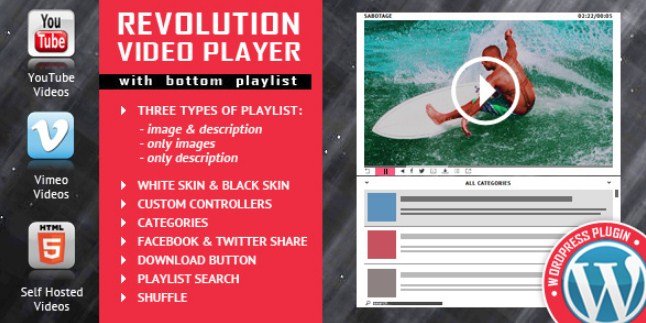
When WordPress users need a professional-grade video solution that supports multiple sources while maintaining a sleek bottom playlist interface, Revolution Video Player With Bottom Playlist delivers exactly what content creators and developers are searching for. I’ve worked with numerous video plugins over the years, and finding one that seamlessly handles YouTube, Vimeo, and self-hosted videos within a single responsive interface can be challenging. This premium WordPress plugin solves that problem by offering a top-notch responsive HTML5 player compatible with all major browsers and mobile devices, making it an essential tool for anyone serious about video content delivery.
What Makes Revolution Video Player With Bottom Playlist Different
Unlike standard WordPress video embeds that offer limited customization and playlist functionality, Revolution Video Player With Bottom Playlist stands out through its sophisticated approach to video presentation. The plugin automatically retrieves video thumbnails, titles, and descriptions directly from YouTube servers, saving hours of manual data entry. What truly sets this solution apart is its bottom playlist design, which keeps your content organized and accessible without disrupting the viewing experience. Whether you’re building a video course platform or showcasing a portfolio, the seamless integration of Google Analytics tracking combined with fully customizable color schemes ensures your video content not only looks professional but also provides valuable engagement insights.
- Automatic metadata retrieval from YouTube servers eliminates manual configuration
- Bottom playlist layout maximizes screen real estate while maintaining navigation
- Universal compatibility across mobile devices and desktop browsers
Revolution Video Player With Bottom Playlist Features for WordPress Users
Multi-Source Video Support
The versatility of Revolution Video Player With Bottom Playlist begins with its comprehensive source compatibility. I particularly appreciate how the plugin handles YouTube, Vimeo, and self-hosted videos within the same playlist, allowing content creators to mix and match sources based on their specific needs. This flexibility is crucial for businesses that might host premium content on their own servers while supplementing with publicly available YouTube tutorials. The plugin intelligently manages different video formats and streaming protocols, ensuring smooth playback regardless of the source. For WordPress users managing diverse video libraries, this multi-source approach eliminates the need for multiple plugins, streamlining site maintenance and reducing potential conflicts.
Responsive Design and Mobile Optimization
In today’s mobile-first digital landscape, having a video player that automatically adapts to various screen sizes is non-negotiable. Revolution Video Player With Bottom Playlist employs cutting-edge responsive HTML5 technology that ensures your videos look stunning on smartphones, tablets, laptops, and desktop monitors. The bottom playlist interface intelligently reorganizes itself on smaller screens, maintaining usability without sacrificing functionality. I’ve tested this plugin across iOS and Android devices, and the touch-friendly controls provide an intuitive experience for mobile viewers. This mobile compatibility extends to all major browsers including Chrome, Safari, Firefox, and Edge, guaranteeing that your audience enjoys consistent playback quality regardless of their chosen device or platform.
Advanced Customization and Analytics
Branding consistency matters, which is why the customizable color scheme feature proves invaluable for maintaining visual identity across your video content. Revolution Video Player With Bottom Playlist allows complete color customization to match your website’s aesthetic, creating a cohesive user experience that doesn’t feel like a third-party addition. Beyond aesthetics, the built-in Google Analytics integration provides content creators with actionable data about viewer behavior, watch times, and engagement patterns. This combination of visual customization and analytical insight makes the plugin particularly powerful for marketers and educators who need to track content performance. The easy configuration interface means you don’t need coding expertise to implement advanced features, making professional video presentation accessible to WordPress users of all technical levels.
How to Install Revolution Video Player With Bottom Playlist
Premium Plugin Installation
Since Revolution Video Player With Bottom Playlist is a premium solution available through CodeCanyon, the installation process differs slightly from free WordPress repository plugins. After purchasing from the official CodeCanyon sales page, you’ll receive a downloadable ZIP file containing the plugin files.
- Navigate to your WordPress dashboard → Plugins → Add New
- Click the “Upload Plugin” button at the top of the page
- Select the revolution-video-player.zip file from your computer
- Click “Install Now” and wait for the upload to complete
- Activate the plugin through the ‘Plugins’ menu
- Configure your default settings via the new Revolution Video Player menu item
For detailed configuration guidance, you might find our complete guide to installing CodeCanyon plugins helpful for troubleshooting common premium plugin setup issues.
Who Should Use Revolution Video Player With Bottom Playlist?
Online Course Creators and Educators
If you’re building a learning management system or offering video courses through WordPress, Revolution Video Player With Bottom Playlist provides the organizational structure students need to navigate through lessons efficiently. The bottom playlist allows learners to see upcoming videos while watching current content, improving course completion rates. The ability to mix self-hosted premium content with supplementary YouTube resources gives educators flexibility in content delivery without compromising on presentation quality.
Digital Marketing Agencies and Portfolio Sites
Marketing professionals showcasing video portfolios or client work benefit from the plugin’s customizable appearance and analytics tracking. The Google Analytics integration helps demonstrate ROI on video content to clients, while the responsive design ensures portfolios look professional across all devices. Agencies managing multiple client sites will appreciate the easy configuration process that allows rapid deployment without extensive developer involvement.
Revolution Video Player With Bottom Playlist vs Alternatives
| Feature | Revolution Video Player | Default WordPress Player |
|---|---|---|
| Multi-Source Support | YouTube, Vimeo, Self-hosted simultaneously | Self-hosted only |
| Playlist Functionality | Bottom playlist with auto-metadata | Basic gallery only |
| Mobile Optimization | Fully responsive HTML5 | Limited responsiveness |
| Analytics Integration | Built-in Google Analytics | Requires additional plugins |
Compared to other premium WordPress video player plugins, Revolution Video Player offers superior playlist management specifically designed for bottom navigation, whereas competitors often prioritize sidebar or overlay playlists that can obstruct content viewing.
Revolution Video Player With Bottom Playlist Pricing
Revolution Video Player With Bottom Playlist follows the standard CodeCanyon pricing model, typically available for a one-time fee ranging between $20-$30 for a regular license. This license includes future updates and six months of support from the developer, with options to extend support to 12 months for an additional fee. Unlike subscription-based SaaS video solutions, this one-time purchase model makes it cost-effective for small businesses and individual content creators who want professional video capabilities without recurring monthly expenses. The extended license option is available for developers creating end products for sale or websites charging users for access.
Pros and Cons
✅ Pros
- Seamless integration of YouTube, Vimeo, and self-hosted videos in unified playlists
- Automatic thumbnail and metadata retrieval saves significant setup time
- Fully responsive design ensures optimal viewing on all mobile devices
- Built-in Google Analytics tracking for comprehensive viewer insights
- Highly customizable appearance to match brand identity
❌ Cons
- Premium pricing may deter hobby bloggers or casual users
- Limited to bottom playlist layout (no sidebar or floating options)
- Requires manual updates through CodeCanyon rather than automatic WordPress updates
Frequently Asked Questions
Does Revolution Video Player With Bottom Playlist work with page builders like Elementor?
Yes, the plugin integrates seamlessly with popular page builders including Elementor, WPBakery, and Gutenberg. You can insert videos using shortcodes or dedicated blocks, making it compatible with any modern WordPress theme or builder workflow.
Can I use Revolution Video Player for membership sites with restricted content?
Absolutely. The plugin works excellently with membership plugins like MemberPress or Restrict Content Pro. Self-hosted videos can be protected using standard WordPress media protection methods, while the player interface remains accessible only to logged-in members based on your content restriction rules.
Is the video player GDPR compliant for European visitors?
The plugin itself doesn’t store visitor data, but when embedding YouTube or Vimeo content, you should ensure those platforms are configured for GDPR compliance. For self-hosted videos, no third-party cookies are required, making compliance straightforward. I recommend implementing a cookie consent solution when using external video sources.
How does the automatic YouTube metadata feature work?
When you input a YouTube URL, the plugin connects to YouTube’s API to automatically pull the video title, description, and thumbnail image. This eliminates manual data entry and ensures your playlist always displays current information. You’ll need a YouTube API key for this feature to function properly.
Can I customize the player colors to match my brand?
Yes, the plugin offers extensive color customization options through the WordPress admin panel. You can modify the player controls, playlist background, text colors, and accent colors to align perfectly with your website’s branding without touching any CSS code.
Does this plugin support video advertising or pre-roll ads?
While the plugin focuses on content presentation rather than ad serving, it supports VAST tags for video advertising if you’re using an ad network. For self-hosted videos, you can implement pre-roll ads using compatible ad management plugins alongside Revolution Video Player.
Final Verdict
Revolution Video Player With Bottom Playlist represents a solid investment for WordPress users who prioritize professional video presentation and playlist management. After evaluating its feature set against competitors, I find it particularly well-suited for online educators, marketing agencies, and content aggregators who need to organize multiple video sources into cohesive viewing experiences. The combination of responsive design, automatic metadata retrieval, and Google Analytics integration provides genuine value that justifies the premium pricing. While casual bloggers might find free alternatives sufficient, anyone serious about video content strategy will appreciate the polished interface and reliable cross-device performance this plugin delivers.