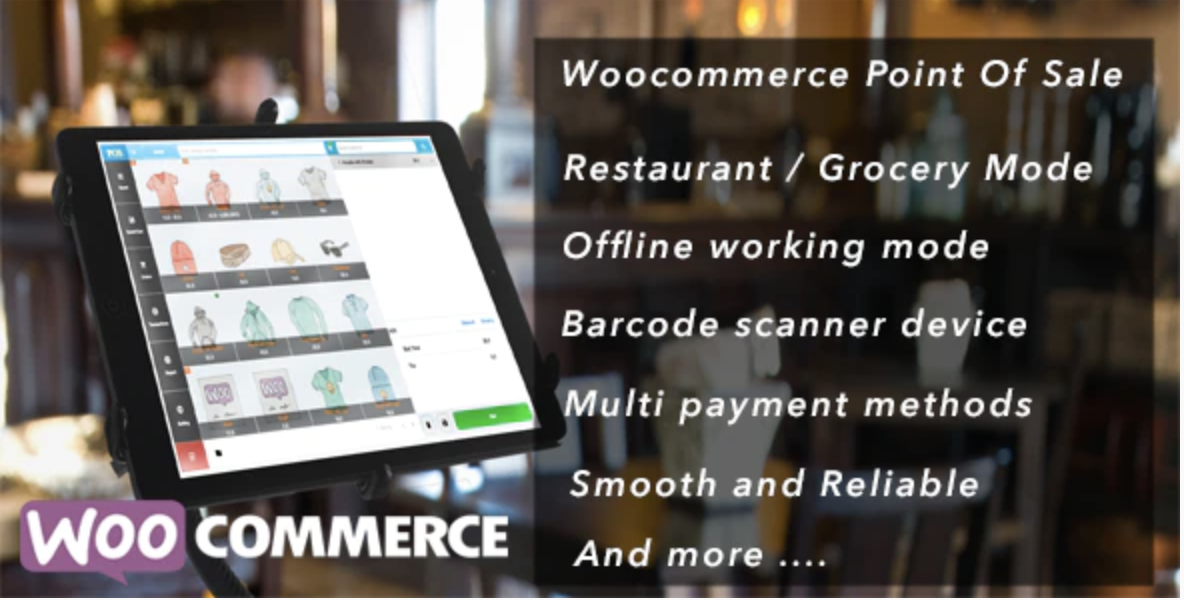
Openpos – WooCommerce Point Of Sale(POS) is a complete point of sale system that synchronizes data between online WooCommerce websites and physical local stores. It supports multiple business types including retail, restaurants, and cafes with advanced Progressive Web App capabilities. This tool provides a reliable interface for developers building integrated unified commerce solutions for clients.
WPExclusive members get access to Openpos – WooCommerce Point Of Sale(POS) as part of a full plugin and theme library — plans from $9.99/month. See the full CodeCanyon WooCommerce collection →
What Is Openpos – WooCommerce Point Of Sale(POS)?
Openpos – WooCommerce Point Of Sale(POS) is developed by CodeCanyon WooCommerce and is a ecommerce plugin for WordPress. It belongs to the ecommerce category on WPExclusive, alongside other tools for digital storefront management and physical sales integration.
The plugin resolves the discrepancy between online inventory levels and physical store stock by providing a real-time bridge. It is designed for business owners running physical retail outlets, cafes, or salons who also maintain a WordPress-based web store.
Openpos – WooCommerce Point Of Sale(POS) Features
The system provides a localized interface that functions as a traditional cash register while remaining connected to the WordPress database.
Hospitality and Restaurant Management
OpenPOS includes a dedicated Cafe/Restaurant mode featuring table management, merging, and transfers. It also offers a Kitchen View Screen for orders and real-time data synchronization between a waiter’s tablet and the kitchen display. These features are essential for WordPress ecommerce plugins focusing on food service.
Inventory and Warehouse Control
Users can manage multiple warehouses or outlets with stock transfer and adjustment capabilities. The plugin supports decimal stock for items sold by weight and allows for negative quantity tracking if required. It also includes a stock overview dashboard to monitor levels across all physical locations simultaneously.
Hardware and Barcode Integration
The interface automatically detects barcode scanner inputs and supports camera-based scanning via HTTPS. It works with digital weighing scales and can process barcode labels directly for quick checkout. The plugin is compatible with standard receipt printers and customer pole displays for professional retail environments.
Payment and Checkout Flexibility
Cashiers can process split payments, apply item-level or cart discounts, and use saved carts for multi-customer management. The system supports full or partial refunds and exchanges directly from the POS interface. It integrates with standard WooCommerce gateways and allows for cash management and session logging for different cashiers.
Pricing
Check current pricing on the Openpos – WooCommerce Point Of Sale(POS) sales page — WPExclusive members access it as part of their plan.
| Plan | Price | Sites | Includes |
|---|---|---|---|
| WPExclusive Membership | From $9.99/month | Unlimited | Openpos – WooCommerce Point Of Sale(POS) + full library |
For developers managing multiple sites, a WPExclusive membership covers OpenPOS plus hundreds of other plugins and themes — usually less than one premium license.
Openpos – WooCommerce Point Of Sale(POS) – Latest Version
Openpos – WooCommerce Point Of Sale(POS) receives regular updates. WPExclusive updates plugin files promptly after each release.
How to Install?
- Download the Openpos – WooCommerce Point Of Sale(POS) .zip from your WPExclusive member account
- In WordPress: Plugins → Add New → Upload Plugin
- Select the .zip and click Install Now → Activate
- Navigate to the OpenPOS menu in your WordPress dashboard to set up your first Outlet and Register
- Configure the receipt printer settings and synchronization interval in the POS settings tab
Openpos – WooCommerce Point Of Sale(POS) Use Cases
Retail Grocery Stores with Multi-Location Inventory
A grocery retailer with multiple outlets can use the warehouse management feature to track stock across different buildings. The plugin solves the problem of manual inventory counting by syncing sales from the physical register directly to the WooCommerce database. This ensures accurate stock levels for both walk-in and online customers using WordPress ecommerce plugins.
Fine Dining and Fast Casual Restaurants
Restaurant managers can coordinate between the dining floor and the kitchen using the real-time sync table order data. Waiters use tablets to enter orders which instantly appear on the kitchen display screen, reducing paper waste and communication errors. The outcome is a faster checkout process with table merging and transfer options.
Agencies and Developers Managing Multiple Client Sites
Agencies can deploy this POS system for various clients ranging from spas to karaoke bars without purchasing individual licenses for every storefront. Using a WPExclusive membership eliminates per-site licensing costs while providing the same premium features. This allows developers to offer integrated retail solutions as a standard part of their ecommerce packages.
Pros and Cons
✅ Strengths
- Internal Progressive Web App (PWA) support for fast, app-like performance on desktops
- No monthly fees as the system is hosted on your own WooCommerce server
- Real-time synchronization between waiters and kitchen staff for hospitality businesses
- Support for digital scales and various barcode scanning hardware
⚠️ Limitations
- Requires a stable local network connection for real-time synchronization between registers and servers
- The interface requires manual configuration of thermal printer drivers for physical receipt printing
- Developer auto-updates require an active license key. WPExclusive publishes updates manually when new versions are released.
Is Openpos – WooCommerce Point Of Sale(POS) GPL Licensed?
Yes. Openpos – WooCommerce Point Of Sale(POS) is distributed under the GNU General Public License (GPL) — the same license that governs WordPress itself. GPL gives any user the legal right to use, study, share, and redistribute the software. This is the legal framework that makes WPExclusive’s membership model possible.
WPExclusive distributes 100% original, unmodified files — the same release the developer publishes. No injected code, no alterations, no security risks.
Get Openpos – WooCommerce Point Of Sale(POS) on WPExclusive
WPExclusive membership starts at $9.99/month, $87/year, or $149 lifetime — giving you Openpos – WooCommerce Point Of Sale(POS) plus every plugin and theme in the library, on unlimited sites.
Explore the full CodeCanyon WooCommerce collection → or browse all WordPress plugins →
Frequently Asked Questions
What does Openpos – WooCommerce Point Of Sale(POS) do?
Openpos – WooCommerce Point Of Sale(POS) turns a WordPress installation into a full-featured retail or hospitality cash register. It synchronizes stock, orders, and customer data from a browser-based interface to the WooCommerce store database. It is intended for users who need to manage both physical and digital sales channels through one dashboard.
Is Openpos – WooCommerce Point Of Sale(POS) free?
OpenPOS is a premium plugin with no official free version on marketplaces. While some lite versions may exist on the repository, the full version features are available via WPExclusive plans.
What is the latest version of Openpos – WooCommerce Point Of Sale(POS)?
OpenPOS is actively maintained — WPExclusive members always receive the most current release.
How much does Openpos – WooCommerce Point Of Sale(POS) cost?
The plugin typically requires a one-time purchase fee on commercial marketplaces. Via WPExclusive, it is included in plans from $9.99/month.
Is it legal to use Openpos – WooCommerce Point Of Sale(POS) via WPExclusive?
Openpos – WooCommerce Point Of Sale(POS) is GPL licensed, which explicitly permits redistribution. WPExclusive provides original, unmodified files — fully within GPL terms.
Can OpenPOS work offline?
OpenPOS includes an offline mode that allows cashiers to continue processing transactions even if the internet connection is temporarily lost. The data synchronizes with the main WooCommerce server once the connection is restored.