What is Nest – Flyout Sliding Panels for WordPress?
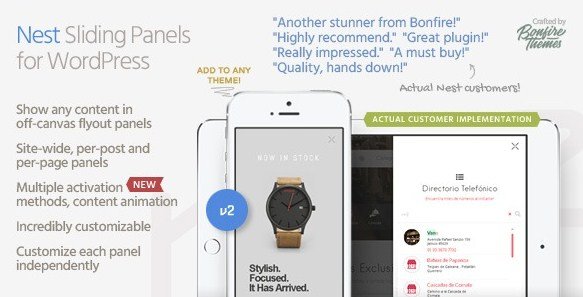
When WordPress users need to maximize screen real estate while keeping navigation accessible, Nest – Flyout Sliding Panels for WordPress offers an elegant solution through animated off-canvas panels. This lightweight plugin transforms how visitors interact with your content by adding smooth sliding sidebars, headers, footers, or full-screen flyout panels without overwhelming your site’s design or performance.
Whether you’re looking to implement a secondary navigation menu, display promotional content, or create hidden sidebars that slide into view, Nest provides the technical flexibility and design customization that modern WordPress websites demand. The plugin integrates seamlessly with your existing theme while offering pixel-perfect control over animations and positioning.
What Makes Nest Different from Other Panel Plugins
Unlike standard sidebar plugins that offer limited positioning options, Nest – Flyout Sliding Panels for WordPress delivers comprehensive control over how and when your panels appear. The plugin distinguishes itself through millisecond-accurate animation timing and the ability to apply scaling or opacity effects to your theme content when panels open or close.
- Site-wide panel configuration with individual post and page override capabilities
- Multiple activation triggers including automatic time-delay and scroll-to-anchor functionality
- Real-time customization through the WordPress Live Customizer for instant visual feedback
- Clean, well-marked code that follows WordPress coding standards for optimal performance
Nest Features for WordPress Users
Flexible Content Display Options
Nest enables you to create virtually any type of sliding panel configuration your project requires. You can establish site-wide panels that appear consistently across your entire website while maintaining the flexibility to override these settings on specific posts or pages. This granular control ensures that your sliding sidebar content remains relevant to individual page contexts rather than displaying generic information everywhere.
The plugin also includes visibility filtering options, allowing you to display panels exclusively on your front page, hide them on specific landing pages, or show different content to logged-in versus logged-out users. This functionality proves particularly valuable for membership sites and e-commerce platforms needing to present contextual information based on user authentication status.
Multiple Activation Methods
One of Nest’s standout capabilities lies in its diverse activation triggers. Beyond standard button clicks, you can initiate panels through customizable buttons, custom HTML elements like text links or images, or WordPress shortcodes that you can insert anywhere within your content. For automated engagement, configure time-delayed activations that trigger after visitors spend a specified duration on your page, with options to show these prompts only once per browser session to avoid annoying repeat visitors.
The scroll-to-anchor feature enables sophisticated user experiences by automatically opening panels when visitors reach specific sections of your content. Combined with the option to lock body scrolling when panels are open, these features create focused interaction zones that guide user attention toward specific calls-to-action or important information without navigating away from the current page.
Advanced Customization Controls
Every sliding panel created with Nest can be customized independently, allowing vastly different visual results across your website. The integration with the WordPress Customizer API enables real-time previews of your panel adjustments, eliminating the guesswork typically associated with configuring off-canvas elements. Adjust panel dimensions with pixel accuracy, fine-tune animation speeds to the millisecond, and modify visual styling to match your brand identity.
The plugin supports smooth, stutter-free animations across all modern browsers and devices, having been thoroughly tested on Chrome, Safari, Firefox, Edge, Internet Explorer, and Opera. Whether your visitors use iOS devices, Android smartphones, Windows tablets, or traditional desktop computers, your sliding panels will perform consistently with professional-grade fluidity.
How to Install Nest – Flyout Sliding Panels
Installation Process
Nest is distributed as a premium plugin through CodeCanyon, requiring a slightly different installation process than free WordPress repository plugins:
- Purchase and download the plugin files from CodeCanyon
- Navigate to Plugins → Add New in your WordPress dashboard
- Click “Upload Plugin” and select the downloaded ZIP file
- Click Install Now and wait for the installation to complete
- Activate the plugin through the ‘Plugins’ menu
- Access the Nest settings panel to configure your global panel options
Once activated, you’ll find the customization options integrated into the WordPress Live Customizer, allowing you to preview changes instantly before publishing them to your live site.
Who Should Use Nest – Flyout Sliding Panels?
Content Publishers and Bloggers
Content creators benefit from Nest’s ability to house secondary navigation, newsletter signup forms, or related article suggestions in unobtrusive sliding panels. Rather than cluttering your main content area with sidebar widgets that distract from your writing, you can tuck these elements into elegant flyout panels that visitors access when needed. The time-delay activation feature works particularly well for displaying email capture forms after readers have engaged with your content for a predetermined period.
E-commerce Store Owners
Online retailers can utilize Nest to create slide-out shopping carts, quick-view product panels, or promotional announcement bars that don’t interfere with the shopping experience. The ability to show different panels to logged-in customers versus guest visitors enables personalized upselling opportunities and account-specific notifications. When integrated with WooCommerce, these panels can significantly improve conversion rates by reducing the friction between browsing and checkout.
Web Design Agencies
For agencies managing multiple client websites, Nest offers a standardized solution for off-canvas functionality that works across diverse themes and page builders. The clean, well-marked code ensures that developers can extend functionality through custom CSS or JavaScript without encountering messy markup. The plugin’s thorough documentation and reliable support from a proven author minimize implementation risks for client projects.
Nest vs Alternative Solutions
| Feature | Nest – Flyout Sliding Panels | Standard Widget Areas |
|---|---|---|
| Animation Control | Millisecond-accurate timing with smooth transitions | Static display only, no animation options |
| Activation Triggers | Buttons, shortcodes, time delay, scroll anchors | Always visible or basic toggle only |
| User Targeting | Logged-in/out specific display options | Same content for all users |
| Mobile Optimization | Touch-optimized with body scroll locking | Often breaks responsive layouts |
Nest Pricing and Licensing
Nest – Flyout Sliding Panels for WordPress is available as a premium plugin through CodeCanyon, typically priced between $20-$30 for a regular license. This one-time purchase includes lifetime free updates, ensuring compatibility with future WordPress versions and continued access to new features as they’re developed. The licensing structure supports use on a single website, with extended licensing options available for agencies and developers building multiple client sites.
The investment proves cost-effective considering the development time saved compared to coding custom off-canvas solutions from scratch, along with the included professional support from the plugin author.
Pros and Cons
✅ Pros
- Lightweight codebase that doesn’t slow down page load times
- Extensive customization options through the familiar WordPress Customizer interface
- Multiple activation methods including sophisticated scroll and time-delay triggers
- Comprehensive device and browser testing ensures reliable performance
- Clean, well-documented code that’s developer-friendly for custom extensions
- Lifetime updates included with purchase
❌ Cons
- Premium pricing may not suit hobbyist bloggers or personal projects
- Learning curve for configuring advanced triggers like scroll-to-anchor
- Requires CodeCanyon account for updates and support access
- No free version available to test functionality before purchasing
Frequently Asked Questions
Is Nest compatible with page builders like Elementor or Divi?
Yes, Nest works seamlessly with all major WordPress page builders. You can insert activation shortcodes within page builder modules, and the sliding panels will function correctly regardless of how your content is structured.
Can I create multiple different panels for different pages?
Absolutely. While you can set a global panel that appears site-wide, Nest allows you to create unique panels for individual posts and pages through the override options in the post editor.
Does Nest work with WooCommerce for sliding cart functionality?
Yes, many users successfully implement Nest as a sliding cart solution for WooCommerce stores. You can place cart shortcodes inside the panel and trigger it with an “Add to Cart” action or dedicated cart button.
How do I customize the animation speed and direction?Animation settings are controlled through the WordPress Customizer with millisecond precision. You can adjust speed, easing effects, and choose from multiple slide directions including left, right, top, and bottom entries.
Will Nest slow down my website?
No, Nest is built with performance in mind. The lightweight code footprint and optimized CSS animations ensure minimal impact on page load times, typically adding less than 50KB to your page weight.
Can I show different content to logged-in versus logged-out users?
Yes, Nest includes visibility controls that let you restrict panels to specific user states. This is ideal for membership sites wanting to show account menus to logged-in users while displaying login prompts to visitors.
Final Verdict
Nest – Flyout Sliding Panels for WordPress stands out as a robust solution for implementing sophisticated off-canvas functionality without compromising site performance. The plugin strikes an excellent balance between ease of use for beginners and advanced customization options for developers. Its seamless integration with the WordPress Customizer, combined with reliable cross-device compatibility, makes it particularly well-suited for agencies, e-commerce operators, and content publishers who need professional-grade sliding panels that work flawlessly across the entire spectrum of modern devices and browsers.