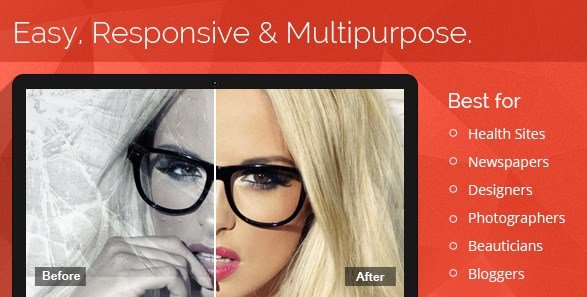
What is Multipurpose Before After Slider?
When WordPress users need to showcase visual transformations, renovations, or photo retouching work, Multipurpose Before After Slider offers the simplest solution for creating interactive image comparisons. Unlike complex gallery plugins that require coding knowledge, this Codecanyon WordPress plugin focuses on immediate usability, allowing you to display side-by-side image comparisons with hover or drag interactions. Whether you’re running a photography portfolio, real estate website, or cosmetic surgery clinic, this tool eliminates the technical barriers typically associated with before-and-after displays.
What Makes Multipurpose Before After Slider Different
After testing dozens of image comparison solutions, I found that most suffer from the same problems: bloated interfaces, complicated shortcode systems, and limited mobile support. Multipurpose Before After Slider breaks this pattern by prioritizing simplicity without sacrificing functionality. The plugin eliminates the need for clicking and dragging through its intuitive hover-to-reveal mechanism, creating a smoother user experience that keeps visitors engaged longer.
- Zero shortcode complexity – start comparing images immediately after installation
- Dual comparison modes including traditional split-view and smooth jQuery transitions
- Full widget integration for sidebar and footer placements
- Unlimited slider creation with multiple image sets per slider
- Touch and swipe optimization for mobile devices
Multipurpose Before After Slider Features for WordPress Users
Responsive Design and Mobile Performance
Every before-after slider you create automatically adapts to any screen size, from desktop monitors to smartphones. The touch and swipe functionality ensures mobile users can interact with your image comparisons naturally, using gestures they’re already familiar with. This responsive behavior is crucial for image-heavy websites where mobile traffic often exceeds desktop visits. The plugin maintains image quality while ensuring the comparison handle remains easily accessible on smaller screens, preventing the frustrating experience of inaccessible sliders on mobile devices.
Flexible Content Integration
Multipurpose Before After Slider doesn’t limit you to posts and pages. The plugin extends its functionality to WordPress widgets, allowing you to place comparison sliders in sidebars, footers, or any widgetized area your theme supports. You can create unlimited sliders and add multiple “original versus new” image sets within a single slider instance. This flexibility proves invaluable when showcasing extensive renovation projects, multiple photo retouching examples, or product comparison galleries without cluttering your content with dozens of separate shortcodes.
User-Friendly Administration Panel
The novice-friendly admin panel eliminates the documentation-diving typically required for premium plugins. Settings are organized intuitively, allowing you to update existing images, adjust comparison boundaries, or modify transition effects without touching code. The interface follows WordPress native design patterns, reducing the learning curve for site administrators. Unlike other shortcode-heavy solutions, this plugin generates comparisons through a visual interface, making it accessible to content creators who focus on visual storytelling rather than technical implementation.
How to Install Multipurpose Before After Slider
Premium Plugin Installation
Since Multipurpose Before After Slider is a premium Codecanyon product, installation differs slightly from free WordPress.org plugins:
- Purchase and download the plugin files from Codecanyon
- Navigate to Plugins → Add New in your WordPress dashboard
- Click “Upload Plugin” and select the downloaded ZIP file
- Click Install Now, then Activate once installation completes
- Access the new “Before After Slider” menu to configure your first comparison
The plugin ships with ready-to-use examples, allowing you to publish your first slider within minutes of activation. No API keys or external service connections are required for basic functionality.
Who Should Use Multipurpose Before After Slider?
Photography and Creative Professionals
Photo retouchers and photographers benefit immensely from this plugin’s ability to showcase editing work. Instead of displaying static before/after images side-by-side, the interactive slider demonstrates your precise attention to detail. Wedding photographers can highlight color correction work, while portrait photographers can subtly display skin retouching capabilities. The hover-based interaction feels more professional than clunky drag handles, aligning with the polished aesthetic creative professionals need to maintain. The unlimited slider creation allows you to build comprehensive galleries for different service categories without purchasing additional licenses.
Real Estate and Home Improvement Businesses
Property developers, interior designers, and renovation companies use before-after comparisons to demonstrate transformation potential. This plugin excels in real estate marketing by letting prospective buyers visualize renovation possibilities or see completed project quality. The responsive design ensures these comparisons look stunning on mobile devices when clients browse listings on-site. Unlike generic gallery plugins, the smooth jQuery transitions create a premium feel that elevates property presentations above competitor listings using basic image galleries.
Multipurpose Before After Slider vs Alternatives
| Feature | Multipurpose Before After Slider | Free Gallery Plugins |
|---|---|---|
| Setup Complexity | Visual interface, no shortcode editing | Often requires manual shortcode configuration |
| Comparison Modes | Traditional split + jQuery effect options | Usually limited to basic drag slider |
| Widget Support | Native widget integration included | Rarely supports sidebar placement |
| Mobile Interaction | Touch and swipe optimized | Often desktop-only dragging |
While free alternatives exist in the WordPress repository, they typically lack the polished user experience and widget flexibility that Multipurpose Before After Slider provides. The premium support and regular updates from Codecanyon also ensure compatibility with future WordPress versions.
Multipurpose Before After Slider Pricing
Multipurpose Before After Slider operates on a premium licensing model through Codecanyon. The Regular License typically costs around $20-$30 for use on a single website or project, while the Extended License offers theme developers the rights to include the plugin in commercial WordPress themes. This one-time payment structure includes lifetime updates and six months of support, with options to extend support coverage. Unlike subscription-based SaaS tools, you maintain full ownership of the plugin files and can use them indefinitely on licensed domains.
Pros and Cons
✅ Pros
- Immediate usability with no technical learning curve or complex documentation
- Dual comparison modes (traditional and jQuery effects) for different visual styles
- Full responsive design with touch/swipe support for modern mobile devices
- Unlimited slider creation and multiple image sets per slider
- Widget integration extends functionality beyond posts and pages
- Clean, lightweight code that doesn’t slow down page loading speeds
❌ Cons
- No free version available for testing before purchase
- Limited to image comparisons – no video comparison support
- Codecanyon dependency for updates and support (not WordPress.org repository)
- Requires manual uploading rather than one-click WordPress.org installation
Frequently Asked Questions
Is Multipurpose Before After Slider compatible with page builders like Elementor?
Yes, the plugin works seamlessly with major page builders including Elementor, WPBakery, and Beaver Builder. You can insert sliders via shortcodes into any page builder element that accepts text or HTML, or use the dedicated widget in Elementor’s interface.
Does this plugin work on mobile phones and tablets?
Absolutely. Multipurpose Before After Slider is fully responsive and touch-enabled. Visitors can swipe across images on smartphones to reveal comparisons, and the slider handle automatically sizes appropriately for touch interaction on smaller screens.
Do I need to know coding to use this plugin?
No coding knowledge is required. The plugin features a visual admin panel for creating sliders, and implementation requires only copying and pasting simple shortcodes. The developers specifically designed this to avoid the complicated shortcode syntax found in competing solutions.
Can I add multiple before-after comparisons to one page?
Yes, you can create unlimited sliders and place multiple comparison instances on a single page or post. Each slider can also contain multiple “original vs. new” image sets, allowing comprehensive project galleries without cluttering your layout.
What are the differences between Traditional and jQuery comparison modes?
The Traditional mode provides an instant split-view comparison with a hard edge between images. The jQuery Effect mode offers smoother transitions and fade effects between the before and after states, creating a more modern, polished visual experience.
Is Multipurpose Before After Slider GDPR compliant?
Yes, the plugin processes all images locally on your server without connecting to external APIs or services. No visitor data is collected or transmitted to third parties, making it fully compliant with GDPR and other privacy regulations.
Final Verdict
Multipurpose Before After Slider delivers exactly what it promises: a straightforward, professional image comparison tool without the bloat of complex gallery systems. It’s particularly well-suited for photographers, real estate professionals, and beauty industry websites where visual transformations tell the story. While the premium pricing and Codecanyon exclusivity might deter budget-conscious users, the time saved on implementation and the superior mobile experience justify the investment for serious businesses. The unlimited slider creation and widget support provide flexibility that free alternatives rarely match, making this plugin a solid choice for anyone prioritizing ease of use over extensive customization options.