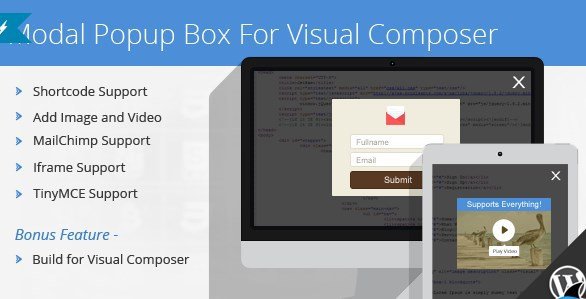
What is Modal Popup Box For Visual Composer?
When WordPress users need to create engaging, conversion-focused modal windows without coding, Modal Popup Box For Visual Composer offers a seamless drag-and-drop solution specifically designed for WPBakery Page Builder. Originally developed as part of the comprehensive Ultimate Addons for WPBakery package, this standalone plugin provides the complete modal functionality for site owners who need targeted popup capabilities without purchasing the full addon suite. If you are searching for a reliable WPBakery extension that supports video embeds, email capture forms, and custom HTML content, this tool delivers professional results directly within your familiar Visual Composer interface.
What Makes Modal Popup Box For Visual Composer Different
Unlike generic WordPress popup plugins that operate independently of your page builder, Modal Popup Box For Visual Composer integrates natively with WPBakery’s frontend and backend editors. This integration means you can design your modal content using the same drag-and-drop interface you use for the rest of your site, ensuring design consistency and reducing the learning curve. The plugin distinguishes itself through its lightweight architecture and focused feature set, making it ideal for developers who want to avoid bloated all-in-one solutions while maintaining the flexibility to embed shortcodes, iframes, and multimedia content within modal windows.
- Native WPBakery Page Builder integration with TinyMCE editor support
- Standalone functionality extracted from Ultimate Addons for focused deployment
- Comprehensive media support including self-hosted videos and external iframes
- Mailchimp email marketing integration for lead generation campaigns
Modal Popup Box For Visual Composer Features for WordPress Users
Advanced Shortcode Support
One of the standout capabilities of this plugin is its robust shortcode compatibility. You can embed any WordPress shortcode directly within your modal content, including contact forms, pricing tables, or gallery plugins. This feature transforms your modal from a simple announcement box into a dynamic content container capable of displaying complex interactive elements. Whether you need to showcase a contact form or display WooCommerce product grids, the shortcode support ensures seamless integration with your existing WordPress ecosystem.
Multimedia and Video Integration
The plugin excels at handling rich media content, supporting both self-hosted videos and external video platforms through direct embeds. You can create video lightbox effects that load YouTube, Vimeo, or HTML5 videos within elegant modal windows. This functionality proves particularly valuable for portfolio sites, online courses, and product demonstrations where video engagement drives conversions. The responsive design ensures your video modals display perfectly across desktop, tablet, and mobile devices without breaking your site’s layout.
Mailchimp Email Marketing Integration
For marketers focused on list building, the built-in Mailchimp support eliminates the need for separate email capture plugins. You can design branded subscription forms within the modal interface and connect them directly to your Mailchimp lists. This integration supports custom fields, audience segmentation, and double opt-in settings, allowing you to create sophisticated lead generation workflows that trigger based on user behavior, time delays, or click interactions.
Iframe Content Embedding
The iframe support feature enables you to load external web pages or web applications within your modal window. This capability is essential for displaying booking calendars, external booking systems, or third-party widgets without redirecting visitors away from your primary content. Site owners can specify custom dimensions for the iframe container and implement scroll controls, ensuring the embedded content fits naturally within the modal aesthetic while maintaining full functionality.
TinyMCE Visual Editor Integration
Content creation feels familiar thanks to the TinyMCE visual editor integration. You can format text, add images, create bulleted lists, and apply styling using the same WordPress editing interface you use for posts and pages. This WYSIWYG approach eliminates the need to write HTML or CSS for basic formatting, though advanced users retain the option to switch to text mode for custom code insertion. The editor supports WordPress media uploads, allowing you to insert royalty-free images from your library directly into the modal content.
How to Install Modal Popup Box For Visual Composer
Installation via CodeCanyon
As a premium plugin available exclusively on CodeCanyon, installation requires manual uploading to your WordPress site. Ensure you have WPBakery Page Builder installed and activated before proceeding, as this plugin functions as an addon rather than a standalone solution.
- Purchase and download the plugin files from CodeCanyon
- Navigate to Plugins → Add New → Upload Plugin in your WordPress dashboard
- Select the downloaded ZIP file and click Install Now
- Activate the plugin through the ‘Plugins’ menu
- Access WPBakery editor to find the new Modal Popup Box element
After activation, the Modal Popup Box element appears automatically in your WPBakery element library. You can add it to any page or post using the backend editor or the frontend visual builder, depending on your workflow preferences.
Who Should Use Modal Popup Box For Visual Composer?
Digital Marketers and Conversion Specialists
Marketing professionals who rely on lead generation strategies will appreciate the Mailchimp integration and trigger flexibility. You can create exit-intent popups, time-delayed modals, or click-triggered information boxes that capture visitor attention at critical decision points. The ability to A/B test different modal designs using WPBakery’s template system makes this tool particularly valuable for conversion rate optimization campaigns.
E-commerce Store Owners
WooCommerce users can leverage this plugin to display quick view modals, promotional announcements, or terms and conditions without navigating to separate pages. The shortcode support allows integration with product sliders or purchase buttons, while the iframe functionality accommodates external payment gateways or booking systems. Site owners can create region-specific promotional modals that display based on user behavior or referral sources.
Creative Agencies and Freelance Developers
For developers managing multiple client sites, this plugin offers a lightweight alternative to comprehensive popup suites. Since it is available as a standalone product from the Ultimate Addons collection, you can purchase individual licenses per site without paying for unnecessary features. The TinyMCE interface allows clients to update modal content independently after project handover, reducing ongoing maintenance requests while maintaining design integrity.
Modal Popup Box For Visual Composer vs Alternatives
| Feature | Modal Popup Box For Visual Composer | Generic Popup Plugins |
|---|---|---|
| Builder Integration | Native WPBakery drag-and-drop interface | Separate admin interfaces or custom builders |
| Shortcode Support | Full compatibility with WordPress shortcodes | Limited or requires premium upgrades |
| Video Handling | Self-hosted and external video embeds | Often restricted to external links only |
| Email Integration | Built-in Mailchimp connectivity | Requires additional connector plugins |
| Code Footprint | Lightweight, single-purpose solution | Often bloated with unused features |
Modal Popup Box For Visual Composer Pricing
The plugin follows CodeCanyon’s standard licensing model, offering a Regular License typically priced between $17-$25 for use on a single site or single project. This license includes future updates and six months of support from the developer, with options to extend support to twelve months for an additional fee. For developers requiring multiple site usage, separate licenses must be purchased for each installation, though the standalone nature of this plugin (separated from the full Ultimate Addons suite) provides cost savings for those needing only modal functionality.
Pros and Cons
Pros
- Seamless integration with WPBakery Page Builder’s visual editing interface
- Versatile content support including shortcodes, iframes, and multimedia
- Built-in Mailchimp integration eliminates need for additional email plugins
- Lightweight code base that doesn’t slow down page load times
- Responsive design works across all device types and screen sizes
Cons
- Requires WPBakery Page Builder plugin (sold separately) to function
- Single-site licensing requires multiple purchases for agency use
- Limited to modal functionality without advanced rules like geo-targeting
- No free version available for testing before purchase
Frequently Asked Questions
Is Modal Popup Box For Visual Composer compatible with the latest WordPress version?
Yes, the plugin receives regular updates to maintain compatibility with current WordPress releases and WPBakery Page Builder versions. Always ensure you have an active support license to access the latest updates.
Can I use this plugin without WPBakery Page Builder?
No, this plugin functions specifically as an addon for WPBakery Page Builder (formerly Visual Composer). You must have WPBakery installed and activated for the modal functionality to appear in your editor.
Does it support custom CSS styling?
While the plugin includes preset styling options through TinyMCE and WPBakery’s design controls, advanced users can apply custom CSS classes to modal containers for further customization. The plugin generates clean HTML markup that accepts standard CSS overrides.
Can I trigger the popup based on exit intent or time delays?
The plugin supports various trigger methods including click triggers, time delays, and scroll-based activation. However, specific exit-intent functionality depends on your WPBakery configuration and any additional JavaScript implementations on your site.
Is the Mailchimp integration included in the base price?
Yes, Mailchimp connectivity is a standard feature included with the plugin purchase. You simply need to enter your Mailchimp API key in the settings to begin collecting email subscribers through your modal forms.
Can I display different modals on different pages?
Absolutely. Since the modal is added as a WPBakery element, you can create unique modal configurations for each page or post. You can also save modal designs as templates within WPBakery for reuse across multiple pages.
Final Verdict
Modal Popup Box For Visual Composer delivers exactly what it promises: a streamlined, effective solution for creating modal windows within the WPBakery ecosystem. It is particularly well-suited for developers and site owners already invested in the WPBakery Page Builder environment who need reliable popup functionality without switching between different interfaces. While the requirement for a separate WPBakery license adds to the total cost, the seamless integration and focused feature set justify the investment for professional websites requiring polished, conversion-optimized modal experiences. For those seeking a lightweight alternative to comprehensive marketing suites, this plugin strikes an excellent balance between functionality and simplicity.