What is MihanPanel Pro?
MihanPanel Pro is a premium WordPress plugin designed to give website owners granular control over their user login pages and user profile sections. Moving beyond the default WordPress interface, MihanPanel Pro allows for extensive customization, enabling you to create a branded and user-friendly experience for your visitors. It’s particularly useful for sites requiring a tailored user area, such as membership sites, e-commerce stores using WooCommerce, or any platform where presenting a distinct login and personal dashboard is crucial. By offering features like custom login themes, editable profile fields, and integration with WooCommerce purchase history, MihanPanel Pro aims to enhance user engagement and streamline site management from the user’s perspective. Instead of relying on the standard WordPress login and ‘My Account’ pages, this plugin provides a flexible framework to build a unique and professional user environment that aligns with your brand identity, ultimately improving the overall user experience on your WordPress website.Key Features of MihanPanel Pro
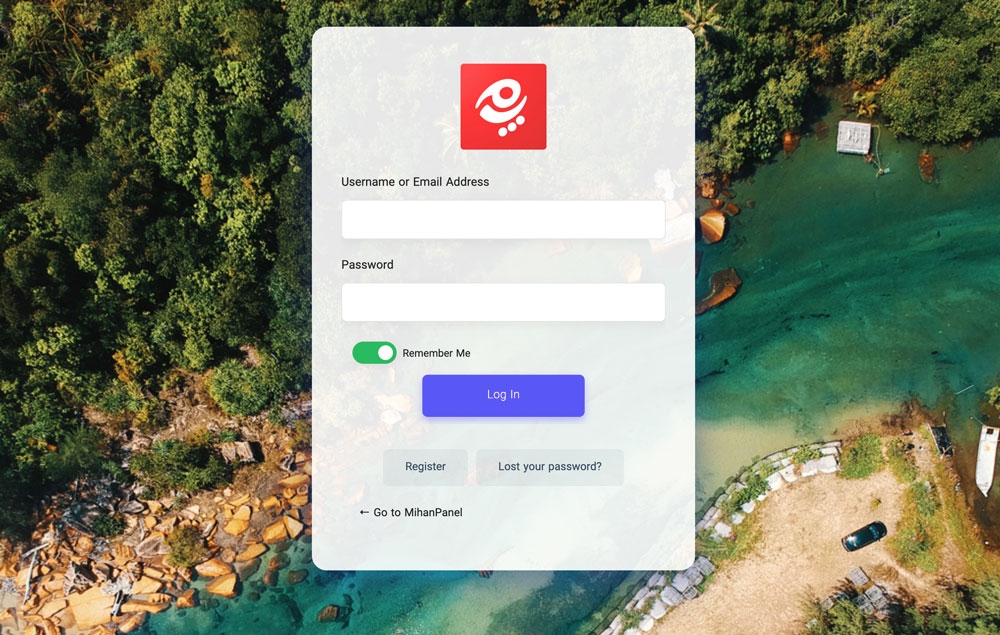
- Custom Login Page Design: Customize the appearance of your WordPress login page with distinct dark and light themes, custom backgrounds, and your own logo to create a branded entry point for users.
- Editable User Profile Fields: Easily add or modify fields in the user profile and registration forms, including file uploads, dates, dropdowns, checkboxes, and custom lists, allowing for detailed user data collection.
- WooCommerce Purchase History Display: Seamlessly integrate and display a user’s WooCommerce purchase history directly within the custom user panel using a dedicated shortcode, eliminating the need for the default WooCommerce ‘My Account’ page.
- Custom Shortcode Integration: Embed any custom plugin shortcode within the user panel tabs, providing the flexibility to showcase various content like forms, sliders, or specific post types within the user’s dashboard.
- Translation Ready & RTL Support: The plugin is fully translatable and includes built-in support for Right-to-Left (RTL) languages, making it accessible to a global audience and compatible with diverse language requirements.
How to Download MihanPanel Pro
1. Visit the Official Website:- Navigate to the official MihanPanel Pro sales page at ertano.com/mihanpanel/. This is the primary source for obtaining the plugin.
- Review the plugin details, features, and pricing options available on the page to ensure it meets your requirements before making a purchase.
- Choose the appropriate license based on the number of sites you intend to use MihanPanel Pro on.
- Complete the purchase process securely through the provided payment gateway on the website. You will typically receive an email with download links and license keys after successful payment.
- Use the download link provided in your purchase confirmation email or access it from your account on the Ertano website.
- The downloaded file will be a .zip archive containing the MihanPanel Pro plugin files. Save this file to your computer, as you will need to upload it to your WordPress site.
Installing MihanPanel Pro: Step-by-Step Guide
1. Access Your WordPress Dashboard:- Log in to the administrator area of your WordPress website. This is usually done by navigating to your site’s URL followed by ‘/wp-admin/’.
- Ensure you have the necessary permissions to install plugins before proceeding.
- In the WordPress dashboard menu, go to ‘Plugins’ > ‘Add New’.
- Click the ‘Upload Plugin’ button at the top of the page. Click ‘Choose File’, locate the MihanPanel Pro .zip file you downloaded, and select it. Then click ‘Install Now’. WordPress will upload and unpack the plugin.
- Once the installation is complete, click the ‘Activate Plugin’ button.
- After activation, find ‘MihanPanel Pro’ in your WordPress admin menu to access its settings. Here you can configure your custom login page, user profile fields, and other features according to your site’s needs. Ensure you enter your license key to receive updates.
MihanPanel Pro Pricing
| Component | Price | Details |
|---|---|---|
| Single Site License | $42.00 | Ideal for one WordPress website. Includes plugin updates and support for a limited duration. |
| Developer License | $99.00 | Suitable for up to 5 WordPress websites. Offers extended usage and support across multiple projects. |
| Unlimited Sites License | $199.00 | Best for agencies or developers managing numerous sites. Provides unlimited usage with comprehensive support and updates. |
MihanPanel Pro Alternatives
WPForms:- Pros: Excellent for creating custom user registration forms with advanced fields, integrates well with various services. Known for its user-friendly drag-and-drop form builder.
- Cons: Primarily a form builder; doesn’t offer the visual customization options for the login page itself or direct integration for displaying WooCommerce purchases within a custom dashboard out-of-the-box.
- Best For: Users needing powerful and flexible custom registration/profile forms and data collection capabilities. Learn more about WPForms and its capabilities here.
- Pros: Provides basic login, registration, and password reset functionality on frontend pages; offers some level of customization and extensions for additional features. Free version is available.
- Cons: Customization options are more limited compared to MihanPanel Pro regarding detailed visual styling and extensive custom profile fields without purchasing extensions. Doesn’t inherently display WooCommerce purchases.
- Best For: Users needing a simple, free solution for frontend login pages and basic user profile editing without deep visual customization or advanced features.
- Pros: Offers comprehensive frontend login, registration, profile editing, and membership features. Includes stylish templates and conditional logic for form fields.
- Cons: Can be more complex to set up than simpler alternatives. Some advanced features require premium add-ons.
- Best For: Users looking for an all-in-one solution for building membership sites, user profiles, and frontend forms with extensive customization options, including integration with WooCommerce. Consider comparing it with other membership tools like MemberPress Pro for broader membership site needs.
MihanPanel Pro vs. Other User Panel Plugins
Comparing MihanPanel Pro to other plugins in the user panel and login customization space reveals its specific strengths. While plugins might offer custom registration forms or frontend login areas, MihanPanel Pro focuses heavily on transforming the _visual_ experience of both the classic WordPress login page and the user’s profile area with dedicated features like dark/light themes and background customization. Many alternatives provide functional changes but lack the aesthetic control MihanPanel Pro offers out-of-the-box for the login screen. Furthermore, its native feature for displaying WooCommerce purchases directly within the custom user panel is a significant advantage for e-commerce sites, often requiring separate add-ons or custom code in competing plugins. The ability to easily add diverse custom fields to the user profile without complex configurations also sets it apart from simpler options. Finally, the plugin’s emphasis on loading only necessary files contributes to better performance compared to some feature-bloated alternatives.- Visual Customization Depth: MihanPanel Pro offers more extensive theme and background options for the default WordPress login page.
- Dedicated WooCommerce Integration: Provides a built-in shortcode to display user purchase history without relying on the standard WooCommerce ‘My Account’ page.
- Flexible Custom Profile Fields: Simple interface for adding various field types (uploads, dates, lists) to user profiles and registration forms.
- Performance Optimization: Designed to load assets efficiently, potentially offering better site speed than less optimized plugins.
Tips for Using MihanPanel Pro Effectively
- Match Branding: Utilize the custom logo and background options to ensure the login page perfectly matches your website’s overall branding for a consistent user experience.
- Plan Custom Fields: Before adding custom profile fields, determine exactly what information is necessary to collect from users. Avoid overwhelming users with too many optional fields.
- Test WooCommerce Display: If using the WooCommerce purchase history shortcode, test it across different user accounts to ensure it’s displaying correctly and is intuitively placed within the user panel.
- Use Custom Shortcodes Wisely: When embedding shortcodes from other plugins, test them thoroughly within the MihanPanel tabs to ensure they render correctly and don’t negatively impact the functionality or appearance of the user panel.
- Optimize Images: Ensure any custom background images you upload for the login page are optimized for web use to maintain fast loading times and a smooth user experience.
Pairing MihanPanel Pro with WooCommerce
MihanPanel Pro pairs exceptionally well with WooCommerce, primarily through its dedicated feature for displaying a user’s purchase history. While WooCommerce provides its own “My Account” page for users to view orders, downloads, addresses, and other details, MihanPanel Pro allows you to build a completely custom user dashboard where you can integrate this information alongside other relevant content using a simple shortcode. This is particularly useful if you want to create a unified user experience that goes beyond the standard WooCommerce layout. For example, you could have a custom user panel tab for profile editing (enhanced with MihanPanel’s custom fields), another for support tickets (using a support plugin’s shortcode), and a dedicated tab displaying their past WooCommerce orders, all within a branded interface built by MihanPanel Pro. This integration allows you to offer a more streamlined and branded post-purchase experience for your e-commerce customers. For enhancing product pages or store listings within WooCommerce, consider exploring options like Woo Product Table Pro which can further improve the shopping experience before users even reach their account panel. You can also complement your WooCommerce setup with tools like WooCommerce Developer Documentation for deeper customization.Should You Invest in Premium Extensions?
The core MihanPanel Pro plugin provides the foundational features for login page styling, custom profile fields, and WooCommerce purchase display. There is no separate free version or premium extensions listed on the official sales page; the purchase options represent different license tiers for the premium plugin itself. Therefore, the question isn’t about purchasing extensions but selecting the appropriate premium license (Single Site, Developer, or Unlimited Sites) based on your website needs. Investing in the premium plugin is necessary to access _any_ of the features described, as there is no publicly available free version with limited functionality. The choice of license depends purely on how many websites you intend to install and use MihanPanel Pro on. Each premium license grants access to the full suite of features at that tier, along with support and updates for a specified period. Consider your current and future website plans when deciding on the license tier.- To access custom login page themes and branding
- To add and manage comprehensive, custom user profile fields
- To display WooCommerce purchase history within a custom user panel
- To gain access to plugin updates, security patches, and developer support
Frequently Asked Question:
Can I use MihanPanel Pro with any WordPress theme?Yes, MihanPanel Pro is designed to be compatible with most standard WordPress themes. It primarily modifies the default WordPress login page and provides shortcodes and options for creating a user area within your existing theme’s pages. However, theme conflicts can occasionally occur with any plugin, so testing is recommended. Does MihanPanel Pro replace the default WordPress user dashboard?
MihanPanel Pro allows you to create a custom user panel on a frontend page of your choice, potentially replacing the need for users to access the standard WordPress backend ‘Profile’ screen or the default WooCommerce ‘My Account’ page for certain functions. However, it doesn’t remove the default backend options; it provides a frontend alternative you can direct your users to. Is MihanPanel Pro compatible with membership plugins?
While MihanPanel Pro’s core focus is on login page and profile field customization, its ability to use custom shortcodes means you can potentially integrate features from membership plugins within the custom user panel you create. Check specific membership plugin shortcode documentation for compatibility. WPManageNinja documentation offers insights into various plugin integrations. Does MihanPanel Pro affect website load speed?
MihanPanel Pro is optimized to load its necessary files only on the pages where they are used (like the login page or the custom user panel page). This approach helps minimize its impact on overall website speed compared to plugins that indiscriminately load assets site-wide. As with any plugin, it’s wise to monitor your site’s performance after installation. How do I translate MihanPanel Pro?
The plugin is translation ready. You can translate it using standard WordPress translation methods, such as using theme and plugin translation tools like Loco Translate or by manually creating .mo and .po files based on the plugin’s .pot file. This makes your user panel accessible to a wider audience. Can I add file upload fields to the user profile?
Yes, one of the key features of MihanPanel Pro is the ability to add various custom field types, including file upload fields, to the user profile and registration forms. This allows you to collect specific documents or files from your users during registration or profile updates.


.png "Pricer – Price List for Elementor")