What is Mega Posts Display for Visual Composer?
When WordPress users need to showcase content in dynamic, engaging layouts beyond standard blog lists, Mega Posts Display for Visual Composer offers a comprehensive solution with multiple display formats. This premium addon for WPBakery Page Builder transforms how you present posts, supporting everything from elegant carousels to scrolling news tickers.
Originally designed for Visual Composer (now WPBakery Page Builder), this plugin serves as a powerful content presentation tool that integrates seamlessly with your existing page builder workflow. Whether you’re running a news magazine, personal blog, or WooCommerce store, it provides the flexibility to display your content exactly how your audience prefers to consume it.
What Makes Mega Posts Display Different
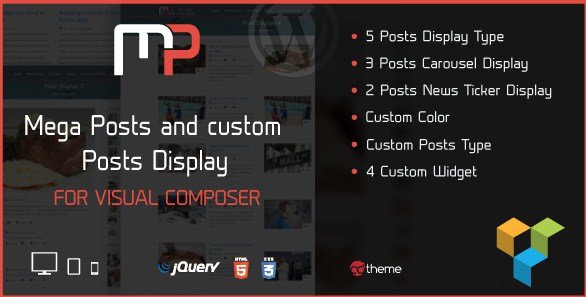
Unlike standard post grid plugins that offer limited layout options, Mega Posts Display for Visual Composer delivers five distinct post display types, three carousel variations, and two news ticker styles—all within a single addon package. This versatility eliminates the need for multiple plugins to achieve different content presentation styles.
- Multi-format display options: Grid layouts, carousels, and news tickers in one plugin
- Enhanced customization: 200+ animations, Google Fonts integration, and opacity-controlled color schemes
- Widget compatibility: Four specialized widgets including WooCommerce product displays and Flickr integration
- Custom post type support: Works with standard posts, pages, and any registered custom post types
Mega Posts Display Features for WordPress Users
Flexible Content Display Types
The plugin offers five distinct post display layouts that cater to different content strategies. From traditional grid arrangements suitable for portfolio showcases to list formats perfect for news sites, each display type maintains responsive integrity across devices. The three carousel variations enable touch-friendly sliding content for featured articles or product highlights, while the two news ticker options provide automated scrolling announcements ideal for breaking news or promotional content.
Content sourcing remains flexible with support for standard WordPress posts, pages, and any active custom post types on your site. This means whether you’re displaying portfolio items, testimonials, recipes, or events, the plugin adapts to your content structure without requiring code modifications.
Advanced Styling and Animation Controls
Visual customization reaches professional levels with the integrated color picker supporting opacity adjustments, allowing for modern半透明 overlays and gradient effects. The inclusion of 200+ CSS3 animations brings life to your content displays, with entrance effects, hover states, and transition animations that capture visitor attention without compromising site performance.
Typography control comes through Google Fonts integration, ensuring your post displays match your brand identity perfectly. Combined with custom ordering options—including sorting by post views, random selection, or traditional date/alphabetical arrangements—you maintain complete creative control over how content appears and behaves.
Widget Integration and WooCommerce Support
Beyond shortcode functionality, Mega Posts Display for Visual Composer extends to WordPress widget areas through four specialized widgets. The Mega Posts widget brings layout flexibility to sidebars and footers, while the Woo Mega widget specifically targets e-commerce sites needing to showcase products in attractive carousel or grid formats outside standard shop pages.
Additional widgets for Flickr galleries and contact information round out the feature set, making this plugin a comprehensive content presentation suite. The translation-ready architecture, complete with .po and .mo files, ensures your multilingual sites maintain consistent display quality across all languages.
How to Install Mega Posts Display
Installation via CodeCanyon
As a premium plugin available exclusively through CodeCanyon, installation requires manual upload rather than the standard WordPress repository search. After purchasing from the official sales page, download the plugin files to your local machine.
- Navigate to Plugins → Add New in your WordPress dashboard
- Click “Upload Plugin” at the top of the page
- Select the downloaded .zip file containing Mega Posts Display
- Click “Install Now” and wait for the upload to complete
- Activate the plugin through the ‘Plugins’ menu
- Ensure WPBakery Page Builder is installed and activated as a dependency
Upon activation, new elements will appear in your WPBakery Page Builder interface, ready for immediate use in any page or post layout.
Who Should Use Mega Posts Display?
News Publishers and Magazine Websites
Editorial teams managing high-volume content sites benefit significantly from the news ticker functionality and multiple grid layouts. The ability to display breaking news in scrolling tickers while featuring evergreen content in responsive grids creates hierarchical content presentation that improves user engagement. Custom post type support allows seamless integration with review systems, recipe cards, or event calendars alongside standard articles.
E-commerce Store Owners
WooCommerce merchants utilize the specialized Woo Mega widget to showcase products in homepage carousels or promotional sidebars. The post view ordering option helps highlight bestselling items, while the animation effects draw attention to featured products or limited-time offers. For stores using magazine-style themes, this plugin bridges the gap between editorial content and product listings.
Mega Posts Display vs Alternatives
| Feature | Mega Posts Display | Essential Grid |
|---|---|---|
| Display Variations | 5 layouts + 3 carousels + 2 tickers | Grid-focused with lightbox |
| Page Builder Integration | Native WPBakery addon | Multi-builder support |
| WooCommerce Widgets | Dedicated Woo Mega widget included | Requires separate configuration |
| Animation Library | 200+ CSS3 animations built-in | Limited animation preset |
While Essential Grid offers broader page builder compatibility, Mega Posts Display provides superior value for dedicated WPBakery users through its integrated widget system and news ticker functionality rarely found in competing post grid solutions.
Mega Posts Display Pricing
Available exclusively through CodeCanyon’s marketplace, Mega Posts Display for Visual Composer follows Envato’s standard licensing structure. The Regular License typically covers single-site usage suitable for individual blogs or small business websites, while the Extended License accommodates commercial projects and client work requiring redistribution rights. Pricing includes lifetime updates from the original author and six months of included technical support, with options to extend support periods for ongoing development assistance.
Pros and Cons
✅ Pros
- Versatile display options including rare news ticker functionality
- Seamless integration with WPBakery Page Builder workflow
- Custom post type support for complex content architectures
- Comprehensive widget suite including WooCommerce-specific tools
- Extensive animation library without additional plugin requirements
- Translation-ready for multilingual website deployments
❌ Cons
- Requires WPBakery Page Builder (sold separately) limiting standalone usability
- No Gutenberg block support for modern WordPress editing
- CodeCanyon licensing restrictions compared to GPL alternatives
- Learning curve for utilizing all 10+ display variations effectively
Frequently Asked Questions
Is WPBakery Page Builder required for Mega Posts Display?
Yes, this plugin functions exclusively as an addon for WPBakery Page Builder (formerly Visual Composer). You must have the base page builder installed and activated for the post display elements to appear in your editor. It does not work with Gutenberg, Elementor, or other page builders.
Can I display custom post types like portfolios or testimonials?
Absolutely. The plugin supports any registered custom post type on your WordPress installation. When configuring a display element, simply select your custom post type from the source dropdown menu. This includes WooCommerce products, events, team members, or any CPT created by third-party plugins.
Are the post displays responsive on mobile devices?
Yes, all five display types and carousel variations are fully responsive. The carousels include touch-swipe functionality for mobile users, while grid layouts automatically adjust columns based on screen size. You can also set specific ordering for mobile versus desktop views using WPBakery’s built-in responsive controls.
Does it work with WooCommerce product listings?
Yes, through the dedicated Woo Mega widget and custom post type support. You can display products in grid or carousel formats, filter by categories, and order by popularity or price. The styling options allow you to match product displays with your overall site design seamlessly.
How do I update the plugin?
Updates are delivered through the Envato Market plugin or manual download from your CodeCanyon account. Since this is a premium marketplace plugin, it does not appear in the standard WordPress update queue. Regular updates ensure compatibility with the latest WPBakery Page Builder releases and WordPress core updates.
Can I use custom fonts with the post displays?
The plugin includes Google Fonts integration, allowing you to select from hundreds of typefaces for your post titles and excerpts. For custom web fonts or Adobe Fonts (Typekit), you can apply additional CSS through the plugin’s custom CSS fields or your theme’s stylesheet to override default typography.
Final Verdict
Mega Posts Display for Visual Composer delivers exceptional value for content-heavy websites already utilizing WPBakery Page Builder. The combination of grid layouts, carousels, and news tickers addresses diverse content presentation needs without requiring multiple specialized plugins. While the dependency on WPBakery limits its audience, existing users of that page builder will find the widget integration and WooCommerce support particularly compelling. For magazine sites, news portals, and e-commerce platforms seeking cohesive post display solutions, this addon represents a solid investment in content presentation capabilities.