What is Location Autocomplete for BuddyPress?
When WordPress users need to implement accurate location functionality in their BuddyPress communities, Location Autocomplete for BuddyPress offers a powerful solution that integrates Google’s address autocomplete technology directly into member profiles and group creation. This Location Autocomplete for BuddyPress plugin transforms how users enter and search location data, eliminating common issues like misspellings and inconsistent formatting.
What Makes Location Autocomplete for BuddyPress Different
Unlike basic location field plugins, Location Autocomplete for BuddyPress leverages Google Places API to provide real-time address suggestions as users type, ensuring data accuracy and consistency across your community. The plugin seamlessly integrates with BuddyPress member profiles and group creation, making it the most comprehensive location solution for BuddyPress-powered websites.
- Google-powered address suggestions with real-time autocomplete
- Seamless integration with BuddyPress member profiles and groups
- Customizable address fields to match your specific requirements
Location Autocomplete for BuddyPress Features for WordPress Users
Google Address Suggestion and Autocompletion
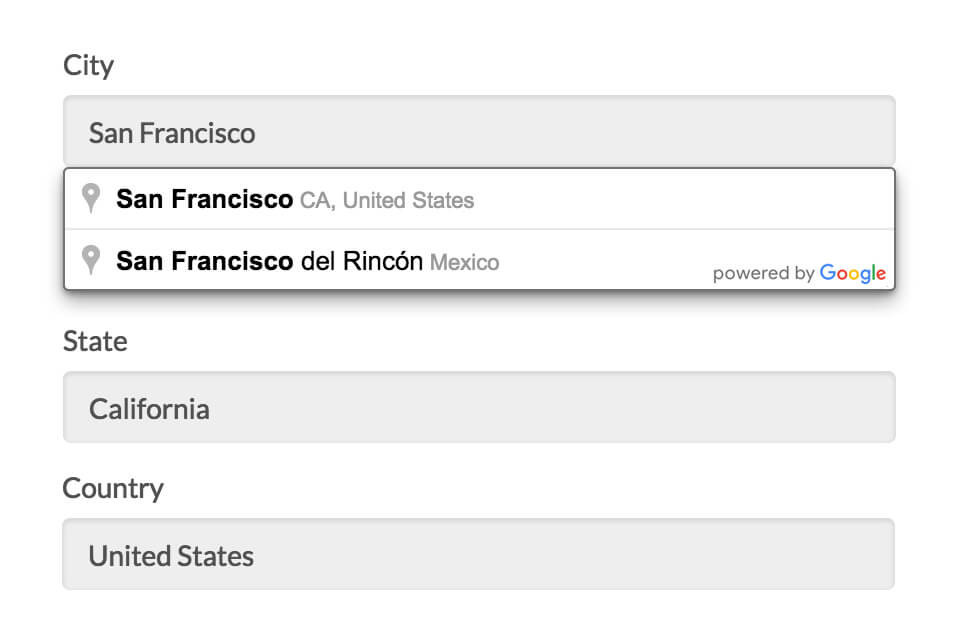
The core feature of Location Autocomplete for BuddyPress is its intelligent address suggestion system. As members type their location during registration or profile editing, the plugin displays a dropdown with Google-verified address suggestions. Once users select their address, all relevant fields including street address, city, state, zip code, and country are automatically populated. This eliminates common data entry errors and ensures consistent location data across your entire community. The integration with Google Places API means your users get the same reliable address suggestions they’re accustomed to from Google Maps.
Accurate Location Search Integration
One of the most powerful aspects of Location Autocomplete for BuddyPress is how it revolutionizes location-based searches within your community. Before implementing this plugin, location searches were often unreliable due to inconsistent data entry – one user might enter “San Francisco,” another “SF,” and another might misspell it entirely. With Location Autocomplete for BuddyPress, all location data is standardized through Google’s API, enabling incredibly accurate location searches. The plugin works seamlessly with popular BuddyPress search plugins including BuddyPress Global Search and BP Profile Search, ensuring your members can find each other based on precise location criteria.
Member Profile and Group Location Management
Location Autocomplete for BuddyPress provides comprehensive location functionality for both member profiles and BuddyPress groups. Members can add their location during registration or edit it later in their profile settings. This location information displays prominently on member profiles and becomes searchable in member directories. For group functionality, administrators and group creators can add location data when creating or editing BuddyPress groups. These group locations appear on group pages and are searchable in group directories, making it easy for members to find local groups or groups in specific areas. The plugin’s dual focus on members and groups makes it ideal for building location-based communities.
How to Install Location Autocomplete for BuddyPress
Quick Installation
- Purchase and download Location Autocomplete for BuddyPress from BuddyBoss
- Go to Plugins → Add New in WordPress dashboard
- Click Upload Plugin and select the downloaded zip file
- Click Install Now → Activate
- Enter your license key in the plugin settings
- Configure your Google Places API credentials
- Customize address field settings according to your needs
Google API Configuration
To use Location Autocomplete for BuddyPress, you’ll need to set up a Google Places API key. Visit the Google Cloud Console to create a new project and enable the Places API. The plugin provides detailed documentation on how to obtain and configure your API key. Once set up, your users will have access to Google’s powerful address autocomplete functionality.
Who Should Use Location Autocomplete for BuddyPress?
Social Networking Communities
For social networking sites focused on connecting people in specific geographic areas, Location Autocomplete for BuddyPress is essential. Whether you’re building a neighborhood social network, a city-based community platform, or a regional interest group, this plugin ensures members can accurately share their locations and find others nearby. The standardized location data makes it easy to create location-based member directories and facilitate real-world meetups and events.
Dating and Matchmaking Websites
Dating platforms built on BuddyPress benefit tremendously from Location Autocomplete for BuddyPress. The plugin’s precise location data enables accurate distance-based matching and search functionality. Users can find potential matches within specific radiuses, and the consistent address formatting prevents the common problem of missed connections due to location data inconsistencies. The integration with member profiles means location becomes a natural part of the dating profile experience.
Business and Professional Networks
Professional networking sites and business directories using BuddyPress can leverage Location Autocomplete for BuddyPress to connect professionals based on geographic proximity. The plugin supports both individual member locations and group locations, making it perfect for regional business chapters, industry meetups, and local professional associations. The accurate location data enhances networking opportunities and helps members find relevant business connections in their area.
Location Autocomplete for BuddyPress vs Alternatives
| Feature | Location Autocomplete for BuddyPress | Basic Location Field Plugins |
|---|---|---|
| Google API Integration | Full Google Places API with autocomplete | Manual text input only |
| Address Validation | Real-time validation and correction | No validation |
| Search Integration | Works with BuddyPress Global Search | Limited search compatibility |
| Customizable Fields | Fully customizable address components | Fixed field structure |
Location Autocomplete for BuddyPress Pricing
Location Autocomplete for BuddyPress is available as a premium plugin from BuddyBoss with flexible pricing options. Single site licenses start at $49 annually, including updates and support. Multi-site and developer licenses are also available for agencies and developers managing multiple BuddyPress installations. The plugin includes one year of updates and premium support, with renewal options available at discounted rates. While there’s no free version, the investment is justified by the robust functionality and reliable Google API integration.
Pros and Cons
✅ Pros
- Google-powered address autocomplete ensures data accuracy
- Seamless integration with both member profiles and groups
- Highly customizable address field configuration
- Works with popular BuddyPress search plugins
- Professional support and regular updates from BuddyBoss
❌ Cons
- Requires Google Places API key and potential API costs
- Premium-only plugin with no free version available
- Dependent on third-party Google services
- Requires BuddyPress to function (not standalone)
Frequently Asked Questions
Does Location Autocomplete for BuddyPress work with BuddyBoss Theme?
Yes, Location Autocomplete for BuddyPress is fully compatible with BuddyBoss Theme and platform. In fact, it’s developed by BuddyBoss specifically for their ecosystem, ensuring seamless integration and optimal performance with BuddyBoss products.
Do I need to pay for Google Places API usage?
Google Places API includes a generous free tier of $300 credit per month, which is sufficient for most small to medium-sized communities. Larger sites with high traffic may incur costs, but you can set usage limits in your Google Cloud Console to manage expenses.
Can I customize which address fields to display?
Absolutely! Location Autocomplete for BuddyPress offers full control over address field configuration. You can choose to collect street addresses, cities, states, zip codes, or countries in any combination. You can also customize field labels and set required fields according to your needs.
Is Location Autocomplete for BuddyPress GDPR compliant?
Yes, the plugin is designed with GDPR compliance in mind. Location data is processed through Google’s services, and you can include appropriate consent mechanisms in your privacy policy. The plugin doesn’t store unnecessary location data beyond what users explicitly provide.
Does it work with other BuddyPress search plugins?
Location Autocomplete for BuddyPress is specifically designed to work with BuddyPress Global Search and BP Profile Search. The standardized location data ensures compatibility with most BuddyPress search solutions, though some custom implementation may be needed for third-party search plugins.
Can members hide their location from other users?
Yes, you can configure location field visibility settings in your BuddyPress profile field settings. Members can have control over who sees their location information, similar to other profile fields in your community.
Final Verdict
Location Autocomplete for BuddyPress is an essential plugin for any serious BuddyPress community that needs reliable location functionality. The Google Places API integration sets it apart from basic location field solutions, providing professional-grade address autocomplete and validation. While the premium price point and API requirements might be considerations for some, the value it brings in terms of data accuracy and user experience is undeniable. It’s particularly well-suited for social networks, dating sites, and professional communities where location-based connections are crucial. The plugin’s robust feature set, combined with BuddyBoss’s reputation for quality support, makes it a worthwhile investment for communities serious about location-based functionality.