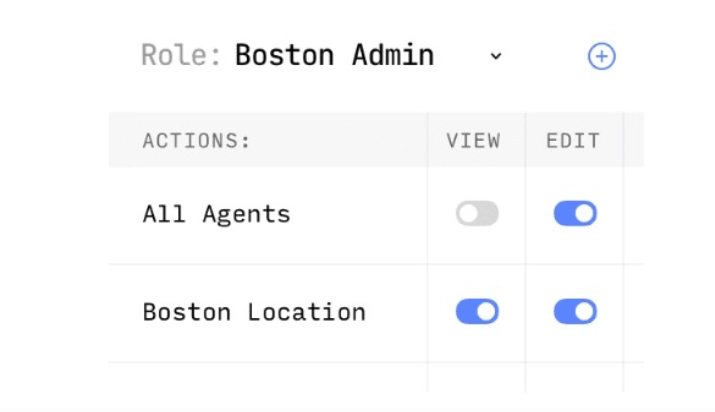
LatePoint Role Manager is a specialized extension that lets you create custom roles with specific capabilities that have access to restricted records within your appointment system. It provides granular control over which users can view or edit specific data. This addon is essential for businesses needing to delegate administrative tasks without granting full site access.
WPExclusive members get access to Role Manager as part of a full plugin and theme library — plans from $9.99/month. See the full LatePoint collection →
What Is LatePoint Role Manager?
LatePoint Role Manager is developed by LatePoint and is a booking plugin for WordPress. It belongs to the booking category on WPExclusive, alongside other tools for service providers and appointment-based businesses.
It solves the problem of “all or nothing” access by allowing site owners to define exactly what a staff member or manager can see. This is for businesses with multiple employees who handle different parts of the booking workflow.
LatePoint Role Manager Features
The feature set is built around providing custom permissions for the LatePoint ecosystem.
Custom Role Creation
Role Manager allows you to define entirely new WordPress roles specifically for your booking operations. You can assign these roles to staff members who need to manage schedules but should not have access to theme settings or other sensitive areas. This is highly effective for large-scale booking environments where security is a priority.
Granular Capability Control
The plugin enables you to toggle specific capabilities for each role. You can determine who has the power to edit appointments, view customer contact details, or browse the ‘Pending Approval’ page. This ensures staff members only interact with the data relevant to their specific job description.
Restricted Record Access
Users assigned to custom roles can be restricted to viewing only certain records. For instance, a manager can be set up to oversee the approval process, verifying and approving appointments after they have been edited. This workflow keeps the scheduling data clean and organized while preventing unauthorized changes.
Pricing
Check current pricing on the Role Manager sales page — WPExclusive members access it as part of their plan.
| Plan | Price | Sites | Includes |
|---|---|---|---|
| WPExclusive Membership | From $9.99/month | Unlimited | Role Manager + full library |
For developers managing multiple sites, a WPExclusive membership covers Role Manager plus hundreds of other plugins and themes — usually less than one premium license.
Latest Version
The current version is 1.0.0. The plugin receives regular updates to ensure compatibility with the core booking engine. WPExclusive updates plugin files promptly after each release.
How to Install
- Download the Role Manager .zip from your WPExclusive member account
- In WordPress: Plugins → Add New → Upload Plugin
- Select the .zip and click Install Now → Activate
- Navigate to LatePoint Settings and locate the Roles tab
- Create your first custom role and assign specific capabilities
Use Cases
Front-Desk Management
Staff members can be given a role that only allows them to manage the booking calendar and approve pending appointments. This keeps them focused on daily operations without exposing financial reports or plugin settings.
Sub-Contractor Access
If you hire temporary staff, you can create a role that only allows them to view their specific appointments. They can check their schedule and update appointment statuses without seeing the records of other team members.
Agencies and Developers Managing Multiple Client Sites
Agencies can use a WPExclusive membership to deploy this addon across numerous client sites. This allows for standardized role management setups without the need to purchase separate licenses for every single project.
Pros and Cons
✅ Strengths
- Allows for precise control over the ‘Pending Approval’ page
- Ability to create an unlimited number of custom roles
- Integrates directly into the existing WordPress role framework
⚠️ Limitations
- Requires the core LatePoint plugin to be installed and active
- Specific role configurations may require manual mapping to WordPress users
- Developer auto-updates require an active license key. WPExclusive publishes updates manually when new versions are released.
Is LatePoint Role Manager GPL Licensed?
Yes. LatePoint Role Manager is distributed under the GNU General Public License (GPL) — the same license that governs WordPress itself. GPL gives any user the legal right to use, study, share, and redistribute the software. This is the legal framework that makes WPExclusive’s membership model possible.
WPExclusive distributes 100% original, unmodified files — the same release the developer publishes. No injected code, no alterations, no security risks.
Get LatePoint Role Manager on WPExclusive
WPExclusive membership starts at $9.99/month, $87/year, or $149 lifetime — giving you LatePoint Role Manager plus every plugin and theme in the library, on unlimited sites.
Explore the full LatePoint collection → or browse all WordPress plugins →
Frequently Asked Questions
What does LatePoint Role Manager do?
LatePoint Role Manager is an extension for the LatePoint booking plugin. Role Manager allows site administrators to create custom user roles with limited capabilities to protect sensitive booking records.
Is LatePoint Role Manager free?
No, this is a premium addon for the LatePoint ecosystem. However, it can be accessed via a WPExclusive membership starting from $9.99/month.
What is the latest version of LatePoint Role Manager?
The current version is 1.0.0. The plugin is actively maintained — WPExclusive members always receive the most current release.
How much does LatePoint Role Manager cost?
Retail pricing is managed by the developer. Via WPExclusive, it is included in plans from $9.99/month.
Is it legal to use LatePoint Role Manager via WPExclusive?
The plugin is GPL licensed, which explicitly permits redistribution. WPExclusive provides original, unmodified files — fully within GPL terms.
Can I use LatePoint Role Manager to manage appointment approvals?
Yes, Role Manager specifically includes capabilities for overseeing the pending approval page, allowing users with high enough permissions to verify and approve bookings.