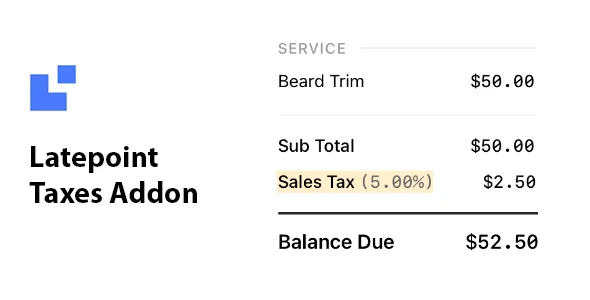
LatePoint Addon – Taxes is a specialized extension that lets you add taxes and service charges for bookings within the LatePoint ecosystem. It provides the flexibility to specify these costs as a percentage or a fixed value. This ensures compliance with local tax laws while maintaining transparent pricing for your clients.
WPExclusive members get access to the Taxes addon as part of a full plugin and theme library, with plans starting from $9.99/month. See the full LatePoint collection →
What Is LatePoint Addon – Taxes?
LatePoint Addon – Taxes is developed by LatePoint and is a booking enhancement plugin for WordPress. It is an essential component for businesses that need to calculate final appointment costs inclusive of government levies or operational service fees. It belongs to the booking category on WPExclusive, alongside other tools for professional service providers and appointment-based businesses.
The plugin solves the problem of manual tax calculation and separate invoicing by integrating these costs directly into the booking checkout flow. It is designed for salon owners, consultants, and service agencies who require precise financial reporting and automated fee collection.
LatePoint Addon – Taxes Features
The functionality of this extension is centered around automated financial calculations at the point of sale.
Flexible Tax Calculation
The Taxes addon allows you to define how taxes are applied to your services. You can choose to set a percentage-based tax, which is ideal for VAT or GST, or a fixed-value charge for flat service fees. This flexibility ensures the plugin can adapt to different booking workflows and regional requirements.
Service Charge Management
Beyond standard government taxes, you can utilize this extension to apply mandatory service charges. These charges can be applied across all services or specific categories. The plugin ensures these items are clearly itemized on the customer’s summary before they confirm their appointment.
Pricing Display Control
The plugin integrates with the core LatePoint settings to control how customers see your rates. You can choose to display tax-inclusive prices on the booking form so there are no surprises at checkout. This helps maintain a professional appearance and improves conversion rates by providing full price transparency upfront.
Pricing
Check current pricing on the Taxes addon sales page. Most LatePoint extensions are bundled with Pro licenses, but WPExclusive members access it as part of their inclusive plan.
| Plan | Price | Sites | Includes |
|---|---|---|---|
| WPExclusive Membership | From $9.99/month | Unlimited | Taxes addon + full library |
For developers managing multiple sites, a WPExclusive membership covers the Taxes addon plus hundreds of other plugins and themes, costing significantly less than individual premium licenses.
Latest Version
The plugin receives regular updates from the developer to ensure compatibility with the latest versions of the LatePoint core engine. WPExclusive updates plugin files promptly after each release to ensure members have access to the latest security patches and features.
How to Install
- Download the Taxes addon .zip from your WPExclusive member account
- In WordPress: Plugins → Add New → Upload Plugin
- Select the .zip and click Install Now → Activate
- Navigate to LatePoint → Settings → Taxes to begin setup
- Define your tax rates and choose between percentage or fixed values
Use Cases
Compliant Service Invoicing
Businesses operating in regions with mandatory VAT or sales tax can use this plugin to automate tax collection during the booking process. This ensures that every transaction is recorded with the correct tax liability as per local laws.
Mandatory Administrative Fees
Venues or professional service providers who charge a flat cleaning fee or booking fee can apply these as service charges. The plugin allows these to be added automatically to the base price of the service during customer checkout.
Agencies and Developers Managing Multiple Client Sites
Developers who build booking sites for clients can deploy the Taxes addon across multiple domains using a single WPExclusive membership. This significantly reduces overhead costs while providing clients with a fully professional financial setup for their appointments.
Pros and Cons
✅ Strengths
- Supports both percentage-based and fixed-value tax rules
- Native integration with LatePoint for a consistent user interface
- Ensures price transparency for customers during the booking flow
⚠️ Limitations
- Requires the core LatePoint plugin to be installed and active
- Does not currently support dynamic tax rates based on customer location
- Developer auto-updates require an active license key. WPExclusive publishes updates manually when new versions are released.
Is LatePoint Addon – Taxes GPL Licensed?
Yes. LatePoint Addon – Taxes is distributed under the GNU General Public License (GPL), the same license that governs WordPress itself. GPL gives any user the legal right to use, study, share, and redistribute the software. This is the legal framework that makes WPExclusive’s membership model possible.
WPExclusive distributes 100% original, unmodified files, the same release the developer publishes. No injected code, no alterations, and no security risks for your WordPress installation.
Get LatePoint Addon – Taxes on WPExclusive
WPExclusive membership starts at $9.99/month, $87/year, or $149 lifetime, giving you LatePoint Addon – Taxes plus every plugin and theme in the library, on unlimited sites.
Explore the full LatePoint collection → or browse all WordPress plugins →
Frequently Asked Questions
What does LatePoint Addon – Taxes do?
LatePoint Addon – Taxes is an extension designed to handle financial additions to appointment prices. The plugin allows administrators to apply either percentage taxes or flat service fees during the customer booking journey.
Is LatePoint Addon – Taxes free?
No, this is a premium addon generally sold as part of the LatePoint ecosystem. However, it can be accessed through a WPExclusive membership starting from $9.99/month.
What is the latest version of LatePoint Addon – Taxes?
The plugin is actively maintained. WPExclusive members always receive the most current release as soon as it is verified and uploaded to our repository.
How much does LatePoint Addon – Taxes cost?
Retail pricing is usually associated with LatePoint’s annual pro plans. Via WPExclusive, it is included in plans from $9.99/month, covering unlimited sites and the full plugin library.
Is it legal to use LatePoint Addon – Taxes via WPExclusive?
The plugin is GPL licensed, which explicitly permits redistribution. WPExclusive provides original, unmodified files, ensuring total compliance with the legal terms of the GPL.
How do I display prices with taxes included?
Inside the plugin settings, you can toggle the option to show tax-inclusive prices on the frontend calendar and booking steps, providing a better experience for the end-user.