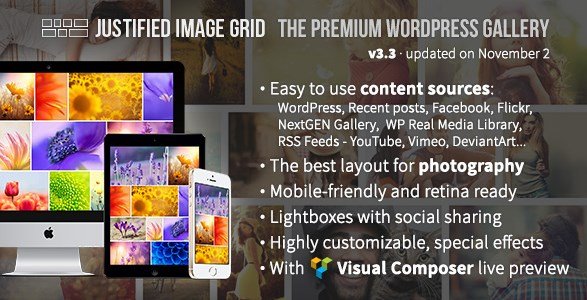
What is Justified Image Grid – Premium WordPress Gallery?
When WordPress users need to display images in a professional, Pinterest-style layout, Justified Image Grid – Premium WordPress Gallery offers an elegant solution with automatic justified layouts and extensive customization options. This premium plugin transforms standard image galleries into visually stunning displays that adapt perfectly to any screen size.
What Makes Justified Image Grid Different
Justified Image Grid stands out from other gallery plugins with its sophisticated automatic layout algorithm that creates perfect horizontal rows of images, similar to popular image-sharing platforms. The plugin’s unique approach combines aesthetic appeal with powerful functionality, supporting multiple content sources and offering hundreds of customization options.
- Automatic justified layout with flexible row heights
- Integration with 20+ content sources including social media
- Advanced filtering and infinite scroll capabilities
Justified Image Grid Features for WordPress Users
Visual Layout and Customization
The core strength of Justified Image Grid lies in its visual presentation capabilities. The plugin creates horizontal grids that naturally guide the eye in reading direction (LTR/RTL), with flexible dynamic row heights and intelligent handling of incomplete last rows. You can limit image count or maximum rows, and even implement a hidden limit that shows all images in the lightbox while displaying only selected thumbnails. The aspect ratio and random width features allow you to redefine thumbnail shapes for uniform or artistic grid layouts. Learn more about WordPress gallery best practices.
Responsive Design and Mobile Optimization
Justified Image Grid is fully responsive, adapting seamlessly to any width across different devices, screens, and orientations. The plugin includes mobile-specific settings that automatically activate when a mobile device is detected, ensuring optimal viewing experience on all platforms. It’s retina-ready, serving thumbnails that match screen capabilities and supporting resolutions much higher than standard retina displays. Special effects like desaturation, blur, sepia, and glow can be applied on-the-fly, while extensive customization options for overlays, borders, shadows, and icons allow for perfect brand alignment.
Content Source Integration
One of the most powerful aspects of Justified Image Grid is its extensive content source support. The plugin seamlessly integrates with WordPress native galleries, NextGEN Gallery, Real Media Library, and social media platforms including Facebook and Flickr. It can also pull content from RSS feeds of popular platforms like YouTube, Vimeo, DeviantArt, 500px, Pinterest, Imgur, and Tumblr. This means you can create unified galleries from multiple sources, display social media content on your site, or replace existing gallery displays with the superior justified layout. For developers working with WooCommerce, the plugin supports custom post types, making it perfect for product galleries.
How to Install Justified Image Grid
Quick Installation
- Purchase Justified Image Grid from CodeCanyon
- Download the plugin ZIP file
- Go to Plugins → Add New in WordPress dashboard
- Click Upload Plugin and select the ZIP file
- Install Now → Activate
Who Should Use Justified Image Grid?
Photographers and Visual Artists
Professional photographers and visual artists will appreciate Justified Image Grid’s ability to showcase portfolios in a sophisticated, magazine-style layout. The plugin’s support for high-resolution images, retina displays, and various lightbox options ensures your work looks its best. The filtering and categorization features help organize extensive portfolios, while social media integration allows for automatic gallery updates from platforms like Flickr or 500px.
Design Agencies and Creative Studios
Design agencies can leverage Justified Image Grid to create impressive project showcases and portfolio websites. The plugin’s custom presets feature allows agencies to maintain consistent branding across multiple client sites, while the extensive customization options ensure each gallery can be tailored to specific project needs. The built-in WPBakery Page Builder addon with live preview functionality makes it easy for designers to create and adjust galleries visually.
Justified Image Grid vs Alternatives
| Feature | Justified Image Grid | Envira Gallery |
|---|---|---|
| Layout Options | Automatic justified with flexible rows | Standard grid, masonry, columns |
| Social Media Integration | 20+ sources including Facebook, Flickr, RSS | Limited to Instagram, Flickr |
| Lightbox Options | 7 different lightboxes included | Custom lightbox only |
Justified Image Grid Pricing
Justified Image Grid is available as a premium plugin through CodeCanyon for a one-time purchase of $29. This includes 6 months of support from the developer and lifetime updates. Extended 12-month support is available for an additional $8.63. The pricing model is straightforward with no recurring subscription fees, making it a cost-effective solution for long-term use. Compared to other premium gallery plugins with annual subscriptions, Justified Image Grid offers excellent value with its extensive feature set.
Pros and Cons
✅ Pros
- Automatic justified layout creates professional, magazine-style galleries
- Extensive content source integration (20+ platforms)
- Highly customizable with hundreds of settings
- Excellent mobile responsiveness and retina support
- One-time purchase with lifetime updates
- Multiple lightbox options included
❌ Cons
- Learning curve due to extensive features
- Not available on WordPress.org repository
- May impact page load time with large galleries
- No free version to test before purchase
Frequently Asked Questions
Is Justified Image Grid compatible with page builders?
Yes, Justified Image Grid includes a built-in WPBakery Page Builder addon with live preview functionality. It’s also compatible with Elementor and other popular page builders through shortcode integration.
Can I use Justified Image Grid with WooCommerce?
Absolutely! The plugin supports custom post types, making it perfect for creating product galleries in WooCommerce stores. You can display product images in beautiful justified layouts to enhance the shopping experience.
Does Justified Image Grid support video content?
Yes, the plugin supports video galleries from YouTube, Vimeo, and self-hosted videos. You can create mixed media galleries combining images and videos in the same justified layout.
How does Justified Image Grid handle SEO?
The plugin is SEO-friendly, adding images to XML sitemaps when used with WordPress SEO by Yoast. It also supports alt tags and proper image attribution. The responsive design ensures good mobile SEO performance.
Can I protect my images from being copied?
Yes, Justified Image Grid includes right-click protection for both thumbnails and lightbox images. You can also add watermarks and enable download protection to prevent unauthorized image use.
Is Justified Image Grid WPML compatible?
The plugin is WPML ready and translation-ready. It includes Spanish translation and covers admin areas and applicable settings for multilingual websites.
Final Verdict
Justified Image Grid – Premium WordPress Gallery is an exceptional choice for users who prioritize visual presentation and need extensive content source integration. Its automatic justified layout creates stunning galleries that rival professional portfolio sites, while the vast customization options ensure it can adapt to any design requirement. It’s particularly well-suited for photographers, designers, and content creators who showcase visual work across multiple platforms. While the learning curve might be steep for beginners, the results justify the investment for those seeking professional-grade gallery displays.