
What is Gravity Flow Flowchart Extension?
The Gravity Flow Flowchart Extension is a dynamic tool designed to simplify the visualization and management of complex workflows within WordPress. It integrates seamlessly with Gravity Forms and Gravity Flow, allowing users to switch between a standard step list view and an intuitive Flowchart view. This extension is ideal for streamlining business processes, improving team communication, and optimizing workflow efficiency. With features like auto-layout, zoom functionality, and step manipulation, it empowers users to design workflows visually and make real-time adjustments. Whether you’re managing approvals, data processing, or task assignments, the Flowchart Extension ensures clarity and precision in every step.
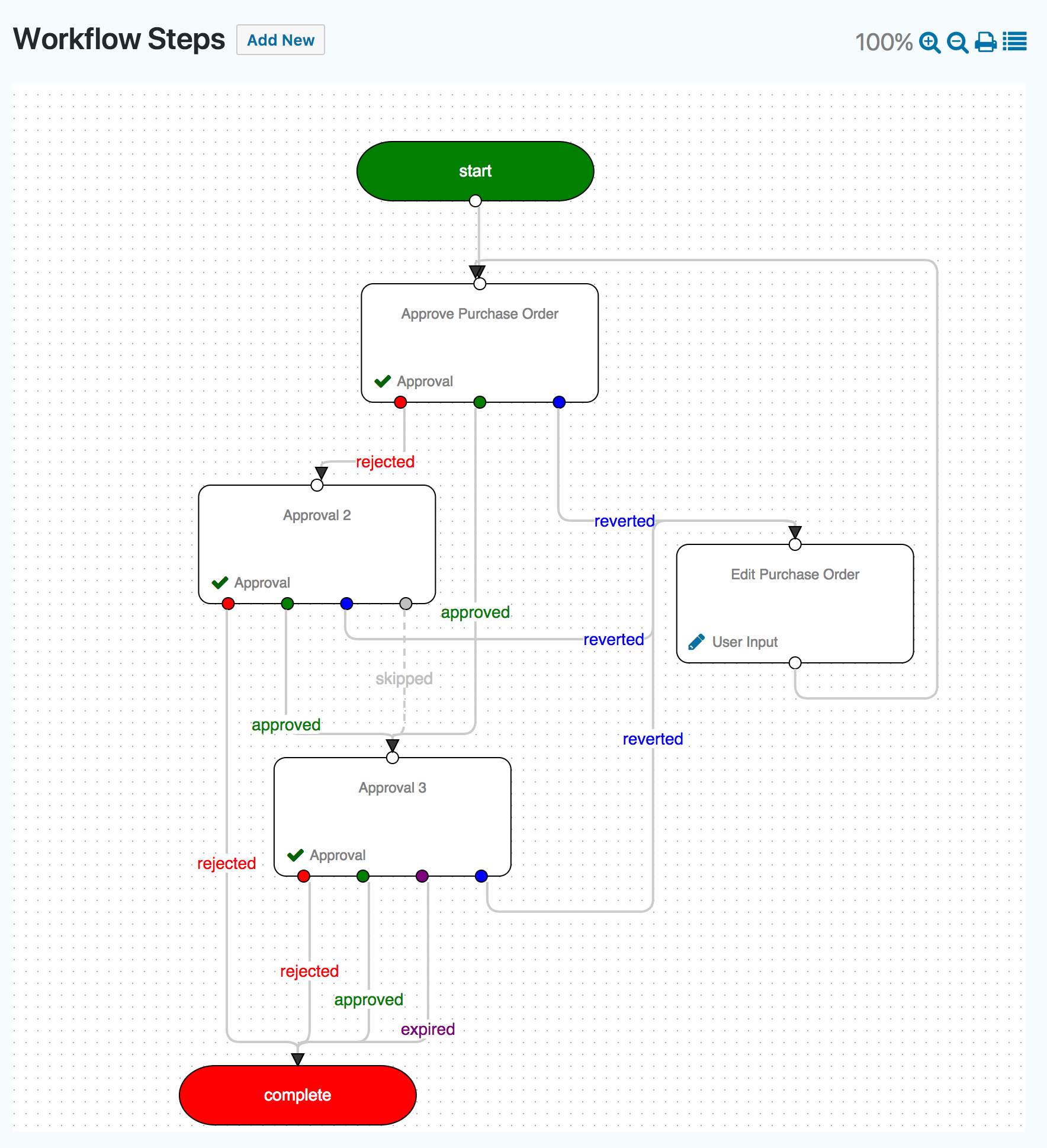
Key Features of Gravity Flow Flowchart Extension
The Gravity Flow Flowchart Extension comes packed with features designed to enhance workflow management:
- ✅ Auto-layout – Automatically arranges steps for a clean and organized flowchart.
- ✅ Zoom In/Out – Easily focus on specific parts of the workflow or view the entire process at a glance.
- ✅ Panning – Move the canvas effortlessly to navigate large workflows.
- ✅ Print Functionality – Export your workflow for offline review or presentations.
- ✅ Step Manipulation – Add, modify, delete, or reorder steps with changes reflected instantly in the flowchart.
These features make the Flowchart Extension an indispensable tool for visualizing and optimizing workflows.
How to Get Started with Gravity Flow Flowchart Extension?
To get started with the Gravity Flow Flowchart Extension, ensure you have Gravity Forms (version 2.2 or greater) and Gravity Flow (version 2.0 or greater) installed on your WordPress site. Purchase and download the Flowchart Extension from the official sales page. Upload the extension to your WordPress dashboard, activate it, and navigate to your Gravity Flow workflows. Switch to the Flowchart view to start designing and optimizing your workflows visually. For a detailed guide, refer to the official documentation.
Gravity Flow Flowchart Extension Integrations
The Gravity Flow Flowchart Extension integrates seamlessly with Gravity Forms and other Gravity Flow extensions like WooCommerce, Stripe, and PayPal. It also works with third-party tools like SalesForce through Gravity Forms add-ons, enabling robust workflow automation across multiple platforms.
Gravity Flow Flowchart Extension Pricing
| Plan | Price |
|---|---|
| 1 Site | $59.00/year |
| Up to 5 Sites | $129.00/year |
| Volume (up to 25 Sites) | $199.00/year |
All plans include automatic updates and support. Visit the pricing page for more details.
Gravity Flow Flowchart Extension Alternatives
| Plugin | Features | Price |
|---|---|---|
| Gravity Flow Flowchart Extension | Auto-layout, Zoom, Panning | From $59/year |
| WP Workflow | Basic workflow automation | From $49/year |
| AutomatorWP | Automation with integrations | From $99/year |
Gravity Flow Flowchart Extension Pros and Cons
Pros:
- Intuitive visual workflow design.
- Seamless integration with Gravity Forms and other extensions.
- Real-time step updates in the flowchart.
- Advanced features like auto-layout and panning.
Cons:
- Requires Gravity Forms and Gravity Flow.
- Higher pricing for multi-site licenses.
Summary
The Gravity Flow Flowchart Extension is a must-have tool for businesses looking to streamline and visualize complex workflows. Its intuitive interface, advanced features, and seamless integrations make it a powerful addition to the Gravity Flow ecosystem. While it requires Gravity Forms and Gravity Flow, the benefits far outweigh the cost. Explore its capabilities today and transform your workflow management.
Gravity Flow Flowchart Extension FAQs
What is the Gravity Flow Flowchart Extension?
The Gravity Flow Flowchart Extension is a plugin that allows users to visualize and manage workflows using a flowchart view.
What are the system requirements?
You need Gravity Forms (version 2.2 or greater) and Gravity Flow (version 2.0 or greater).
Can I use it on multiple sites?
Yes, licenses are available for 1, 5, or 25 sites.
Does it support third-party integrations?
Yes, it integrates with tools like SalesForce through Gravity Forms add-ons.
Is there a free trial?
No, but you can demo Gravity Flow features on their demo site.
Where can I get support?
Support is available through the Gravity Flow support portal.