What is Front-end Membership Modules?
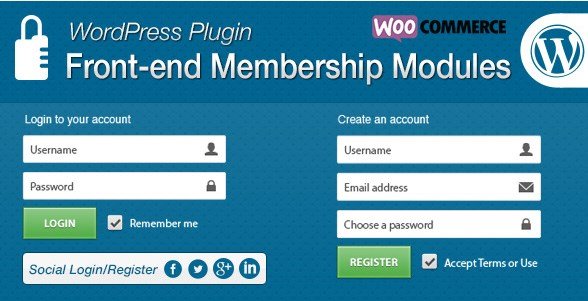
When WordPress users need to move away from the default and often clunky backend admin pages for user interactions, Front-end Membership Modules offers a sophisticated solution to completely overhaul your site’s authentication layer. This plugin is not just a login form; it is a comprehensive system that transforms the user experience by placing login, registration, password reset, and profile editing directly on the front-end of your website. By replacing the standard /wp-admin login screen with beautiful, customizable forms, Front-end Membership Modules ensures a consistent brand experience from the moment a user visits your site. Whether you are running a membership site, an online community, or an e-commerce store, this plugin bridges the gap between WordPress functionality and professional user interface design.
What Makes Front-end Membership Modules Different
While many plugins offer simple front-end login shortcodes, Front-end Membership Modules differentiates itself through a modular architecture and deep integration with essential user management tools. Unlike standalone plugins, this solution works in tandem with WP Form Builder and WP Social Login to provide an unlimited array of customization options. It doesn’t just display a form; it allows you to build complex registration workflows, manage user data through custom fields saved in the user_meta table, and secure your content with granular restriction settings. Its ability to disable the default WordPress login screen and restrict dashboard access based on user roles makes it a fortress for site security while maintaining a welcoming front-end environment.
- Seamless Frontend Experience: Completely removes the need for users to ever see the WordPress backend dashboard.
- Modular Flexibility: Integrates with WP Form Builder and WP Social Login for extended functionality.
- Advanced Data Capture: Saves unlimited custom fields directly to the user_meta table for complex data management.
Front-end Membership Modules Features for WordPress Users
Comprehensive Authentication Forms
At its core, the plugin provides shortcodes to display Login, Register, Edit Profile, and Forgot Password forms anywhere on your site—pages, posts, or sidebar widgets. These are not static HTML forms but dynamic, interactive components. The Frontend Auth Panel allows for extensive management of these forms. You can implement a Frontend Login Form that supports redirects, a Frontend Registration Form with various validation methods, and an Frontend Edit Profile Form that empowers users to manage their own data without admin intervention. This creates a cohesive user journey where account management feels like a native part of your website’s design rather than a detached utility. You can check out other robust form solutions at WPExclusive to compare functionality.
Unlimited Custom Form Fields
One of the standout features is the ability to add an unlimited number of custom form fields to your registration and profile pages. Through the managed form fields interface, you can control every aspect of the input. This includes managing labels, default values, and icons that appear beside the field to enhance visual recognition. You can apply specific CSS classes, placeholders, and inline styles to ensure the forms match your theme’s typography perfectly. Furthermore, the plugin supports robust validation rules, ensuring that the data collected is clean and usable. Whether you need basic HTML fields, specific WordPress user fields, or advanced integrations like Google Location and reCaptcha, this plugin handles the technical requirements, saving the data securely in the WordPress user_meta database.
Flexible Registration Workflows
Not every website handles user sign-ups the same way. Front-end Membership Modules offers four distinct registration types to suit your specific security and community needs:
1. Direct Registration: Users fill the form, and the account is created immediately upon validation.
2. Verified Registration: Users must click a verification link sent to their email to activate the account.
3. Invite Only Registration: Access is gated; users must enter a specific invitation code to view the registration form.
4. Approved Registration: Users submit their data, which sits in a pending state until an admin manually approves or declines the account from the backend.
This flexibility is crucial for private communities, premium content sites, or internal company portals where vetting is necessary. Learn more about managing user roles at WordPress Developer Resources.
Security, Redirection, and Content Restriction
Security goes beyond passwords. This plugin allows you to Restrict Dashboard Access for specific user roles, redirecting them to the homepage if they attempt to access /wp-admin. You can also Disable the Default WordPress Login Screen entirely, funneling all login attempts through your branded front-end page. Redirection logic is sophisticated: you can redirect logged-in users who visit the login page to a specific URL (like a ‘My Account’ page). Additionally, the Restricted Content feature lets you lock down your site. You can restrict all pages except essential ones (home, login, register) or specifically target posts, categories, and custom post types. Shortcodes allow you to hide specific content blocks based on login status, creating a truly dynamic user experience.
WooCommerce and Social Integration
For e-commerce sites, the plugin offers seamless WooCommerce Integration. You can extend the standard WooCommerce registration form with your custom fields, capturing vital customer data during checkout. It also includes Role Based Menu capabilities, allowing you to display different navigation menus to visitors versus logged-in customers (e.g., showing a ‘Logout’ link instead of ‘Login’). Furthermore, the WP Social Login addon enables registration via 73+ social networks, including Facebook, Twitter, Google, GitHub, and Envato. Users can also utilize Custom or Social User Avatars, uploading their own image or pulling from their social profile, adding a personal touch to their user profile. Visit WooCommerce.com for best practices on user management in online stores.
How to Install Front-end Membership Modules
Quick Installation
- Download the plugin ZIP file from CodeCanyon.
- Go to Plugins → Add New → Upload Plugin in your WordPress dashboard.
- Upload the ZIP file, click Install Now, and then Activate.
- Ensure required addons (WP Form Builder, WP Social Login) are installed and activated as well.
Automatic Page Setup
Once installed, you don’t need to manually create pages and paste shortcodes. The plugin features a convenient Automatic Page Setup option. With a single click, it generates the necessary Login, Register, Edit Profile, and Reset Password pages, inserts the correct shortcodes into them, and saves the configuration under the Page Setup settings. This one-click setup dramatically reduces the time to launch your membership system. For more plugins with easy setup features, browse WPExclusive Plugins.
Who Should Use Front-end Membership Modules?
Community and Membership Site Owners
If you run a BuddyPress community, a private membership site, or a forum, keeping users out of the backend is crucial for security and branding. This plugin allows you to create a gated environment where users can sign up, edit their profiles, and reset passwords without ever seeing the WordPress admin bar or dashboard. The ‘Invite Only’ and ‘Approved’ registration types are specifically beneficial for maintaining exclusivity.
E-commerce Stores with Custom Data Needs
Standard WooCommerce checkout fields are often insufficient for businesses that need to collect tax IDs, delivery preferences, or custom marketing consents. By using Front-end Membership Modules, store owners can extend the WooCommerce registration form with unlimited custom fields. This ensures that all necessary user data is captured during account creation and stored efficiently for backend viewing and export.
Front-end Membership Modules vs Alternatives
| Feature | Front-end Membership Modules | Theme My Login |
|---|---|---|
| Custom Form Fields | Unlimited fields with WP Form Builder integration | Basic customization, no drag-and-drop builder |
| Registration Types | Direct, Verified, Invite Only, Approved | Mainly standard registration with email verification |
| Social Login | Native integration with 73+ networks via addon | Requires 3rd party plugins |
| Content Restriction | Built-in restriction for pages/posts/categories | Focuses primarily on login pages, not content gating |
Front-end Membership Modules Pricing
Front-end Membership Modules is a premium plugin available exclusively on CodeCanyon. It typically follows a one-time purchase model for a regular license, which includes lifetime updates and 6 months of support (with the option to extend support). Since it requires the WP Form Builder and WP Social Login addons to function fully, users should ensure they have access to these plugins as well. This pricing model is cost-effective for developers and businesses looking for a long-term solution without recurring monthly subscriptions.
Pros and Cons
✅ Pros
- Deep Customization: The integration with a form builder allows for unlimited fields and styling.
- Enhanced Security: Disabling wp-admin access and using strong password enforcement secures the site.
- Flexible Registration: The ‘Invite Only’ and ‘Admin Approval’ workflows are rare and valuable features.
- WooCommerce Ready: Extends e-commerce functionality effortlessly.
❌ Cons
- Dependency: It requires two other plugins (Form Builder and Social Login) to function, which can complicate management.
- Premium Only: There is no free version to test on the WordPress.org repository.
- Learning Curve: The sheer number of options (redirection, validation, field types) can be overwhelming for beginners.
Frequently Asked Questions
Can I use Front-end Membership Modules without WP Form Builder?
No, this addon specifically requires the WP Form Builder addon to function, as it relies on its architecture to render and manage the custom form fields for registration and profiles.
Does this plugin support social media login?
Yes, it includes the WP Social Login addon, which enables login and registration via 73 popular social networks, including Facebook, Twitter, Google, GitHub, and Envato.
How do I restrict content to logged-in users only?
You can use the ‘Restricted Content’ settings in the plugin to lock down all pages (except login/register) or restrict specific posts, categories, and post types. Shortcodes are also provided to show/hide content within page bodies.
Can I disable the default WordPress login page?
Absolutely. The plugin has a setting to ‘Disable Default WordPress Login Screen’, redirecting anyone trying to access wp-login.php to your custom frontend login page.
Does it work with WooCommerce?
Yes, it offers WooCommerce integration that allows you to attach your custom registration fields to the WooCommerce checkout and registration process, capturing extra user data during purchase.
What happens when a user registers?
Depending on your settings, the user can be created immediately (Direct), after email verification (Verified), after admin approval (Approved), or only with an invitation code (Invite Only).
Final Verdict
Front-end Membership Modules is a powerhouse for WordPress sites that require more than just a simple login form. Its modular approach, combining authentication with robust form building and social capabilities, makes it an all-in-one solution for serious membership sites and e-commerce stores. While the dependency on multiple addons might be a slight hurdle, the payoff in terms of customization and user experience is significant. It is particularly well-suited for developers and site administrators who need granular control over user registration workflows and frontend security.