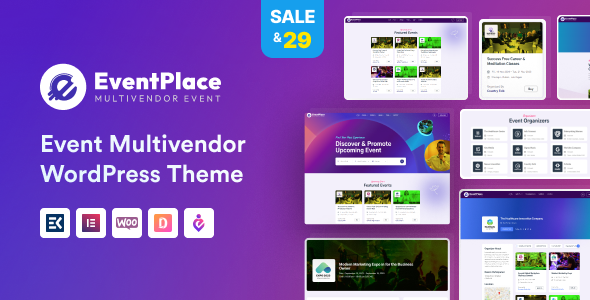
What is Eventplace – Multivendor Event Management WordPress Theme?
Eventplace – Multivendor Event Management WordPress Theme is a comprehensive and robust WordPress theme specifically designed for creating dynamic, feature-rich multivendor event marketplaces. Developed by Frenify, this theme empowers entrepreneurs, event organizers, and businesses to build platforms similar to Eventbrite or Ticketmaster, where multiple vendors can list, manage, and sell tickets for their events. Its core purpose is to facilitate a seamless experience for both event organizers (vendors) and attendees. The significance of Eventplace lies in its ability to democratize event hosting and ticket sales, allowing smaller organizers to reach a wider audience and providing a centralized hub for event discovery. Built on WordPress, it leverages the flexibility and extensibility of the world’s most popular CMS. The theme is tailored for those looking to establish an online community around events, be it concerts, workshops, conferences, festivals, or virtual gatherings. It addresses the growing demand for niche event platforms and offers a turnkey solution that is both powerful and user-friendly. With its dedicated multivendor capabilities, Eventplace – Multivendor Event Management WordPress Theme stands out by offering integrated solutions for vendor registration, event submission, commission management, and payout systems, often achieved through compatibility with leading multivendor plugins like Dokan. This makes it an ideal choice for anyone aiming to launch a profitable online event business without needing extensive custom development. The theme also emphasizes a modern, responsive design ensuring a great user experience across all devices, which is crucial for maximizing engagement and ticket sales in today’s mobile-first world.
Key Features of Eventplace – Multivendor Event Management WordPress Theme
- Comprehensive Multivendor System: Eventplace – Multivendor Event Management WordPress Theme is fully compatible with the Dokan multivendor plugin, enabling you to create a true marketplace. Vendors can register, create profiles, submit and manage their own events, track sales, and manage earnings through dedicated dashboards. This feature is central to creating a scalable event platform. Admins can manage vendors, set commission rates, and oversee the entire marketplace operation effectively.
- Advanced Event Listing & Management: The theme provides sophisticated tools for listing events with all necessary details, including dates, times, locations (with Google Maps integration), descriptions, images, videos, and organizer information. Organizers can manage event capacities, set different ticket types (e.g., VIP, General Admission), and handle recurring events. Attendees can easily browse, search, and filter events based on various criteria like category, location, date, and price.
- Integrated Booking and Ticketing System: Eventplace – Multivendor Event Management WordPress Theme includes a seamless booking and ticketing system, typically powered by WooCommerce integration. This allows for secure online ticket sales, diverse payment gateway options, and automated e-ticket generation (often with QR codes for check-in). Attendees receive their tickets via email, and organizers can manage attendee lists and check-ins efficiently.
- User-Friendly Dashboards: Both vendors and registered users (attendees) get access to intuitive dashboards. Vendors can manage their event listings, view sales reports, and handle payouts. Attendees can view their booked tickets, manage their profiles, and track their favorite events or organizers. This personalized experience enhances user engagement and loyalty.
- Elementor Page Builder & Customization: Built with flexibility in mind, Eventplace – Multivendor Event Management WordPress Theme offers deep integration with the Elementor Page Builder. This allows for easy drag-and-drop customization of page layouts and designs without needing to write any code. The theme also includes a comprehensive theme options panel for customizing colors, fonts, layouts, and other visual aspects to match your brand identity. It also comes with multiple pre-built homepage demos to get you started quickly.
- Responsive Design & SEO Optimization: The theme is fully responsive, ensuring that your event marketplace looks and functions flawlessly on desktops, tablets, and smartphones. It’s also built with SEO best practices in mind, helping your events rank higher in search engine results and attract more organic traffic. Clean code and fast loading speeds contribute to both user experience and SEO performance.
The latest version of Eventplace – Multivendor Event Management WordPress Theme, as of its last update on May 23, 2024, continues to receive regular updates for compatibility with the latest WordPress and WooCommerce versions, as well as feature enhancements and bug fixes. Users can expect ongoing support and development, ensuring the theme remains a cutting-edge solution for event marketplaces. Always check the official ThemeForest page for the most current version details and changelog.
How to Download Eventplace – Multivendor Event Management WordPress Theme
Eventplace – Multivendor Event Management WordPress Theme is a premium theme available exclusively on ThemeForest (part of Envato Market). It is not offered for free due to its extensive features, ongoing development, and dedicated support. Attempting to find nulled or free versions from unofficial sources is risky, as these often contain malware, lack updates, and offer no support, potentially compromising your website’s security and functionality. To legitimately acquire and download the theme, follow these steps:
- Navigate to ThemeForest: Visit the official Eventplace – Multivendor Event Management WordPress Theme page on ThemeForest.net. This is the sole authorized marketplace for purchasing this theme. Review all the theme details, live preview, features, and user reviews to ensure it meets your requirements.
- Purchase a License: Click the “Buy Now” or “Add to Cart” button. You will need an Envato account to complete the purchase. If you don’t have one, you can create it during the checkout process. The standard license typically covers use on a single end product (i.e., one website). You may also have options to extend support duration at the time of purchase.
- Download Theme Files: Once your purchase is complete, log in to your ThemeForest account and navigate to your “Downloads” section. Locate Eventplace – Multivendor Event Management WordPress Theme in your list of purchases. You’ll typically have a few download options: “All files & documentation” (recommended, as it includes the theme files, any bundled plugins, and documentation) or “Installable WordPress file only” (the zipped theme file for direct upload). Download the “All files & documentation” package to ensure you have everything you need.
For a hassle-free setup, consider WPX Hosting from top rated reliable and managed providers, which comes with pre-install WordPress and WooCommerce with optimized performance, making the initial steps of your event marketplace creation smoother.
Installing Eventplace – Multivendor Event Management WordPress Theme: Step-by-Step Guide
Once you have purchased and downloaded Eventplace – Multivendor Event Management WordPress Theme from ThemeForest, installing it on your WordPress website is a straightforward process. Ensure you have a working WordPress installation first. If you downloaded the “All files & documentation” package, make sure to extract it on your computer first. Inside, you will find the installable theme ZIP file (e.g., `eventplace.zip`) and likely other assets like documentation and child theme.
- Via WordPress Admin Dashboard (Recommended):
- Log in to your WordPress admin area.
- Navigate to Appearance → Themes from the left-hand menu.
- Click the Add New button at the top of the page.
- On the Add Themes page, click the Upload Theme button.
- Click Choose File and select the installable `eventplace.zip` file (or similarly named theme ZIP) from your computer. Do not upload the entire package downloaded from ThemeForest, only the theme’s ZIP file.
- Click Install Now. WordPress will upload and install the theme.
- Once the installation is complete, click the Activate link to make Eventplace – Multivendor Event Management WordPress Theme your active theme.
- Via FTP (Alternative Method):
- If you prefer, or if your server has upload size restrictions, you can install the theme via FTP.
- Unzip the `eventplace.zip` file on your computer. This will create a folder named `eventplace` (or similar).
- Connect to your web server using an FTP client (e.g., FileZilla).
- Navigate to the `wp-content/themes/` directory within your WordPress installation.
- Upload the extracted `eventplace` folder (not the ZIP file) into this directory.
- After the upload is complete, log in to your WordPress admin area, go to Appearance → Themes. You should see Eventplace – Multivendor Event Management WordPress Theme listed among the available themes.
- Hover over the theme and click the Activate button.
- Post-Installation Steps:
- After activation, Eventplace – Multivendor Event Management WordPress Theme will likely prompt you to install and activate recommended or required plugins, such as Elementor, WooCommerce, and Dokan (if it’s the chosen multivendor solution). Follow these prompts for optimal theme functionality. This is crucial for enabling all the features advertised.
- Import demo content if available and desired. This can give you a head start by setting up your site to look like the theme’s demo, which you can then customize. Check the theme documentation for instructions on demo import.
- Configure theme options via the Customizer or the theme’s dedicated options panel to personalize your site’s appearance and settings.
Note: Always back up your WordPress site (files and database) before installing a new theme or making significant changes. If Eventplace – Multivendor Event Management WordPress Theme comes with a child theme, it’s highly recommended to install and activate the child theme and make your customizations there. This preserves your modifications when the parent theme is updated.
Eventplace – Multivendor Event Management WordPress Theme Pricing
Eventplace – Multivendor Event Management WordPress Theme is a premium product available for purchase on the ThemeForest marketplace. The pricing structure is typical for themes on this platform, primarily involving a one-time payment for the theme license, which includes future updates and a period of author support. As of the latest information, the pricing is as follows:
| Component | Price (USD) | Details |
|---|---|---|
| Regular License | $79 (subject to change) | This license allows you to use Eventplace – Multivendor Event Management WordPress Theme on a single end product (one website) which end users are NOT charged to access. It includes future theme updates and 6 months of support from Frenify, the theme author. |
| Extended Support (Optional) | Approx. $25.88 (subject to change) | You can choose to extend the included 6 months of support to 12 months. This option is typically available at the time of purchase or can be added later before the initial support period expires. Provides continued access to the author for technical questions and assistance. |
| Additional Services/Plugins | Varies | While Eventplace provides core functionality, you might incur additional costs for premium versions of recommended plugins if their free versions are insufficient for your needs (e.g., premium add-ons for Dokan or Elementor Pro for more advanced features). However, the theme is designed to work well with the free versions of essential plugins like Elementor and WooCommerce. Always check the theme’s description for what is bundled versus what might be an optional extra cost. |
It’s crucial to verify the current pricing directly on the Eventplace ThemeForest page as prices and terms can occasionally change. The Regular License typically covers most use cases for individuals or businesses setting up their own event marketplace. If you plan to use the theme in a product that will be sold to multiple clients, you would need a different type of license (e.g., Extended License, though this is less common for single-use themes and more for items incorporated into larger projects sold multiple times). Remember that the investment in a quality theme like Eventplace – Multivendor Event Management WordPress Theme can save significant development costs and time compared to building a similar platform from scratch.
Eventplace – Multivendor Event Management WordPress Theme Alternatives
While Eventplace – Multivendor Event Management WordPress Theme offers a robust solution for event marketplaces, several alternatives in the WordPress ecosystem cater to event management and directory needs, some with multivendor capabilities. Here are a few notable options:
- Eventin Plugin (with compatible themes):
- Pros: Eventin is a comprehensive event management plugin offering features like event calendars, scheduling, speaker management, Zoom integration for virtual events, and ticket sales with WooCommerce. It’s flexible and can be used with various themes. Some dedicated themes are also built around Eventin. It supports multivendor functionality through Dokan or WC Vendors integrations.
- Cons: As a plugin-centric solution, the overall design and deep multivendor integration might not be as tightly knit as a dedicated theme like Eventplace. Full multivendor capabilities often rely on integrating multiple plugins.
- Best For: Users who want a powerful event management plugin that can be added to an existing site or paired with a theme of their choice, and require robust virtual event capabilities.
- WP Event Manager (Plugin with add-ons):
- Pros: A popular, lightweight, and scalable event management plugin. It offers a free core plugin with numerous premium add-ons for specific functionalities like ticket sales, calendars, Google Maps, registrations, and more. This modular approach allows users to pay only for features they need. It can be integrated with many themes.
- Cons: Achieving full multivendor marketplace functionality comparable to Eventplace might require purchasing several premium add-ons and potentially more custom setup. The out-of-the-box multivendor aspect may not be as prominent as in Eventplace.
- Best For: Users who prefer a modular approach, starting with a free core plugin and adding features as their event platform grows, or those integrating event listings into an existing diverse website.
- MyListing – Directory & Listing WordPress Theme:
- Pros: MyListing is a highly versatile and customizable directory theme. While not exclusively for events, it can be configured to create powerful event listing sites with custom fields, advanced search filters, and front-end submission for listing owners (vendors). It integrates with Elementor for design flexibility.
- Cons: It’s a general directory theme, so adapting it for specific event marketplace features (like complex ticketing, specific event calendars, or deep multivendor commission structures) might require more customization or additional plugins compared to a dedicated theme like Eventplace. The multivendor aspect is more about listing ownership than full vendor dashboards for sales.
- Best For: Users who need a highly flexible directory for various listing types (including events) and prioritize customizability and advanced search/filtering capabilities. Suitable if events are one part of a larger directory.
Eventplace – Multivendor Event Management WordPress Theme vs. Other Event Themes
Eventplace – Multivendor Event Management WordPress Theme carves out a specific niche in the crowded market of WordPress event themes by strongly emphasizing its multivendor capabilities. When comparing it to other general event themes or even some directory themes that can be adapted for events, Eventplace’s dedicated focus on creating a marketplace where multiple organizers can sell tickets offers distinct advantages. Many event themes are designed for single organizers or businesses showcasing their own events. In contrast, Eventplace is built from the ground up to support a community of vendors, providing them with tools to manage their listings and sales independently under the umbrella of a central platform. This is a crucial differentiator for anyone looking to build an Eventbrite-style website.
- Integrated Multivendor Functionality: The most significant advantage of Eventplace – Multivendor Event Management WordPress Theme is its seamless integration with multivendor solutions like Dokan. While other themes might claim event capabilities, they often lack the deep vendor dashboards, commission systems, and event submission workflows that Eventplace, paired with Dokan, offers out-of-the-box. This tight integration saves considerable development time and potential conflicts between disparate plugins.
- Elementor-Powered Customization: Eventplace leverages the Elementor page builder, providing users with extensive drag-and-drop customization capabilities. This allows for unique layouts and designs without needing coding skills. While many modern themes support page builders, Eventplace’s pre-designed Elementor widgets and templates are specifically tailored for event listings and marketplace elements, offering a more refined starting point.
- Comprehensive Event Features: Beyond multivendor support, Eventplace – Multivendor Event Management WordPress Theme includes a rich set of features specific to event management, such as advanced event search, Google Maps integration, various ticket types, booking systems, and dedicated event pages. Some generic themes or directory themes might require numerous additional plugins to achieve this level of specialized functionality.
- User Experience for All Parties: The theme focuses on providing a good user experience not just for site administrators and attendees, but critically for event vendors. Features like front-end event submission, sales analytics, and easy payout management are key for attracting and retaining vendors on the platform, which is essential for the success of any multivendor marketplace.
While general-purpose themes or simpler event themes might be cheaper or seem easier to set up initially, they often fall short when scaling to a true multivendor event platform. Eventplace – Multivendor Event Management WordPress Theme is targeted at users who have a clear vision for an event marketplace and need a robust, specialized solution. Its setup might be more involved than a basic blog theme, but the integrated features are designed to handle the complexities of a multivendor environment effectively. Consider Eventplace if your primary goal is to create a thriving ecosystem of event organizers and attendees.
Tips for Using Eventplace – Multivendor Event Management WordPress Theme Effectively
- Thoroughly Configure Vendor Settings: Since Eventplace – Multivendor Event Management WordPress Theme is designed for multiple vendors, pay close attention to configuring the multivendor plugin settings (e.g., Dokan). Define commission rates, payout methods, vendor registration processes, and terms and conditions clearly. A well-structured vendor system is crucial for smooth operations.
- Leverage Elementor for Unique Designs: Don’t just stick to the default demo layouts. Use the integrated Elementor page builder to customize your homepage, event listing pages, and single event pages to create a unique brand identity. Explore Eventplace’s custom Elementor widgets to enhance event displays and calls to action.
- Optimize Event Listings for Search: Encourage vendors to create detailed and keyword-rich event descriptions. Utilize categories, tags, and location data effectively. Ensure your site’s SEO settings are configured correctly to help events get discovered through search engines and within your platform’s internal search.
- Promote Your Platform and Vendor Onboarding: Simply building the platform isn’t enough. Actively market your event marketplace to attract both event organizers (vendors) and attendees. Create clear guidelines and support resources for vendors to help them easily list and manage their events. Consider offering incentives for early vendor adoption.
- Regularly Update and Maintain: Keep WordPress, Eventplace – Multivendor Event Management WordPress Theme, and all associated plugins (especially WooCommerce and your multivendor plugin) updated to their latest versions. Regularly back up your site. Monitor site performance and address any issues promptly to ensure a reliable experience for all users. Check the theme’s changelog for new features or improvements that you can implement.
- Utilize the Child Theme for Customizations: If you plan to make code-level customizations (CSS, PHP), always use the child theme provided with Eventplace. This ensures that your modifications are not overwritten when you update the parent theme, saving you from potential headaches and lost work.
Pairing Eventplace – Multivendor Event Management WordPress Theme with Complementary Tools
To maximize the potential of your Eventplace – Multivendor Event Management WordPress Theme powered website, pairing it with other complementary tools and plugins is highly recommended. These integrations can enhance functionality, streamline operations, and improve user experience. The theme is already built for synergy with key WordPress plugins. For instance, its core multivendor capability relies heavily on plugins like Dokan. This combination transforms your site into a full-fledged marketplace, allowing vendors to manage their own event stores, products (tickets), and earnings. The financial backbone of Eventplace is typically managed through WooCommerce, which handles ticket sales, payment processing, and order management. Integrating various WooCommerce extensions, such as specific payment gateways (Stripe, PayPal), PDF Invoices & Packing Slips for ticket generation, or advanced coupon systems, can further tailor the purchasing experience. For design and layout customization, Eventplace’s compatibility with Elementor Page Builder is a major asset. Using Elementor Pro can unlock even more design features, widgets, and theme building capabilities, allowing you to craft highly unique and engaging event pages. To engage with your audience and promote events, consider integrating email marketing services like Mailchimp or Sendinblue, possibly through dedicated WordPress plugins. This allows you to build mailing lists, send out newsletters about upcoming events, and run targeted marketing campaigns. For analytics and tracking, integrating Google Analytics and Facebook Pixel will provide valuable insights into user behavior, traffic sources, and conversion rates, helping you optimize your marketing efforts and improve your platform. Lastly, for enhanced SEO, plugins like Rank Math or Yoast SEO can work alongside Eventplace’s built-in SEO features to further optimize your event listings and overall site visibility in search engine results.
Should You Invest in Eventplace – Multivendor Event Management WordPress Theme?
Investing in Eventplace – Multivendor Event Management WordPress Theme is a significant decision, but for the right user, it offers substantial value. This theme is not a generic, all-purpose solution; it’s a specialized tool designed for a specific business model: creating a marketplace where multiple vendors can list and sell event tickets. If your goal is to build such a platform, Eventplace can save you thousands of dollars in custom development costs and months of development time. The theme bundles complex functionalities like vendor dashboards, commission structures (via Dokan compatibility), event submission forms, booking systems, and payment integrations into a cohesive package. Consider the cost of the theme (currently around $79 for a Regular License) as an investment in a pre-built infrastructure. The alternative would be hiring developers to build these features from scratch, which would be considerably more expensive and time-consuming.
- Building a Niche Event Marketplace: If you aim to create a platform like a local event hub, a specific industry conference portal, or a marketplace for online workshops, Eventplace provides the foundational tools.
- Monetization through Commissions: The multivendor model allows you to earn revenue by taking a commission on each ticket sold by your vendors, creating a scalable business model.
- Desire for Control and Customization: Unlike SaaS event platforms, a WordPress theme like Eventplace gives you full ownership and control over your data, branding, and functionality. With Elementor integration, customization is also highly accessible.
- Community Building: An event marketplace can foster a community of event organizers and attendees, creating a vibrant ecosystem around your platform.
However, running a multivendor platform also requires effort in terms of vendor management, marketing, and technical upkeep. If you only need to list a few events for your own organization, a simpler event calendar plugin or a standard business theme might suffice. But if the multivendor marketplace model aligns with your business vision, Eventplace – Multivendor Event Management WordPress Theme is a strong contender worth the investment. Visit the official ThemeForest page to explore its features in-depth and read user reviews before making your decision.
Frequently Asked Questions:
What kind of events can I manage with Eventplace – Multivendor Event Management WordPress Theme?
Eventplace is highly versatile and can be used to manage a wide array of events, both physical and virtual. This includes concerts, festivals, conferences, workshops, seminars, webinars, community gatherings, sports events, classes, and more. Its multivendor nature means various organizers can list diverse types of events on your platform.
Is Eventplace – Multivendor Event Management WordPress Theme compatible with popular multivendor plugins?
Yes, Eventplace is specifically designed to be compatible with leading multivendor plugins, with explicit mention of Dokan compatibility on its sales page. This integration is key to its functionality, enabling features like vendor dashboards, commission management, and front-end event submission for vendors.
Can I customize the design of Eventplace – Multivendor Event Management WordPress Theme?
Absolutely. Eventplace is built with customization in mind. It integrates with the Elementor page builder, allowing for drag-and-drop design changes without needing code. It also includes a theme options panel for broader customizations like colors, fonts, and layout settings. Plus, it typically comes with multiple demo layouts to start from.
Does Eventplace – Multivendor Event Management WordPress Theme support online ticket sales and payments?
Yes, online ticket sales and payments are core features. Eventplace typically integrates with WooCommerce to handle the e-commerce aspects, allowing you to sell tickets directly from your website and accept payments through various gateways supported by WooCommerce (like PayPal, Stripe, etc.).
Is technical support included with the Eventplace – Multivendor Event Management WordPress Theme?
When you purchase Eventplace from ThemeForest, the Regular License includes 6 months of technical support from Frenify, the theme author. This support generally covers help with theme setup, bug fixes, and questions about theme features. You usually have the option to purchase extended support for an additional 6 or 12 months.
How does Eventplace – Multivendor Event Management WordPress Theme handle event discovery and search for users?
Eventplace typically includes advanced search and filtering capabilities. Users can search for events based on keywords, categories, tags, dates, locations (often with map views), and price. This helps attendees easily find relevant events, which is crucial for the user experience of an event marketplace.
Conclusion
Eventplace – Multivendor Event Management WordPress Theme stands out as a specialized and powerful solution for anyone looking to create a comprehensive event marketplace on WordPress. Its strong focus on multivendor functionality, primarily through Dokan compatibility, combined with robust event listing, management, booking, and ticketing features, makes it an excellent choice for entrepreneurs and organizations aiming to build platforms where multiple organizers can showcase and sell their events. The integration with Elementor ensures design flexibility, allowing users to craft a unique and professional-looking website without deep coding knowledge. Furthermore, its responsive design and SEO-friendly structure contribute to a positive user experience and better visibility in search results. While setting up a multivendor platform requires careful planning and ongoing management, Eventplace provides a solid foundation, significantly reducing the development time and cost associated with building such a complex system from scratch. If your project involves creating a dynamic hub for various event providers and a seamless booking experience for attendees, then Eventplace – Multivendor Event Management WordPress Theme is a compelling option that merits serious consideration. Its blend of dedicated features, customization options, and support for essential e-commerce and multivendor plugins positions it as a leading theme in its niche. We encourage you to explore its live demo and detailed feature list on ThemeForest to see if it aligns with your specific project requirements.
Disclaimer: Information regarding features, pricing, and compatibility of Eventplace – Multivendor Event Management WordPress Theme is based on details available at the time of writing. Always refer to the official ThemeForest sales page for the most current and accurate information before making a purchase. Theme features and pricing are subject to change by the theme developer.