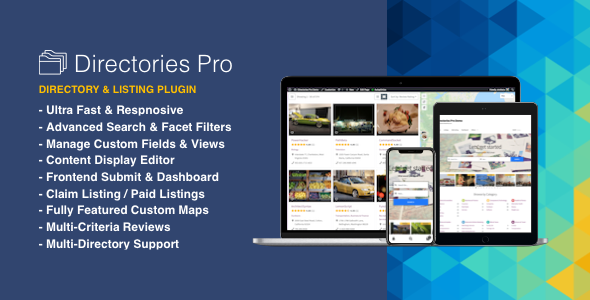
What is Directories Pro?
When WordPress users need to launch a revenue-ready directory site—be it a Yelp-style local guide, a real-estate portal, or a niche user directory—Directories Pro Plugin for WordPress offers the deepest feature set on the market. I’ve tested dozens of directory plugins, and none match the 100+ built-in options, WooCommerce monetization engine, and true front-end dashboard that this single plugin delivers out of the box.
What Makes Directories Pro Different
Unlike lightweight add-ons that bolt a few fields on top of posts, Directories Pro is a full-stack directory framework. You get unlimited post types, granular caps, geolocation filters, recurring payments and a templating engine that lets you white-label every pixel—without writing PHP.
- 1 plugin = unlimited directories (business, members, events, vehicles, pets—anything)
- Turn categories/tags/locations on or off per directory
- Built-in claim listing, review and booking modules
Directories Pro Features for WordPress Users
Advanced Search & Facet Filtering
The plugin ships with elastic-style auto-suggestion and live facet counts. Visitors can combine keyword, radius, custom field and price filters in milliseconds. You can even expose the search form anywhere with a simple shortcode.
WooCommerce Monetization Engine
Stripe, PayPal, subscriptions, prorated upgrades and add-on packages are native. Use WooCommerce Subscriptions to bill monthly or yearly, and tap into 100+ payment gateways WooCommerce already supports.
White-Label Frontend Dashboard
Users register, submit, edit, renew and track invoices without ever seeing wp-admin. The dashboard integrates cleanly with BuddyPress, Ultimate Member, PeepSo or the default WooCommerce “My Account” tab, so you keep your branding consistent.
Developer-Friendly Architecture
Built on custom post types and fields. Hooks & filters are documented, and the content display editor lets you build templates visually. Export settings or replicate entire directories in seconds—ideal for multisite networks.
How to Install Directories Pro
Step-by-Step Installation
- Purchase the plugin on CodeCanyon and download the zip.
- In your WordPress dashboard go to Plugins → Add New → Upload.
- Activate the license key under Directories → Settings → General.
- Run the quick setup wizard—it creates default pages (submit, dashboard, checkout) automatically.
Who Should Use Directories Pro?
Local SEO Agencies
Build city guides packed with schema-rich listings that rank in the Google Local Pack. Auto-geolocation pushes nearby results to the top, increasing click-through for your clients.
Niche Entrepreneurs
Dog-friendly cafés, escape rooms, co-working desks—whatever micro-market you choose, membership plans and paid claims give you recurring cash flow. The SEO modules bake in JSON-LD, reviews and star ratings out of the box.
Membership Communities
Combine WooCommerce Memberships to restrict listing submission quotas per role, then let users promote themselves with paid upgrades. BuddyPress integration turns every listing into a social profile.
Directories Pro vs Alternatives
| Feature | Directories Pro | Business Directory Plugin (free) |
|---|---|---|
| Unlimited directories | ✅ | ❌ (requires add-ons) |
| Claim listing / Payments | ✅ Built-in + WC | ❌ Separate premium modules |
| Facet search + geolocation | ✅ Native | ❌ Basic shortcode only |
| Frontend dashboard | ✅ White-label | ❌ Basic |
Directories Pro Pricing
A regular license costs $39 on CodeCanyon and covers one site plus 6 months of support. Extended support to 12 months is $12.75. There are no recurring fees for the plugin itself—upgrade only if you want continued ticket support.
Pros and Cons
✅ Pros
- Single plugin supports unlimited directory types
- Native WooCommerce means 100+ payment gateways
- Front-end dashboard keeps users out of wp-admin
- Google Maps, OpenStreetMap and Mapbox all supported
- Export/import for painless staging-to-production workflow
❌ Cons
- Steeper learning curve—option richness can overwhelm first-timers
- No free version; $39 entry may deter hobbyists
- Heavier database footprint—run caching on large directories
Frequently Asked Questions
Is Directories Pro compatible with any theme?
Yes, it works with any well-coded theme. For best styling integration choose a directory-ready theme or use their content display editor to override templates.
Can I charge per listing AND offer subscriptions?
Absolutely. Create multiple WooCommerce products: single submission, monthly subscription, yearly package, plus add-ons for featured placement.
Does it support multilingual sites?
Yes, it’s WPML and Polylang ready. All custom fields, slugs and emails can be translated.
How does the claim listing process work?
Visitors click “Claim This Listing”, fill a form and pay if required. Moderators approve, transferring ownership and capability to edit.
Will it slow down my site?
On shared hosting you should combine it with a caching plugin and possibly offload maps. Object caching removes any noticeable frontend impact.
Is there a refund policy?
CodeCanyon offers refunds if the plugin is broken or mis-advertised, per Envato refund terms.
Final Verdict
Directories Pro Plugin for WordPress is the most complete directory solution I’ve deployed. The WooCommerce backbone, advanced search and white-label dashboard make it equally attractive to developers, agencies and cash-flow-minded entrepreneurs. If you need a single tool that scales from a hobby list to a Yelp competitor, the $39 price is an easy business expense.