What is Customize My Account Page For Woocommerce?
Customize My Account Page For Woocommerce is a versatile WooCommerce extension designed to enhance the user experience on your online store’s My Account page. This plugin allows WooCommerce site owners to add, remove, reorder, and customize endpoints such as tabs, links, and groups with ease. Its primary purpose is to provide a tailored dashboard for customers, making it simpler to manage orders, addresses, and other account details while aligning with your site’s branding. With over 1,000 active installs and a 3.8-star rating, it stands out in the WooCommerce ecosystem for its user-friendly interface and powerful customization options. This plugin is particularly significant for e-commerce businesses aiming to improve customer engagement and retention by creating a more intuitive and personalized account experience. By integrating seamlessly with WooCommerce core features, it addresses common limitations, such as the default page’s rigidity, enabling shop owners to incorporate custom content like text, media, or forms. Whether you’re a small business or a large enterprise, this tool empowers you to optimize the My Account page for better usability, potentially boosting customer satisfaction and sales.Developed by ThemeGrill, it’s compatible with major WooCommerce plugins like Bookings and Subscriptions, ensuring a smooth experience. For more insights, visit the official sales page or check out internal resource on best plugins.
Key Features of Customize My Account Page For Woocommerce
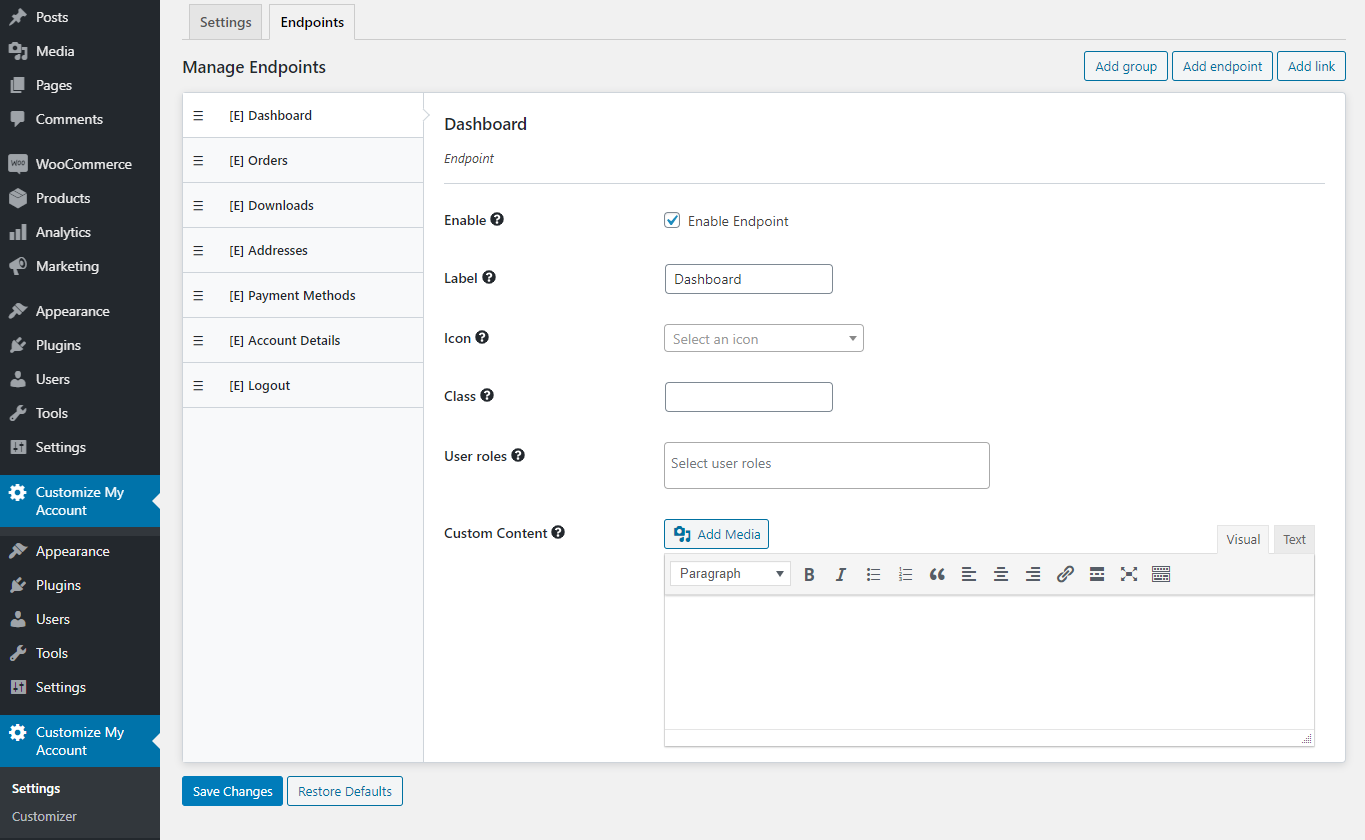
- Add, remove, and reorder endpoints, links, and groups on the My Account Dashboard to organize content intuitively.
- Customize labels, add icons, and display custom content like text, media, or forms for a personalized user interface.
- Restrict endpoint access to specific user roles, enhancing security and targeted content delivery.
- One-click option to hide or disable tabs, simplifying dashboard management without complex coding.
- Utilize a built-in style customizer for live editing of fonts, colors, backgrounds, borders, and more to match your site’s design.
The latest version, 1.0.2, introduces improved compatibility with third-party plugins like WooCommerce Bookings and Subscriptions, along with enhanced performance optimizations for faster loading times. This update ensures better integration and resolves minor bugs, making it even more reliable for WooCommerce users. With these features, Customize My Account Page For Woocommerce stands as an essential tool for e-commerce sites seeking to elevate their customer account pages. It supports WordPress 5.0+ and WooCommerce 3.5+, with options for custom CSS, making it adaptable for various business needs. For detailed setup, refer to the official documentation or explore our internal WooCommerce guide.
How to Download Customize My Account Page For Woocommerce for Free
1. Visit the Official Page:
- Go to the WooCommerce marketplace and search for “Customize My Account Page For Woocommerce” on the sales page.
- Ensure you are logged into your WooCommerce account to access free downloads if available.
2. Check for Free Version:
- Verify if a free version exists; otherwise, note that this plugin primarily offers a premium plan starting at $59 for one year.
- Click on the download link, which might redirect to the WordPress plugin repository or direct purchase.
3. Download and Prepare:
- Once downloaded, unzip the file if necessary and prepare for installation on your WordPress site.
- For a seamless experience, consider using WPX Hosting as recommended, which optimizes WooCommerce performance.
For a hassle-free setup, consider WPX Hosting from top rated reliable and managed providers, which comes with pre-installed WordPress and WooCommerce with optimized performance.
Installing Customize My Account Page For Woocommerce: Step-by-Step Guide
1. Upload the Plugin:
- Log into your WordPress dashboard, navigate to Plugins > Add New, and upload the ZIP file you downloaded.
- Activate the plugin after upload to enable its features on your WooCommerce site.
2. Configure Settings:
- Go to WooCommerce > Settings > Customize My Account to start adding custom tabs and adjusting designs.
- Use the live customizer to preview changes before saving, ensuring compatibility with your theme.
3. Test Functionality:
- Test the My Account page as a logged-in user to verify custom endpoints and styling.
- If issues arise, consult the WordPress support forums or our internal support page for troubleshooting.
Note: Back up your site before installing or updating plugins. Use Customize My Account Page For Woocommerce’s built-in tools if prompted after an update.
Customize My Account Page For Woocommerce Pricing
| Component | Price | Details |
|---|---|---|
| 1 Year Plan | $59 | Includes updates, support, and full features for one year; ideal for small businesses. |
| 2 Years Plan | $94.40 (Save 20%) | Extended access with the same benefits, perfect for growing e-commerce sites. |
| Money-Back Guarantee | N/A | 30-day refund policy; visit WooCommerce’s policy page for details. |
Customize My Account Page For Woocommerce Alternatives
YITH WooCommerce Customize My Account Page:
- Pros: Offers advanced tab customization and integration with YITH themes.
- Cons: May require additional plugins for full functionality.
- Best For: Users invested in the YITH ecosystem.
WooCommerce Custom My Account:
- Pros: Free version available with basic features.
- Cons: Limited design options compared to premium alternatives.
- Best For: Budget-conscious beginners.
Elementor Pro for WooCommerce:
- Pros: Visual builder for comprehensive page design.
- Cons: Steeper learning curve.
- Best For: Advanced users seeking drag-and-drop editing.
Customize My Account Page For Woocommerce vs. Other Plugins
Customize My Account Page For Woocommerce excels in providing dedicated tools for My Account page enhancements, outpacing general plugins like Elementor in WooCommerce-specific features. It offers superior customization without excessive bloat.
- Customization Flexibility: More intuitive than competitors for tab management.
- Integration Ease: Seamlessly works with WooCommerce extensions, as detailed in official docs.
- Cost-Effectiveness: Competitive pricing with a 30-day guarantee, better than pricier alternatives.
- User Support: Includes dedicated support, surpassing free plugins’ community forums.
This makes it ideal for users needing WooCommerce-focused solutions; check our internal comparison guide for more.
Tips for Using Customize My Account Page For Woocommerce Effectively
- Start with the live customizer to test changes before going live, ensuring your site’s design remains consistent.
- Use role-based access to limit sensitive tabs, enhancing user privacy and security.
- Group related endpoints for better navigation, improving customer experience on mobile devices.
- Regularly update the plugin to leverage new features and compatibility fixes.
- Integrate with complementary tools like WooCommerce Subscriptions for a holistic e-commerce setup.
Pairing Customize My Account Page For Woocommerce with Elementor
Pairing Customize My Account Page For Woocommerce with Elementor allows for advanced visual design of your My Account page, combining the plugin’s tab management with Elementor’s drag-and-drop builder. This integration enhances customization benefits, enabling dynamic content creation and responsive designs that boost user engagement and conversion rates.
Should You Invest in Premium Extensions?
The free version of Customize My Account Page For Woocommerce handles basic needs, but premium features are worth considering if you require advanced customization like extensive design options and third-party integrations.
- Advanced functionality for complex e-commerce sites.
- Enhanced feature sets for better user personalization.
- Seamless integration with other WooCommerce tools.
- Premium customization for matching brand aesthetics.
Visit the official site for pricing details and decide based on your store’s scale.
Frequently Asked Questions
Is Customize My Account Page For Woocommerce compatible with the latest WooCommerce version?
Yes, it’s tested with WooCommerce up to version 7.1.0, ensuring smooth performance and updates as per official documentation.
How can I add custom content to the My Account page?
Use the plugin’s intuitive interface to add text, media, or forms to new endpoints for a personalized experience.
Does it work with other page builders like Elementor?
Absolutely, it pairs well with Elementor for enhanced visual customizations, as outlined in our guides.
What support options are available?
Premium plans include dedicated support; for free users, check community forums or the WooCommerce support page.
Can I restrict access to certain tabs?
Yes, set user roles to control access, improving security for sensitive account information.
Is there a money-back guarantee?
Yes, it offers a 30-day money-back guarantee, as per WooCommerce’s policy.
Conclusion
Customize My Account Page For Woocommerce is an invaluable tool for enhancing your WooCommerce store’s user interface, offering extensive customization that drives customer loyalty. By downloading and implementing this plugin, you’ll create a more engaging My Account page, ultimately boosting your e-commerce success. Prioritize regular updates and integrations for the best results.
Disclaimer: Always use official sources for the latest features and pricing; verify compatibility before installation.