What is Custom Sidebar Manager?
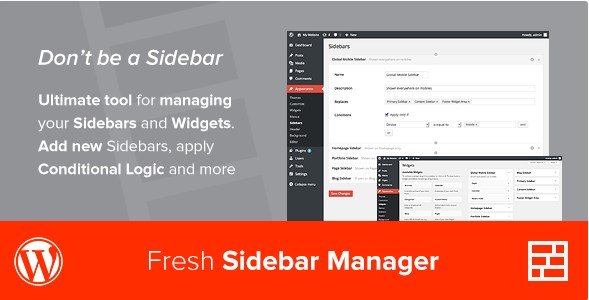
Custom Sidebar Manager is a premium WordPress plugin available on CodeCanyon, designed to give website administrators unparalleled control over their sidebar content. Standard WordPress themes often come with predefined sidebar areas, limiting flexibility in content display across different sections of a site. Custom Sidebar Manager directly addresses this limitation by allowing users to create an unlimited number of custom sidebars and, crucially, define precisely where and when these sidebars (and the individual widgets within them) appear. Its core strength lies in its robust conditional logic engine. You can move beyond generic, site-wide sidebars and implement highly targeted content strategies. For instance, display a specific set of widgets on blog posts within a particular category, show unique promotional content only on your shop pages, or even tailor sidebars based on user roles or the language being viewed (thanks to WPML integration). This plugin essentially transforms sidebars from static containers into dynamic content areas, enhancing user experience and enabling more effective communication or calls to action. It integrates smoothly into the WordPress admin area under ‘Appearance’ > ‘Sidebars’, providing a dedicated interface for managing these custom areas without cluttering other menus. For anyone finding their theme’s default sidebar options restrictive, Custom Sidebar Manager offers a powerful and intuitive solution.
Key Features of Custom Sidebar Manager
- Unlimited Custom Sidebars: Break free from theme limitations. Create as many unique sidebar areas as your website requires, each configurable with its own set of rules and widgets.
- Advanced Conditional Logic for Sidebars: Define specific conditions for displaying entire sidebars. Show or hide sidebars based on post types (posts, pages, custom post types), categories, tags, taxonomies, page templates, specific post/page IDs, user login status, user roles, and even the specific theme currently active.
- Granular Conditional Logic for Widgets: Apply display rules not just to sidebars, but to individual widgets within any sidebar (default or custom). This allows for fine-grained control, such as showing a login form widget only to logged-out users or displaying a special offer widget only on specific product pages.
- Flexible Sidebar Placement: Easily replace existing theme sidebars with your custom creations or add entirely new sidebar locations. This is useful for creating global sidebars if your theme lacks them, or conversely, adding highly specific sidebars for sections like blogs, archives, or search results pages if your theme only provides a generic one.
- WPML Compatibility: Fully integrated with the WordPress Multilingual Plugin (WPML). Set conditional rules based on the language the visitor is currently viewing, allowing for truly localized sidebar content on multilingual websites.
- White Label Admin Interface: The plugin operates discreetly within the WordPress admin panel (‘Appearance’ > ‘Sidebars’) without intrusive branding or advertising, maintaining a clean backend environment.
- Lightweight and Integrated: Designed with performance in mind, the plugin adds minimal overhead and integrates naturally into the WordPress dashboard for a familiar user experience.
The latest version continues to refine the conditional logic options and ensure compatibility with the latest WordPress core updates and popular themes, providing a stable and powerful sidebar management solution.
How to Purchase and Download Custom Sidebar Manager
Custom Sidebar Manager is a premium plugin available exclusively through the Envato Market (CodeCanyon). As such, there isn’t a free version available for direct download from the WordPress.org repository. Follow these steps to purchase and download the plugin:
1. Visit the CodeCanyon Product Page:
- Navigate to the official Custom Sidebar Manager page on CodeCanyon.
- Review the plugin details, features, demos (if available), reviews, and support information provided by the developer (FreshPlugins).
2. Purchase the Plugin License:
- You’ll need an Envato account. If you don’t have one, you can create one during the purchase process.
- Click the ‘Buy Now’ or ‘Add to Cart’ button. Select the appropriate license (usually the ‘Regular License’ for use on a single end-product website).
- Complete the checkout process using your preferred payment method. Note the options for extending support beyond the initial 6 months.
3. Download the Plugin Files:
- Once the purchase is complete, log in to your Envato account and go to your ‘Downloads’ section.
- Locate Custom Sidebar Manager in your list of purchased items.
- Click the ‘Download’ button and choose the ‘Installable WordPress file only’ option. This will download a .zip file containing the plugin. Do not unzip this file yet.
For a hassle-free setup and optimized performance for your WordPress site, consider reliable managed hosting providers like WPX Hosting, which often include easy WordPress installation and performance enhancements crucial for running premium plugins effectively.
Installing Custom Sidebar Manager: Step-by-Step Guide
Once you have purchased and downloaded the installable .zip file for Custom Sidebar Manager from CodeCanyon, installing it on your WordPress website is straightforward. Follow these standard WordPress plugin installation steps:
1. Access Your WordPress Dashboard:
- Log in to your WordPress website’s administrator area. This is typically found at `yourdomain.com/wp-admin`.
- Ensure you have administrator privileges, as these are required to install new plugins.
2. Navigate to the Plugin Uploader:
- In the left-hand navigation menu, hover over ‘Plugins’.
- Click on ‘Add New’. This will take you to the ‘Add Plugins’ screen.
- At the top of the ‘Add Plugins’ screen, click the ‘Upload Plugin’ button.
3. Upload and Activate the Plugin:
- Click the ‘Choose File’ button. Locate the `custom-sidebar-manager.zip` file (or similarly named zip file) you downloaded from CodeCanyon on your computer. Select it.
- Click the ‘Install Now’ button. WordPress will upload the file and unpack the plugin.
- Once the installation is complete, you will see a success message. Click the ‘Activate Plugin’ button to enable Custom Sidebar Manager on your site.
- After activation, you should find the plugin’s settings under ‘Appearance’ > ‘Sidebars’ in your WordPress dashboard.
Note: Always back up your WordPress site completely before installing new plugins, especially premium ones. After installation or updates, check the plugin’s settings page or the CodeCanyon item page for any specific setup instructions or post-activation steps recommended by the developer.
Custom Sidebar Manager Pricing
Custom Sidebar Manager is a premium plugin sold exclusively through the Envato Market (CodeCanyon). The pricing structure follows Envato’s standard model for WordPress plugins, primarily based on a one-time purchase fee per license, which includes future plugin updates and a set period of author support. Here’s a typical breakdown of the pricing components (Note: prices are subject to change, always verify on the official CodeCanyon page):
| Component | Price (approx.) | Details |
|---|---|---|
| Regular License | ~$25 USD | This is the standard license required for using the plugin on a single end-product (i.e., one website) which does not charge users. It typically includes all future plugin updates and 6 months of technical support from the plugin author (FreshPlugins). |
| Extended Support (Optional) | ~$7-8 USD | During the purchase, or within a certain timeframe after the initial 6 months of support expire, you can purchase an additional 6 months of support, extending the total support period to 12 months. This is useful if you anticipate needing ongoing assistance. |
| Extended License | ~$125 USD (approx.) | This license is required if the end-product using the plugin charges users (e.g., a membership site where sidebar content is part of the paid offering). It also allows usage on a single end-product but covers the commercial use case. Includes 6 months support, extendable similarly to the Regular License. |
The purchase grants you access to download the plugin files and receive automatic update notifications within your WordPress dashboard (usually requiring the Envato Market plugin to be installed and configured). It’s important to understand the license terms regarding usage on single or multiple sites and the duration of included support.
Custom Sidebar Manager Alternatives
While Custom Sidebar Manager is a robust solution, several other plugins offer similar functionalities for managing sidebars and widgets in WordPress. Here are a few notable alternatives:
- Pros: Highly popular with a powerful free version offering extensive conditional logic. Supports custom post types, taxonomies, user roles, dates, and more. Pro version adds even more conditions (like WooCommerce specifics, time schedules). Actively developed.
- Cons: The most advanced features require the paid Pro version. The interface might feel slightly more complex initially compared to CSM for some users.
- Best For: Users needing a very capable free solution or those requiring extremely specific conditions available in the Pro version.
- Pros: Focuses heavily on widget-level control. Offers visibility options (devices, pages, user roles), styling, alignment, and more even in the free version. Premium versions add features like sticky widgets, custom links, and advanced logic.
- Cons: Primarily a widget enhancement tool; while it offers visibility control, its core focus isn’t necessarily creating and managing *new* sidebar areas like Custom Sidebar Manager. You might need another tool or theme support for sidebar creation itself.
- Best For: Users whose main goal is enhancing and controlling existing widgets within their theme’s sidebars, rather than creating many new sidebar structures.
Theme Built-in Options / Full Site Editing (FSE):
- Pros: Increasingly, modern block themes and Full Site Editing (FSE) offer native ways to create and manage template parts, including areas that function like sidebars, with block-level visibility controls. Some premium themes also include advanced sidebar logic. No extra plugin needed.
- Cons: Functionality varies greatly depending on the theme. FSE is still evolving and might have a steeper learning curve. May not offer the same depth of conditional logic as dedicated plugins.
- Best For: Users employing modern block themes or themes with strong built-in sidebar/widget management features who prefer to minimize plugin reliance.
Custom Sidebar Manager vs. Other Sidebar Plugins
Custom Sidebar Manager carves out its niche by offering a balanced and dedicated approach specifically focused on both creating custom sidebar areas and applying conditional logic to sidebars and widgets. When comparing it to competitors, several aspects stand out:
- Dedicated Sidebar & Widget Focus: Unlike plugins like Widget Options which excel primarily at widget-level enhancements, Custom Sidebar Manager strongly emphasizes the creation of *new* sidebar structures alongside widget control. It’s built ground-up for managing the entire sidebar experience.
- Premium, All-Inclusive Feature Set: Compared to freemium alternatives like Content Aware Sidebars, Custom Sidebar Manager provides its full range of conditional logic and features upon purchase. There’s no need to upgrade for core functionalities like specific post type targeting or user role visibility for both sidebars and widgets.
- Integrated WPML Support: While other plugins might support WPML, CSM lists it as a key feature, suggesting deep integration for controlling sidebar/widget visibility based on language, a crucial aspect for multilingual sites.
- Simplicity and Integration: Users often praise its straightforward interface located neatly within the ‘Appearance’ > ‘Sidebars’ section of WordPress. It aims for power without overwhelming complexity, fitting naturally into the WordPress workflow. It avoids the potential feature bloat of page builders or overly complex visibility rule builders found in some alternatives.
Essentially, Custom Sidebar Manager is ideal for users who know they need robust, conditional sidebar and widget management beyond basic theme capabilities, prefer a premium, fully-featured plugin from the outset, and value a clean, integrated admin experience. It strikes a good balance between the simplicity of older sidebar plugins and the complexity of some newer, highly modular solutions or page builder extensions. It directly addresses the need for targeted content delivery within traditional WordPress sidebar structures.
Tips for Using Custom Sidebar Manager Effectively
- Plan Your Sidebar Strategy: Before creating sidebars, map out where you need unique content. Identify target audiences, content types (posts, pages, products), or site sections (blog, shop, specific categories) that would benefit from tailored sidebars or widgets.
- Be Specific with Conditions: While broad conditions are possible, the real power lies in specificity. Target individual pages, posts within certain tags, or specific user roles for maximum impact. Avoid overlapping or conflicting rules where possible.
- Leverage Widget Conditions: Don’t forget you can apply conditions to individual widgets, even within a default theme sidebar or a conditionally displayed custom sidebar. This allows for showing/hiding specific elements like ads, calls-to-action, or related posts based on finer criteria.
- Test Thoroughly: After setting up conditions, view your site from different perspectives. Check pages, posts, archives, and different user roles (logged in/out). Test on various devices (desktop, mobile) if using device-specific conditions. Ensure sidebars and widgets appear exactly as intended.
- Combine with Relevant Widgets: Populate your custom sidebars with meaningful widgets. Use WordPress’s built-in widgets (Recent Posts, Categories, Custom HTML) or widgets from other plugins (e.g., social feeds, forms, Elementor templates if your theme supports shortcodes/templates in sidebars).
- Keep Documentation Handy: Although there’s no linked documentation, refer to any guides provided by the developer on the CodeCanyon page or within the plugin settings for understanding complex condition combinations.
- Optimize Content for Performance: While CSM itself is lightweight, loading too many complex widgets (especially those making external calls) in numerous sidebars can impact WordPress performance. Be mindful of the widgets you use.
Pairing Custom Sidebar Manager with Other Tools
Custom Sidebar Manager enhances WordPress functionality significantly on its own, but its true potential can often be unlocked when paired strategically with other themes, plugins, and tools. Its ability to control sidebar display complements various aspects of website building. For instance, when using page builders like Elementor, Beaver Builder, or WPBakery Page Builder, you typically focus on the main content area. Custom Sidebar Manager allows you to retain dynamic, conditional control over the sidebar areas defined by your theme, ensuring relevant supplementary content appears alongside your custom page layouts. This prevents having static, irrelevant sidebars next to highly customized page content. Similarly, for WooCommerce stores, CSM is invaluable. You can create specific sidebars for the main shop page (e.g., showing product filters, categories), different sidebars for specific product categories (e.g., highlighting category-specific promotions), and even unique sidebars for individual products (e.g., displaying related items, upsells, or specific support information). Pairing it with WPML allows for language-specific sidebars, essential for international stores or multilingual content sites. Furthermore, using CSM with themes that might have limited built-in sidebar options allows you to overcome those limitations without needing to switch themes entirely. It empowers you to add sophisticated sidebar logic to almost any standard WordPress setup.
Why Choose a Premium Solution like Custom Sidebar Manager?
While free alternatives exist, investing in a premium plugin like Custom Sidebar Manager offers distinct advantages, particularly for businesses, professional bloggers, or developers seeking robust and reliable functionality. The primary reason is the depth and breadth of features available immediately upon purchase. You gain access to advanced conditional logic for both sidebars and individual widgets without needing to upgrade or deal with limitations often found in free versions. This includes targeting specific user roles, post types, taxonomies, languages (via WPML), and more granular controls that are often reserved for paid tiers elsewhere. Premium plugins typically come with dedicated author support, which is crucial when you encounter issues or need guidance implementing complex conditions. The 6 months of support included with the CodeCanyon license (extendable to 12) provides a safety net that free plugins rarely offer. Furthermore, premium plugins often have more rigorous development cycles, ensuring better compatibility with WordPress updates, popular themes, and other plugins. The ‘White Label’ aspect ensures a professional backend experience, especially important for developers building sites for clients. Ultimately, choosing Custom Sidebar Manager means investing in:
- Comprehensive Conditional Logic: Access to all targeting rules without needing upgrades.
- Dual Sidebar/Widget Control: Robust management for both entire sidebars and individual widgets.
- Dedicated Support & Updates: Reliability and assistance from the developer.
- Professional Integration: Clean backend interface and proven compatibility (like WPML support).
For users serious about targeted content delivery and maximizing the utility of their sidebar real estate, the one-time cost of Custom Sidebar Manager often represents excellent value compared to patching together multiple free tools or hitting feature walls.
Frequently Asked Questions:
Can I show different sidebars for logged-in vs. logged-out users with Custom Sidebar Manager?
Yes, Custom Sidebar Manager includes conditional logic based on user login status and specific user roles. You can easily create one sidebar visible only to logged-in users (e.g., showing account links) and another for logged-out visitors (e.g., showing a registration prompt).
Does Custom Sidebar Manager work with any WordPress theme?
Generally, yes. Custom Sidebar Manager is designed to work with themes that utilize standard WordPress sidebar registration and display functions (like `register_sidebar` and `dynamic_sidebar`). It integrates with the core WordPress widget and sidebar system. While conflicts are rare, it’s always good practice to test with your specific theme, especially if the theme heavily modifies sidebar behavior.
Can I completely replace my theme’s default sidebar using this plugin?
Yes, you can create custom sidebars and then use the conditional logic to display your custom sidebar in the location where the theme’s default sidebar would normally appear (often by targeting the specific theme location or using broad conditions like ‘all pages’ or ‘all posts’). This effectively replaces the default content.
Is Custom Sidebar Manager compatible with page builders like Elementor or Beaver Builder?
Yes, Custom Sidebar Manager controls the sidebar areas defined by your theme, while page builders typically control the main content area. They work well together. You can design your page content with a builder and use CSM to ensure the sidebar content dynamically changes based on the page, post type, or user viewing it.
How do I update Custom Sidebar Manager after purchasing?
Updates are typically handled through the Envato Market plugin, which you can install on your WordPress site. After connecting it to your Envato account, it will notify you of updates for purchased items like Custom Sidebar Manager and allow one-click updates from the dashboard. Alternatively, you can manually download the latest version from your CodeCanyon ‘Downloads’ section and upload it via FTP or the WordPress plugin installer (deactivating and deleting the old version first is recommended for manual updates).
Can I use Custom Sidebar Manager to hide specific widgets on mobile devices?
Yes, the conditional logic extends to individual widgets. While the sales page doesn’t explicitly list ‘device type’ as a condition, many conditional logic plugins offer this. If CSM includes it, you could set a rule for a specific widget to ‘hide on mobile’. If not directly, you might achieve this by using custom CSS classes added via widget settings combined with media queries, or potentially by pairing it with a plugin like Widget Options that explicitly offers device visibility control.
Conclusion
Custom Sidebar Manager stands out as a powerful and focused solution for WordPress users needing sophisticated control over their sidebar content. By enabling the creation of unlimited custom sidebars and offering deep conditional logic for both entire sidebars and individual widgets, it transforms a typically static website element into a dynamic and targeted content delivery system. Its seamless integration into the WordPress admin, compatibility with key tools like WPML, and the reliability of a premium product make it an excellent investment for enhancing user experience, improving site navigation, and implementing effective marketing or informational strategies within sidebar areas. If your theme’s sidebar limitations are holding you back, or if you need to display highly specific content to different user segments or across various site sections, Custom Sidebar Manager provides the necessary tools with clarity and power. It effectively bridges the gap between basic sidebar functionality and complex page-building environments, offering precise control where it’s most needed. Consider purchasing Custom Sidebar Manager from CodeCanyon to unlock advanced sidebar management capabilities for your WordPress site.
Disclaimer: Information regarding features and pricing is based on data available at the time of writing. Always refer to the official Custom Sidebar Manager CodeCanyon page for the most current details, pricing, and support terms. Ensure compatibility with your theme and other plugins before purchase.