What is CommandUI?
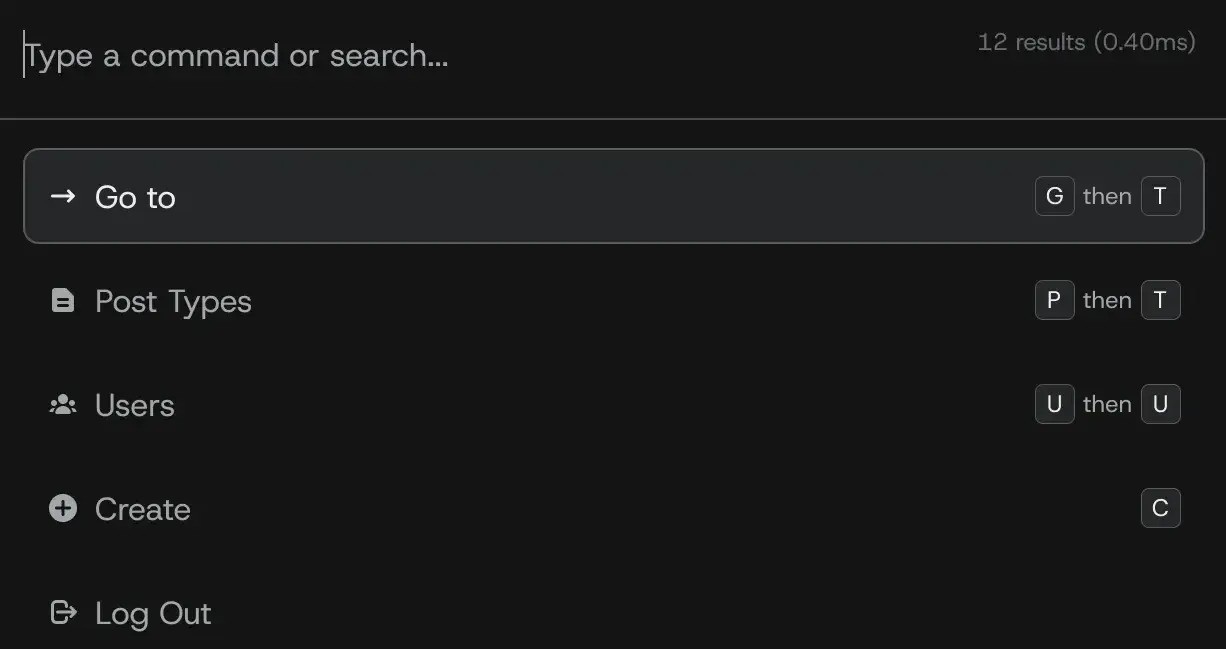
CommandUI is a revolutionary WordPress plugin designed to transform how users interact with the WordPress admin interface. It introduces a command bar that allows you to manage all aspects of your site using simple keyboard shortcuts, making navigation faster and more efficient than traditional mouse-based methods. Developed by experts frustrated with WordPress’s default setup, CommandUI addresses common pain points like slow page loads, excessive clicking, and cognitive overload from managing multiple tabs. With features like instant access to pages, posts, plugins, and settings, it enhances productivity for developers, agencies, and site managers. This plugin is particularly significant in the WordPress ecosystem as it brings modern web app-like functionality to an otherwise dated backend, improving workflow speed even on slower hosting environments. Users praise its accessibility features, ensuring it’s usable for everyone, including those relying on screen readers. By integrating seamlessly with WordPress, CommandUI saves time and reduces frustration, making it an essential tool for anyone who spends significant time in the admin area. For more insights, check out our guide to top WordPress plugins on WPExclusive.
Key Features of CommandUI
- Instant Access: Navigate to any WordPress page, settings, posts, or plugins with keystrokes, eliminating the need for multiple clicks and reducing navigation time significantly.
- Dynamic Content Search: Quickly find and edit posts, pages, users, or media files with high accuracy and typo tolerance, even handling large databases of over 100,000 records effortlessly.
- Plugin Management: Search, install, activate, or deactivate plugins from the WordPress repository without leaving your workflow, avoiding slow admin page loads.
- Content Creation: Create new posts, pages, products, or any custom content type with a single keystroke, streamlining your content workflow.
- Additional Enhancements: Includes customizable shortcuts, light/dark mode, native integrations with tools like Elementor and Bricks, and accessibility features for screen readers, making it versatile for all users. The latest version, 1.0, introduces faster performance and upcoming ZeroLatency Navigation for even quicker responses.
The latest version, 1.0, enhances user experience with improved search accuracy and better integration with popular plugins, ensuring seamless performance across various WordPress setups. For authoritative details, visit the official WordPress plugin repository.
How to Download CommandUI for Free
1. Visit the Official Site:
- Go to the sales page at https://commandui.com/ and locate the download section.
- Ensure you have a WordPress site ready, as CommandUI is designed for active use in the admin area.
2. Sign Up or Download:
- Create an account if required, or directly download the free version via the provided link.
- Review any trial or pricing options, but note that basic features are available for free trial use.
3. Prepare for Installation:
- Back up your site before proceeding, and ensure your WordPress version is 6.5 or higher with PHP 7.4+.
- For a hassle-free setup, consider WPX Hosting from top-rated reliable providers, which comes with pre-installed WordPress and optimized performance.
Installing CommandUI: Step-by-Step Guide
1. Upload the Plugin:
- Log into your WordPress admin dashboard and go to Plugins > Add New.
- Upload the downloaded ZIP file of CommandUI and activate it immediately.
2. Configure Settings:
- Once activated, access the command bar via the default shortcut (e.g., Ctrl + K) and customize shortcuts as needed.
- Ensure compatibility by checking for any conflicts with existing plugins; integrate with tools like Elementor for enhanced functionality.
3. Test Functionality:
- Test features like quick navigation and plugin management to confirm everything works smoothly.
- Note: Back up your site before installing or updating plugins. Use CommandUI’s built-in tools if prompted after an update. For more tips, see WPExclusive’s WordPress tips guide.
CommandUI Pricing
| Component | Price | Details |
|---|---|---|
| Agency Plan | $150/year | Includes 150 sites, priority support, and upcoming features like white-labeling; ideal for agencies managing multiple clients. |
| Freelancer Plan | $50/year | Covers 50 sites with no device limits; suited for freelancers handling client and personal sites. |
| Site Owner Plan | Free or $5/year | For personal use on up to 5 sites; basic features available, with upgrades for advanced needs. For more, check Yoast’s pricing insights. |
CommandUI Alternatives
Adminimize:
- Pros: Simplifies admin menus and improves navigation speed.
- Cons: Lacks advanced keyboard shortcuts and integrations.
- Best For: Users seeking basic admin customization without CommandUI’s depth.
WP CLI:
- Pros: Command-line interface for advanced users, offering scriptable tasks.
- Cons: Requires technical knowledge and isn’t as user-friendly for beginners.
- Best For: Developers who prefer terminal-based workflows. Learn more at WordPress Developer Resources.
Advanced Custom Fields (ACF):
- Pros: Enhances content creation with custom fields.
- Cons: Doesn’t focus on overall navigation like CommandUI.
- Best For: Content-heavy sites needing field management.
CommandUI vs. Other Plugins
CommandUI stands out compared to plugins like Adminimize or WP CLI by offering a more intuitive, keyboard-driven interface that boosts productivity without requiring coding skills. It excels in speed and accessibility, making it superior for daily admin tasks.
- Speed Advantage: Delivers instant navigation, reducing load times by up to 5x, unlike traditional plugins that rely on page refreshes.
- Integration Edge: Seamlessly pairs with Elementor and Bricks, providing a unified experience not found in competitors.
- Accessibility Benefits: Fully keyboard-accessible and screen reader compatible, setting it apart from less inclusive alternatives.
- Support Superiority: Offers priority support and regular updates, enhancing user satisfaction over basic free plugins.
This makes CommandUI ideal for agencies and power users. For comparisons, visit WPExclusive’s plugin comparisons.
Tips for Using CommandUI Effectively
- Customize shortcuts to match your workflow for maximum efficiency.
- Use it in combination with Elementor for faster page editing and building.
- Regularly clear caches to maintain optimal performance with CommandUI’s features.
- Train team members on its keyboard commands to boost collaborative productivity.
- Monitor site analytics post-implementation to measure time savings and workflow improvements.
Pairing CommandUI with Elementor
Pairing CommandUI with Elementor creates a powerhouse for WordPress site building. CommandUI’s quick navigation allows instant access to Elementor editing modes, enabling users to jump into page design without searching through menus. This integration boosts efficiency by combining CommandUI’s speed with Elementor’s drag-and-drop capabilities, resulting in faster development cycles and reduced errors. For users managing complex sites, this duo enhances accessibility and productivity, making it easier to handle large-scale projects. As noted by experts, this setup is ideal for agencies, with more details available at Elementor’s official site.
Should You Invest in Premium Extensions?
The free version of CommandUI is sufficient for basic navigation, but premium features are worth considering if you need advanced integrations, priority support, and multi-site management. These upgrades provide scalability for growing businesses, ensuring seamless performance across projects.
- Advanced functionality for larger teams and client sites.
- Enhanced features like white-labeling for branding.
- Integration options for hosting or SaaS environments.
- Customization tools for tailored workflows.
Visit the official site for pricing details and to make an informed decision.
Frequently Asked Questions
Is CommandUI compatible with my WordPress setup?
Yes, it requires WordPress 6.5+ and PHP 7.4+, and it’s designed to work seamlessly with most themes and plugins for fast navigation.
How does CommandUI improve productivity?
It allows keyboard-based management, reducing clicks and load times, which is ideal for users searching for efficient WordPress tools.
Can I use CommandUI on client sites?
Yes, premium plans support client sites, making it perfect for agencies looking to enhance workflows, as per user intent for scalable solutions.
Does it offer refunds?
CommandUI has a 14-day refund policy, addressing concerns for users hesitant about new plugins and seeking risk-free trials.
What are the system requirements?
It needs PHP 7.4+ and WordPress 6.5+, which is common for modern sites, helping users check compatibility before download.
Is there technical support available?
Yes, premium users get priority support, fulfilling the need for reliable assistance in managing WordPress efficiently.
Conclusion
CommandUI revolutionizes WordPress management by offering a fast, accessible, and efficient command bar that saves time and enhances productivity. Whether you’re a developer or site owner, downloading and using CommandUI can transform your workflow, making WordPress feel like a modern app. Explore its features today for better results. Disclaimer: Always use official sources for the latest pricing and features, and verify compatibility before installation.