What is Booknetic Conditional Prices?
When WordPress users need dynamic pricing solutions for their appointment booking systems, Booknetic Conditional Prices offers a powerful and flexible approach to automated rate management. This premium add-on transforms your standard booking system into an intelligent pricing engine that adjusts rates based on specific conditions, maximizing revenue while providing personalized experiences for your clients.
What Makes Booknetic Conditional Prices Different
Unlike static pricing plugins, Booknetic Conditional Prices integrates seamlessly with your existing Booknetic booking system to create sophisticated pricing rules that respond to multiple variables. The plugin’s unique strength lies in its ability to combine multiple conditions, creating granular control over your pricing strategy without requiring manual intervention.
- Advanced condition-based pricing with 15+ trigger variables
- Seamless integration with Booknetic’s core booking features
- Real-time price adjustments during the booking process
Booknetic Conditional Prices Features for WordPress Users
Dynamic Pricing Rules Engine
Create unlimited pricing conditions that automatically adjust your appointment rates based on specific criteria. The system supports both percentage-based and fixed-value adjustments, giving you complete control over your pricing strategy. You can set up seasonal promotions, peak hour surcharges, or loyalty discounts that activate automatically when conditions are met.
Multi-Variable Condition System
Configure pricing rules based on 15 different variables including service type, staff selection, appointment duration, booking date, time slots, payment methods, and customer behavior. The system allows you to combine multiple conditions using logical operators, creating sophisticated pricing scenarios that respond to complex business requirements.
Campaign Management Tools
Schedule pricing campaigns with specific start and end dates, perfect for holiday promotions, seasonal pricing, or limited-time offers. The system automatically activates and deactivates rules based on your timeline, ensuring your pricing strategy runs on autopilot without requiring constant monitoring.
How to Install Booknetic Conditional Prices
Quick Installation
- Ensure you have the main Booknetic plugin installed and activated
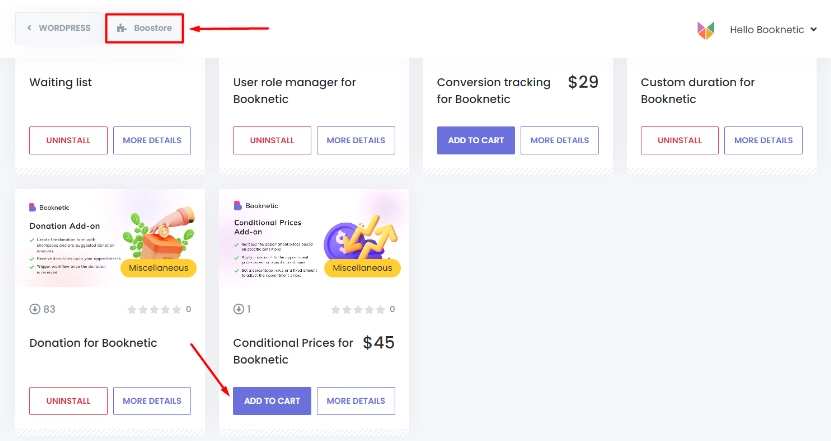
- Navigate to Booknetic > Boostore in your WordPress dashboard
- Search for “Conditional Prices” and click Install
- Activate the add-on to access conditional pricing features
Who Should Use Booknetic Conditional Prices?
Service-Based Businesses
Salons, spas, and wellness centers can implement time-based pricing, charging premium rates during peak hours or offering discounts for weekday appointments. Staff-based pricing allows senior professionals to command higher rates while junior staff remain competitively priced.
Professional Consultants
Consultants and coaches can create tiered pricing based on appointment duration, with longer sessions receiving bulk discounts. Payment method incentives can encourage clients to use preferred payment systems, reducing transaction costs and improving cash flow.
Booknetic Conditional Prices vs Alternatives
| Feature | Booknetic Conditional Prices | Generic Pricing Plugins |
|---|---|---|
| Native Booking Integration | Seamless Booknetic integration | Requires custom development |
| Condition Variables | 15+ built-in conditions | Limited to basic rules |
| Real-time Updates | Instant price adjustments | Manual refresh required |
Booknetic Conditional Prices Pricing
Conditional Prices is available as a premium add-on through the Booknetic Boostore. Pricing varies based on your Booknetic license tier, with the add-on included in premium packages or available as a separate purchase for standard license holders. Contact Booknetic sales for current pricing details and volume discounts.
Pros and Cons
✅ Pros
- Extensive condition options for precise pricing control
- Automated campaign scheduling saves time
- Seamless integration with Booknetic ecosystem
❌ Cons
- Requires main Booknetic plugin to function
- Learning curve for complex rule combinations
- Premium add-on requires additional investment
Frequently Asked Questions
Can I use Booknetic Conditional Prices without the main plugin?
No, Conditional Prices is an add-on that requires the main Booknetic appointment booking plugin to function properly.
How many pricing rules can I create?
There’s no limit to the number of conditional pricing rules you can create, allowing for unlimited pricing strategies.
Does it support recurring appointment pricing?
Yes, you can create specific rules for recurring appointments, offering discounts for multiple bookings or loyalty programs.
Can I combine multiple conditions in one rule?
Absolutely! The system supports complex rule combinations using logical operators to create sophisticated pricing scenarios.
Is there a mobile app for managing pricing rules?
Yes, Booknetic offers a mobile app that allows you to manage your conditional pricing rules on the go.
Does it integrate with payment gateways?
Yes, the add-on works seamlessly with all Booknetic-supported payment gateways, including Stripe, PayPal, and WooCommerce.
Final Verdict
Booknetic Conditional Prices is an essential tool for service businesses looking to optimize their revenue through intelligent pricing strategies. Its comprehensive condition system and seamless integration make it particularly valuable for businesses with complex pricing needs. While it requires investment in the Booknetic ecosystem, the return through optimized pricing and automated revenue management makes it a worthwhile addition for serious service providers.