
What is Block Shop WooCommerce Theme?
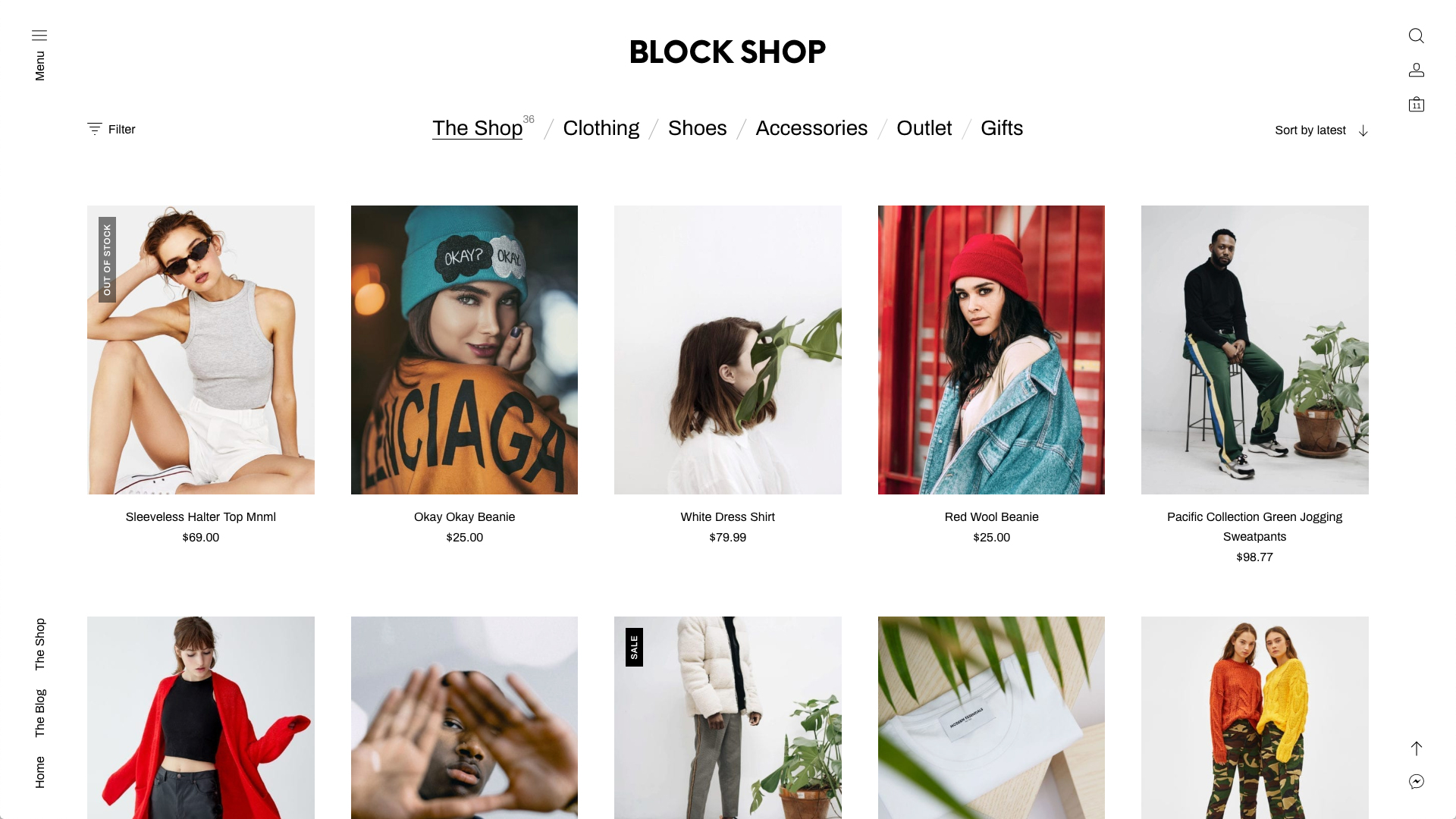
The Block Shop WooCommerce Theme, developed by Get Bowtied, is a premium WordPress theme meticulously designed for businesses aiming to establish a sleek, modern, and efficient online presence. Its core philosophy revolves around minimalism, prioritizing speed and user experience by stripping away unnecessary features often found in bulkier themes. This approach makes it an excellent choice for a wide array of eCommerce ventures, from fashion and apparel boutiques to artisanal product showcases, particularly those that benefit from a clean aesthetic that puts products front and center. The Block Shop WooCommerce Theme is fully compatible with the latest versions of WordPress and WooCommerce, ensuring seamless integration and access to the full suite of eCommerce functionalities. Its design is deeply intertwined with the WordPress block editor (Gutenberg), empowering users to build and customize their store layouts with an intuitive drag-and-drop interface, offering significant freedom in design without needing to write code. This theme is particularly well-suited for merchants who appreciate a clutter-free shopping experience for their customers, leading to potentially higher conversion rates. It’s built to be responsive, ensuring that your online store looks and functions flawlessly across all devices, from desktops to smartphones. For businesses seeking a theme that is easy to set up, maintain, and customize while delivering a professional and engaging user experience, the Block Shop WooCommerce Theme stands out as a compelling option. Its focus on essential e-commerce tools and a beautiful, adaptable catalog display makes it suitable for both small inventories and large-scale online stores looking for performance and style. Further information can often be found on the official WooCommerce website, which hosts the theme.
Key Features of Block Shop WooCommerce Theme
- Minimalist and Efficient Design: The Block Shop WooCommerce Theme champions a clean, uncluttered aesthetic that emphasizes your products. This minimalist approach not only enhances visual appeal but also contributes to faster loading times and a smoother user experience, focusing on efficiency over superfluous elements.
- Full Block Editor (Gutenberg) Integration: Build your store visually with the WordPress block editor. The Block Shop WooCommerce Theme provides extensive support for Gutenberg, allowing you to create custom page layouts, product displays, and content sections with ease, offering remarkable design flexibility.
- Beautiful Shop Catalog & Product Pages: It offers a beautifully designed shop catalog suitable for both small and large inventories. Product pages are clean, focusing attention on product details, images, and purchasing options, supporting various product types like simple, variable, grouped, and downloadable.
- Advanced Customization via WP Customizer: Tailor your store’s appearance in real-time using the native WordPress Customizer. Adjust color schemes, typography, layout options, upload your logo, and toggle various elements on or off with live previews before publishing changes.
- Mini Cart & Convenient Account Features: Enhance the shopping experience with a sleek mini cart for quick access and faster checkouts. The theme also includes a convenient and user-friendly login and registration screen for customer accounts, streamlining user interaction.
- One-Click Demo Import: Get your store up and running quickly by importing the demo content with a single click. This feature provides a foundational layout and design that you can then customize to match your brand.
- Responsive and Retina Ready: Ensures your online store looks sharp and functions perfectly on all devices, including desktops, tablets, and smartphones, adapting to various screen sizes and resolutions for an optimal viewing experience.
The latest version of the Block Shop WooCommerce Theme, 5.2, continues to build upon its robust foundation by ensuring compatibility with WordPress 6.7 and WooCommerce 9.4. This version likely includes performance enhancements, security updates, and refinements to its block editor integration, ensuring users have access to the latest web standards and e-commerce capabilities. Ongoing development means the theme stays current with the evolving WordPress and WooCommerce ecosystems.
How to Download Block Shop WooCommerce Theme
The Block Shop WooCommerce Theme is a premium theme, meaning it is not available for free download directly from the WordPress.org repository. To acquire this theme, you’ll need to purchase it from the official WooCommerce Marketplace. Here’s a general guide on how to obtain it:
- Visit the Official WooCommerce Marketplace:
- Navigate to the Block Shop WooCommerce Theme product page on WooCommerce.com. Here you can find detailed information, demos, and pricing.
- Review the theme’s features, system requirements (like PHP version 7.4.1 or higher), and compatibility details to ensure it meets your needs.
- Choose a Billing Option and Purchase:
- Select your preferred billing option (e.g., 1-year plan or 2-years plan). The WooCommerce Marketplace often provides discounts for longer subscription periods.
- Add the theme to your cart and proceed to checkout. You will need a WooCommerce.com account to complete the purchase. If you don’t have one, you’ll be prompted to create one.
- Download the Theme File:
- Once your purchase is complete, log in to your WooCommerce.com account. Navigate to the ‘Downloads’ section.
- You should find the Block Shop WooCommerce Theme listed among your purchased products. Download the theme’s .zip file to your computer. This file contains all the necessary theme files for installation.
For a hassle-free setup and to ensure optimal performance for your Block Shop WooCommerce Theme powered store, consider using reliable managed WordPress hosting. Providers like WPX Hosting often come with WordPress and WooCommerce pre-installed and are optimized for e-commerce, potentially simplifying your initial setup and ongoing maintenance. While the theme itself is premium, investing in good hosting is crucial for any online store’s success.
Installing Block Shop WooCommerce Theme: Step-by-Step Guide
Once you have purchased and downloaded the Block Shop WooCommerce Theme .zip file from your WooCommerce.com account, installing it on your WordPress website is a straightforward process. Follow these steps to get your new theme up and running:
- Access Your WordPress Dashboard:
- Log in to your WordPress admin area. This is typically found by navigating to `yourwebsite.com/wp-admin`.
- Ensure you have administrator privileges to install new themes.
- Upload the Theme File:
- In the WordPress dashboard, go to Appearance > Themes.
- Click the Add New button at the top of the page. Then, click the Upload Theme button.
- Click Choose File, locate the `block-shop.zip` (or similarly named) file you downloaded from WooCommerce.com, and select it.
- Click Install Now. WordPress will now upload and install the theme files from the .zip package. This process might take a few moments.
- Activate and Configure the Theme:
- After the installation is complete, you will see a success message with options to Live Preview, Activate, or Return to Themes page. Click Activate to make the Block Shop WooCommerce Theme your site’s active theme.
- Once activated, the Block Shop WooCommerce Theme may prompt you to install recommended plugins or guide you through a setup wizard (often including the One-Click Demo Import feature). Follow these on-screen instructions to configure the theme according to your preferences and import demo content if desired. This can be a great way to quickly understand the theme’s structure and capabilities. Consult the theme’s official documentation for specific setup steps and customization options.
Note: Always back up your WordPress site (files and database) before installing a new theme or making significant changes. If the Block Shop WooCommerce Theme prompts for any updates or offers built-in tools after activation, it’s generally recommended to follow those instructions for optimal performance and compatibility.
Block Shop WooCommerce Theme Pricing
| Component | Price | Details |
|---|---|---|
| Block Shop WooCommerce Theme (1 Year Plan) | $59 | Includes 1 year of product updates, customer support, and a 30-day money-back guarantee. Ideal for getting started and evaluating the theme. |
| Block Shop WooCommerce Theme (2 Years Plan) | $94.40 (Save 20%) | Originally $118. Includes 2 years of product updates, customer support, and the 30-day money-back guarantee. Offers better value for long-term commitment. |
| Subscription Inclusions | Included with Purchase | Access to all product updates and improvements, dedicated customer support for any issues, and the peace of mind of a 30-day money-back guarantee if the theme doesn’t meet your expectations. |
The pricing for the Block Shop WooCommerce Theme is subscription-based, ensuring you receive ongoing updates and support. It’s important to check the official Block Shop WooCommerce Theme page on WooCommerce.com for the most current pricing and any promotional offers, as these can change. The subscription model is common for premium themes and plugins, as it supports continuous development, ensuring compatibility with new WordPress and WooCommerce versions, and the introduction of new features or improvements.
Block Shop WooCommerce Theme Alternatives
While the Block Shop WooCommerce Theme offers a compelling minimalist and block-editor-focused solution, several other themes cater to different needs and preferences within the WooCommerce ecosystem. Here are a few notable alternatives:
1. Storefront Theme:
- Pros: Developed and maintained by WooCommerce core developers, ensuring maximum compatibility and seamless integration. It’s free, lightweight, and provides a solid, extendable foundation for any WooCommerce store. A wide range of Storefront child themes and extensions are available for customization.
- Cons: The default design is quite basic and may require significant customization or child themes to achieve a unique look. While solid, it might lack some of the built-in advanced design features of premium themes.
- Best For: Users looking for a free, reliable, and highly compatible theme that serves as a blank canvas for customization, or for developers who want a robust starting point.
2. Astra with WooCommerce:
- Pros: Astra is a highly popular, fast, and lightweight multipurpose theme. It offers deep WooCommerce integration, numerous starter templates, and extensive customization options through the WordPress Customizer and compatibility with page builders like Elementor and Beaver Builder. Its performance focus is excellent for SEO.
- Cons: While the free version is generous, many advanced WooCommerce-specific features and design options require upgrading to Astra Pro, which is a paid add-on.
- Best For: Users who prioritize speed, flexibility, and a wide range of design options, especially those who prefer working with page builders for extensive customization. Ideal for building various types of websites, including e-commerce stores. Check out our Astra Theme review for more details.
3. Flatsome:
- Pros: Flatsome is one of the best-selling WooCommerce themes, known for its built-in UX Builder, a live page builder designed for creating custom layouts. It comes packed with features, demo content, and design options tailored for e-commerce, often reducing the need for additional plugins.
- Cons: The sheer number of features can be overwhelming for beginners and might lead to a steeper learning curve. If not optimized carefully, feature-rich themes can sometimes impact site speed.
- Best For: Users who want an all-in-one theme with a powerful built-in page builder and extensive e-commerce specific features, aiming for a highly customized store without relying heavily on third-party plugins.
Block Shop WooCommerce Theme vs. Other Themes
The Block Shop WooCommerce Theme carves out its niche by strongly emphasizing a minimalist design philosophy coupled with deep integration with the WordPress block editor (Gutenberg). This distinguishes it from many other popular WooCommerce themes that might offer broader, multipurpose functionality or rely on proprietary page builders. When comparing Block Shop to alternatives, several key differences emerge. For instance, themes like Flatsome or Avada come packed with a vast array of features and their own page builders, which can be powerful but also potentially lead to a steeper learning curve and, if not managed well, site bloat. In contrast, Block Shop’s focus on efficiency means it aims to provide essential e-commerce tools in a lightweight package, promoting faster loading times and a more straightforward user experience for both the merchant and the customer. While themes like Astra offer excellent performance and flexibility through page builder compatibility, Block Shop’s primary customization pathway is through the native WordPress Customizer and the block editor, appealing to users who prefer to work within the evolving core WordPress experience. This commitment to the Gutenberg editor ensures that Block Shop users are well-positioned for future WordPress developments. Furthermore, unlike the free Storefront theme, which acts as a basic but solid foundation, Block Shop is a premium offering that provides a more polished and feature-rich design out-of-the-box, specifically curated for a modern, clean aesthetic. This makes it ideal for store owners who want a sophisticated look without extensive custom development from scratch.
- Focus on Simplicity and Efficiency: Block Shop WooCommerce Theme prioritizes a clean, minimal design and efficient performance over an exhaustive list of features, distinguishing it from more feature-heavy multipurpose themes.
- Native Block Editor Experience: Its deep integration with the Gutenberg block editor offers a modern, WordPress-native approach to site building, differing from themes reliant on third-party page builders.
- WooCommerce-Centric Design: While many themes support WooCommerce, Block Shop is designed specifically with WooCommerce stores in mind, ensuring a cohesive and optimized e-commerce experience.
- Premium Support and Polish: As a premium theme from WooCommerce.com, it offers dedicated support and a refined aesthetic out-of-the-box compared to free alternatives like Storefront.
Ultimately, the choice depends on your specific needs: if you desire a streamlined, fast, and modern store that leverages the latest WordPress block editing capabilities, the Block Shop WooCommerce Theme is an excellent contender. If you need a broader range of built-in features or prefer a specific page builder, other themes might be more suitable. For those looking to dive deep into block-based design, exploring resources on the Gutenberg block editor can be highly beneficial.
Tips for Using Block Shop WooCommerce Theme Effectively
- Embrace the Block Editor: Fully utilize the theme’s compatibility with the WordPress block editor (Gutenberg). Experiment with different blocks to create unique layouts for your homepage, product pages, and blog posts. This is where the Block Shop WooCommerce Theme truly shines.
- Leverage the One-Click Demo Import: If you’re unsure where to start, use the one-click demo import feature. This will set up your site with a pre-designed layout and content, which you can then customize to fit your brand and products, providing a significant head start.
- Master the WordPress Customizer: Explore all the options available in the WordPress Customizer (Appearance > Customize). The Block Shop WooCommerce Theme allows for adjustments to colors, fonts, logo, header/footer layouts, and various theme-specific settings, all with live previews.
- Optimize Product Imagery: Given the theme’s minimalist design, high-quality, well-optimized product images are crucial. Ensure your images are clear, professional, and compressed for the web to maintain fast loading times without sacrificing visual appeal.
- Keep It Clean and Focused: The strength of the Block Shop WooCommerce Theme is its minimalism. Avoid cluttering your pages with too many widgets or unnecessary elements. Maintain a clear navigation structure and focus on guiding users towards making a purchase.
- Regularly Update Theme and Plugins: Keep your Block Shop WooCommerce Theme, WordPress core, WooCommerce plugin, and any other plugins updated to their latest versions. This ensures security, compatibility, and access to new features.
- Consult Documentation and Support: Refer to the official Block Shop WooCommerce Theme documentation for detailed guidance. If you encounter issues, utilize the support included with your theme purchase.
- Focus on Mobile Responsiveness: While the theme is inherently responsive, always test your store’s appearance and functionality on various mobile devices and screen sizes to ensure a seamless experience for all users.
Pairing Block Shop WooCommerce Theme with Complementary Tools
The Block Shop WooCommerce Theme is designed for seamless integration with WooCommerce and the WordPress block editor, forming a powerful core for your online store. To further enhance its capabilities and your store’s performance, consider pairing it with specific complementary tools and plugins. Given its focus on a clean user experience and efficient operation, plugins that augment SEO, customer engagement, and site speed can be particularly beneficial. For instance, an advanced SEO plugin like Rank Math SEO or Yoast SEO can help you optimize your product listings and content more effectively, complementing the theme’s already SEO-friendly structure. For customer engagement, consider integrating a live chat plugin or an email marketing tool like MailPoet (also available on WooCommerce.com) to build relationships and drive repeat sales. Since Block Shop emphasizes speed, pairing it with a caching plugin (if not already provided by your hosting) such as WP Rocket or LiteSpeed Cache can further improve loading times. The theme’s sales page mentions compatibility with WooCommerce Bookings and WooCommerce Subscriptions, making these excellent choices if your business model involves appointments, rentals, or recurring payments. Utilizing these extensions with Block Shop’s clean interface can lead to a highly professional and functional specialized store. The minimalist nature of Block Shop also means that well-chosen analytics tools, like Google Analytics via a dedicated plugin, will provide crucial insights into customer behavior without adding unnecessary bloat. The key is to select tools that align with Block Shop’s philosophy of efficiency and user-centric design, enhancing functionality without compromising its core strengths. Always ensure any added plugins are well-coded and regularly updated to maintain site integrity and performance.
Why Invest in the Premium Block Shop WooCommerce Theme?
Investing in a premium theme like the Block Shop WooCommerce Theme, as opposed to opting for a free alternative, offers several distinct advantages that can significantly impact your online store’s success and your overall management experience. While free themes can be a good starting point, premium themes like Block Shop are specifically crafted to deliver a higher level of design polish, functionality, and dedicated support. The initial cost translates into long-term value, particularly for businesses serious about their online presence. Here’s why investing in the Block Shop WooCommerce Theme is often a worthwhile decision:
- Professional Design and Aesthetics: Block Shop provides a sophisticated, minimalist design out-of-the-box. This professional appearance can build trust with customers and enhance your brand’s image, which might require significant custom work or additional plugins to achieve with a basic free theme.
- Dedicated Support and Regular Updates: Purchasing Block Shop from WooCommerce.com grants you access to customer support from the developers (Get Bowtied) and WooCommerce. This is invaluable for troubleshooting and guidance. Regular updates ensure compatibility with the latest WordPress and WooCommerce versions, plus ongoing security patches and feature enhancements.
- Optimized for Performance and SEO: Premium themes are often better optimized for speed and SEO best practices. Block Shop’s emphasis on efficiency and clean code contributes to faster loading times, which is crucial for user experience and search engine rankings. A good WooCommerce SEO strategy is vital.
- Seamless Block Editor Integration: For users who want to leverage the full power of the WordPress block editor (Gutenberg), Block Shop is designed from the ground up for this, offering a more intuitive and flexible content creation experience than many generic themes.
- Advanced Features and Customization: While minimalist, Block Shop includes thoughtful e-commerce features like an enhanced mini-cart, clean product pages, and various customization options through the WP Customizer, reducing the need for multiple extra plugins.
- Peace of Mind with a Money-Back Guarantee: The 30-day money-back guarantee offered by WooCommerce.com allows you to try the theme and ensure it fits your needs, reducing the financial risk of the investment.
Investing in the Block Shop WooCommerce Theme means you’re paying for quality, reliability, ongoing development, and support, which are critical components for a thriving online store. Visit the official WooCommerce product page for the most current details and to make your purchase.
Frequently Asked Question:
Is the Block Shop WooCommerce Theme free?
No, the Block Shop WooCommerce Theme is a premium theme. It must be purchased from the official WooCommerce Marketplace. Prices typically start from $59 for a 1-year plan.
Is Block Shop WooCommerce Theme compatible with the latest versions of WordPress and WooCommerce?
Yes, the Block Shop WooCommerce Theme is actively maintained and updated. According to its sales page, it is tested with WordPress 6.7 and WooCommerce 9.4, ensuring compatibility with recent versions.
Can I customize the Block Shop WooCommerce Theme?
Absolutely. The theme offers customization options through the native WordPress Customizer (for colors, fonts, logos, etc.) and is fully integrated with the WordPress block editor (Gutenberg), allowing for flexible page and content layouts.
Does the Block Shop WooCommerce Theme support different product types?
Yes, being a WooCommerce theme, it supports all standard WooCommerce product types, including Simple, Variable (e.g., different colors/sizes), Grouped, External/Affiliate, and Downloadable products. Its product pages are designed to showcase these effectively.
What kind of support is available for the Block Shop WooCommerce Theme?
When you purchase the Block Shop WooCommerce Theme from WooCommerce.com, your subscription includes product updates and improvements, customer support from the theme developers (Get Bowtied) via WooCommerce, and access to documentation.
Is the Block Shop WooCommerce Theme good for SEO?
The Block Shop WooCommerce Theme’s minimalist design, clean code, and focus on efficiency contribute positively to SEO. Fast loading times and a responsive design are important ranking factors. Pairing it with a good SEO plugin can further enhance its SEO capabilities. For more on minimalist design benefits, authoritative sources like the Nielsen Norman Group discuss its impact on usability.
Conclusion
The Block Shop WooCommerce Theme by Get Bowtied stands out as a premier choice for WordPress users looking to build a modern, minimalist, and highly efficient online store. Its deep integration with the WordPress block editor (Gutenberg) empowers users with remarkable design flexibility without sacrificing performance or ease of use. With features like a beautiful shop catalog suitable for any inventory size, a streamlined mini cart, convenient account management, and extensive customization options via the WordPress Customizer, Block Shop provides a robust toolkit for crafting an engaging shopping experience. Its responsive design ensures your store looks impeccable on all devices, a critical factor in today’s mobile-first world. The theme’s focus on efficiency means faster load times and a cleaner interface, which can lead to improved user satisfaction and conversion rates. While it is a premium theme, the investment includes ongoing updates, dedicated support, and the assurance of compatibility with the latest WordPress and WooCommerce versions. If your goal is to create a sophisticated, product-focused e-commerce site that is easy to manage and delightful for customers to navigate, the Block Shop WooCommerce Theme is certainly worth strong consideration. We encourage you to explore its demo and features further on the official WooCommerce sales page to see if it aligns with your vision for your online business.
Disclaimer: Information, including pricing and version details, is accurate as of the time of writing but is subject to change. Always refer to the official Block Shop WooCommerce Theme sales page on WooCommerce.com for the most up-to-date information and to make your purchase. Ensure you back up your website before installing any new theme or plugin.

.png "WooThumbs for WooCommerce")