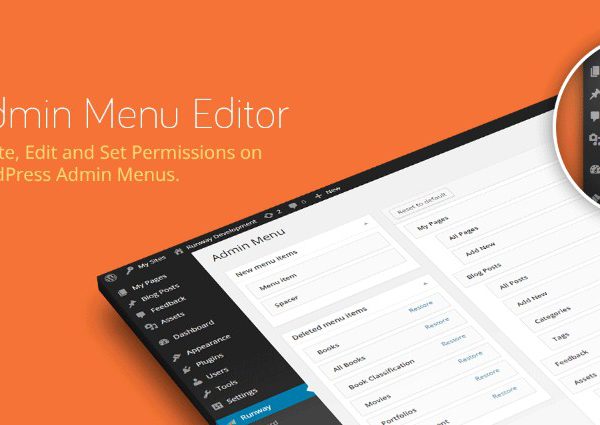
What is Admin Menu Editor Pro WordPress Plugin?
When WordPress users need to customize their admin dashboard for better user experience and security, Admin Menu Editor Pro WordPress Plugin offers a comprehensive solution for complete menu management. This powerful plugin gives you full control over your WordPress admin interface, making it ideal for developers, agencies, and site owners who want to create a tailored experience for different user roles.
What Makes Admin Menu Editor Pro Different
Admin Menu Editor Pro stands out as the most comprehensive WordPress admin menu customization tool available, offering unparalleled control over every aspect of your dashboard navigation. Unlike basic menu editors, this plugin provides role-based permissions, drag-and-drop organization, and extensive customization options that transform the default WordPress admin experience into a professional, branded interface.
- Complete role-based menu control with granular permissions
- Drag-and-drop interface for intuitive menu organization
- 600+ menu icons and full color customization options
Admin Menu Editor Pro Features for WordPress Users
Menu Permission Management
The plugin’s core strength lies in its sophisticated permission system. You can easily hide or show menu items based on user roles or individual users with just a few clicks. This feature is particularly valuable for creating client-friendly admin interfaces where you want to restrict access to sensitive areas. For example, you can hide plugin management from everyone except administrators, or give specific users access to custom admin pages without changing their WordPress role.
Visual Customization Options
p>Transform the look and feel of your admin menu with extensive visual customization options. Choose from over 600 icons including Dashicons and FontAwesome collections, or upload your own custom icons. The color customization feature allows you to modify background, text, icon, and highlight colors for the entire menu or individual items, perfect for white-label WordPress solutions. These branding capabilities help maintain consistency with your client’s brand identity.Advanced Menu Organization
Reorganize your WordPress admin menu with an intuitive drag-and-drop interface. Move frequently used items to the top level, relocate plugin pages to more logical positions, or create custom menu structures that match your workflow. The plugin also supports creating non-clickable menu items for organizational purposes and adding custom links that can open in new tabs or iframes, making it perfect for integrating external services directly into the WordPress admin experience.
How to Install Admin Menu Editor Pro
Quick Installation
- Download the plugin from the official website after purchase
- Go to Plugins → Add New → Upload Plugin in WordPress dashboard
- Select the downloaded zip file and click Install Now
- Activate the plugin and enter your license key
Who Should Use Admin Menu Editor Pro?
WordPress Agencies and Freelance Developers
Agencies building client websites will find this plugin invaluable for creating branded, user-friendly admin interfaces. You can hide unnecessary menu items that might confuse clients, add custom links to support documentation, and ensure clients only have access to the features they need. The import/export functionality makes it easy to apply consistent menu configurations across multiple client sites, saving significant development time.
Multisite Network Administrators
For WordPress multisite installations, Admin Menu Editor Pro provides essential control over what different site administrators can access. Network admins can create standardized menu structures across all subsites while allowing individual site customization where needed. This is particularly useful for educational institutions, franchise businesses, or any organization running multiple WordPress sites with different user permission requirements.
Admin Menu Editor Pro vs Alternatives
| Feature | Admin Menu Editor Pro | User Role Editor |
|---|---|---|
| Menu Reorganization | Full drag-and-drop control | Limited to role permissions |
| Visual Customization | 600+ icons, color controls | No visual customization |
| Plugin Hiding | Individual plugin visibility control | No plugin management |
Admin Menu Editor Pro Pricing
The plugin offers three flexible pricing tiers to suit different needs. The Personal license at $39 covers use on 2 sites with one year of updates. The Plus license at $59 extends usage to 5 sites and includes client site usage. The Agency license at $79 provides unlimited site usage and includes both the Toolbar Editor and Branding add-ons, making it the best value for professional developers. All licenses include one year of free updates and support, with lifetime update options available for long-term projects.
Pros and Cons
✅ Pros
- Comprehensive menu customization with role-based permissions
- Intuitive drag-and-drop interface for easy organization
- Extensive visual customization options including 600+ icons
❌ Cons
- Annual renewal required for updates after first year
- Learning curve for advanced features like iframe embedding
- Higher price point compared to basic menu editors
Frequently Asked Questions
Can I hide specific plugins from certain users?
Yes, Admin Menu Editor Pro allows you to hide individual plugins from the Plugins page based on user roles or specific users, giving you complete control over plugin visibility.
Does this plugin work with WordPress multisite?
Absolutely! The plugin is fully compatible with WordPress multisite installations and can be used to customize menus across your entire network or individual subsites.
Can I export my menu settings to use on other sites?
Yes, the plugin includes import/export functionality that allows you to save your menu configuration and apply it to multiple sites, perfect for agencies maintaining consistent setups.
Will this plugin slow down my WordPress admin?
No, Admin Menu Editor Pro is lightweight and optimized for performance. It’s actively used on over 75,000 sites with no reported performance issues.
What happens if I don’t renew my license after one year?
The plugin will continue to work, but you won’t receive updates or support. Renewing is recommended for security updates and new features.
Can I create custom menu items that link to external pages?
Yes, you can add custom menu items that link to any URL, with options to open in new tabs or display external pages in iframes within the WordPress admin.
Final Verdict
Admin Menu Editor Pro is an essential tool for any serious WordPress developer or agency managing client sites. Its comprehensive feature set, intuitive interface, and robust permission system make it the gold standard for WordPress admin customization. While the annual renewal might be a consideration for some users, the time saved and professional results achieved make it a worthwhile investment for anyone serious about creating tailored WordPress admin experiences.