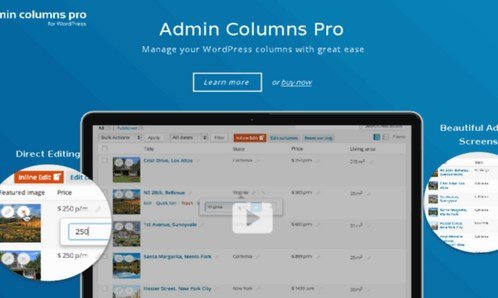
What is Admin Columns Pro Events Calendar Addon?
When WordPress users need to manage large-scale events efficiently, the Admin Columns Pro Events Calendar Addon offers a revolutionary approach to event administration. This powerful addon transforms your WordPress dashboard into a comprehensive event management hub, allowing you to view, filter, and edit all your events, venues, and organizers from a single interface. The Admin Columns Pro Events Calendar Addon seamlessly integrates with The Events Calendar plugin, extending its functionality with advanced column customization and inline editing capabilities that save you hours of administrative work.
What Makes Admin Columns Pro Events Calendar Addon Different
Unlike standard event management solutions that require navigating multiple screens to access and modify event information, this addon brings everything together in customizable list tables. It’s specifically designed to address the pain points of event managers who deal with numerous events, multiple venues, and various organizers. The addon’s unique selling proposition lies in its ability to display almost every event field as a column, making it incredibly easy to find specific information and make quick edits without leaving the overview screen.
- Seamless integration with The Events Calendar plugin
- Inline editing capabilities for all event fields
- Advanced filtering by organizer, venue, and event status
Admin Columns Pro Events Calendar Addon Features for WordPress Users
Custom Event, Organizer, and Venue Columns
The addon allows you to create custom columns for virtually every event field, including event dates, times, venues, organizers, ticket information, and custom fields. This flexibility means you can display exactly the information you need at a glance, whether you’re tracking upcoming events, monitoring venue capacity, or managing organizer assignments. Each column can be sorted and filtered, making it simple to organize your events based on any criteria you choose.
Smart Filtering and Search
With smart filtering capabilities, you can quickly narrow down your event list based on specific criteria. Filter events by organizer to see all events managed by a particular person, or filter by venue to view all upcoming events at a specific location. The addon also allows you to filter by event status, date ranges, and custom field values. This powerful filtering system transforms how you navigate through your events, saving you valuable time when managing large event databases.
Inline Editing and Bulk Operations
One of the most powerful features is the ability to edit event data directly from the overview screen. No more clicking through multiple pages to make simple changes. With inline editing, you can update event titles, change venues, modify dates, or edit any custom field without leaving the list view. The addon also supports bulk editing, allowing you to update multiple events simultaneously – perfect for when you need to change venue information for several events or update organizer details across your calendar.
How to Install Admin Columns Pro Events Calendar Addon
Quick Installation
- Ensure you have Admin Columns Pro and The Events Calendar plugins installed
- Download the Events Calendar addon from your Admin Columns account
- Go to Plugins → Add New → Upload Plugin in WordPress dashboard
- Select the addon file and click Install Now → Activate
- Navigate to Admin Columns settings to configure your event columns
Who Should Use Admin Columns Pro Events Calendar Addon?
Event Management Agencies
Event management agencies handling multiple clients’ events will find this addon invaluable. It allows you to manage hundreds of events across different venues and organizers efficiently. The ability to filter by client, venue, or event type means you can quickly access the information you need without sifting through irrelevant data. Bulk editing features save hours when updating event details across multiple calendars.
Venue Managers and Event Coordinators
Venue managers can use the addon to track all events at their location, monitor booking schedules, and manage organizer information. The filtering system allows you to view events by date range, check venue availability, and quickly access contact information for event organizers. This makes coordination and communication much more efficient, especially during busy event seasons.
Admin Columns Pro Events Calendar Addon vs Alternatives
| Feature | Admin Columns Pro Events Calendar Addon | Native Events Calendar |
|---|---|---|
| Inline Editing | Edit directly from list view | Requires opening each event |
| Custom Columns | Unlimited custom columns | Limited default columns |
| Advanced Filtering | Multi-field filtering with operators | Basic search only |
Admin Columns Pro Events Calendar Addon Pricing
The Events Calendar addon is included with Admin Columns Pro licenses, which start at €79 for a single site license. Multi-site and developer licenses are also available, offering better value for agencies and developers managing multiple WordPress installations. All purchases include a 30-day money-back guarantee and one year of updates and support.
Pros and Cons
✅ Pros
- Dramatically reduces time spent managing events
- Powerful filtering and search capabilities
- Seamless integration with existing Events Calendar setup
❌ Cons
- Requires Admin Columns Pro license
- Learning curve for advanced features
- Only works with The Events Calendar plugin
Frequently Asked Questions
Does the addon work with Events Calendar Free version?
Yes, the Admin Columns Pro Events Calendar Addon works with both the free and pro versions of The Events Calendar plugin.
Can I export filtered event lists?
Absolutely! You can export your filtered and sorted event lists to CSV format for reporting or external analysis.
Is inline editing available for all event fields?
Most event fields support inline editing, including custom fields. Some complex fields may require opening the full event editor.
Can multiple users have different column layouts?
Yes, Admin Columns Pro supports user-specific column sets, allowing different team members to customize their view.
Does the addon support recurring events?
Yes, the addon fully supports recurring events from The Events Calendar and allows you to manage them efficiently.
Is there a limit to the number of custom columns?
No, there’s no limit to the number of custom columns you can create for your events, venues, and organizers.
Final Verdict
The Admin Columns Pro Events Calendar Addon is an essential tool for anyone serious about event management in WordPress. It transforms the cumbersome process of managing multiple events into a streamlined, efficient workflow. While it requires an investment in Admin Columns Pro, the time savings and productivity gains make it well worth the cost for agencies, venue managers, and anyone handling multiple events regularly.