What is Admin Columns Pro BuddyPress Addon?
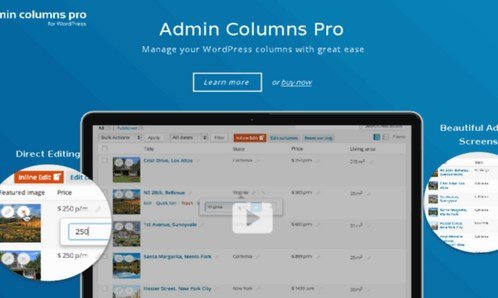
When WordPress users need efficient BuddyPress community management, Admin Columns Pro BuddyPress Addon offers a powerful solution for transforming profile data into manageable columns. This specialized add-on extends the capabilities of Admin Columns Pro, allowing you to display, sort, filter, and edit BuddyPress profile fields directly from the WordPress user overview screen. The Admin Columns Pro BuddyPress Addon eliminates the need to navigate through individual user profiles, making community management significantly more efficient.
What Makes Admin Columns Pro BuddyPress Addon Different
Unlike standard WordPress user management tools, this add-on specifically targets BuddyPress extended profile fields (Xprofile), bringing them directly into your admin interface. The seamless integration between BuddyPress social features and Admin Pro’s powerful column management creates a unique solution for community administrators who need to manage user data efficiently without sacrificing functionality.
- Direct manipulation of BuddyPress profile fields from user list
- Advanced sorting and filtering capabilities for community data
- Bulk editing support for multiple user profiles simultaneously
Admin Columns Pro BuddyPress Addon Features for WordPress Users
Profile Field Column Management
The core functionality transforms any BuddyPress profile field into a sortable, filterable column in your WordPress users table. Whether you’re managing custom registration fields, user interests, location data, or social media links, each field becomes immediately accessible from the main user overview screen. This feature eliminates countless clicks spent navigating through individual profiles to gather or update user information.
Advanced Sorting and Filtering
Beyond simple display, the add-on provides sophisticated sorting and filtering options for all profile fields. Need to find users from a specific location? Sort by age to identify your youngest or oldest community members? Filter users by their interests or membership level? The Admin Columns Pro BuddyPress Addon makes these operations instantaneous, turning hours of manual searching into seconds of precise data retrieval.
Inline and Bulk Editing Capabilities
Perhaps the most powerful feature is the ability to edit profile data directly from the list view. Update single user information without leaving the table, or select multiple users for bulk edits across common fields. This functionality is particularly valuable for community managers who need to update user categories, membership statuses, or profile verification flags across multiple accounts efficiently.
How to Install Admin Columns Pro BuddyPress Addon
Quick Installation
- First, install and activate Admin Columns Pro from our WordPress plugin collection
- Navigate to Admin Columns → Add-ons in your WordPress dashboard
- Locate the BuddyPress integration and click to activate
- Configure your BuddyPress columns from Users → Admin Columns
Who Should Use Admin Columns Pro BuddyPress Addon?
Community Managers
For administrators managing large BuddyPress communities, this add-on transforms user management from a time-consuming task into an efficient workflow. Quickly identify inactive users, segment members by interests, or update membership statuses across hundreds of profiles without leaving the admin interface.
Membership Site Owners
Membership sites using BuddyPress for member profiles benefit immensely from the ability to sort and filter users by subscription level, payment status, or engagement metrics. The bulk editing features make it simple to update member categories or verify account statuses in batches.
Admin Columns Pro BuddyPress Addon vs Alternatives
| Feature | Admin Columns Pro BuddyPress Addon | Default WordPress/BuddyPress |
|---|---|---|
| Profile Field Display | Customizable columns in user list | td>Requires visiting individual profiles|
| Bulk Editing | td>Direct bulk updates from list viewManual individual profile editing | |
| Advanced Filtering | Multi-operator filtering on all fields | Basic search only |
Admin Columns Pro BuddyPress Addon Pricing
The BuddyPress add-on is included with Admin Columns Pro licenses, starting at €79 for a single site license. Multi-site and developer packages are available, offering better value for agencies managing multiple BuddyPress installations. All purchases include a 30-day money-back guarantee and one year of updates and support.
Pros and Cons
✅ Pros
- Dramatically reduces time spent on user management tasks
- Eliminates need to navigate individual profiles for data updates
- Powerful filtering and sorting for all BuddyPress profile fields
❌ Cons
- Requires Admin Columns Pro as base plugin (additional cost)
- Learning curve for advanced filtering features
- May not support all third-party BuddyPress field types
Frequently Asked Questions
Does Admin Columns Pro BuddyPress Addon work with custom profile field types?
Yes, the add-on supports most standard BuddyPress profile field types including text boxes, dropdowns, multi-select boxes, date fields, and radio buttons. However, some highly specialized third-party field types may require additional configuration.
Can I export filtered BuddyPress user data?
Absolutely! When combined with Admin Columns Pro’s export feature, you can export your filtered and sorted BuddyPress user data to CSV format, perfect for creating member reports or backing up profile information.
Is the BuddyPress add-on included in all Admin Columns Pro packages?
Yes, the BuddyPress integration is included with all Admin Columns Pro license levels, from single site to unlimited packages. There’s no additional cost for the add-on itself.
Will this slow down my WordPress admin with many users?
The add-on is optimized for performance, even with large user bases. The smart loading system only fetches data when needed, and filtering uses efficient database queries to maintain responsiveness.
Can different user roles see different BuddyPress columns?
Yes, Admin Columns Pro allows you to create different column sets based on user roles. You can configure which BuddyPress fields are visible to administrators, editors, or other custom roles.
Does this work with BuddyPress member types?
Yes, the add-on fully supports BuddyPress member types, allowing you to filter and sort users based on their member type classification, making it easy to manage different user categories within your community.
Final Verdict
Admin Columns Pro BuddyPress Addon is an essential tool for anyone serious about BuddyPress community management. The time savings alone justify the investment, transforming what could be hours of tedious profile management into minutes of efficient data manipulation. It’s particularly well-suited for membership sites, educational platforms, and social communities with active user bases. While the requirement of Admin Columns Pro adds to the cost, the combined functionality creates a user management powerhouse that pays for itself in productivity gains within the first month of use.