What is AD Portfolio Filter and Carousel WordPress Plugin?
When WordPress users need to showcase their creative work or professional projects in a dynamic and interactive way, the AD Portfolio Filter and Carousel WordPress Plugin offers a robust solution that combines aesthetics with functionality. Building a portfolio from scratch can be daunting, often requiring complex coding knowledge to achieve smooth filtering animations and responsive carousels. This plugin eliminates that technical barrier, providing a comprehensive toolkit that empowers designers, photographers, and agencies to deploy professional-grade galleries with a single click. Whether you are looking to display a minimalist grid or a high-energy slider, this plugin ensures your work stands out.
Distributed exclusively via CodeCanyon, this plugin has established itself as a reliable asset for those who value variety and ease of use. It is not just a gallery; it is a complete presentation system designed to keep visitors engaged. By integrating CSS3 animations and cross-browser compatibility, it guarantees that your visual content looks crisp and performs flawlessly across all devices, from desktop monitors to mobile smartphones. For anyone serious about their online presence, having a filterable portfolio is non-negotiable, and this tool provides exactly that.
What Makes AD Portfolio Filter and Carousel Different
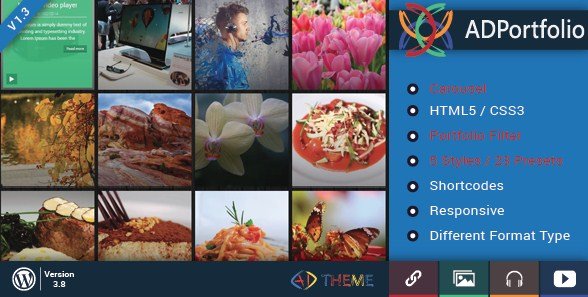
While the WordPress repository is flooded with gallery plugins, the AD Portfolio Filter and Carousel WordPress Plugin distinguishes itself through its sheer volume of ready-made designs and its emphasis on “one-click” deployment. Many competitors offer basic functionality but require extensive styling to match your brand’s identity. This plugin, however, comes pre-loaded with 23 distinct presets across 5 different styles. This means you can install the plugin, select a preset that resonates with your aesthetic, and go live almost immediately.
- Instant Visual Impact: Choose from 23 professionally designed presets to give your site an instant makeover without touching a line of code.
- Hybrid Functionality: Seamlessly switch between static grid layouts and dynamic carousel views to suit different content types.
- Developer-Friendly: Despite its ease for beginners, it offers translation files (.po/.mo) and clean CSS3 architecture for developers needing deeper customization.
AD Portfolio Filter and Carousel Features for WordPress Users
Advanced Filtering & Categorization
At the core of this plugin is its robust filtering system. For creatives with diverse bodies of work—such as a photographer offering wedding, portrait, and landscape services—being able to separate these categories is crucial for User Experience (UX). The AD Portfolio Filter and Carousel WordPress Plugin implements an AJAX-powered filtering mechanism that is smooth and lag-free. Unlike older scripts that cause the page to reload when selecting a category, this plugin updates the grid instantly using CSS3 transitions. This keeps the user on the page longer, reducing bounce rates and increasing the likelihood of conversion. You can create unlimited categories and assign them to specific portfolio items, giving your visitors granular control over what they view.
Responsive Carousel Integration
Space is often at a premium on modern web layouts, particularly on mobile devices. The plugin’s carousel feature addresses this by allowing you to display multiple portfolio items in a sliding, horizontal format. This is particularly effective for testimonials, logo showcases, or highlighting featured projects at the top of a page. The carousel is fully touch-enabled for mobile users, supporting swipe gestures that feel native to the device. Furthermore, the responsiveness is automatic; you don’t need to manually adjust settings for different screen sizes. The plugin intelligently adapts the number of visible items based on the viewport width, ensuring the layout never breaks or looks cluttered. For more examples of responsive design, check out other tools available on our site map.
Customization & Shortcode Flexibility
Flexibility is key in WordPress design. This plugin utilizes a robust shortcode generator that allows you to insert portfolios anywhere on your site—be it a page, a post, or even a text widget. The “Shortcode Button” in the visual editor makes this process painless, opening a modal where you can configure parameters like the number of columns, spacing, and preset style. Beyond the presets, every aspect of the CSS3 styling is customizable. If you want to change the hover effects, the typography of the filter buttons, or the border radius of the images, you can do so via the settings or by overriding the styles in your child theme. This balance of “out-of-the-box” readiness and deep customization potential makes it a favorite among freelancers who need to tailor each client’s site to their specific branding. For developers, adhering to WordPress coding standards ensures that these customizations remain stable even after updates.
How to Install AD Portfolio Filter and Carousel
Quick Installation
- Log in to your CodeCanyon account and download the plugin’s ZIP file.
- Navigate to your WordPress Dashboard and go to Plugins → Add New.
- Click the Upload Plugin button at the top of the page.
- Select the ZIP file you downloaded and click Install Now.
- Once installed, click Activate.
After activation, you will find a new menu item in your dashboard dedicated to the plugin. Here, you can add new portfolio items, define categories, and generate your shortcodes. It is recommended to set up your categories first before adding items to ensure a smooth workflow.
Who Should Use AD Portfolio Filter and Carousel?
Creative Agencies & Design Studios
For agencies, visual presentation is everything. When pitching to high-end clients, a cluttered or generic gallery can undermine the perceived value of your work. This plugin allows agencies to build sophisticated, interactive portfolios that mirror the quality of their output. The ability to use carousels means agencies can create a ” Clients” ticker on the homepage to build social proof instantly, while the detailed filterable grids serve as the primary project archive. The multi-site license options often available on CodeCanyon also make this a cost-effective solution for agencies managing multiple client sites.
Freelance Photographers & Illustrators
Freelancers need to spend their time creating, not coding. The 23 presets included in the AD Portfolio Filter and Carousel WordPress Plugin are a godsend for this demographic. A photographer can switch between a masonry layout for a blog feel and a strict grid for a professional look with just a few clicks. The lightbox integration (typically standard in such plugins) ensures that high-resolution images can be viewed in full screen without the user leaving the gallery page. This distraction-free viewing environment is essential for selling art or services. Furthermore, the translation-ready feature ensures that if your client base is international, your portfolio can speak their language.
AD Portfolio Filter and Carousel vs Alternatives
| Feature | AD Portfolio Plugin | Standard WordPress Gallery |
|---|---|---|
| Filtering | Advanced AJAX filtering with animations | None (displays all images) |
| Layouts | 5 Styles, 23 Presets, Carousel | Basic Grid/List |
| Responsiveness | Mobile-optimized with touch gestures | Responsive but basic stacking |
| Setup Time | Minutes (Shortcode based) | Fast but limited customization |
AD Portfolio Filter and Carousel Pricing
As a premium product available on CodeCanyon, the AD Portfolio Filter and Carousel WordPress Plugin typically follows a one-time purchase model. This usually includes lifetime updates and 6 months of support from the developer, with the option to extend support. This pricing model is often more cost-effective in the long run compared to subscription-based plugins, as you own the license forever after the initial purchase. It is an investment in a professional asset that requires no monthly recurring fees.
Pros and Cons
✅ Pros
- Diversity of Design: The 23 presets offer a wide range of aesthetic choices, significantly reducing design time.
- User Experience: The filtering and carousel animations are smooth and enhance the professional feel of the site.
- Translation Ready: Essential for reaching a global audience, with included .po/.mo files.
- Easy Integration: The shortcode generator makes it easy to place portfolios exactly where you want them.
❌ Cons
- Premium Only: Unlike some alternatives, there is no free version to test in the WordPress repository before buying.
- Learning Curve for Presets: While easy to use, customizing the presets heavily requires some CSS knowledge.
- Dependency: Being a CodeCanyon plugin, updates are handled manually via upload, rather than the automatic one-click updates native to the repo plugins.
Frequently Asked Questions
Is the AD Portfolio Filter and Carousel WordPress Plugin mobile responsive?
Yes, the plugin is fully responsive. It adapts automatically to different screen sizes, and the carousel features specific touch-support for mobile users, ensuring a smooth experience on smartphones and tablets.
Can I use this plugin with any WordPress theme?
Absolutely. The plugin is designed to be theme-agnostic. However, because it uses its own CSS presets, some minor theme conflicts might occur, which can usually be resolved with simple CSS adjustments.
Does this plugin support high-resolution images?
Yes, the plugin supports all standard image formats used by WordPress. It handles image scaling responsively, and when paired with a lightbox, allows users to view images in their full, original resolution.
How do I add a portfolio to a specific page?
You can use the built-in shortcode generator button located in the WordPress page/post editor. Simply configure your settings in the popup, click insert, and the portfolio will appear on that page.
Is customer support available for this plugin?
Yes, support is provided through the CodeCanyon comments section or direct support system, depending on the developer’s terms. The initial purchase usually includes 6 months of support.
Can I translate the portfolio interface?
Yes, the plugin is translation-ready and includes .po and .mo files, allowing you to easily translate the front-end elements like filter categories and buttons into any language.