What is AB Testimonial WordPress Plugin?
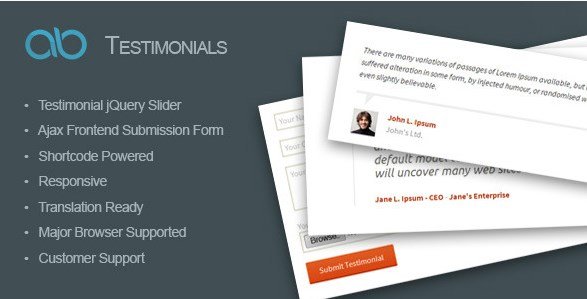
In the competitive landscape of digital marketing, establishing credibility is paramount. When WordPress users need a robust solution to showcase client feedback effectively, the AB Testimonial WordPress Plugin offers a streamlined, feature-rich approach. This plugin is specifically designed to help website owners aggregate, manage, and display customer reviews with elegance. Unlike simple text-based solutions, the AB Testimonial WordPress Plugin integrates dynamic jQuery sliders and a user-friendly frontend submission system, allowing you to leverage social proof without diving into complex code.
Building trust is the cornerstone of conversion optimization. Whether you are running an agency, an e-commerce store, or a personal portfolio, displaying genuine testimonials can significantly impact your bottom line. I have found that this plugin bridges the gap between collecting reviews and presenting them in a visually appealing format that works seamlessly across all devices. By utilizing shortcodes and custom post types, it simplifies what would otherwise require extensive development work.
What Makes AB Testimonial WordPress Plugin Different
While there are numerous review plugins available in the WordPress ecosystem, the AB Testimonial WordPress Plugin distinguishes itself through its dual focus on visual presentation and user engagement. The core unique selling proposition is the combination of a high-performance jQuery slider with an Ajax-powered frontend submission form. This means your visitors don’t just see static quotes; they experience an interactive showcase of your brand’s reputation.
- Seamless Frontend Submission: Allows clients to submit their own reviews and photos directly from your website without accessing the admin dashboard.
- Dynamic Slider Integration: Displays testimonials in an automated, sliding format with multiple transition effects to capture user attention.
- Granular Control: Offers specific category selection and display limits, giving you precise control over which reviews appear on specific pages.
AB Testimonial WordPress Plugin Features for WordPress Users
Advanced Slider & Display Options
The visual aspect of a testimonial can determine whether a visitor stops to read it or scrolls past. This plugin comes equipped with a robust Testimonial jQuery Slider that supports autoplay functionality. This ensures that your best reviews rotate automatically, keeping the content fresh for returning visitors. You get two distinct testimonial styles to choose from, allowing you to match the slider’s aesthetic to your existing theme. The display is fully responsive, meaning it looks just as polished on mobile devices as it does on desktop monitors. You can easily embed these sliders into any page, post, or even a sidebar text widget using a simple shortcode.
Frontend Submission & User Engagement
One of the standout features of this plugin is the ability to let your clients submit testimonials via a frontend Ajax form. This feature is invaluable for gathering user-generated content without granting users access to your WordPress backend. The form includes an image uploader, so clients can attach their photos, adding a layer of authenticity to the review. From an administrative standpoint, this workflow is secure; submissions are saved as “pending” by default. You retain full editorial control to review, edit, and approve the content before it goes live, ensuring quality and preventing spam.
Management & Customization
Managing a large volume of reviews can be cumbersome, but the AB Testimonial WordPress Plugin utilizes a Custom Post Type interface that feels native to WordPress. This makes organizing your testimonials intuitive and familiar. You can categorize testimonials, which is particularly useful if you offer multiple services or products and want to display relevant reviews on specific pages. The plugin also allows you to limit the number of testimonials displayed in the slider, preventing page clutter. It is built on valid HTML5 standards and is translation-ready, making it a viable option for international websites serving diverse audiences.
How to Install AB Testimonial WordPress Plugin
Quick Installation
- Log in to your WordPress dashboard.
- Navigate to Plugins → Add New.
- Click the “Upload Plugin” button at the top of the page.
- Select the zip file you downloaded from CodeCanyon.
- Click Install Now and then Activate.
Once installed, you will find a new menu item in your dashboard specifically for managing testimonials. From there, you can configure the slider settings and create your frontend submission page.
Who Should Use AB Testimonial WordPress Plugin?
Digital Agencies & Freelancers
For agencies, proof of competence is everything. You need to show potential clients that you have delivered results for others. This plugin allows you to create a dedicated portfolio page where past clients can submit detailed feedback. The ability to categorize testimonials means you can show “Web Design” reviews on your web design service page and “SEO” reviews on your SEO service page, creating a highly targeted user experience. This is much more effective than a generic “Clients” page.
E-commerce Store Owners
While WooCommerce has built-in reviews, sometimes you want to highlight “star” reviews on your homepage or landing pages without showing the full comment thread. The AB Testimonial WordPress Plugin allows you to curate the best 5-star reviews and display them prominently in a slider. By enabling the frontend submission form, you can actively encourage your happy customers to share their experiences, turning your satisfied buyer base into a marketing team.
AB Testimonial WordPress Plugin vs Alternatives
| Feature | AB Testimonial WordPress Plugin | Strong Testimonials (Free Alternative) |
|---|---|---|
| Frontend Submission | Native Ajax form with image upload included | Available in Pro version only |
| Display Types | Focus on jQuery Slider with 2 styles | Multiple views (Grid, List, Slider, Masonry) |
| Ease of Use | Simple, shortcode-based, lightweight | More settings, slightly steeper learning curve |
AB Testimonial WordPress Plugin Pricing
The AB Testimonial WordPress Plugin is available exclusively on CodeCanyon. It follows a standard marketplace pricing model, usually requiring a one-time purchase for a Regular License. This license typically includes lifetime updates and 6 months of support, with the option to extend support. This is a cost-effective solution compared to subscription-based plugins, as you only pay once to access the full suite of features without monthly recurring fees.
Pros and Cons
✅ Pros
- Included Frontend Form: The Ajax submission form with image upload is a premium feature often sold as an add-on in other plugins.
- Responsive Design: The slider automatically adjusts to mobile screens, tablets, and desktops.
- Developer Friendly: Valid HTML5 code and clean shortcodes make it easy to customize if you have coding knowledge.
❌ Cons
- Limited Visual Styles: Only two testimonial styles are included, which might require custom CSS for highly specific branding needs.
- No Block Editor Support: The plugin relies on shortcodes and classic widgets, meaning it doesn’t have a native Gutenberg block integration (though shortcodes work in blocks).
- One-Time vs Subscription: While cost-effective initially, future major updates or compatibility fixes for newer PHP versions rely on the developer’s roadmap without a subscription revenue stream motivating them.
Frequently Asked Questions
Can users upload their photos when submitting a testimonial?
Yes, the AB Testimonial WordPress Plugin includes an image uploader in the frontend Ajax form, allowing clients to attach their photos to their reviews.
Is the slider responsive on mobile devices?
Absolutely. The plugin is fully responsive, ensuring that the testimonial slider displays correctly and functions smoothly on smartphones, tablets, and desktop computers.
Do I need to know how to code to use this plugin?
No coding knowledge is required. You can add testimonials to any page or post by simply pasting the provided shortcode. However, developers will appreciate the clean HTML5 structure.
How do I control which testimonials appear on a specific page?
You can filter testimonials by category. When generating your shortcode, you can specify a category ID, allowing you to display only relevant reviews for that specific page content.
Does this plugin work with page builders like Elementor or Divi?
Yes, since the plugin uses shortcodes, it is compatible with page builders. You simply use the “Shortcode” or “HTML” widget within your page builder to display the testimonial slider.
Are submissions published immediately?
No, for your security and quality control, all frontend submissions are set to “Pending” by default. You must review and approve them in the WordPress dashboard before they appear on the live site.
Final Verdict
The AB Testimonial WordPress Plugin is a solid, no-nonsense solution for website owners who want to add a testimonial slider and a submission form without the bloat of complex marketing suites. It delivers exactly what it promises: a responsive slider and an easy way for clients to submit reviews. While it may lack the extensive visual templates of some competitors, its strength lies in its simplicity and the inclusion of the frontend submission feature in the core package. It’s particularly well-suited for small businesses, freelancers, and agencies looking for a cost-effective way to build trust through social proof.