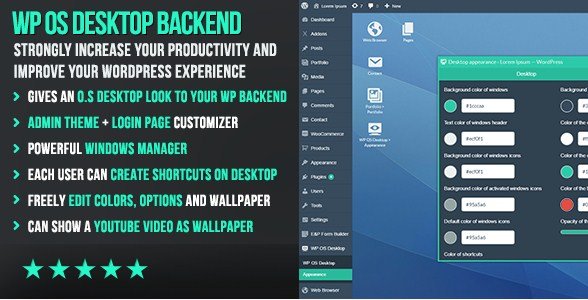
WP OS Desktop Backend is a WordPress administration plugin that transforms the standard backend into a desktop-style interface with draggable windows and customizable shortcuts. It eliminates browser tab overload by letting you manage admin pages in resizable, movable windows side by side. Developers and agencies use it to streamline complex workflows and simplify client backend experiences.
WPExclusive members get access to WP OS Desktop Backend as part of a full plugin and theme library — plans from $9.99/month. See the full CodeCanyon collection →
What Is WP OS Desktop Backend?
WP OS Desktop Backend is developed by CodeCanyon and is an administration plugin for WordPress. It belongs to the administration category on WPExclusive, alongside other tools for backend customization and workflow optimization.
The plugin solves the problem of cluttered browser tabs when managing multiple admin sections simultaneously. It is designed for developers and agencies who need to navigate between posts, pages, settings, and plugins without losing context or opening endless tabs.
WP OS Desktop Backend Features
The plugin provides a complete window management system for WordPress admin, featuring drag-and-drop shortcut creation, per-user customization, and visual personalization options.
Window Management & Productivity
The core functionality transforms admin pages into movable windows that can be resized, maximized, minimized, and arranged side by side with single-click actions. Users navigate between windows using keyboard shortcuts rather than clicking through menu hierarchies. The system is fully AJAX-powered, supporting browser history while eliminating page reloads. This makes it one of the strongest tools in the WordPress administration category for multitasking.
Desktop Customization & User Shortcuts
Each user can create personalized shortcuts by dragging links from the WordPress menu directly onto their desktop. Shortcut icons and titles are fully editable, allowing clear labeling for specific workflows. Users can customize colors, background images, and even set video wallpapers from YouTube for a branded admin experience. This per-user personalization ensures that administrators, editors, and clients each see only the tools they need.
Login Page & Visual Integration
Beyond the admin interface, the plugin allows complete customization of the WordPress login page to match the desktop theme. All visual effects and styling options extend to the authentication screen, creating a cohesive branded experience from the moment users access the site. The interface is fully translatable with WPML support and .po files included for international deployments.
WP OS Desktop Backend Pricing
Check current pricing on the WP OS Desktop Backend sales page — WPExclusive members access it as part of their plan.
| Plan | Price | Sites | Includes |
|---|---|---|---|
| WPExclusive Membership | From $9.99/month | Unlimited | WP OS Desktop Backend + full library |
For developers managing multiple sites, a WPExclusive membership covers WP OS Desktop Backend plus hundreds of other plugins and themes — usually less than one premium license.
WP OS Desktop Backend – Latest Version
WP OS Desktop Backend is actively maintained and receives regular updates. WPExclusive keeps plugin files current — members always download the latest available release.
How to Install WP OS Desktop Backend
- Download the WP OS Desktop Backend .zip from your WPExclusive member account
- In WordPress: Plugins → Add New → Upload Plugin
- Select the .zip and click Install Now → Activate
- Navigate to the desktop settings panel to configure default windows and user permissions
- Customize the desktop background, colors, and create initial shortcuts for frequently used admin sections
WP OS Desktop Backend Use Cases
Developers Managing Complex Administration Workflows
When building or maintaining complex WordPress sites, developers constantly switch between the theme editor, plugin settings, post lists, and custom fields. The plugin allows you to keep all these sections open in separate windows simultaneously, referencing documentation in one pane while editing content in another. This eliminates the cognitive load of navigating back and forth through the standard WordPress menu hierarchy.
Agencies Creating Simplified Client Dashboards
Agencies use the plugin to hide WordPress complexity from non-technical clients. By creating shortcuts only to essential features and removing the standard admin menu, clients see a clean desktop with icons for “Add Blog Post,” “View Orders,” or “Edit Team” rather than the full WordPress backend. This reduces support requests and makes clients feel comfortable managing their own content.
Multilingual Teams and International Projects
For teams working across different languages, the plugin’s full translation support and WPML compatibility ensure that each user can interact with the interface in their preferred language. The visual nature of icon-based shortcuts transcends language barriers, making it ideal for distributed teams managing international WordPress installations.
Agencies or Developers Managing Multiple Sites
Agencies maintaining dozens of client sites can deploy the plugin across all installations with a WPExclusive membership, eliminating per-site licensing costs. The familiar desktop interface reduces training time when onboarding new team members across different client projects, as the environment remains consistent regardless of the underlying site complexity.
Pros and Cons
✅ Strengths
- Unique OS-style window management eliminates browser tab overload
- Per-user desktop customization with drag-and-drop shortcut creation
- Video wallpaper support and full visual branding capabilities
- Keyboard shortcuts enable rapid navigation between admin sections
- Fully AJAX-powered interface maintains browser history without page reloads
⚠️ Limitations
- Learning curve for users accustomed to standard WordPress admin menus
- May conflict with other admin theme or menu customization plugins
- Developer auto-updates require an active license key. WPExclusive publishes updates manually when new versions are released.
Is WP OS Desktop Backend GPL Licensed?
Yes. WP OS Desktop Backend is distributed under the GNU General Public License (GPL) — the same license that governs WordPress itself. GPL gives any user the legal right to use, study, share, and redistribute the software. This is the legal framework that makes WPExclusive’s membership model possible.
WPExclusive distributes 100% original, unmodified files — the same release the developer publishes. No injected code, no alterations, no security risks.
Get WP OS Desktop Backend on WPExclusive
WPExclusive membership starts at $9.99/month, $79/year, or $149 lifetime — giving you WP OS Desktop Backend plus every plugin and theme in the library, on unlimited sites.
Explore the full CodeCanyon collection → or browse all WordPress plugins →
Frequently Asked Questions
What does WP OS Desktop Backend do?
WP OS Desktop Backend transforms the WordPress administration panel into a desktop operating system-style interface. It replaces standard menu navigation with draggable, resizable windows and customizable desktop shortcuts, allowing you to manage multiple admin pages simultaneously without browser tabs.
Is WP OS Desktop Backend free?
WP OS Desktop Backend is a premium plugin sold through CodeCanyon. It is not available as a free version on the WordPress.org repository.
What is the latest version of WP OS Desktop Backend?
WP OS Desktop Backend is actively maintained with regular updates for compatibility and feature improvements. WPExclusive members always receive the most current release available.
How much does WP OS Desktop Backend cost?
WP OS Desktop Backend is sold as a premium license through CodeCanyon. Via WPExclusive, it is included in membership plans starting at $9.99 per month with unlimited site usage.
Is it legal to use WP OS Desktop Backend via WPExclusive?
WP OS Desktop Backend is GPL licensed, which explicitly permits redistribution. WPExclusive provides original, unmodified files — fully within GPL terms.
Is WP OS Desktop Backend compatible with WPML?
Yes, WP OS Desktop Backend is fully translatable and WPML compatible with .po files included. This makes it suitable for multilingual websites and international development teams.