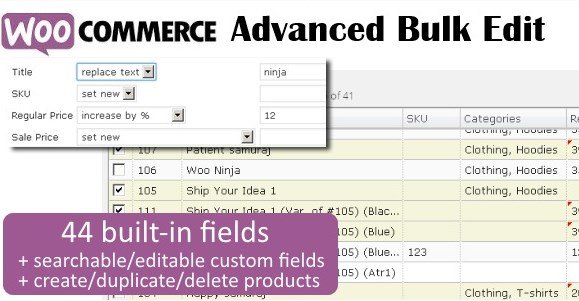
What is WooCommerce Advanced Bulk Edit?
When WordPress users need to manage hundreds or thousands of products efficiently, WooCommerce Advanced Bulk Edit offers a powerful spreadsheet-like interface directly within the dashboard. This plugin eliminates the tedious task of editing products one by one, providing a comprehensive solution for store owners who value time and precision. WooCommerce Advanced Bulk Edit transforms your product management experience into an intuitive process similar to using Excel, but with the full power of WooCommerce integration.
What Makes WooCommerce Advanced Bulk Edit Different
While the default WordPress and WooCommerce interfaces allow for basic bulk editing, they are often limited in scope and difficult to navigate for complex tasks. WooCommerce Advanced Bulk Edit stands out by offering a visual, editable grid that supports every product data type. Whether you need to adjust pricing strategies, manage stock levels, or modify product attributes en masse, this plugin provides the granular control necessary for professional e-commerce management. It is not just an editor; it is a complete store management tool designed for scalability.
- Direct spreadsheet-style editing for products and variations
- Advanced filtering with the Selection Manager for precise targeting
- Revertible changes allowing you to undo edits before saving
WooCommerce Advanced Bulk Edit Features for WordPress Users
Advanced Product Management & Selection
One of the most frustrating aspects of managing a growing catalog is finding specific products to edit. The Selection Manager in WooCommerce Advanced Bulk Edit acts as a robust filter engine. You can filter products by virtually any criteria, including title, SKU, category, tags, attributes, regular price, sale price, stock quantity, and status. This means if you need to target only “T-shirts” in the “Summer” category that have a stock quantity of less than 10, you can do so with a few clicks. For those looking to expand their toolkit further, check out our collection of premium WordPress plugins that integrate seamlessly with this solution.
Powerful Bulk Editing Operations
The core strength of this plugin lies in its editing capabilities. It goes beyond simple text replacement. You can perform mathematical operations to increase or decrease prices by a fixed value or percentage—a lifesaver for seasonal sales or supplier price hikes. Text fields support append, prepend, and replace functions, allowing you to update descriptions or titles in bulk. Additionally, the “Fill Series” feature helps automate the generation of SKUs or sequential numbers, ensuring your data remains organized without manual entry.
Visual Editing & Media Management
Managing product visuals can be cumbersome, but WooCommerce Advanced Bulk Edit simplifies this with inline image editing. You can change product images directly within the table view. The plugin also supports creating new products and variations on the fly. If you have a complex product with multiple variations, you can generate variations for multiple products simultaneously. The interface highlights changed cells visually, giving you immediate feedback on what has been modified before you commit to saving the changes. For more complex site setups, you might also find useful utilities in our WooCommerce extensions library.
How to Install WooCommerce Advanced Bulk Edit
Quick Installation
- Log in to your CodeCanyon account and download the plugin ZIP file.
- Go to Plugins → Add New in your WordPress dashboard.
- Click “Upload Plugin” at the top of the page.
- Select the ZIP file you downloaded and click Install Now.
- Activate the plugin and enter your purchase code if prompted.
Who Should Use WooCommerce Advanced Bulk Edit?
E-commerce Store Owners with Large Inventories
If your store has hundreds or thousands of products, manual editing is not an option. This plugin is essential for owners who need to perform regular updates to pricing, stock, or descriptions across their entire catalog. It reduces hours of work into minutes. According to WooCommerce’s official features, efficient management is key to scaling, and this tool facilitates that growth.
Dropshippers and Affiliate Stores
Dropshippers often receive updated CSV feeds from suppliers. While this plugin doesn’t import, its editing capabilities allow you to quickly adjust prices, update stock statuses based on supplier feeds, or edit long/short descriptions to match your brand’s voice. The ability to filter by SKU or meta fields makes it incredibly versatile for hybrid business models. You can learn more about optimizing product feeds from authoritative sources like Yoast’s WooCommerce SEO guide.
WooCommerce Advanced Bulk Edit vs Alternatives
| Feature | WooCommerce Advanced Bulk Edit | Native WooCommerce Bulk Edit |
|---|---|---|
| Interface | Spreadsheet-style (Excel-like) | List view with limited fields |
| Price Editing | Increase/Decrease by % or value | Fixed price input only |
| Filtering | Advanced (Meta, Attributes, Stock) | Basic (Category, Stock status) |
| Variations | Edit inline in the same grid | Requires opening each product |
WooCommerce Advanced Bulk Edit Pricing
WooCommerce Advanced Bulk Edit is a premium plugin available exclusively on CodeCanyon. It typically utilizes a one-time payment model for a regular license, which includes lifetime updates and 6 months of support (optionally renewable). This makes it a cost-effective solution compared to subscription-based alternatives, providing high value for a single upfront investment.
Pros and Cons
✅ Pros
- Intuitive spreadsheet interface reduces the learning curve.
- Highly customizable column views allow you to see only what you need.
- Support for custom meta fields and taxonomies ensures compatibility with third-party plugins.
- Revertible changes prevent data loss errors.
- Built-in translations for multiple languages.
❌ Cons
- Premium only; no free version available to test before buying.
- Can be resource-intensive on stores with extremely large databases (10,000+ products) if pagination isn’t managed.
- Requires a slight learning curve to master the Selection Manager filters.
Frequently Asked Questions
Can I undo changes made with WooCommerce Advanced Bulk Edit?
Yes, the plugin features a revertible changes system. Any field you edit is visually marked, and you can revert specific cells or the entire set of changes back to their original values before you click the save button.
Does this plugin support product variations?
Absolutely. One of its strongest features is the ability to view and edit product variations alongside parent products in the same grid. You can even create variations for multiple products at once.
Is it possible to edit custom fields added by other plugins?
Yes, the plugin supports custom meta fields (text, number, checkbox, and select). It can also find and display custom meta fields added by third-party plugins, making it highly versatile for complex setups.
How do I perform a bulk price increase?
Simply select the products you wish to update using the filter or Selection Manager. Then, choose the “Increase by value” or “Increase by percent” option in the bulk edit menu for the price column to apply the change instantly.
Can I export my products to Excel?
The plugin includes an export feature that allows you to export your products to a CSV file. Note that this feature is primarily for viewing or backing up data; it is not intended as a full import tool.
Will this slow down my website?
The plugin is built to support large stores with customizable product limits. While retrieving thousands of variations can be memory-intensive, the optional variation retrieval and pagination settings allow you to manage performance effectively.
Final Verdict
WooCommerce Advanced Bulk Edit is a robust, feature-rich tool that pays for itself by saving countless hours of administrative work. It bridges the gap between the flexibility of a spreadsheet and the structural requirements of a database. It’s particularly well-suited for store owners with medium to large inventories who need precise control over pricing, stock, and attributes. While the lack of a free tier might deter some, the efficiency gains make it a worthwhile investment for serious e-commerce professionals.