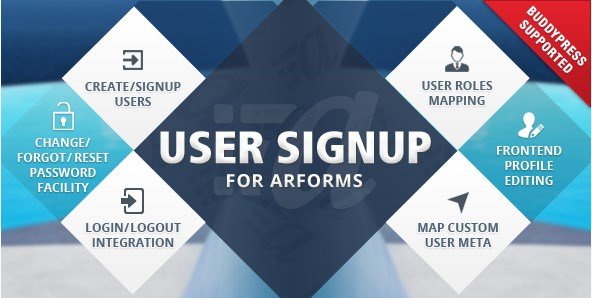
What is User Signup for Arforms?
When WordPress site owners need streamlined user registration and profile management without coding, User Signup for Arforms offers a powerful solution that transforms standard ARForms into a complete membership system. This specialized addon extends the ARForms WordPress Form Builder capabilities, enabling you to create beautiful, custom forms for user registration, password management, profile editing, and social media login functionality all within one integrated ecosystem.
What Makes User Signup for Arforms Different
Unlike standalone WordPress user registration plugins that force you to adapt to rigid templates, User Signup for Arforms leverages the drag-and-drop flexibility of ARForms to create completely customized user experiences. The addon seamlessly integrates social authentication with traditional registration methods, offering a hybrid approach that reduces friction during user onboarding while maintaining complete design control over every aspect of your membership interface.
- Complete visual customization using ARForms’ intuitive form builder interface
- Integrated social login supporting Facebook, Twitter, LinkedIn, and Google authentication
- Comprehensive password management suite including forgot, reset, and change password functionality
- Frontend profile editing capabilities that eliminate backend access for subscribers
User Signup for Arforms Features for WordPress Users
Custom Registration & Authentication Forms
The core strength of User Signup for Arforms lies in its ability to replace WordPress’s default registration system with fully branded, custom-designed forms. You can create distinct registration forms for different WordPress user roles, implement conditional logic to show specific fields based on user selections, and style every element to match your site aesthetic. The addon supports email verification workflows, admin approval processes, and automatic role assignment based on form submissions, giving you granular control over how users enter your ecosystem.
Social Media Login Integration
Modern users expect frictionless authentication options, and this addon delivers by supporting major social platforms including Facebook, Twitter, LinkedIn, and Google. The social login feature reduces password fatigue for your users while increasing conversion rates for registration. Each social provider can be configured independently, allowing you to require specific permissions and automatically map social profile data to WordPress user meta fields. This integration works seamlessly alongside traditional email registration, giving users choice while maintaining data integrity within your membership site infrastructure.
Comprehensive Password Management Suite
Security and user experience converge in the password management features offered by User Signup for Arforms. Rather than relying on WordPress’s default password reset emails, you can design custom forgot password forms that maintain brand consistency throughout the recovery process. The addon includes dedicated forms for password changes (for logged-in users) and password resets (for forgotten credentials), both of which can be enhanced with strength indicators, confirmation fields, and custom validation rules. This comprehensive approach reduces support tickets while ensuring users maintain secure access to their accounts.
Frontend Profile Editing Capabilities
Eliminate the need for users to access the WordPress dashboard with robust frontend profile management. User Signup for Arforms enables creation of detailed profile editing forms where members can update personal information, change passwords, upload avatars, and modify custom meta fields without ever seeing the backend interface. This feature is particularly valuable for community websites and membership platforms where user experience continuity matters. Profile forms can be pre-populated with existing user data and restricted to specific roles, ensuring members only see and edit appropriate fields.
How to Install User Signup for Arforms
Prerequisites and Quick Installation
Before installing this addon, ensure you have ARForms Pro installed and activated, as User Signup for Arforms functions as an extension of the core form builder plugin. The installation process follows standard WordPress protocols with some specific configuration requirements for optimal functionality.
- Purchase and download the addon from CodeCanyon
- Navigate to Plugins → Add New in your WordPress dashboard
- Click “Upload Plugin” and select the downloaded ZIP file
- Click Install Now, then Activate the plugin
- Navigate to ARForms → User Signup to configure general settings
- Set up your social media API credentials for Facebook, Twitter, LinkedIn, or Google if using social login features
- Create your first custom registration form using the ARForms form builder interface
Who Should Use User Signup for Arforms?
Membership Site Administrators
If you operate a membership website using ARForms, this addon eliminates the need for separate user management plugins. Whether you’re running a premium content site, a subscription-based service, or a professional community, the ability to create role-specific registration forms and maintain brand consistency throughout the user journey significantly enhances perceived value. The social login feature particularly benefits membership sites by reducing the abandonment rate during sign-up processes, while frontend profile editing keeps members engaged within your branded environment rather than the generic WordPress dashboard.
E-Learning Platform Managers
Online course creators and LMS administrators benefit from the streamlined onboarding capabilities that User Signup for Arforms provides. When students register for courses, the addon can automatically enroll them in specific curricula based on form selections, capture additional profile information relevant to their learning goals, and provide easy profile management for updating progress or personal details. The integration with ARForms’ conditional logic means you can show different registration fields for different course types, creating tailored onboarding experiences for various student segments without maintaining multiple registration systems.
User Signup for Arforms vs Alternatives
| Feature | User Signup for Arforms | Standalone Registration Plugins |
|---|---|---|
| Form Design Flexibility | Full drag-and-drop customization via ARForms | Limited to predefined templates or shortcodes |
| Social Login Integration | Built-in Facebook, Twitter, LinkedIn, Google support | Requires additional paid addons |
| Conditional Logic | Native ARForms conditional fields support | Basic or unavailable in free versions |
| Payment Integration | Seamless with ARForms payment addons | Often requires separate ecommerce plugins |
User Signup for Arforms Pricing
User Signup for Arforms is available exclusively through CodeCanyon as a premium addon requiring the ARForms Pro plugin. The pricing follows Envato’s standard licensing model with a one-time purchase fee that includes six months of support and lifetime updates for the purchased version. Extended support options are available for users requiring priority assistance beyond the initial period. Unlike subscription-based alternatives, this model requires no recurring fees, making it cost-effective for long-term projects. Note that you must also hold an ARForms Pro license to utilize this addon, so factor both costs into your budget planning.
Pros and Cons
✅ Pros
- Seamless integration with ARForms’ powerful drag-and-drop form builder
- Comprehensive social login options reducing user friction during registration
- Complete frontend user management eliminating backend access for subscribers
- No recurring subscription fees with one-time CodeCanyon purchase model
- Advanced password management with customizable security workflows
❌ Cons
- Requires ARForms Pro license, adding to overall cost
- Limited utility as a standalone plugin without ARForms core
- Social login configuration requires API setup with each provider
- Support limited to six months unless extended license purchased
Frequently Asked Questions
Do I need ARForms Pro to use User Signup for Arforms?
Yes, this addon requires the ARForms Pro plugin as it extends the core functionality. It cannot function as a standalone plugin and requires an active ARForms license to access the form builder interface and settings.
Which social media platforms are supported for login?
User Signup for Arforms supports Facebook, Twitter, LinkedIn, and Google authentication. Each platform requires API credentials obtained through their respective developer consoles, but the addon provides clear documentation for configuration.
Can I create different registration forms for different user roles?
Absolutely. You can create unlimited registration forms, each configured to assign specific WordPress user roles upon submission. This allows you to capture different information from subscribers versus contributors or customers versus vendors.
Is User Signup for Arforms GDPR compliant?
The addon supports GDPR compliance through ARForms’ privacy features, including consent checkboxes, data export capabilities, and the ability to delete user data upon request. However, you should configure these settings according to your specific legal requirements.
Does it work with WordPress Multisite?
Yes, User Signup for Arforms is compatible with WordPress Multisite installations, allowing network administrators to manage user registration across multiple sites with centralized form configurations and user management.
Can I integrate payment processing with registration forms?
Since it works with ARForms, you can combine user registration with payment collection using ARForms’ payment addons for PayPal, Stripe, or Authorize.net, creating paid membership registration workflows.
Final Verdict
User Signup for Arforms represents a robust solution for WordPress sites already invested in the ARForms ecosystem or those planning comprehensive form strategies. The addon successfully bridges the gap between basic WordPress registration and sophisticated membership management without requiring multiple disparate plugins. Its tight integration with ARForms’ conditional logic and payment processing makes it particularly valuable for sites requiring complex registration workflows or monetized memberships. While the requirement for ARForms Pro adds to the initial investment, the unified workflow and design consistency justify the cost for serious membership sites. It’s particularly well-suited for e-learning platforms, premium communities, and businesses requiring branded user experiences with social authentication options.