

What is the Sticky Full Width Radio Player WordPress Plugin?
The Sticky Full Width Radio Player WordPress Plugin by LambertGroup, available on CodeCanyon, is a sophisticated HTML5-based audio player designed specifically for WordPress websites. Its primary purpose is to provide a seamless and engaging listening experience for website visitors by integrating live radio streams directly into the site’s interface. What sets this plugin apart is its ‘sticky’ and ‘full-width’ nature; it typically docks to the bottom or top of the browser window, remaining visible and accessible as users navigate through different pages of the website. This ensures continuous playback and keeps the audio controls readily available, significantly enhancing user engagement for sites focused on audio content, such as online radio stations, community broadcasters, or podcasters featuring live streams. It boasts robust support for the most common internet radio streaming protocols, namely ShoutCast and Icecast. The plugin automatically fetches crucial stream information like the radio station name, current track title, artist, and even the artist’s image (leveraging APIs like Last.fm or AudioDB), reducing the need for manual data entry and keeping the player dynamically updated. Its responsive design ensures optimal viewing and functionality across all devices, from desktops to smartphones and tablets, making it a versatile solution for reaching a wide audience. The inclusion of a searchable playlist with category support further enhances usability, allowing listeners to easily browse available streams if multiple are configured.
Key Features of Sticky Full Width Radio Player WordPress Plugin
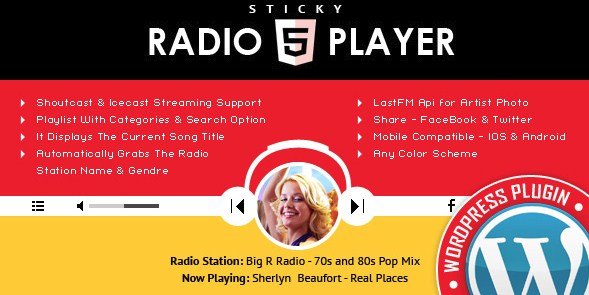
- Shoutcast & Icecast Support: Seamlessly integrates with popular Shoutcast and Icecast streaming servers (MP3 primarily, AAC on supported browsers). Just input the stream URL.
- Automatic Stream Data Fetching: Automatically displays radio name, categories, current song title, and artist information retrieved directly from the stream or via integrated APIs.
- Artist Image Display: Enhances visual appeal by showing the current artist’s photo, fetched automatically using integrated third-party services like AudioDB (formerly Last.fm).
- Responsive & Mobile Compatible: Adapts flawlessly to any screen size, ensuring a consistent experience on desktops, tablets, and smartphones (iOS & Android compatible, with notes on mobile OS limitations like autoplay).
- Sticky Full-Width Design: Remains persistently visible at the top or bottom of the screen, ensuring continuous playback and easy access to controls as users browse the site.
- Customizable Appearance: Offers multiple skins (e.g., black & white) and over 70 customization parameters for colors, layout, and features, allowing perfect integration with any site design.
- Categorized & Searchable Playlist: Organizes radio streams into categories (auto-generated or manually set) and includes a search function for easy navigation within the playlist.
- Show/Hide Options: Provides toggles for the playlist visibility and options to hide specific controls like volume or share buttons, offering layout flexibility.
- Social Sharing: Built-in buttons for sharing the currently playing station or track on platforms like Facebook and Twitter, with customizable share messages.
- Regular Updates & Support: Actively maintained by an Elite Author on CodeCanyon, ensuring compatibility with the latest WordPress versions and browser standards, plus dedicated support.
The latest version often includes crucial updates like improved session handling (using cookies instead of PHP sessions), updates to third-party APIs (like the switch from Last.fm to AudioDB), compatibility fixes for browser autoplay policies (a significant challenge for developers), HTTPS stream support, and general code improvements for performance and reliability. Always check the plugin’s changelog on CodeCanyon for the most recent feature enhancements and fixes, such as version 3.4 released on February 11, 2024, which included image fixes.
Why Choose Sticky Full Width Radio Player WordPress Plugin in 2024?
In the current digital landscape where user engagement and unique website experiences are paramount, the Sticky Full Width Radio Player WordPress Plugin remains a compelling choice for several reasons. Firstly, its core proposition – providing continuous, non-intrusive audio playback – directly addresses a key need for websites centered around audio content. Unlike embedded players that stop when a user navigates away, the sticky feature keeps the audience connected to the stream, significantly boosting listening times and user retention. Secondly, its specialized support for both Shoutcast and Icecast, combined with automatic data fetching, simplifies the setup process immensely. Website owners only need the stream URL, and the plugin handles the rest, presenting a professional-looking player with rich, dynamic information. The deep customization options are another major draw; with numerous parameters and skin choices, the player can be tailored to perfectly match any website’s branding and design aesthetic, avoiding the generic look of many free alternatives. Furthermore, its guaranteed responsiveness and mobile compatibility are crucial in today’s multi-device world. While mobile OS restrictions on autoplay and volume control exist (common to all web audio players), the plugin is designed to work smoothly within these constraints. The ongoing development by LambertGroup, an Elite Author on Envato, ensures the plugin stays updated with evolving web standards (like HTTPS requirements and browser autoplay policies) and WordPress core updates. Investing in a premium plugin like this often translates to better reliability, more advanced features, and access to dedicated customer support compared to potentially abandoned or less feature-rich free options available in the WordPress plugin repository.
- Enhanced User Engagement: Sticky player ensures continuous audio, keeping visitors engaged longer.
- Broad Stream Compatibility: Works reliably with industry-standard Shoutcast and Icecast servers.
- Automated Content Display: Fetches and displays stream details and artist images automatically.
- High Customization: Extensive options to tailor the player’s appearance to your site’s branding.
- Reliable Performance & Updates: Developed by an Elite Author, ensuring ongoing compatibility and support.
How to Download Sticky Full Width Radio Player WordPress Plugin
The Sticky Full Width Radio Player WordPress Plugin is a premium plugin exclusively available for purchase on the CodeCanyon marketplace. It is not available for free download from the official WordPress repository or other third-party GPL sites (downloading from unofficial sources is highly discouraged due to security risks and lack of updates/support). Here’s how to acquire the legitimate plugin:
1. Visit the Official Sales Page:
- Navigate to the plugin’s page on CodeCanyon: Sticky Full Width Radio Player WordPress Plugin.
- Review the plugin details, features, live preview, and reviews to ensure it meets your requirements.
2. Purchase a License:
- Select the appropriate license (Regular or Extended) based on your intended use. The Regular License ($19 at the time of writing) is sufficient for use on a single end product where users are not charged.
- Add the plugin to your cart and proceed through Envato Market’s checkout process. You may need to create an Envato account if you don’t have one. Consider extending support to 12 months during purchase for longer access to developer assistance.
3. Download the Plugin Files:
- Once the purchase is complete, go to your ‘Downloads’ section within your Envato Market account.
- Locate the Sticky Full Width Radio Player WordPress Plugin and click the ‘Download’ button. Choose to download ‘All files & documentation’ or just the ‘Installable WordPress file only’. The installable file will be a .zip archive.
For a hassle-free setup and optimal performance for your WordPress site, especially one streaming media, consider reliable hosting. WPX Hosting is a top-rated managed WordPress provider known for speed and excellent support, ensuring your radio player runs smoothly.
Installing Sticky Full Width Radio Player WordPress Plugin: Step-by-Step Guide
Once you have downloaded the installable .zip file from CodeCanyon, installing the Sticky Full Width Radio Player WordPress Plugin is a standard WordPress procedure. Here are the common methods:
1. Installation via WordPress Admin Dashboard (Recommended):
- Log in to your WordPress admin area (/wp-admin).
- Navigate to ‘Plugins’ > ‘Add New’ from the left-hand menu.
- Click the ‘Upload Plugin’ button located at the top of the page.
- Click ‘Choose File’ and select the .zip file you downloaded from CodeCanyon (e.g., `sticky-radio-player-wp.zip`).
- Click ‘Install Now’. WordPress will upload and unpack the plugin files.
- After successful installation, click the ‘Activate Plugin’ link.
2. Installation via FTP (File Transfer Protocol):
- Unzip the downloaded plugin .zip file on your local computer. You should find a folder named something like `sticky-radio-player-wp`.
- Connect to your web server using an FTP client (like FileZilla or Cyberduck).
- Navigate to the `wp-content/plugins/` directory within your WordPress installation.
- Upload the entire `sticky-radio-player-wp` folder (extracted in step 1) into the `wp-content/plugins/` directory on your server.
- Once the upload is complete, log in to your WordPress admin area.
- Go to ‘Plugins’ > ‘Installed Plugins’.
- Locate ‘Sticky Radio Player WP’ in the list and click the ‘Activate’ link below it.
3. Initial Configuration:
- After activation, look for a new menu item in your WordPress admin sidebar, likely labeled ‘Sticky Radio Player’ or similar.
- Access the plugin’s settings page to configure your radio stream(s), customize the player’s appearance (colors, skins, visible buttons), manage playlists, and adjust other parameters according to your needs. Refer to the plugin’s documentation (usually included in the ‘All files & documentation’ download) for detailed guidance.
- Follow the specific instructions provided by the plugin on how to display the player on your site (it might activate automatically sitewide or require adding a shortcode/widget).
Note: Always back up your WordPress site completely (files and database) before installing new plugins or themes. Use tools like UpdraftPlus or your hosting provider’s backup solution. After installation or updates, check your site’s functionality, especially the player itself, to ensure everything works as expected.
Sticky Full Width Radio Player WordPress Plugin Pricing
The Sticky Full Width Radio Player WordPress Plugin is a premium product sold through the Envato Market (CodeCanyon). Pricing is based on the license type, which dictates how the plugin can be used. Here’s a breakdown of the typical pricing structure found on CodeCanyon (prices subject to change by the author or Envato):
| Component | Price (USD) | Details |
|---|---|---|
| Regular License | $19 | Grants the right to use the plugin on one single end product (e.g., one website) for yourself or one client. The end product must be one where end users are not charged for access or use of the product. This license includes 6 months of support from the author (LambertGroup) and future updates. Ideal for most standard website implementations. |
| Extended License | $80 | Grants the right to use the plugin on one single end product where end users can be charged for access (e.g., a subscription-based site featuring the player as part of its paid offering). This license also includes 6 months of support and future updates. Required if your business model involves charging users for the site/service where the plugin is implemented. |
| Support Extension (Optional) | ~$5.25 – $12.25 | At the time of purchase or later, you can choose to extend the included 6 months of author support to a total of 12 months. The price for this extension varies but is often offered at a discount during the initial purchase ($5.25 in the sales page details) compared to extending it later ($12.25). This provides longer access to technical assistance from the developer. |
The price includes the plugin files, documentation, quality checks by Envato, and access to all future updates released by the author for the lifetime of the product listing on CodeCanyon. The primary difference between the licenses revolves around the commercialization model of the website where the plugin is installed. Most users implementing the player on a standard blog, business site, or community radio page will find the Regular License sufficient. Always verify the current pricing and license terms directly on the CodeCanyon sales page before purchasing.
Sticky Full Width Radio Player WordPress Plugin Alternatives
While the Sticky Full Width Radio Player WordPress Plugin offers a specific set of features centered around a sticky, full-width design, several other plugins provide radio streaming capabilities for WordPress, each with its own strengths and weaknesses:
1. Radio Player by TuneIn (Formerly by Radio.co):
- Pros: Often free, easy setup, connects directly to TuneIn directory or potentially other services, simple interface.
- Cons: May lack the sticky/full-width feature, limited customization options compared to premium plugins, potentially fewer streaming protocol flexibilities, may rely on specific radio directories.
- Best For: Users looking for a free, straightforward way to embed streams, especially if listed on TuneIn; less concerned about advanced customization or sticky playback.
2. Hero Shoutcast and Icecast Radio Player With History – WordPress Plugin:
- Pros: Premium plugin (also on CodeCanyon), supports Shoutcast/Icecast, includes song history feature, mobile compatible, customizable skins.
- Cons: May not offer the specific full-width *sticky* design of the LambertGroup plugin (check demos), feature set priorities might differ (e.g., emphasis on history).
- Best For: Users who prioritize seeing recent track history alongside the player and need Shoutcast/Icecast support, potentially preferring its specific design/features over the sticky full-width layout.
3. MP3 Sticky Player (if compatible with streams):
- Pros: Offers a sticky player interface, potentially simpler for single audio files or straightforward streams if supported, might be premium or freemium.
- Cons: May be primarily designed for MP3 files/playlists rather than dedicated radio streams (Shoutcast/Icecast metadata handling might be limited or absent), feature set might be less radio-centric.
- Best For: Users needing a sticky *audio* player who might also use it for standard MP3s, podcasts, or potentially basic streams if compatibility is confirmed. Less ideal for feature-rich radio integration.
The best alternative depends heavily on specific needs: budget (free vs. premium), required features (sticky playback, history, metadata handling, customization level), streaming source compatibility (Shoutcast, Icecast, other services), and desired aesthetic. The Sticky Full Width Radio Player specifically excels in its persistent, screen-wide presentation and automated radio data handling.
Sticky Full Width Radio Player WordPress Plugin vs. Other Radio Plugins
When comparing the Sticky Full Width Radio Player WordPress Plugin to the broader landscape of WordPress radio player plugins, its unique value proposition becomes clearer. Many alternatives, especially free ones from the WordPress repository, offer basic stream embedding, often via shortcodes or widgets, but lack the sophisticated features and presentation style of this premium Ccodecanyon offering. Here’s how it generally stacks up:
- Persistent Playback Experience: The most defining advantage is the sticky, full-width interface. While other players might exist within a page’s content area and stop on navigation, this plugin ensures the audio stream continues uninterrupted as users explore the site, crucial for listener retention on radio-focused websites. Few competitors replicate this specific combination of sticky behavior and full-width aesthetic effectively.
- Automated Stream Intelligence: Its ability to automatically parse Shoutcast/Icecast metadata (station name, current track, artist) and fetch supplementary data like artist images is a significant time-saver and enhances the user experience. Many basic players require manual input for all display information or offer limited metadata support.
- Deep Customization: With over 70 parameters, multiple skins, and extensive color options, this plugin offers far greater control over appearance than most free or even some premium alternatives. This allows seamless integration into diverse website designs, maintaining brand consistency.
- Playlist Functionality: The inclusion of categorized playlists with a search function provides a robust way to present multiple streams or channels, a feature often basic or missing in simpler players.
- Dedicated Support and Updates: Being a premium product from an established Elite Author generally ensures more reliable updates (addressing browser changes, WordPress updates, security patches) and access to direct technical support, which can be invaluable compared to community-supported free plugins.
However, the specialized nature might be its only minor drawback for some; users seeking a simple, non-sticky player embedded within a specific post might find it overly feature-rich. Also, as a premium plugin, it requires an initial investment, unlike free alternatives. Its complexity, while powerful, might also mean a slightly steeper learning curve for absolute beginners compared to a basic plug-and-play free option. Ultimately, it excels for sites prioritizing a continuous, branded, feature-rich radio listening experience across their entire platform.
Tips for Using Sticky Full Width Radio Player WordPress Plugin Effectively
- Optimize Stream Quality: Ensure your Shoutcast or Icecast stream source is stable and offers good audio quality. A high-quality stream enhances the listener experience provided by the player. Use reliable stream hosting.
- Configure Metadata Correctly: Double-check that your radio stream server is configured to send accurate metadata (song titles, artists). This allows the plugin to automatically fetch and display the correct ‘Now Playing’ information. Manually override names/categories if needed via plugin settings for better presentation.
- Customize Appearance Thoughtfully: Utilize the extensive color and skin options to seamlessly integrate the player with your website’s design. A well-matched player looks professional and less like a generic add-on. Test different color schemes using the live preview feature in the settings.
- Use Playlist Features Wisely: If you offer multiple streams, organize them logically using categories. Ensure category names are descriptive. Keep the playlist manageable; too many options can overwhelm users. Encourage use of the search feature if the list is long.
- Be Mindful of Autoplay Restrictions: Understand that modern browsers heavily restrict autoplay for media with sound. While the plugin offers an autoplay setting, it may not work reliably due to browser policies aimed at improving user experience. Inform users they may need to manually press play.
- Leverage Social Sharing: Enable and configure the social sharing buttons (Facebook, Twitter). Customize the default share text to encourage listeners to spread the word about your station or the current track.
- Check Mobile Performance: Regularly test the player on different mobile devices (iOS, Android) and browsers to ensure it functions correctly, acknowledging the inherent OS limitations on volume control and autoplay.
- Consult Documentation: The plugin comes with documentation. Refer to it for detailed explanations of all settings, troubleshooting common issues (like HTTPS stream requirements), and understanding specific features or API integrations (like AudioDB for artist images).
Pairing Sticky Full Width Radio Player WordPress Plugin with Other Tools
The Sticky Full Width Radio Player WordPress Plugin functions excellently on its own but can be even more powerful when paired strategically with other WordPress plugins and tools to create a comprehensive online radio or audio-centric platform. For instance, combining it with an events calendar plugin like The Events Calendar Pro allows you to schedule and promote live shows, DJ sets, or special broadcasts. You can create event pages detailing the schedule and have the sticky player provide the live audio feed when the event is happening. This synergy creates a dynamic schedule and listening experience. For community radio stations or sites with multiple hosts, pairing the player with user profile or membership plugins (like Ultimate Member or MemberPress) could allow DJ profiles to be displayed, perhaps even linking specific shows in the calendar to host profiles. If your radio station relies on donations or sells merchandise, integrating the player alongside e-commerce solutions like WooCommerce is essential. The persistent player keeps listeners tuned in while they browse merchandise or access donation forms, potentially increasing conversions. Furthermore, since the plugin is compatible with page builders like Elementor (as listed in its compatibility attributes), you can easily integrate any necessary shortcodes or potentially widgets provided by the player into custom-designed pages, ensuring seamless layout integration within your Elementor-built site structure. Using analytics tools alongside the player (like Google Analytics event tracking, if configurable) can help understand listener behavior, peak times, and popular streams, informing content strategy.
Is the Extended License Necessary?
The Sticky Full Width Radio Player WordPress Plugin is inherently a premium product, meaning even basic usage requires purchasing the Regular License ($19). The question then becomes whether the significantly more expensive Extended License ($80) is required for your specific implementation. The key differentiator, according to Envato’s standard licensing terms, is whether the end product incorporating the plugin is something end users are charged for.
You typically NEED the Extended License if:
- Subscription-Based Access: Your website requires users to pay a subscription fee (monthly, yearly, etc.) to access content, and the radio player is part of that premium content offering.
- Paid Membership Tiers: You offer different membership levels, and access to certain radio streams or the player itself is restricted to paying members.
- Direct Sale of Service Using the Player: The website’s primary function, which uses the player, is sold as a service itself. (e.g., providing a platform where others pay to stream their content using your site featuring this player).
- Bundled Paid Products: The website featuring the player is sold as part of a larger package or product for which customers pay.
You generally only need the Regular License if the website using the player is freely accessible to end users, even if the site generates revenue through other means like advertising, voluntary donations (where access isn’t conditional on donating), or selling merchandise separately. For most online radio stations, blogs incorporating a stream, or community sites, the Regular License is sufficient. Always consult the official CodeCanyon license terms for the definitive explanation if you are unsure which license applies to your specific business model.
Frequently Asked Questions:
How do I add the Sticky Full Width Radio Player to my WordPress site after installation?
Typically, after activating the plugin, it might enable the player sitewide automatically, or you might need to configure it in the plugin’s settings panel found in the WordPress admin area. You’ll add your radio stream URL(s) and customize settings there. Check the plugin’s documentation for specific instructions, as some might use shortcodes or widgets.
Does the Sticky Full Width Radio Player WordPress Plugin support HTTPS radio streams?
Yes, the plugin has been updated to support HTTPS streams. This is crucial for modern websites running on HTTPS, as browsers block mixed content (loading HTTP resources on an HTTPS page). Ensure your radio stream URL uses HTTPS if your website does.
Is the radio player responsive and mobile-friendly?
Yes, the plugin is designed to be fully responsive and compatible with mobile devices, including iOS and Android. It adapts its layout to fit different screen sizes. However, be aware of mobile OS limitations regarding autoplay (usually requires user interaction) and hardware volume control.
Can I customize the colors and appearance of the player?
Absolutely. The plugin offers extensive customization options, including different skins (e.g., dark/light) and over 70 parameters to control colors, visibility of buttons (playlist, volume, share), dimensions, and more, allowing you to match it perfectly with your site’s branding.
Will the autoplay feature work reliably on all devices and browsers?
No. Due to restrictions imposed by most modern browsers (Chrome, Safari, Firefox) and mobile operating systems (iOS, Android) to prevent intrusive audio, autoplay features are often blocked or require specific user interaction first (like clicking anywhere on the page). While the plugin has an autoplay setting, its effectiveness is subject to these external limitations.
What types of radio streams does this plugin support?
The plugin primarily supports Shoutcast (v1 and v2) and Icecast radio streams. It works best with MP3 stream formats. While it might play AAC streams, this depends on the browser’s native support for AAC audio codecs.
Conclusion
The Sticky Full Width Radio Player WordPress Plugin stands out as a robust and highly specialized solution for WordPress site owners looking to integrate live Shoutcast or Icecast radio streams in a highly engaging manner. Its core strength lies in the persistent, full-width sticky interface that ensures continuous playback and easy access to controls, dramatically improving listener retention compared to standard embedded players. Coupled with automatic stream data fetching (including artist images), extensive customization options, and well-implemented playlist features, it offers a professional and user-friendly experience out of the box. While it’s a premium plugin requiring purchase from CodeCanyon, the investment translates into reliable performance, ongoing updates addressing modern web challenges (like browser autoplay policies and HTTPS), and dedicated support from an Elite Author. For websites where audio streaming is a central component – be it online radio stations, community broadcasters, or sites featuring live audio events – this plugin provides a powerful and effective tool to captivate and retain audiences. If a persistent, customizable, and feature-rich radio player is what your site needs, the Sticky Full Width Radio Player WordPress Plugin is a top contender worth considering.
Disclaimer: Plugin features, pricing, and compatibility details are based on information available at the time of writing. Always refer to the official CodeCanyon sales page and documentation for the most current information before purchase. Ensure you download and use software from official sources only.



.png "Extender Pro Plugin")


