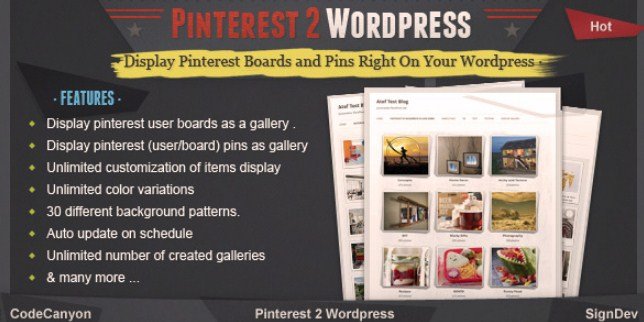
What is Pinterest To WordPress Plugin?
When WordPress users need seamless Pinterest To WordPress Plugin solutions for displaying visual content, this CodeCanyon tool offers automatic synchronization and gallery display capabilities. I have tested numerous social media integration tools, and this specific plugin stands out for its ability to transform Pinterest boards and pins into fully customizable WordPress galleries without manual coding or constant content updates.
This premium WordPress plugin serves as a bridge between your Pinterest account and website, allowing you to showcase boards, specific pins, or entire profiles directly on your posts and pages. Whether you run a lifestyle blog, e-commerce store, or portfolio site, maintaining fresh visual content becomes effortless with automatic updates scheduled at your preferred intervals.
What Makes Pinterest To WordPress Plugin Different
Unlike basic Pinterest widgets that simply embed content via iframe or limited API connections, Pinterest To WordPress Plugin creates native WordPress galleries with advanced customization options. The plugin distinguishes itself through comprehensive control over display dimensions, automatic content synchronization, and multiple gallery formats that maintain your site’s aesthetic consistency while leveraging Pinterest’s visual discovery power.
- Automatic scheduled updates keep galleries fresh without manual intervention
- Three distinct display modes: full boards, specific boards, or individual pin collections
- Advanced dimension controls for perfect responsive layouts
- Pop-up lightbox functionality keeping visitors on your site longer
- Unlimited color variations and 30 background patterns for brand consistency
Pinterest To WordPress Plugin Features for WordPress Users
Flexible Content Display Modes
The plugin offers three primary display configurations tailored to different content strategies. You can display Pinterest boards as WordPress galleries where each board thumbnail opens to reveal its contained pins in an elegant pop-up interface. Alternatively, display Pinterest pins as WordPress galleries by pulling specific pins from any username, creating curated collections that update automatically. For targeted content marketing, the specific board display mode allows showcasing pins from particular boards only, perfect for seasonal campaigns or product categories.
Advanced Customization and Branding Controls
Visual consistency matters for professional websites, which is why Pinterest To WordPress Plugin provides unlimited customization options for item dimensions. You maintain complete control over height, width, and margin settings, generating 100% customizable layouts that integrate seamlessly with your existing theme. The plugin includes granular visibility controls allowing you to show or hide item descriptions, pin counts, and specific metadata. With unlimited color variations via built-in color selectors and 30 different background patterns, matching your brand guidelines becomes straightforward.
Automated Content Management
Content freshness significantly impacts SEO and user engagement. The auto-update feature allows scheduling regular content synchronization, ensuring your galleries reflect your latest Pinterest activity without manual refreshing. You can create unlimited galleries across different pages or posts, each with unique settings and source accounts. The plugin also includes selective display controls, enabling you to check specific items for display or hide irrelevant content, maintaining gallery relevance and quality.
For more WordPress automation strategies, explore our guide on how to automate WordPress content effectively.
How to Install Pinterest To WordPress Plugin
Quick Installation Guide
- Purchase and download the plugin files from CodeCanyon
- Navigate to Plugins → Add New in your WordPress dashboard
- Click “Upload Plugin” and select the downloaded ZIP file
- Click Install Now, then Activate the plugin
- Access Pinterest To WordPress settings from the admin menu to configure your Pinterest username and API credentials
- Create your first gallery using the shortcode generator or widget interface
For additional gallery plugin options, check our comprehensive review of the best WordPress gallery plugins available today.
Who Should Use Pinterest To WordPress Plugin?
Content Creators and Lifestyle Bloggers
If you maintain an active Pinterest presence with multiple boards covering recipes, home decor, fashion, or DIY projects, this plugin eliminates manual content duplication. Rather than uploading images twice, your Pinterest activity automatically populates your WordPress galleries, driving traffic between platforms while maintaining visual consistency. The pop-up gallery feature keeps readers engaged on your site longer, reducing bounce rates and improving SEO metrics.
E-commerce Store Owners and Marketers
Online retailers leveraging Pinterest for product discovery can utilize Pinterest To WordPress Plugin to create dynamic lookbooks and product collections. The ability to display specific boards allows showcasing seasonal collections or featured product lines directly on landing pages. With customizable linking options, you can direct visitors either to Pinterest for social engagement or keep them in pop-up modals for immediate on-site browsing, depending on your conversion strategy.
Learn more about maximizing CodeCanyon plugins in our CodeCanyon WordPress plugins guide.
Pinterest To WordPress Plugin vs Alternatives
| Feature | Pinterest To WordPress Plugin | Basic Pinterest Widgets |
|---|---|---|
| Content Updates | Automatic scheduled synchronization | Manual refresh or real-time API only |
| Display Flexibility | Boards, pins, or specific collections | Limited to profile or single board |
| Customization | Unlimited colors, dimensions, patterns | Basic styling options |
| Lightbox Integration | Built-in pop-up gallery system | External links only |
| Gallery Limitations | Unlimited galleries across site | Usually restricted to one instance |
For official Pinterest integration standards, refer to Pinterest Developers documentation.
Pinterest To WordPress Plugin Pricing
Pinterest To WordPress Plugin operates on a premium licensing model through CodeCanyon. The regular license typically ranges between $20-30 USD for use on a single website, including future updates and six months of support from the developer. Extended licenses are available for multi-site implementations or commercial redistribution. Unlike subscription-based alternatives, this one-time payment structure provides lifetime access to the plugin core, with optional support renewals available for continued technical assistance.
Compare this pricing model with free alternatives on the WordPress Plugin Repository.
Pros and Cons
✅ Pros
- True automatic synchronization eliminates manual content management
- Highly customizable dimensions and styling match any theme
- Multiple display modes (boards, pins, specific collections) offer versatile content strategies
- Pop-up lightbox functionality improves user engagement and time-on-site metrics
- Unlimited gallery creation allows diverse implementation across multiple pages
❌ Cons
- Premium pricing may not suit hobby bloggers or micro-businesses
- Requires CodeCanyon account for updates and support access
- Dependent on Pinterest API stability (though plugin includes fallback options)
- Learning curve for advanced customization settings
Frequently Asked Questions
How do I connect my Pinterest account to WordPress using this plugin?
After installing Pinterest To WordPress Plugin, navigate to the plugin settings panel in your WordPress dashboard. Enter your Pinterest username and configure the API connection settings. You can then create galleries by selecting display modes (boards, pins, or specific collections) and generating shortcodes for insertion into posts or pages.
Does Pinterest To WordPress Plugin automatically update when I add new pins?
Yes, the plugin includes a robust auto-update feature that synchronizes content based on your preferred schedule. You can set regular intervals for the plugin to check your Pinterest account and automatically display new boards or pins without manual refreshing or republishing content.
Can I display only specific Pinterest boards rather than my entire profile?
Absolutely. The plugin offers three distinct display modes: full profile boards, specific individual boards, or curated pin collections. When creating a gallery, simply select the “Specific Board” option and enter the board name alongside your Pinterest username to display targeted content only.
Is there a free version of Pinterest To WordPress Plugin available?
No, this is a premium plugin exclusively available through CodeCanyon. The one-time purchase includes lifetime updates for the core plugin and six months of developer support. While free Pinterest widgets exist, they lack the automatic synchronization, unlimited galleries, and advanced customization features this plugin provides.
Will displaying Pinterest galleries slow down my WordPress website?
The plugin utilizes optimized API calls and caching mechanisms to minimize load times. Images load asynchronously, and the auto-update feature runs via WordPress cron jobs rather than real-time API calls during page loads. For optimal performance, ensure your hosting meets Pinterest business account requirements.
Does this plugin work with Pinterest business accounts and rich pins?
Yes, Pinterest To WordPress Plugin fully supports Pinterest business accounts and displays rich pin metadata including descriptions, counts, and attribution information. The customization panel allows you to toggle visibility of these elements depending on your design preferences and content strategy needs.
Final Verdict
Pinterest To WordPress Plugin delivers exceptional value for WordPress users prioritizing visual content integration and automation. The combination of flexible display modes, comprehensive customization options, and reliable auto-synchronization makes it superior to basic embedding solutions. It’s particularly well-suited for content creators, marketing professionals, and e-commerce operators who maintain active Pinterest presences and require seamless cross-platform content management without technical complexity.