What is Block Double Logins Protect Your Membership Site?
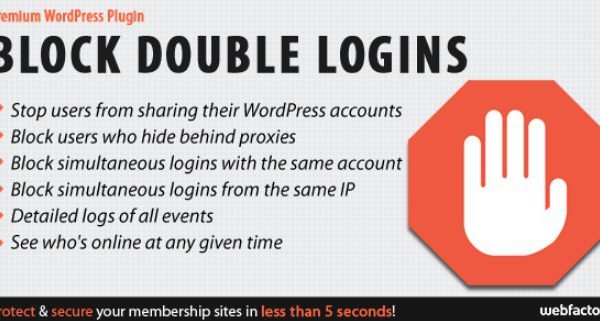
As a WordPress site owner specializing in premium content, I know that few things are as frustrating as discovering that five different people are accessing your course using a single paid account. This is known as account sharing, and it eats directly into your revenue. When WordPress users need to prevent users from sharing accounts and secure their digital assets, Block Double Logins Protect Your Membership Site offers a robust, automated solution. This plugin acts as a gatekeeper, ensuring that one set of credentials equals one active user, effectively closing the loophole that allows dishonest members to distribute their login details to friends or family.
Distributed by CodeCanyon, this lightweight but powerful tool is designed specifically for membership sites, LMS platforms, and any WordPress installation where paid access is restricted. Unlike generic security plugins that focus on brute-force attacks, this plugin focuses on session integrity. It monitors active sessions and IP addresses to enforce the rules you set, ensuring that your paying customers are the only ones accessing your content.
What Makes Block Double Logins Different
While WordPress has a native mechanism for handling user sessions, it is notoriously lenient. By default, WordPress allows a user to remain logged in on multiple devices—laptops, phones, and tablets—simultaneously without raising any flags. While this is convenient for personal blogs, it is a vulnerability for paid membership sites. Block Double Logins differentiates itself by intercepting this standard behavior and giving the site administrator total control over session concurrency.
- Dual-Layer Protection: It doesn’t just block one account logging in twice; it also blocks multiple accounts logging in from the same IP address.
- Proxy Detection: It actively identifies users trying to hide their identity behind proxy servers to bypass restrictions.
- Real-Time Monitoring: You get a live dashboard of who is online right now, allowing you to spot sharing patterns instantly.
Block Double Logins Features for WordPress Users
Concurrent Session Management
The core functionality of the plugin revolves around its ability to manage concurrent sessions. You can configure the plugin to automatically block users from simultaneously using the same WordPress account. If User A is logged in on their home computer and User B tries to log in with the same credentials from a different location, the plugin intervenes. Depending on your settings, it will either block the new login or kick the old session out. This is crucial for premium membership sites where account sharing is rampant. It ensures that a license purchased for one person is used by one person.
IP-Based Restrictions and Proxy Blocking
Beyond just single-account sharing, sophisticated content pirates often purchase one account and share it within an office or network using the same IP address. Alternatively, they use multiple accounts from a single machine. Block Double Logins handles this by allowing you to block users from simultaneously logging in to multiple accounts from the same IP address. Furthermore, the plugin includes specific logic to block users who hide behind a proxy. This is a vital security feature, as proxies are often used to mask the true location of users attempting to violate your terms of service. By stopping proxy traffic, you ensure that the geographical location and digital footprint of the user remain consistent.
Admin Dashboard and Fail-Safes
Managing security shouldn’t mean you lock yourself out. The plugin features a built-in fail-safe mechanism designed to protect administrators. If you accidentally configure a rule that locks you out of your own dashboard, the fail-safe ensures you can regain access without needing to edit database files via FTP. Additionally, the plugin provides an intuitive admin overlay that shows you who is online at any given time. You can see exactly who is trying to share their account, which helps in making informed decisions about banning specific users or tightening your rules. The session timeout can also be adjusted manually, allowing you to balance strict security with user convenience for those who frequently switch devices legitimately. You can explore more security tools in the WordPress security plugins category to complement this functionality.
How to Install Block Double Logins
Quick Installation
- Log in to your WordPress dashboard and navigate to Plugins → Add New.
- Click the “Upload Plugin” button at the top of the page.
- Select the ZIP file you downloaded from CodeCanyon and click Install Now.
- Once installed, click “Activate Plugin”.
- Navigate to the plugin’s settings page to configure your blocking rules.
After installation, I recommend enabling the “Who Is Online” feature first. This allows you to monitor your site’s traffic for 24 hours before enforcing strict blocks. This observation period helps you understand normal user behavior so you don’t accidentally lock out legitimate users who may travel frequently.
Who Should Use Block Double Logins?
Online Course Creators (LMS)
If you are selling courses on platforms like LearnDash, TutorLMS, or LearnPress, your content is your product. When one student buys a course and shares the login with three friends, you lose 75% of potential revenue on that lead. Block Double Logins is essential for LMS owners because it enforces the “single seat” license model. It ensures that the user engaging with the quizzes and watching the videos is the verified customer, protecting your intellectual property and your bottom line.
Does it work with WooCommerce?
Yes. If you are selling products or courses on WooCommerce, this plugin will protect the customer accounts associated with those purchases. It ensures that the customer account access is restricted to the buyer, securing your digital products.
Final Verdict
Block Double Logins Protect Your Membership Site is a specialized, no-nonsense tool that solves a very specific and expensive problem for content creators. If you run a paid membership site, an LMS, or a premium download repository, this plugin is not just a luxury—it is a necessity to protect your revenue. It successfully bridges the gap between standard WordPress functionality and the need for strict license enforcement. While it lacks a free tier and requires careful configuration regarding IP rules, its ability to instantly stop account sharing makes it a valuable investment for any serious WordPress business owner.
Paid Membership Site Owners
For sites using plugins like MemberPress, Paid Memberships Pro, or Restrict Content Pro to sell recurring subscriptions, account churn due to “shared passwords” is a silent killer. Membership site owners should use this plugin to strictly enforce the subscription terms. It is particularly useful for sites that offer downloadable resources or proprietary data, as it prevents a group of colleagues from pooling money for a single subscription to access business-critical tools.
Block Double Logins vs Alternatives
| Feature | Block Double Logins | Standard Limit Login Attempts |
|---|---|---|
| Primary Goal | Prevent account sharing (Session management) | Prevent brute force attacks (Security) |
| IP Restrictions | Yes (Blocks multiple accounts from one IP) | No |
| Proxy Detection | Yes | No |
| “Who Is Online” Dashboard | Yes | No |
Many site owners confuse session limiters with login limiters. Plugins like “Limit Login Attempts Reloaded” are excellent for stopping hackers from guessing passwords, but they do nothing to stop a legitimate user from giving their correct password to a friend. Block Double Logins fills this specific gap. According to WordPress developer documentation, managing user sessions requires specific handling of authentication cookies, which this plugin manages seamlessly compared to standard security plugins.
Block Double Logins Pricing
This plugin is available exclusively on CodeCanyon as a premium product. It typically follows a standard Envato licensing model: a single license for use on one end product, and an extended license for use on multiple projects or SaaS applications. The price point is generally affordable for individual site owners, making the ROI immediate if it stops just one user from sharing an account. As a premium plugin, it includes 6 months of support from the developer, with the option to extend support periods. For the exact current pricing, you can check the official CodeCanyon sales page.
Pros and Cons
✅ Pros
- Extremely effective at stopping credential sharing immediately.
- Lightweight code; does not slow down site performance.
- Features a built-in fail-safe to prevent admins from locking themselves out.
- Works seamlessly with all major themes and membership plugins.
- Proxy detection adds a layer of security against savvy users.
❌ Cons
- No free version available; must be purchased via CodeCanyon.
- Strict IP blocking might occasionally affect legitimate users on shared networks (like office Wi-Fi) if not configured carefully.
- Interface is functional but utilitarian; lacks modern dashboard aesthetics of some newer plugins.
Frequently Asked Questions
Does this plugin work with all membership plugins?
Yes, Block Double Logins is designed to work at the WordPress core authentication level. This means it is compatible with popular plugins like MemberPress, WooCommerce Memberships, Ultimate Member, and s2Member without conflicts.
Will I get locked out of my own site?
The plugin includes a built-in fail-safe mechanism specifically to prevent this. However, it is always good practice to keep an FTP connection or database access handy when testing new security plugins, just in case.
Can I allow specific users to bypass the rules?
Absolutely. You can configure the plugin to ignore specific user roles (such as Administrators or Editors) from the blocking rules. This allows your team to manage the site from multiple locations without triggering the security blocks.
What happens when a user is blocked?
When a user is blocked due to a double login attempt, they are typically presented with a standard WordPress error message or a custom message explaining that they are already logged in elsewhere. You can customize this behavior in the settings to provide a better user experience.
Does this plugin require any coding knowledge?
No. The plugin is “ready for use 5 seconds after install,” as the developer states. The interface is straightforward, requiring you to simply check boxes for the rules you want to enforce and select which user roles to monitor.
Does it work with WooCommerce?
Yes. If you are selling products or courses on WooCommerce, this plugin will protect the customer accounts associated with those purchases. It ensures that the customer account access is restricted to the buyer, securing your digital products.
Final Verdict
Block Double Logins Protect Your Membership Site is a specialized, no-nonsense tool that solves a very specific and expensive problem for content creators. If you run a paid membership site, an LMS, or a premium download repository, this plugin is not just a luxury—it is a necessity to protect your revenue. It successfully bridges the gap between standard WordPress functionality and the need for strict license enforcement. While it lacks a free tier and requires careful configuration regarding IP rules, its ability to instantly stop account sharing makes it a valuable investment for any serious WordPress business owner.