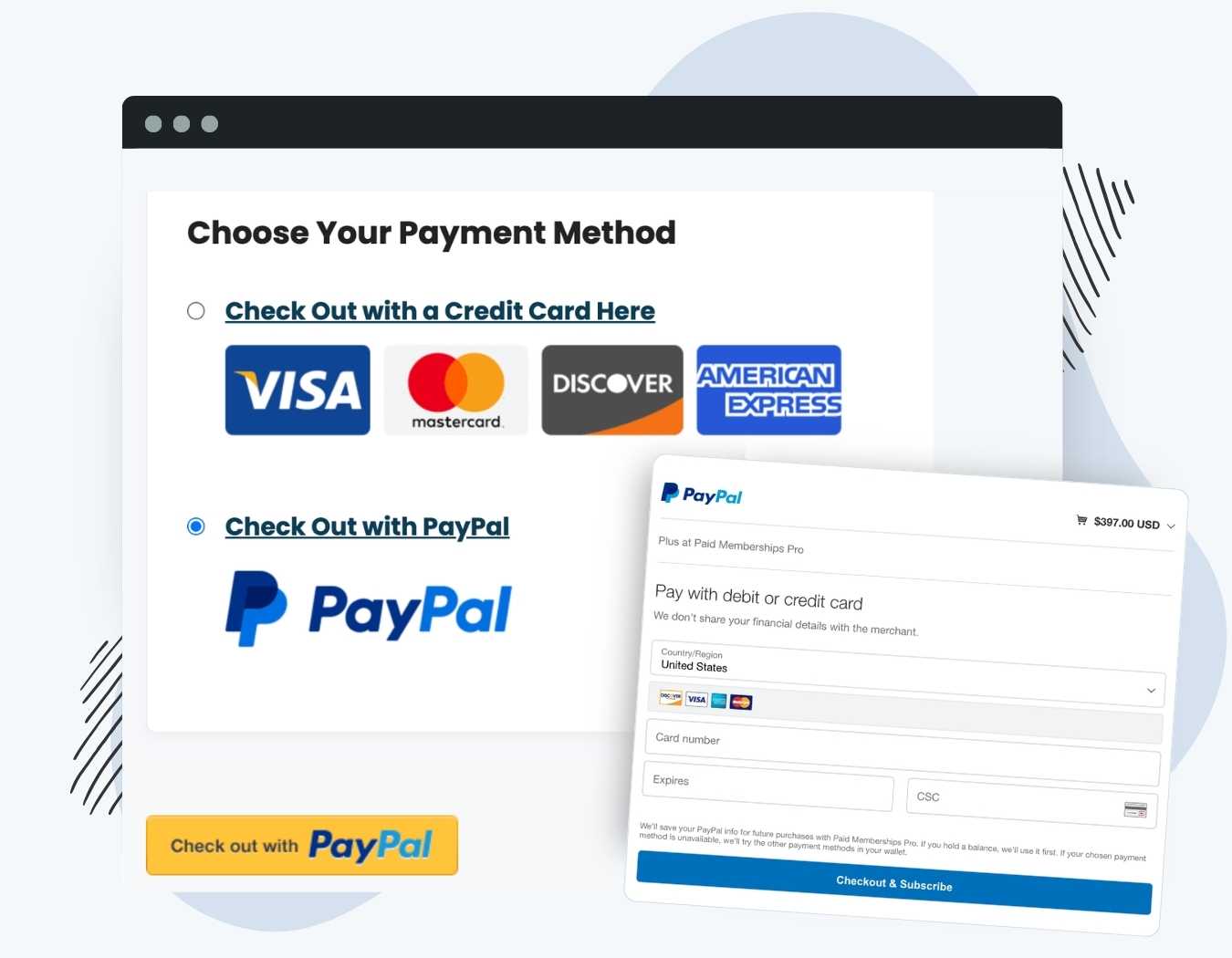
PMPro – Add PayPal Express Option At Checkout is a payment integration extension that adds a radio selection toggle to your membership signup page, allowing users to choose their preferred payment method. This specific configuration is required for site owners who want to run Stripe as their primary gateway while also offering a PayPal button. Deploying dual payment gateways directly impacts frontend conversion metrics by accommodating different user checkout preferences.
WPExclusive members get access to PMPro – Add PayPal Express Option At Checkout as part of a full plugin and theme library, with plans starting from $9.99/month. See the full Paid Memberships Pro collection →
What Is PMPro – Add PayPal Express Option At Checkout?
PMPro – Add PayPal Express Option At Checkout is developed by Paid Memberships Pro and is a payment integration plugin for WordPress. It belongs to the membership category on WPExclusive, alongside other tools for building restricted content portals and subscription communities. By default, the core membership engine restricts active checkouts to a single payment processor. This extension overrides that structural limitation by rendering multiple payment interfaces dynamically.
The addon solves the immediate problem of lost conversions due to missing payment options. It is designed for WordPress administrators and developers who need to configure a dual Stripe and PayPal environment without writing custom JavaScript to hide or show credit card fields.
PMPro – Add PayPal Express Option At Checkout Features
PMPro PayPal Express modifies the standard checkout template by injecting a gateway selection layer before the main checkout button.
Dual Gateway Selection Interface
The plugin renders a radio button group directly on the checkout form. When a site visitor selects their preferred method, appropriate data fields map to the chosen choice. If the user clicks the credit card option, standard Stripe inline fields appear. Selecting PayPal hides the credit card inputs and forces a redirect to the PayPal server for authentication upon form submission. This architecture is common among advanced WordPress membership plugins to prevent submission errors.
Pay by Check Addon Integration
Developers often pair online processors with offline transaction methods. PMPro PayPal Express includes code to detect if the Pay by Check Addon is active in the WordPress environment. When detected, the system adds a third radio option for offline invoicing. The extension actively checks the database for the pmpro_check_gateway_label value, ensuring your customized text outputs correctly on the frontend form instead of a generic string.
API Credential Routing
Running this extension requires active developer credentials, specifically the PayPal API Signature, Username, and Password. These inputs are stored securely within the primary Payment Settings screen in the WordPress dashboard. The plugin intercepts the standard checkout submission process and routes the user data securely via PayPal’s Name-Value Pair (NVP) API structure. Note that you do not need to activate this addon if your primary gateway is PayPal Website Payments Pro, as that system enables Express features natively.
Pricing
Paid Memberships Pro bundles this extension within their premium pricing tiers, typically requiring a Plus or Builder license starting at $247 per year. The base membership plugin is free, but specialized payment integrations require an active commercial subscription for automated updates through their official platform.
| Plan | Price | Sites | Includes |
|---|---|---|---|
| Standard Premium Tier | $247/year | 1 to 5 | Official Support and Addons |
| WPExclusive Membership | From $9.99/month | Unlimited | PMPro PayPal Express + full library |
For developers managing multiple sites, a WPExclusive membership covers the addon plus hundreds of other plugins and themes. This approach eliminates per-site licensing costs for development environments and production servers.
PMPro – Add PayPal Express Option At Checkout – Latest Version
PMPro PayPal Express receives regular updates to maintain strict compatibility with the latest API standards and core system changes. WPExclusive updates plugin files promptly after each official release, giving developers access to current builds immediately.
How to Install?
- Download the PMPro – Add PayPal Express Option At Checkout .zip from your WPExclusive member account
- In WordPress: Plugins → Add New → Upload Plugin
- Select the .zip and click Install Now → Activate
- Navigate to Memberships → Payment Settings in the WordPress dashboard and enter your specific PayPal Express API Username, Password, and Signature.
- Enable a primary payment gateway like Stripe to activate the dual radio selection on the frontend checkout page.
PMPro – Add PayPal Express Option At Checkout Use Cases
Maximizing Subscription Conversions
Site owners frequently lose potential subscribers on checkout pages when a preferred payment interface is absent. Users who do not want to pull out a physical credit card will abandon carts if an alternative is unavailable. PMPro PayPal Express targets this friction point directly by loading a distinct radio button selection. This allows users to rely on saved credentials, solving the abandonment issue for Paid Memberships Pro installations.
Handling Regional Payment Preferences
International users often approach direct credit card forms differently depending on local banking regulations and security concerns. Offering an established third-party processor alongside native Stripe fields provides international members an alternative they recognize. The extension handles the form action logic automatically, directing the international user away from the local site to complete their transaction safely.
Agencies and Developers Managing Multiple Client Sites
Freelancers building community networks for multiple clients need a standardized way to toggle payment methods without custom development. Rather than maintaining manual JavaScript toggles for every client project, agencies deploy this exact extension. A WPExclusive membership eliminates per-site licensing costs, allowing developers to standardize their technology stack across their entire portfolio affordably.
PMPro – Add PayPal Express Option At Checkout vs Alternatives
| Feature | PMPro PayPal Express | Paid Member Subscriptions PayPal Addon | MemberPress (Core) |
|---|---|---|---|
| Target Framework | Paid Memberships Pro | Paid Member Subscriptions | MemberPress |
| Dual Gateway Standard Support | ✅ Yes (via specific Addon) | ✅ Yes (via Pro Addon) | ✅ Yes (Built-in) |
| Starting Price | $247/year (Developer bundle) | $149/year | $179/year |
| Available on WPExclusive | ✅ Yes | ✅ Yes | ✅ Yes |
Browse the full membership plugins on WPExclusive →
Pros and Cons
✅ Strengths
- Permits distinct Stripe and PayPal selections on one single checkout layout.
- Contains native compatibility checks for the PMPro Pay by Check extension.
- Requires no custom JavaScript to toggle required fields visually.
⚠️ Limitations
- Only necessary if you explicitly require a dual-gateway environment.
- Demands exact NVP API credentials to function, not just an associated email address.
- Developer auto-updates require an active license key. WPExclusive publishes updates manually when new versions are released.
Is PMPro – Add PayPal Express Option At Checkout GPL Licensed?
Yes. PMPro – Add PayPal Express Option At Checkout is distributed under the GNU General Public License (GPL), the same license that governs WordPress itself. GPL gives any user the legal right to use, study, share, and redistribute the software. This is the legal framework that makes WPExclusive’s membership model possible.
WPExclusive distributes 100% original, unmodified files, the same release the developer publishes. No injected code, no alterations, no security risks.
Get PMPro – Add PayPal Express Option At Checkout on WPExclusive
WPExclusive membership starts at $9.99/month, $87/year, or $149 lifetime, giving you access to the addon plus every plugin and theme in the library, on unlimited sites.
Explore the full Paid Memberships Pro collection → or browse all WordPress plugins →
Frequently Asked Questions
What does PMPro – Add PayPal Express Option At Checkout do?
PMPro – Add PayPal Express Option At Checkout is a payment plugin used to display alternative processor options during registration. It bypasses single-gateway limitations to display dual Stripe and PayPal selections. Membership administrators use it to boost conversion numbers.
Is PMPro – Add PayPal Express Option At Checkout free?
The extension is a premium offering strictly bundled within Paid Memberships Pro developer pricing tiers. WPExclusive members access it as part of their standard $9.99/month plan.
What is the latest version of PMPro – Add PayPal Express Option At Checkout?
PMPro – Add PayPal Express Option At Checkout is actively maintained. WPExclusive members always receive the most current release after official patches drop.
How much does PMPro – Add PayPal Express Option At Checkout cost?
The original developer packages it with licenses starting at $247 per year. Via WPExclusive, it is included in plans from $9.99/month, covering unlimited sites and the full library.
Is it legal to use PMPro – Add PayPal Express Option At Checkout via WPExclusive?
PMPro – Add PayPal Express Option At Checkout is GPL licensed, which explicitly permits redistribution. WPExclusive provides original, unmodified files, fully within GPL terms.
What are the best alternatives to PMPro – Add PayPal Express Option At Checkout?
Paid Member Subscriptions PayPal Addon offers similar dual-gateway features for its respective core system. MemberPress handles dual processors inherently within its base plugin. All are available on WPExclusive within the same membership.