What is Kadence WP Widget Dock Plugin?
The Kadence WP Widget Dock Plugin is a versatile WordPress tool designed to enhance user engagement by allowing you to display customizable widgets in a sleek, non-intrusive dock. This plugin allows website owners to create a persistent, accessible area for important information or calls to action without disrupting the user experience. The Kadence Widget Dock is particularly useful for showcasing contact forms, social media feeds, promotional offers, or any other content that you want to keep readily available to your visitors. Its customizable design options ensure that the dock seamlessly integrates with your website’s aesthetic, maintaining a professional and cohesive look. With the Kadence Widget Dock, you have full control over where and when the dock appears, based on user interaction or device type, making it an effective tool for improving conversions and overall site usability. It also integrates well with other Kadence products, like Kadence Theme, enhancing overall website functionality.
Key Features of Kadence WP Widget Dock Plugin:
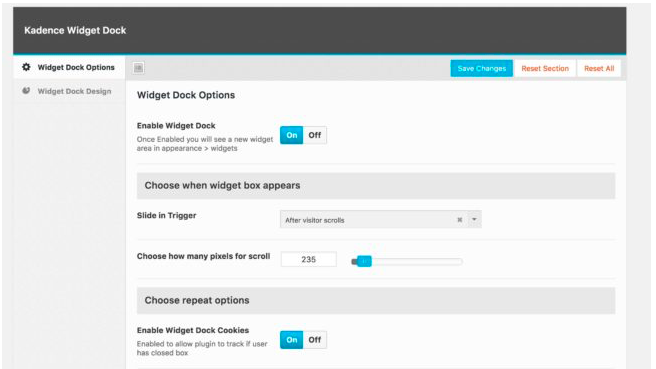
Kadence WP Widget Dock plugin boasts a range of powerful features designed to give you complete control over your widget display. This includes customizable triggers, such as displaying the dock after a set time, after scrolling a certain distance, or after the user reaches the end of content. The plugin also features robust targeting options, allowing you to show or hide the dock based on specific pages, post types, user login status, or device type. Styling options are readily available, giving you the power to set the position, width, background color, border settings, and border radius to match your website’s overall design. By integrating with the standard WordPress widget system, the Kadence Widget Dock is incredibly easy to use. You can also disable the plugin from appearing after the site visitor has already closed the popup to prevent annoyance. These features combine to make the Kadence Widget Dock a flexible and effective addition to any WordPress site. Check out other WordPress plugins to further enhance your website’s capabilities.
- ✅ **Customizable Triggers:** Control when the widget dock appears based on time, scroll distance, or content completion.
- ✅ **Targeting Options:** Display the dock on specific pages, post types, or devices, or based on user login status.
- ✅ **Styling Options:** Customize the position, width, background color, borders, and corner radius of the widget dock.
How to Get Started with Kadence WP Widget Dock Plugin?
Getting started with the Kadence WP Widget Dock Plugin is straightforward. First, download the plugin from the Kadence WP website or through the WordPress plugin directory. Install and activate the plugin via the WordPress admin dashboard. Navigate to the ‘Widget Dock’ menu, typically found at the bottom left of your screen. Here, you can configure the dock’s settings, including its appearance and behavior. After installing head over to Appearance, then Widgets in the WordPress menu in order to add the desired widgets to the dock. Determine when the widget dock should appear by choosing trigger options like time delay, scroll distance, or after-content display. Configure which pages or posts should display the dock, and customize the design elements to match your site’s theme. Save your settings and preview the changes on your website to ensure the widget dock functions as desired. Remember to add widgets to the dock via the Appearance > Widgets section. Also, take a look at the WordPress hosting options to ensure optimal performance.
Kadence WP Widget Dock Plugin Integrations:
The Kadence WP Widget Dock Plugin seamlessly integrates with the WordPress ecosystem, particularly well with other Kadence products like the Kadence Theme and Kadence Blocks. This integration ensures a cohesive design and streamlined workflow, enabling you to build highly customized websites with ease. The plugin is compatible with a wide range of WordPress widgets, allowing you to display various types of content, from social media feeds and contact forms to promotional banners and custom HTML. The Kadence Widget Dock also works well with popular form plugins like Contact Form 7 and WPForms, making it easy to add lead generation forms. Furthermore, it’s designed to be compatible with major browsers and devices, ensuring a consistent user experience across platforms. Although it has limited third-party integrations, its tight integration within the Kadence ecosystem and WordPress’s extensive plugin library makes it highly adaptable. Ensure cross-browser compatibility by testing with tools like BrowserStack.
Kadence WP Widget Dock Plugin Pricing
The Kadence WP Widget Dock Plugin is available to Kadence Themes Members, granting them unlimited access as part of their membership. This means that, at this time, you need a Kadence Membership to use this Plugin. Kadence WP offers a variety of membership plans to fit different needs. These plans provide access to all Kadence themes, blocks, and plugins, offering excellent value for those who want to take full advantage of the Kadence ecosystem. The specific pricing varies based on the level of access and support included. Subscriptions are offered annually, providing ongoing updates and support. For detailed and up-to-date pricing information, please visit the Kadence WP pricing page. Understanding the pricing structure beforehand ensures you can choose a membership that aligns with your project requirements and budget. Check for discounts and promotions periodically to maximize cost savings.
Kadence WP Widget Dock Plugin Alternatives
While the Kadence WP Widget Dock Plugin offers a unique solution for displaying widgets, several alternatives provide similar or complementary functionality. These include plugins like Popup Maker, which offers versatile popup creation with advanced targeting options, and OptinMonster, a leading lead generation platform that provides a variety of opt-in forms, including floating bars and slide-in widgets. Another alternative is WP Notification Bars, which allows you to display simple notification bars at the top or bottom of your site. Each of these tools has its strengths and weaknesses. Popup Maker offers extensive customization but can be more complex to set up while OptinMonster is powerful but comes at a higher price point. WP Notification Bars are simple and effective for basic announcements but lack the flexibility of a full widget dock. Choosing the right alternative depends on your specific needs, budget, and technical expertise. Consider factors like ease of use, customization options, and integration capabilities when making your decision.
Kadence WP Widget Dock Plugin Pros and Cons
The Kadence WP Widget Dock Plugin offers several compelling advantages. Its main pro is its ability to display customizable widgets in a non-intrusive, accessible dock, enhancing user engagement without disrupting the browsing experience. It is also easy to integrate with the Kadence ecosystem. Additionally, the plugin’s flexible targeting options and design settings make it a versatile tool for various website needs. However, there are a few cons to consider. Currently, it is only offered as part of the Kadence Membership and not as a standalone plugin. While its integration with the Kadence ecosystem is a strength, it may limit its appeal to users who prefer other themes or page builders. Also, it may require some hands-on configuration to fully match the website style. Weighing these pros and cons carefully will help you determine whether the Kadence WP Widget Dock Plugin is the right choice for your WordPress site. Look at website accessibility best practices before publishing the widget dock.
Summary
The Kadence WP Widget Dock Plugin is an effective tool for WordPress users looking to enhance user engagement through non-intrusive widget display. With its customizable triggers, targeting options, and design settings, it provides a flexible solution for showcasing important information or calls to action. While it requires a Kadence Membership, the value it brings within the Kadence ecosystem makes it a worthwhile investment for many. By offering a seamless way to integrate widgets into your website design, the Kadence Widget Dock can improve conversions and overall site usability. Consider your specific needs and budget, and evaluate whether its features align with your goals. If you are already invested in the Kadence ecosystem, this plugin is a natural fit. If you are new to Kadence, explore the benefits of a membership and how it can enhance your WordPress experience. Finally, ensure to test the widget dock on various screens and devices.
Kadence WP Widget Dock Plugin FAQs
Question 1: What is the Kadence WP Widget Dock Plugin?
Answer 1: The Kadence WP Widget Dock Plugin allows you to place a customizable, non-intrusive popup on your site that holds widgets. It comes packed with powerful styling options, as well as full control over where the widget dock will appear.
Question 2: How do I install the Kadence WP Widget Dock Plugin?
Answer 2: First download the plugin and then go into the “Widget Dock” menu in the bottom left corner of your screen in the WordPress dashboard.
Question 3: What kind of options does the Widget Dock offer?
Answer 3: The Widget Dock Options screen controls where and when your Widget Dock will appear on your site. You can choose to display the widget dock after a set amount of time, after the user scrolls a certain distance down the page, or after the user scrolls past the page/post’s content.
Question 4: Can I control which pages display the Widget Dock?
Answer 4: Yes, the Widget Dock gives you options to choose which pages will be included and excluded from the viewing of the widget dock. You can manually select all of the pages that you’d like it to appear on, or you can select options to enable or disable it on a certain post or page type.
Question 5: Can I target certain users depending on if they are logged in?
Answer 5: Yes, you’re also given the ability to target certain types of visitors to your site. You can disable the pop up for non-logged viewers of your site, or conversely only show the pop up for non-logged in. Or you can set it to appear for everyone regardless of their status.
Question 6: Can I target specific devices?
Answer 6: If you find that the pop up is too intrusive on a certain display, or you only want certain displays to see the pop up, then you have the ability to set which devices will see the Widget Dock.